Devices & Components
1
Arduino Nano
3
0.96" OLED 64x128 Display Module
1
RTC DS3231
1
tca9548a
Hardware & Tools
1
Soldering Kit
Software & Tools

Arduino IDE
Project description
Code
Code
cpp
...
1#include <Wire.h>
2#include <Adafruit_SSD1306.h>
3#include <RTClib.h>
4
5Adafruit_SSD1306 display(128, 64, &Wire, 4);
6RTC_DS3231 rtc;
7
8int hours, minutes, seconds;
9#define YELLOW_ZONE 16
10
11void TCA9548A(uint8_t bus)
12{
13  Wire.beginTransmission(0x70);
14  Wire.write(1 << bus);
15  Wire.endTransmission();
16}
17
18void setup()
19{
20  // Initialize RTC on channel 1
21  TCA9548A(1);
22  rtc.begin();
23
24  if (rtc.lostPower()) {
25    rtc.adjust(DateTime(F(__DATE__), F(__TIME__)));
26  }
27
28    // --- OPTIONAL MANUAL TIME SET (only enable when needed) ---
29  // To set time manually, remove the comment marks from the lines below,
30  // adjust the DateTime parameters (Year, Month, Day, Hour, Minute, Second),
31  // upload once, then comment them out again to prevent overwriting the RTC each boot.
32
33 // rtc.adjust(DateTime(2025, 10, 22, 12, 15, 00));  // YYYY, MM, DD, HH, MM, SS
34
35
36  // Initialize displays with rotated orientation
37  // Display 1: Seconds (leftmost) - Channel 2
38  TCA9548A(2);
39  display.begin(SSD1306_SWITCHCAPVCC, 0x3C);
40  display.setRotation(1); // Rotate 90 degrees for portrait mode
41  display.clearDisplay();
42  display.display();
43
44  // Display 2: Minutes (middle) - Channel 3
45  TCA9548A(3);
46  display.begin(SSD1306_SWITCHCAPVCC, 0x3C);
47  display.setRotation(1); // Rotate 90 degrees for portrait mode
48  display.clearDisplay();
49  display.display();
50
51  // Display 3: Hours (rightmost) - Channel 4
52  TCA9548A(4);
53  display.begin(SSD1306_SWITCHCAPVCC, 0x3C);
54  display.setRotation(1); // Rotate 90 degrees for portrait mode
55  display.clearDisplay();
56  display.display();
57
58   delay(500);
59  showIntro();
60
61 // delay(1000);
62}
63
64void showIntro() {
65  int screenH = 128;
66  const char* words[3] = {"CLOCK", "DISPL", "THREE"};
67
68  // --- STEP 1: Loading animation + falling letters ---
69  for (int h = 0; h <= 120; h += 6) {
70    for (int idx = 0; idx < 3; idx++) {
71      int ch = 2 + idx;
72      TCA9548A(ch);
73      display.clearDisplay();
74
75      // --- Yellow frame (16x128, 2-px border) ---
76      for (int i = 0; i < 2; i++) {
77        display.drawRect(i, i, YELLOW_ZONE - 2 * i, screenH - 2 * i, WHITE);
78      }
79
80      // --- Filling bar ---
81      int fillX = 4;
82      int fillW = YELLOW_ZONE - 8;
83      int fillY = 124 - h;
84      display.fillRect(fillX, fillY, fillW, h, WHITE);
85
86      // --- Falling letters ---
87      display.setTextColor(WHITE);
88      display.setTextSize(2);
89      int textX = YELLOW_ZONE + 20;
90      int textY = 12;
91      const char* w = words[idx];
92
93      // Determine how many letters to show depending on progress
94      int totalLetters = strlen(w);
95      int visibleLetters = map(h, 0, 120, 0, totalLetters);
96      if (visibleLetters > totalLetters) visibleLetters = totalLetters;
97
98      // Draw visible letters vertically, one by one
99      for (int k = 0; k < visibleLetters; k++) {
100        display.setCursor(textX, textY + k * 20);
101        display.write(w[k]);
102      }
103
104      display.display();
105    }
106    delay(80);
107  }
108
109  delay(1000); // pause 1 s at full bar
110
111  // --- STEP 2: Fade-out animation (bars emptying downward) ---
112  for (int h = 120; h >= 0; h -= 6) {
113    for (int idx = 0; idx < 3; idx++) {
114      int ch = 2 + idx;
115      TCA9548A(ch);
116      display.clearDisplay();
117
118      // --- Yellow frame ---
119      for (int i = 0; i < 2; i++) {
120        display.drawRect(i, i, YELLOW_ZONE - 2 * i, screenH - 2 * i, WHITE);
121      }
122
123      // --- Emptying bar ---
124      int fillX = 4;
125      int fillW = YELLOW_ZONE - 8;
126      int fillY = 124 - h;
127      display.fillRect(fillX, fillY, fillW, h, WHITE);
128
129      // --- Keep all letters visible during fade ---
130      display.setTextColor(WHITE);
131      display.setTextSize(2);
132      int textX = YELLOW_ZONE + 20;
133      int textY = 12;
134      const char* w = words[idx];
135      for (int k = 0; w[k]; k++) {
136        display.setCursor(textX, textY + k * 20);
137        display.write(w[k]);
138      }
139
140      display.display();
141    }
142    delay(60);
143  }
144
145  // --- STEP 3: Clear all displays ---
146  for (int ch = 2; ch <= 4; ch++) {
147    TCA9548A(ch);
148    display.clearDisplay();
149    display.display();
150  }
151}
152
153void loop()
154{
155  // Read time from RTC
156  TCA9548A(1);
157  DateTime now = rtc.now();
158  hours = now.hour();
159  minutes = now.minute();
160  seconds = now.second();
161
162  // Update Seconds Display (Left) - Channel 2
163  TCA9548A(2);
164  display.clearDisplay();
165  drawDisplay(seconds, 'S', 60, seconds);
166  display.display();
167
168  // Update Minute Display (Middle) - Channel 3
169  TCA9548A(3);
170  display.clearDisplay();
171  drawDisplay(minutes, 'M', 60, minutes);
172  display.display();
173
174  // Update Hours Display (Right) - Channel 4
175  TCA9548A(4);
176  display.clearDisplay();
177  drawDisplay(hours, 'H', 24, hours);
178  display.display();
179
180  delay(200); // Update 5 times per second
181}
182
183void drawDisplay(int value, char unit, int maxValue, int barValue) {
184  // NOTE: In portrait rotation, display.width() = 64, display.height() = 128
185  int screenW = 64;
186  int screenH = 128;
187
188  // --- Bargraph container ---
189  int barX = 0;
190  int barW = YELLOW_ZONE;  // 16 px
191  int barY = 0;
192  int barH = screenH;
193
194  // Outer rectangle (frame, 2-px thick)
195  for (int i = 0; i < 2; i++) {
196    display.drawRect(barX + i, barY + i, barW - 2 * i, barH - 2 * i, WHITE);
197  }
198
199  // --- Calculate bar height (usable area = 120 px: from y=4 to y=124) ---
200  int innerTop = 4;
201  int innerBottom = screenH - 4;
202  int usableHeight = innerBottom - innerTop;  // 120 px
203
204  int barHeight = map(barValue, 0, maxValue, 0, usableHeight);
205
206  // --- Fill the bar inside the container ---
207  int fillX = barX + 2 + 2;        // 2-px frame + 2-px gap
208  int fillW = barW - 8;            // 2+2 margin each side → 8 total
209  int fillY = innerBottom - barHeight;  // fill upward from bottom
210  display.fillRect(fillX, fillY, fillW, barHeight, WHITE);
211
212  // --- Blue field dimensions (right side) ---
213  int frameX1 = YELLOW_ZONE;
214  int frameW  = screenW - YELLOW_ZONE;
215  int frameY1 = 0;
216  int frameH  = screenH;
217
218  // --- Outer frame (3 px) ---
219  for (int i = 0; i < 3; i++) {
220    display.drawRect(frameX1 + i, frameY1 + i, frameW - 2 * i, frameH - 2 * i, WHITE);
221  }
222
223  // --- Divider between letter and digits ---
224  int dividerY = 40;
225  display.fillRect(frameX1 + 3, dividerY, frameW - 6, 3, WHITE);
226
227  // --- Text ---
228  display.setTextColor(WHITE);
229  display.setTextSize(3);
230
231  // Upper: unit letter (H / M / S)
232  int unitX = frameX1 + 17;
233  int unitY = 11;
234  display.setCursor(unitX, unitY);
235  display.print(unit);
236
237  display.setTextSize(4);
238
239  // Lower: digits
240  int tens = value / 10;
241  int units = value % 10;
242
243  int tensX = frameX1 + 13;
244  int tensY = 52;
245  display.setCursor(tensX, tensY);
246  display.print(tens);
247
248  int unitsX = frameX1 + 13;
249  int unitsY = 87;
250  display.setCursor(unitsX, unitsY);
251  display.print(units);
252
253  // --- Inner rounded frames ---
254  // Top rectangle (letters)
255  int innerTopX = frameX1 + 4;
256  int innerTopY = 4;
257  int innerTopW = frameW - 8;
258  int innerTopH = dividerY - innerTopY - 2; // 1px gap to divider
259  for (int i = 0; i < 2; i++) {
260    display.drawRoundRect(innerTopX + i, innerTopY + i, innerTopW - 2 * i, innerTopH - 2 * i, 4, WHITE);
261  }
262
263  // Bottom rectangle (digits)
264  int innerBotX = frameX1 + 4;
265  int innerBotY = dividerY + 4; // 1px gap below divider
266  int innerBotW = frameW - 8;
267  int innerBotH = frameH - innerBotY - 4;
268  for (int i = 0; i < 2; i++) {
269    display.drawRoundRect(innerBotX + i, innerBotY + i, innerBotW - 2 * i, innerBotH - 2 * i, 4, WHITE);
270  }
271}
Documentation
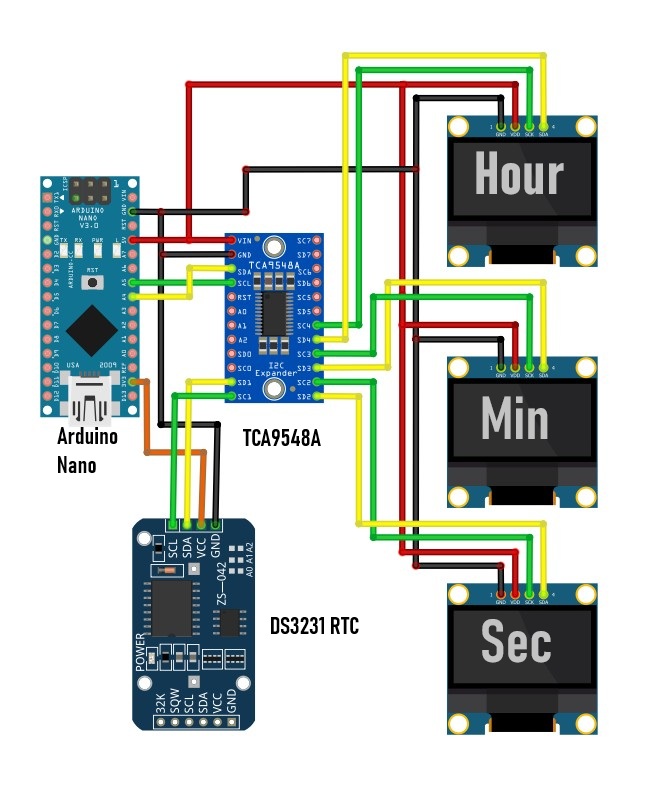
Schematic
...
Schematic.jpg
Comments
Only logged in users can leave comments