Arduino Car Paint Thickness Indicator - Meter
A very useful device especially when buying a car to check suspicious areas where auto putty has been applied under the paint.
Components and supplies
1
LCD 128x64 with ST7565 driver
2
Push Button
1
Arduino Nano
1
Solenoid Valve
Tools and machines
1
Soldering kit
Apps and platforms
1
Arduino IDE
Project description
Code
code
cpp
..
1#include <U8g2lib.h> 2 3//U8G2_ST7565_NHD_C12864_1_4W_SW_SPI u8g2(U8G2_R0, 11, 8, 13, 12, U8X8_PIN_NONE); 4//U8G2_ST7565_NHD_C12864_1_4W_SW_SPI u8g2(U8G2_R0, 13, 11, 10, 9, U8X8_PIN_NONE); 5U8G2_ST7565_ERC12864_1_4W_SW_SPI u8g2 ( U8G2_R0, /* scl=*/ 13 , /* si=*/ 11 , /* cs=*/ 10 , /* rs=*/ 9 , /* rse=*/ 8 ) ; 6int dystans; 7char dystans_str[4]; 8char* rp; 9int d1; 10int a, b ; 11byte outPin = 2; // output 800 Hz 12byte inPin1 = 6; // sw-1 calibration 13byte inPin2 = 7; // sw-2 measurement 14 15int roznica; 16long srednia; 17long sredniaP; 18const byte dt = 10; //amount of data for the average "idle speed" difference 19const byte dt_P = 10; //amount of data for the average measurement difference 20int sred_wi; 21 22void setup() { 23 u8g2.begin(); 24 u8g2.setContrast(40); 25 Serial.begin(9600); 26 pinMode(inPin1, INPUT_PULLUP); //setting the pin as a digital input 27 pinMode(inPin2, INPUT_PULLUP); 28 //pinMode(13, OUTPUT); 29 // digitalWrite (13, LOW); //wlaczenie podswietlenia LCD 30// pinMode(8, OUTPUT); 31// digitalWrite (8, LOW); //providing ground to power the LCD 32 tone(outPin, 800); //feeding to the square wave divider 33} 34 35void loop() { 36 Dipsw(); 37 sprintf(dystans_str,"%d", abs(d1)); 38 Display(); 39 40} 41 42void Display(){ 43 if (sred_wi == 0) {rp = " READY";} 44 u8g2.firstPage(); 45 do { 46 47 u8g2.drawFrame(0,0,128,64); 48 u8g2.drawRFrame(2,2,124,60,3); 49 50 u8g2.setFont(u8g2_font_helvB08_tr); 51 u8g2.drawStr(30,15,rp); 52 u8g2.setFont(u8g2_font_logisoso24_tn); 53 u8g2.drawStr(30,50,dystans_str); 54 u8g2.setFont(u8g2_font_helvB12_tf); 55 //u8g2.drawStr(85,49,","); 56 //u8g2.drawStr(85,50,"um"); 57 if (d1 < 0) {u8g2.drawStr(85,50,"Fe");} 58 if (d1 > 0) {u8g2.drawStr(85,50,"Al");} 59 } while ( u8g2.nextPage() ); 60 delay (200); 61} 62 63void Oblicz_Sr() { 64 srednia = srednia * dt; 65 srednia = srednia + dystans; 66 srednia = srednia / ( dt + 1); 67 sred_wi = srednia; 68} 69 70void Oblicz_sr_P() { 71 sredniaP = sredniaP * dt_P; 72 sredniaP = sredniaP + dystans; 73 sredniaP = sredniaP / ( dt_P + 1); 74} 75 76void Kalibracja() { 77 rp = "CALIBRATION"; 78 for (int a = 1; a <1000; a++) { 79 dystans = 2 * analogRead (1); 80 Oblicz_Sr(); 81 } 82 //d1 = sred_wi; 83 d1 = 0; 84} 85 86void Pomiar() { 87 rp = "MEASURMENT"; 88 for (int a = 1; a < 1000; a++) { 89 dystans = 2 * analogRead (1); 90 Oblicz_sr_P(); 91 } 92 //d1 = sredniaP; 93 d1 = sredniaP - sred_wi; 94} 95 96void Dipsw(){ 97 byte readPin1, readPin1A, readPin2, readPin2A; 98 readPin1 = digitalRead(inPin1); //reading the status of the SET button 99 readPin2 = digitalRead(inPin2); //read the status of the + button 100 delay(1); 101 readPin1A = digitalRead(inPin1); 102 readPin2A = digitalRead(inPin2); 103 if (readPin1 == LOW and readPin1 == readPin1A) { 104 Kalibracja(); 105 delay(100); 106 } 107 if (readPin2 == LOW and readPin2 == readPin2A) { 108 Pomiar(); 109 delay(100); 110 } 111}
Downloadable files
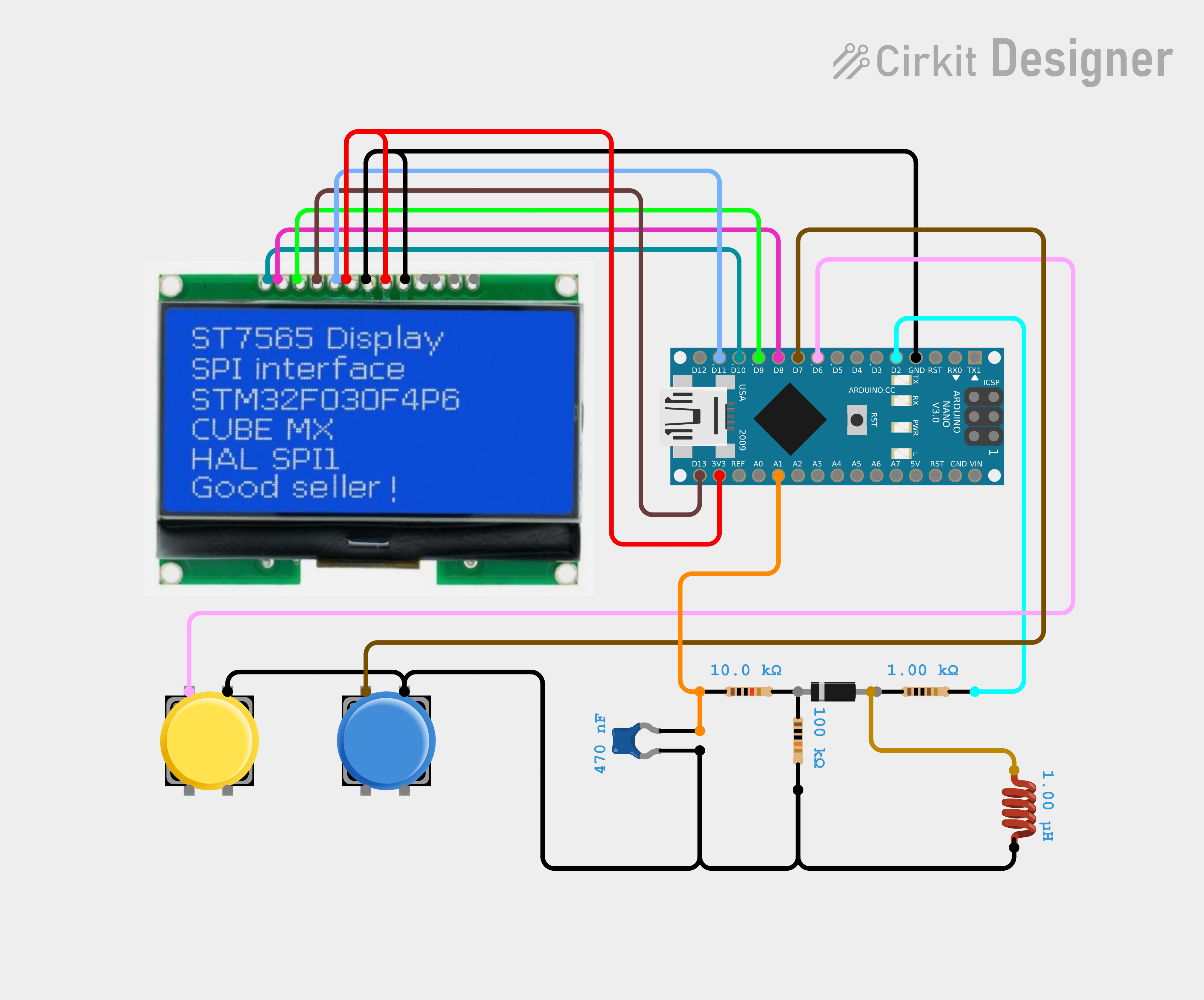
Schematic
...
Schematic.png
Comments
Only logged in users can leave comments