Devices & Components
1
Arduino Uno Rev3
1
HiLetgo GY-NEO6MV2 NEO-6M GPS
1
DS3231 Precision RTC breakout
1
Adafruit white-on-blue 16x2 LCD with potentiometer, header
2
40 jumper wires, M/M
1
Resistor 10k ohm
Hardware & Tools
1
Soldering iron (generic)
1
Breadboard, Plain
1
Solder Wire, Lead Free
Project description
Code
metric_clock_GPS_RTC.ino
c_cpp
Source code
1/*
2 *  Metric Clock: Keep track of the elapsed 100-microday units since  midnight, and display both
3 *  that four-digit (metric) time and the hh:mm time.
4  *
5 *  Uses a DS3231 RTC for accurate time measurement and a NEO6M GPS to set  the clock.
6 */
7
8#include <DS3231.h>           // DS3231 RTC
9#include  <LiquidCrystal.h>    // LCD display
10#include <SoftwareSerial.h>   // How we talk  to the NEO6M GPS receiver
11#include <TinyGPS++.h>        // NEO6M GPS receiver
12
13//  Arduino digital pins for the LCD display
14#define RS 12
15#define EN 11
16#define  D4 4
17#define D5 5
18#define D6 6
19#define D7 7
20LiquidCrystal lcd(RS, EN,  D4, D5, D6, D7);
21
22// Arduino digital pins for the NEO6M GPS receiver. "Transmit"  and "receive" are from the point of
23// view of the component. The Arduino transmits  to the GPS' receiver, and vice versa.
24#define NEO6M_RX    10
25#define NEO6M_TX    9
26#define NEO6M_BAUD  9600
27SoftwareSerial ss(NEO6M_RX, NEO6M_TX);
28TinyGPSPlus  gps;
29
30// should be settable by some config interface, but for now: California,  summertime!
31#define MY_UTC_OFFSET -7
32
33DS3231 myRTC;
34
35// We count  ticks in an interrupt handler with 1.024kHz frequency from the RTC.
36// Volatile  variables are modified in the interrupt handler.
37volatile uint16_t uday_ticks,  min_ticks, half_sec_ticks;
38volatile bool five_microdays_elapsed, half_sec_elapsed,  min_elapsed;
39uint16_t count_five_microdays_elapsed, count_half_secs_elapsed;
40
41//  Arduino interrupts are hardwired to pins 2 (INT0) and 3 (INT1). RTC low INTR pin  wired to 2.
42// You need a 10k omh pull-up resistor on that pin for the low interrupt  to work.
43#define RTC_SQW_PIN 2
44
45/*
46 *  This interrupt handler is called  every 1.024 msec. It counts ticks and manages some boolean
47 *  variables to tell  the loop hander when five microdays, half a second or a full minute have
48 *  passed.
49  */
50void myRTCIntrHdlr()
51{
52  // Five microdays is 432 msec. At 1.024kHz  that's 442 ticks.
53  if (++uday_ticks == 442)
54  {
55    uday_ticks = 0;
56    five_microdays_elapsed = true;
57  }
58
59  // half a second is 512 ticks
60  if (++half_sec_ticks == 512)
61  {
62    half_sec_ticks = 0;
63    half_sec_elapsed  = true;
64  }
65
66  // a minute is 1024*60 ticks at 1.024kHz
67  if (++min_ticks  == 61440)
68  {
69    min_ticks = 0;
70    min_elapsed = true;
71  }
72}
73
74/*
75  * showtime() -- show the current date and time, metric and traditional, on the LCD  display.
76 */
77
78void showtime() {
79  DateTime rightNow;
80  float secs_since_midnight;  // 86,400 is too many for the 16-bit int types on the Arduino Uno
81  unsigned  int udays_hundred_since_midnight;
82  uint16_t hud, md, cd, dd; // hundred-microday  units, millidays, centidays, decidays
83  uint16_t hours_ten, hours_one, minutes_ten,  minutes_one;
84  int year, month, day;
85
86  // Read the real-time clock --  accurate to 2ppm
87  rightNow = RTClib::now();
88
89  // first line of the display  gets the current date
90  year = rightNow.year();
91  month = rightNow.month();
92  day = rightNow.day();
93  lcd.setCursor(3,0);
94  lcd.print(year);
95  lcd.print("/");
96  lcd.print(month / 10);
97  lcd.print(month % 10);
98  lcd.print("/");
99  lcd.print(day / 10);
100  lcd.print(day % 10);
101
102  // We want to convert  the current HH:MM:SS to the number of 100-microday intervals since midnight.
103  // A hundred microdays is 8.64 seconds. We turn current time into seconds since  midnight, then
104  // convert that to 100-microday count, then bust that up for  display so that we get leading zeroes
105  // our our output. We do the "seconds"  calculation in floats because otherwise we overflow the
106  // sixteen-bit integer  types on the Arduino Uno. The number of 100-microday units in a day is
107  // 10,000,  and that fits comfortably in the unsigned integer we use after dividing by 8.64.
108
109  secs_since_midnight = (rightNow.hour() * 3600.0) + (rightNow.minute() * 60.0)
110                        + (float) rightNow.second();
111  udays_hundred_since_midnight  = (unsigned int) (secs_since_midnight / 8.64);
112  hud = udays_hundred_since_midnight  % 10;
113  md = (udays_hundred_since_midnight / 10) % 10;
114  cd = (udays_hundred_since_midnight  / 100) % 10;
115  dd = (udays_hundred_since_midnight / 1000) % 10;
116
117  lcd.setCursor(0,  1);
118  lcd.print(dd);
119  lcd.print(cd);
120  // skip a space for the flashing  decimal point
121  lcd.setCursor(3, 1);
122  lcd.print(md);
123  lcd.print(hud);
124
125  hours_ten = rightNow.hour() / 10;
126  hours_one = rightNow.hour() % 10;
127  minutes_ten = rightNow.minute() / 10;
128  minutes_one = rightNow.minute() % 10;
129
130  lcd.setCursor(11,1);
131  lcd.print(hours_ten);
132  lcd.print(hours_one);
133  // skip a space for the flashing colon
134  lcd.setCursor(13, 1);
135  lcd.print(minutes_ten);
136  lcd.print(minutes_one);
137}
138
139/*
140 * setRTCfromGPS() -- what it says on  the label.
141 *
142 * This routine is a placeholder until I ingegrate a full-featured  library that can handle time zone
143 * conversion, DST and leap year calculations.  I do a minimal job of all that now. This only gets
144 * called when we start up,  to set the clock for the first time. It should also be called periodically
145 *  to resync the clock when the specified drift might affect correctness of the display.  The DS3231
146 * can drift 2ppm, or 2 microdays per day, so we should sync every  fifty days.
147 */
148
149void setRTCfromGPS()
150{
151  bool dateSet = false, timeSet  = false;
152  int year, month, day, hour, minute, second, centisecond;
153  int  new_hour, new_day, new_month, new_year;
154  int month_days[] = { 31, 28, 31, 30,  31, 30, 31, 31, 30, 31, 30, 31 };
155
156  lcd.clear();
157  lcd.setCursor(1,0);
158  lcd.print("Acquiring GPS");
159
160  while (!dateSet || !timeSet)
161  {
162    while (ss.available() > 0)
163    {
164      gps.encode(ss.read());
165      if  (gps.date.isUpdated())
166      {
167        Serial.println("Got date.");
168        year = gps.date.year();
169        month = gps.date.month();
170        day  = gps.date.day();
171        dateSet = true;
172      }
173      if (gps.time.isUpdated())
174      {
175        Serial.println("Got time.");
176        hour = gps.time.hour();
177        minute = gps.time.minute();
178        second = gps.time.second();
179        centisecond  = gps.time.centisecond();
180        timeSet = true;
181      }
182    }
183  }
184
185  Serial.println("We're done.");
186
187  /*
188   * Should use the Timezone_Generic  library here but it's really huge for an Arduino Uno.
189   * We're going to correct  the GPS time, which is in UTC, with the hard-coded timezone offset.
190   */
191  new_hour = hour + MY_UTC_OFFSET;
192  new_day = day;
193  new_month = month;
194  new_year = year;
195  if (new_hour > 24)
196  {
197    // roll forward one day
198    hour = new_hour % 24;
199    new_day = day + 1;
200
201    if (new_day >  month_days[month - 1])
202    {
203      // roll forward one month. ignores leap  years.
204      new_day = 1;
205      new_month = month + 1;
206      if (new_month  > 12)
207      {
208        new_month = 1;
209        new_year = year + 1;
210      }
211    }
212  }
213  else if (new_hour < 0)
214  {
215    // roll back a day
216    new_hour  += 24;
217    new_day = day - 1;
218    if (new_day < 1)
219    {
220      // roll  back a month. ignores leap years.
221      new_month = month - 1;
222      if (new_month  < 1)
223      {
224        new_month = 12;
225        new_year = year - 1;
226      }
227      new_day = month_days[new_month - 1];
228    }
229  }
230  hour = new_hour;
231  day = new_day;
232  month = new_month;
233  year = new_year;
234
235  Serial.print(year);
236  Serial.print("/");
237  Serial.print(month);
238  Serial.print("/");
239  Serial.print(day);
240  Serial.print(" ");
241  Serial.print(hour / 10);
242  Serial.print(hour % 10);
243  Serial.print(":");
244  Serial.print(minute / 10);
245  Serial.print(minute  % 10);
246  Serial.print(":");
247  Serial.print(second / 10);
248  Serial.print(second  % 10);
249
250  // set RTC time. the DS3231 assumes a base year of 2000.
251  myRTC.setClockMode(false);  // 24-hour mode
252  myRTC.setYear(year - 2000);
253  myRTC.setMonth(month);
254  myRTC.setDate(day);
255  myRTC.setHour(hour);
256  myRTC.setMinute(minute);
257  myRTC.setSecond(second);
258}
259
260void setup() {
261
262  // Debug output to  Arduino IDE console
263  Serial.begin(9600);
264
265  // How we talk to the clock
266  Wire.begin();
267
268  // 16x2 LCD display
269  lcd.begin(16, 2);
270
271  // how we talk to the GPS
272  ss.begin(NEO6M_BAUD);
273
274  // We're starting  our counter at time t0
275  uday_ticks = half_sec_ticks = min_ticks = 0;
276  min_elapsed  = half_sec_elapsed = five_microdays_elapsed = false;
277  count_five_microdays_elapsed  = 0;
278  count_half_secs_elapsed = 0;
279
280  // set the real-time clock from  GPS
281  setRTCfromGPS();
282
283  // Okay, fire up the 1.024kHz oscillator and  start handling interrupts.
284  attachInterrupt(digitalPinToInterrupt(RTC_SQW_PIN),  myRTCIntrHdlr, FALLING);
285  myRTC.enableOscillator(true, true, 1); // 1.024kHz,  see header file
286
287  lcd.clear();
288
289  showtime();
290}
291
292/*
293 *  The loop routine keeps track of some boolean variables that get set in the interrupt  handler,
294 *  and manages some counters. It handles the flashing of the decimal  point in the metrick time,
295 *  and the colon on the hh:mm time, directly. It  also notices whether either of those two time
296 *  displays needs to change, and  calls showtime() if so.
297 *
298 *  I instrumented this program separately. The  loop routine gets called between 12 and 16 times per
299 *  millisecond, with an  occasional outlier as low as 10 times per millisecond. Most of the time,
300 *  it  does nothing, since we need a lot of milliseconds to get to 5 microdays, half a  second or
301 *  a full second.
302 */
303
304void loop() {
305  bool doshowtime  = false;
306
307  // If another 5 microdays have elapsed, we have work to do.
308  if (five_microdays_elapsed)
309  {
310    five_microdays_elapsed = false;
311
312    // Flash the colon sign on the clock.
313    lcd.setCursor(8, 0);
314    if (++count_five_microdays_elapsed & 0x01)
315    {
316        // Odd
317        lcd.print(".");
318    }
319    else
320    {
321      // Even, it's been ten microdays. Clear the  decimal point on the display.
322      lcd.print(" ");
323
324      // If  it's been 100 microdays, we need to update the time on the display.
325      if  (count_five_microdays_elapsed == 20)
326      {
327        count_five_microdays_elapsed  = 0;
328        doshowtime = true;
329      }
330    }
331  }
332
333  if (half_sec_elapsed)
334  {
335    half_sec_elapsed = false;
336
337    // flash the colon
338    lcd.setCursor(8,  1);
339    if (++count_half_secs_elapsed == 1)
340    {
341      lcd.print(":");
342    }
343    else
344    {
345      // been a full second
346      count_half_secs_elapsed  = 0;
347      lcd.print(" ");
348    }
349  }
350
351  if (min_elapsed)
352  {
353    min_elapsed = false;
354    doshowtime = true;
355  }
356
357  if (doshowtime)
358    showtime();
359}
Downloadable files
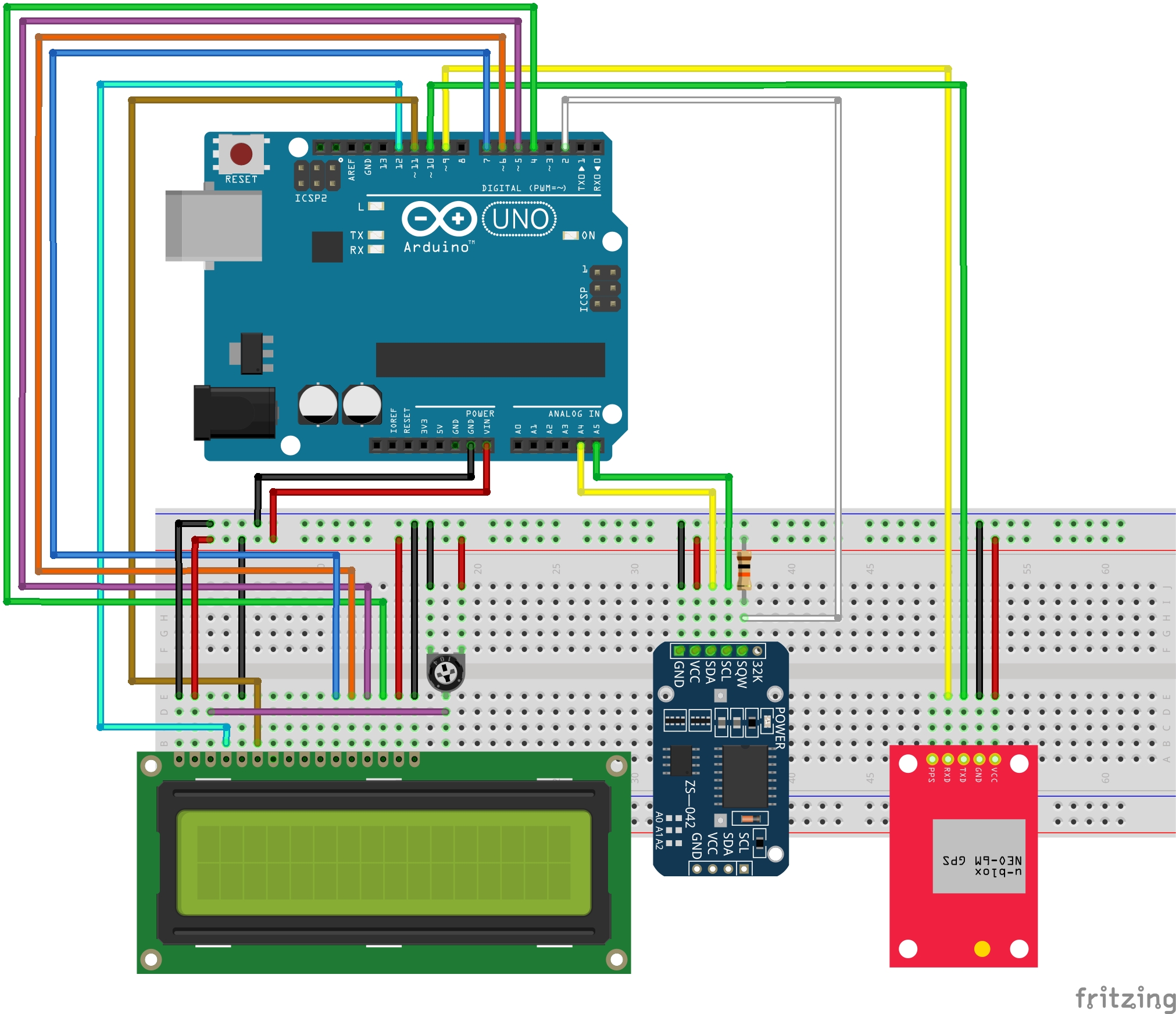
Breadboard image
Breadboard image
Comments
Only logged in users can leave comments