Components and supplies
1
DS3231MPMB1 Peripheral Module
1
Arduino Nano R3
1
SSD1306 OLED display
Project description
Code
OLED clock using DS3231 RTC module
arduino
Working on Arduino Mega (needs more then 2kB of SRAM)
1//Marios Ideas
2//DS3231 Tutorial
3//Using DS3232.h library
4//Formating
5  date and time with dateFormat function (for Arduino board with >2kb SRAM)
6
7#include
8  <Wire.h>
9#include <DS3231.h>
10#include <Adafruit_GFX.h>
11#include <Adafruit_SSD1306.h>
12
13DS3231
14  clock;
15RTCDateTime dt;
16String txt;
17#define SCREEN_WIDTH 128 // OLED display
18  width, in pixels
19#define SCREEN_HEIGHT 64 // OLED display height, in pixels
20
21#define
22  OLED_RESET     -1// Reset pin # (or -1 if sharing Arduino reset pin)
23Adafruit_SSD1306
24  display(SCREEN_WIDTH, SCREEN_HEIGHT, &Wire, OLED_RESET);
25
26void setup() {
27Serial.begin(9600);
28
29    clock.begin();
30  // Set sketch compiling time
31    clock.setDateTime(__DATE__,
32  __TIME__);
33   // SSD1306_SWITCHCAPVCC = generate display voltage from 3.3V internally
34
35  if(!display.begin(SSD1306_SWITCHCAPVCC, 0x3C)) { // Address 0x3D for 128x64
36
37    Serial.println(F("SSD1306 allocation failed"));
38    for(;;); // Don't proceed,
39  loop forever
40  }
41  display.display();
42    delay(2000); // Pause for 2 seconds
43
44
45    // Clear the buffer
46  display.clearDisplay();
47  display.display();
48
49}
50
51
52
53void
54  loop() {
55  dt = clock.getDateTime();
56
57  display.fillRect(0,0,128,16,SSD1306_WHITE);
58
59  display.fillRect(0,17,128,16,SSD1306_BLACK);
60  display.fillRect(0,31,128,33,SSD1306_WHITE);
61
62
63    display.setCursor(1,1);
64    display.setTextSize(2);
65    display.setTextColor(SSD1306_BLACK);
66
67    display.println(clock.dateFormat("l", dt));
68
69  display.setCursor(1,18);
70
71  display.setTextSize(1);
72  display.setTextColor(SSD1306_WHITE);
73  display.println(clock.dateFormat("M
74  jS Y ", dt));
75
76    display.setCursor(3,35);
77    display.setTextSize(3);
78
79    display.setTextColor(SSD1306_BLACK);
80    display.println(clock.dateFormat("H:i",
81  dt));
82
83  display.setCursor(100,35);
84  display.setTextSize(2);
85  display.setTextColor(SSD1306_BLACK);
86
87  display.println(clock.dateFormat("s", dt));
88
89
90  display.display();
91
92
93
94  delay(1000);
95}
OLED clock using DS3231 RTC module with the memory problem fix
arduino
Working on all arduino boards
1//Marios Ideas
2//DS3231 Tutorial
3//Using DS3232.h library
4//Formating
5  date and time with custom functions
6
7#include <Wire.h>
8#include <DS3231.h>
9#include
10  <Adafruit_GFX.h>
11#include <Adafruit_SSD1306.h>
12
13int pause=1000;
14
15DS3231
16  clock;
17RTCDateTime dt;
18
19#define SCREEN_WIDTH 128 // OLED display width,
20  in pixels
21#define SCREEN_HEIGHT 64 // OLED display height, in pixels
22
23
24#define
25  OLED_RESET     -1// Reset pin # (or -1 if sharing Arduino reset pin)
26Adafruit_SSD1306
27  display(SCREEN_WIDTH, SCREEN_HEIGHT, &Wire, OLED_RESET);
28
29void setup() {
30Serial.begin(9600);
31
32    clock.begin();
33  // Set sketch compiling time
34    clock.setDateTime(__DATE__,
35  __TIME__);
36
37   // SSD1306_SWITCHCAPVCC = generate display voltage from 3.3V
38  internally
39  if(!display.begin(SSD1306_SWITCHCAPVCC, 0x3C)) { // Address 0x3D
40  for 128x64
41    Serial.println(F("SSD1306 allocation failed"));
42    for(;;);
43  // Don't proceed, loop forever
44  }
45  display.display(); //display initial
46  Adafruit logo
47    delay(2000);
48
49  // Clear the buffer
50  display.clearDisplay();
51
52  display.display();
53
54}
55
56String DayOfTheWeek(uint8_t Day){
57  String
58  DayText;
59  if (Day==1)  DayText="Monday";
60  if (Day==2)  DayText="Tuesday";
61
62  if (Day==3)  DayText="Wednesday";
63  if (Day==4)  DayText="Thursday";
64
65  if (Day==5)  DayText="Friday";
66  if (Day==6)  DayText="Saturday";
67  if
68  (Day==7)  DayText="Sunday";
69  return DayText;
70}
71
72
73
74String DayMonthYear(uint8_t
75  Day,uint8_t Month,uint16_t Year){
76  String DayMonthYearText;
77  if (Month==1)
78  DayMonthYearText="JAN ";
79  if (Month==2)  DayMonthYearText="FEB ";
80
81  if (Month==3)  DayMonthYearText="MAR ";
82  if (Month==4)  DayMonthYearText="APR
83  ";
84  if (Month==5)  DayMonthYearText="MAY ";
85  if (Month==6)  DayMonthYearText="JUN
86  ";
87  if (Month==7)  DayMonthYearText="JUL ";
88  if (Month==8)  DayMonthYearText="AUG
89  ";
90  if (Month==9)  DayMonthYearText="SEP ";
91  if (Month==10)  DayMonthYearText="OCT
92  ";
93  if (Month==11)  DayMonthYearText="NOV ";
94  if (Month==12)  DayMonthYearText="DEC
95  ";
96
97  DayMonthYearText=DayMonthYearText+Day;
98  if (Day==1)DayMonthYearText=DayMonthYearText+"st
99  ";
100  if (Day==2)DayMonthYearText=DayMonthYearText+"nd ";
101  if (Day>2)DayMonthYearText=DayMonthYearText+"th
102  ";
103
104  DayMonthYearText=DayMonthYearText+Year;
105
106  return DayMonthYearText;
107}
108
109String
110  AddLeadingZero(uint8_t x){
111  String AddLeadingZeroText;
112  if(x<10) AddLeadingZeroText="0";
113
114  else AddLeadingZeroText="";
115  AddLeadingZeroText=AddLeadingZeroText+x;
116
117  return AddLeadingZeroText;
118}
119
120String CurrentTime(uint8_t H, uint8_t I
121  ){
122  String CurrentTimeText="";
123  CurrentTimeText=CurrentTimeText + AddLeadingZero(H)
124  +":"+AddLeadingZero(I);
125  return CurrentTimeText;
126}
127
128void loop() {
129
130  dt = clock.getDateTime();
131
132  display.fillRect(0,0,128,16,SSD1306_WHITE);
133
134  display.fillRect(0,17,128,16,SSD1306_BLACK);
135  display.fillRect(0,31,128,33,SSD1306_WHITE);
136
137
138    display.setCursor(1,1);
139    display.setTextSize(2);
140    display.setTextColor(SSD1306_BLACK);
141
142    display.println(DayOfTheWeek(dt.dayOfWeek));
143
144  display.setCursor(1,18);
145
146  display.setTextSize(1);
147  display.setTextColor(SSD1306_WHITE);
148  display.println(DayMonthYear(dt.day,dt.month,dt.year));
149
150
151    display.setCursor(3,35);
152    display.setTextSize(3);
153    display.setTextColor(SSD1306_BLACK);
154
155    display.println(CurrentTime(dt.hour,dt.minute));
156
157  display.setCursor(100,35);
158
159  display.setTextSize(2);
160  display.setTextColor(SSD1306_BLACK);
161  display.println(AddLeadingZero(dt.second));
162
163
164  clock.forceConversion();
165  display.setCursor(85,18);
166  display.setTextSize(1);
167display.setTextColor(SSD1306_WHITE);
168
169display.print(clock.readTemperature());
170display.setCursor(117,16);
171display.print("o");
172
173
174
175  display.display();
176  delay(1000);
177}
OLED clock using DS3231 RTC module
arduino
Working on Arduino Mega (needs more then 2kB of SRAM)
1//Marios Ideas
2//DS3231 Tutorial
3//Using DS3232.h library
4//Formating  date and time with dateFormat function (for Arduino board with >2kb SRAM)
5
6#include  <Wire.h>
7#include <DS3231.h>
8#include <Adafruit_GFX.h>
9#include <Adafruit_SSD1306.h>
10
11DS3231  clock;
12RTCDateTime dt;
13String txt;
14#define SCREEN_WIDTH 128 // OLED display  width, in pixels
15#define SCREEN_HEIGHT 64 // OLED display height, in pixels
16
17#define  OLED_RESET     -1// Reset pin # (or -1 if sharing Arduino reset pin)
18Adafruit_SSD1306  display(SCREEN_WIDTH, SCREEN_HEIGHT, &Wire, OLED_RESET);
19
20void setup() {
21Serial.begin(9600);
22    clock.begin();
23  // Set sketch compiling time
24    clock.setDateTime(__DATE__,  __TIME__);
25   // SSD1306_SWITCHCAPVCC = generate display voltage from 3.3V internally
26  if(!display.begin(SSD1306_SWITCHCAPVCC, 0x3C)) { // Address 0x3D for 128x64
27    Serial.println(F("SSD1306 allocation failed"));
28    for(;;); // Don't proceed,  loop forever
29  }
30  display.display();
31    delay(2000); // Pause for 2 seconds
32
33    // Clear the buffer
34  display.clearDisplay();
35  display.display();
36
37}
38
39
40
41void  loop() {
42  dt = clock.getDateTime();
43
44  display.fillRect(0,0,128,16,SSD1306_WHITE);
45  display.fillRect(0,17,128,16,SSD1306_BLACK);
46  display.fillRect(0,31,128,33,SSD1306_WHITE);
47
48    display.setCursor(1,1);
49    display.setTextSize(2);
50    display.setTextColor(SSD1306_BLACK);
51    display.println(clock.dateFormat("l", dt));
52
53  display.setCursor(1,18);
54  display.setTextSize(1);
55  display.setTextColor(SSD1306_WHITE);
56  display.println(clock.dateFormat("M  jS Y ", dt));
57
58    display.setCursor(3,35);
59    display.setTextSize(3);
60    display.setTextColor(SSD1306_BLACK);
61    display.println(clock.dateFormat("H:i",  dt));
62
63  display.setCursor(100,35);
64  display.setTextSize(2);
65  display.setTextColor(SSD1306_BLACK);
66  display.println(clock.dateFormat("s", dt));
67
68
69  display.display();
70
71
72  delay(1000);
73}
OLED clock using DS3231 RTC module with the memory problem fix
arduino
Working on all arduino boards
1//Marios Ideas
2//DS3231 Tutorial
3//Using DS3232.h library
4//Formating  date and time with custom functions
5
6#include <Wire.h>
7#include <DS3231.h>
8#include  <Adafruit_GFX.h>
9#include <Adafruit_SSD1306.h>
10
11int pause=1000;
12
13DS3231  clock;
14RTCDateTime dt;
15
16#define SCREEN_WIDTH 128 // OLED display width,  in pixels
17#define SCREEN_HEIGHT 64 // OLED display height, in pixels
18
19
20#define  OLED_RESET     -1// Reset pin # (or -1 if sharing Arduino reset pin)
21Adafruit_SSD1306  display(SCREEN_WIDTH, SCREEN_HEIGHT, &Wire, OLED_RESET);
22
23void setup() {
24Serial.begin(9600);
25    clock.begin();
26  // Set sketch compiling time
27    clock.setDateTime(__DATE__,  __TIME__);
28
29   // SSD1306_SWITCHCAPVCC = generate display voltage from 3.3V  internally
30  if(!display.begin(SSD1306_SWITCHCAPVCC, 0x3C)) { // Address 0x3D  for 128x64
31    Serial.println(F("SSD1306 allocation failed"));
32    for(;;);  // Don't proceed, loop forever
33  }
34  display.display(); //display initial  Adafruit logo
35    delay(2000);
36
37  // Clear the buffer
38  display.clearDisplay();
39  display.display();
40
41}
42
43String DayOfTheWeek(uint8_t Day){
44  String  DayText;
45  if (Day==1)  DayText="Monday";
46  if (Day==2)  DayText="Tuesday";
47  if (Day==3)  DayText="Wednesday";
48  if (Day==4)  DayText="Thursday";
49  if (Day==5)  DayText="Friday";
50  if (Day==6)  DayText="Saturday";
51  if  (Day==7)  DayText="Sunday";
52  return DayText;
53}
54
55
56
57String DayMonthYear(uint8_t  Day,uint8_t Month,uint16_t Year){
58  String DayMonthYearText;
59  if (Month==1)  DayMonthYearText="JAN ";
60  if (Month==2)  DayMonthYearText="FEB ";
61  if (Month==3)  DayMonthYearText="MAR ";
62  if (Month==4)  DayMonthYearText="APR  ";
63  if (Month==5)  DayMonthYearText="MAY ";
64  if (Month==6)  DayMonthYearText="JUN  ";
65  if (Month==7)  DayMonthYearText="JUL ";
66  if (Month==8)  DayMonthYearText="AUG  ";
67  if (Month==9)  DayMonthYearText="SEP ";
68  if (Month==10)  DayMonthYearText="OCT  ";
69  if (Month==11)  DayMonthYearText="NOV ";
70  if (Month==12)  DayMonthYearText="DEC  ";
71
72  DayMonthYearText=DayMonthYearText+Day;
73  if (Day==1)DayMonthYearText=DayMonthYearText+"st  ";
74  if (Day==2)DayMonthYearText=DayMonthYearText+"nd ";
75  if (Day>2)DayMonthYearText=DayMonthYearText+"th  ";
76
77  DayMonthYearText=DayMonthYearText+Year;
78
79  return DayMonthYearText;
80}
81
82String  AddLeadingZero(uint8_t x){
83  String AddLeadingZeroText;
84  if(x<10) AddLeadingZeroText="0";
85  else AddLeadingZeroText="";
86  AddLeadingZeroText=AddLeadingZeroText+x;
87  return AddLeadingZeroText;
88}
89
90String CurrentTime(uint8_t H, uint8_t I  ){
91  String CurrentTimeText="";
92  CurrentTimeText=CurrentTimeText + AddLeadingZero(H)  +":"+AddLeadingZero(I);
93  return CurrentTimeText;
94}
95
96void loop() {
97  dt = clock.getDateTime();
98
99  display.fillRect(0,0,128,16,SSD1306_WHITE);
100  display.fillRect(0,17,128,16,SSD1306_BLACK);
101  display.fillRect(0,31,128,33,SSD1306_WHITE);
102
103    display.setCursor(1,1);
104    display.setTextSize(2);
105    display.setTextColor(SSD1306_BLACK);
106    display.println(DayOfTheWeek(dt.dayOfWeek));
107
108  display.setCursor(1,18);
109  display.setTextSize(1);
110  display.setTextColor(SSD1306_WHITE);
111  display.println(DayMonthYear(dt.day,dt.month,dt.year));
112
113    display.setCursor(3,35);
114    display.setTextSize(3);
115    display.setTextColor(SSD1306_BLACK);
116    display.println(CurrentTime(dt.hour,dt.minute));
117
118  display.setCursor(100,35);
119  display.setTextSize(2);
120  display.setTextColor(SSD1306_BLACK);
121  display.println(AddLeadingZero(dt.second));
122
123  clock.forceConversion();
124  display.setCursor(85,18);
125  display.setTextSize(1);
126display.setTextColor(SSD1306_WHITE);
127display.print(clock.readTemperature());
128display.setCursor(117,16);
129display.print("o");
130
131
132  display.display();
133  delay(1000);
134}
Downloadable files
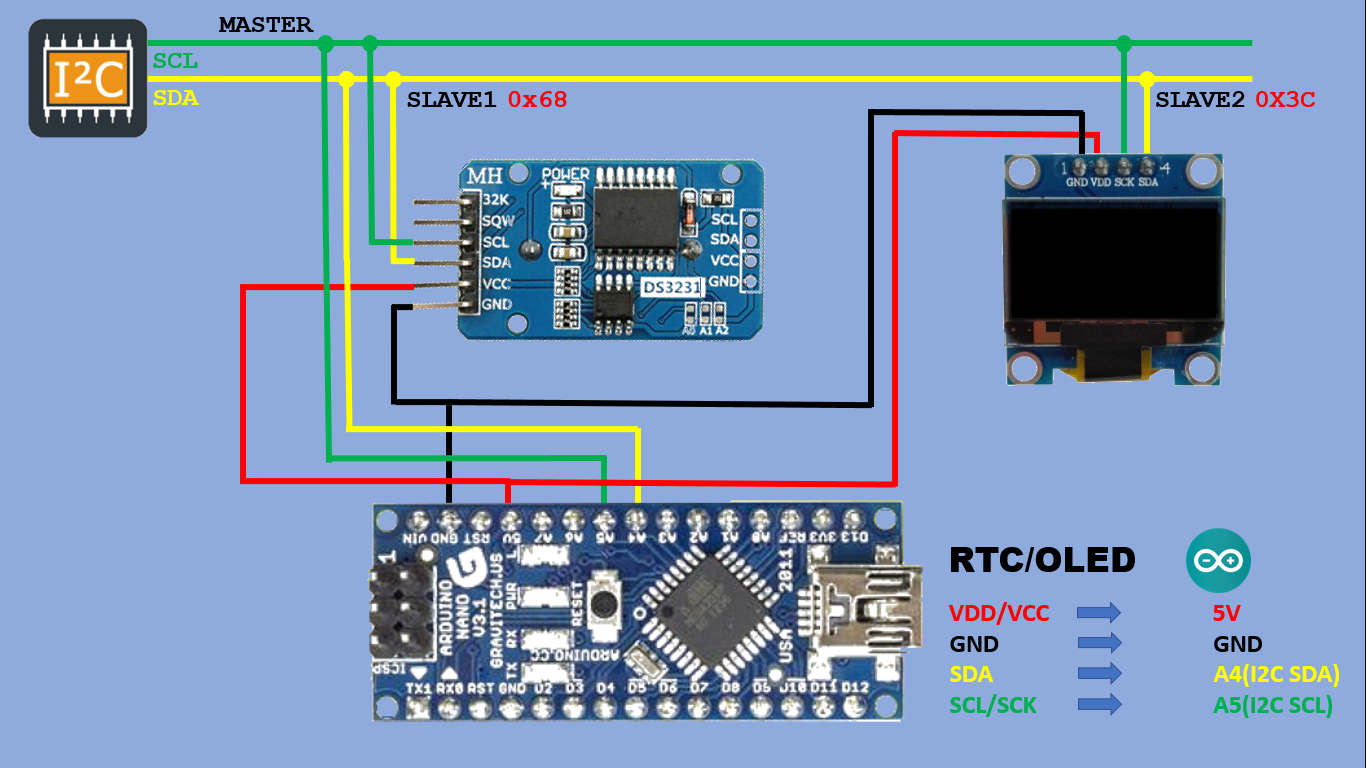
Schematics
Schematics
Comments
Only logged in users can leave comments