Devices & Components
Arduino Nano
WS2812 Addressable LED Strip
Software & Tools
Arduino IDE
Project description
Code
Program to gradually go through Hue Rainbow color Palette, with the adding color flickering effect
arduino
1#include <FastLED.h> 2#define LED_PIN 5 3#define NUM_LEDS 10 4#define BRIGHTNESS 64 5#define LED_TYPE WS2811 6#define COLOR_ORDER GRB 7 8int OldState [NUM_LEDS]; 9int NewState [NUM_LEDS]; 10int Color = 145; 11int ColorChange=0; 12unsigned long timer=0; 13 14 15CRGB leds[NUM_LEDS]; 16void setup() { 17 delay( 3000 ); // power-up safety delay 18 FastLED.addLeds<LED_TYPE, LED_PIN, COLOR_ORDER>(leds, NUM_LEDS).setCorrection( TypicalLEDStrip ); 19 FastLED.setBrightness( BRIGHTNESS ); 20 for( int i = 0; i < NUM_LEDS-1; ++i) if(Color+random(30)>255) OldState[i] = Color+random(30);else OldState[i] = Color+random(30)-255; 21} 22 23void loop() { 24 if (millis()-timer>10000){ 25 timer = millis(); 26 Color=Color+20; 27 if (Color>255)Color=Color-255; 28 } 29 30 for( int i = 0; i < NUM_LEDS-1; ++i) if(Color+random(30)>255) NewState[i] = Color+random(30);else NewState[i] = Color+random(30)-255; 31 for (int j=0;j<30;j++){ 32 for( int i = 0; i < NUM_LEDS-1; ++i) { 33 if (OldState[i]<NewState[i])ColorChange=1; 34 if (OldState[i]>NewState[i])ColorChange=-1; 35 OldState[i]=OldState[i]+ColorChange; 36 if (OldState[i]>255)OldState[i]=OldState[i]-255; 37 leds[i] = CHSV(OldState[i], 255, 255); 38 ColorChange=0; 39 } 40 FastLED.show(); 41 delay(40); 42 } 43 for( int i = 0; i < NUM_LEDS-1; ++i) { 44 OldState[i] = NewState[i]; 45 } 46 leds[9] = CHSV(Color+100, 255, 255); 47}
Documentation
Connecting LED strip to Arduino
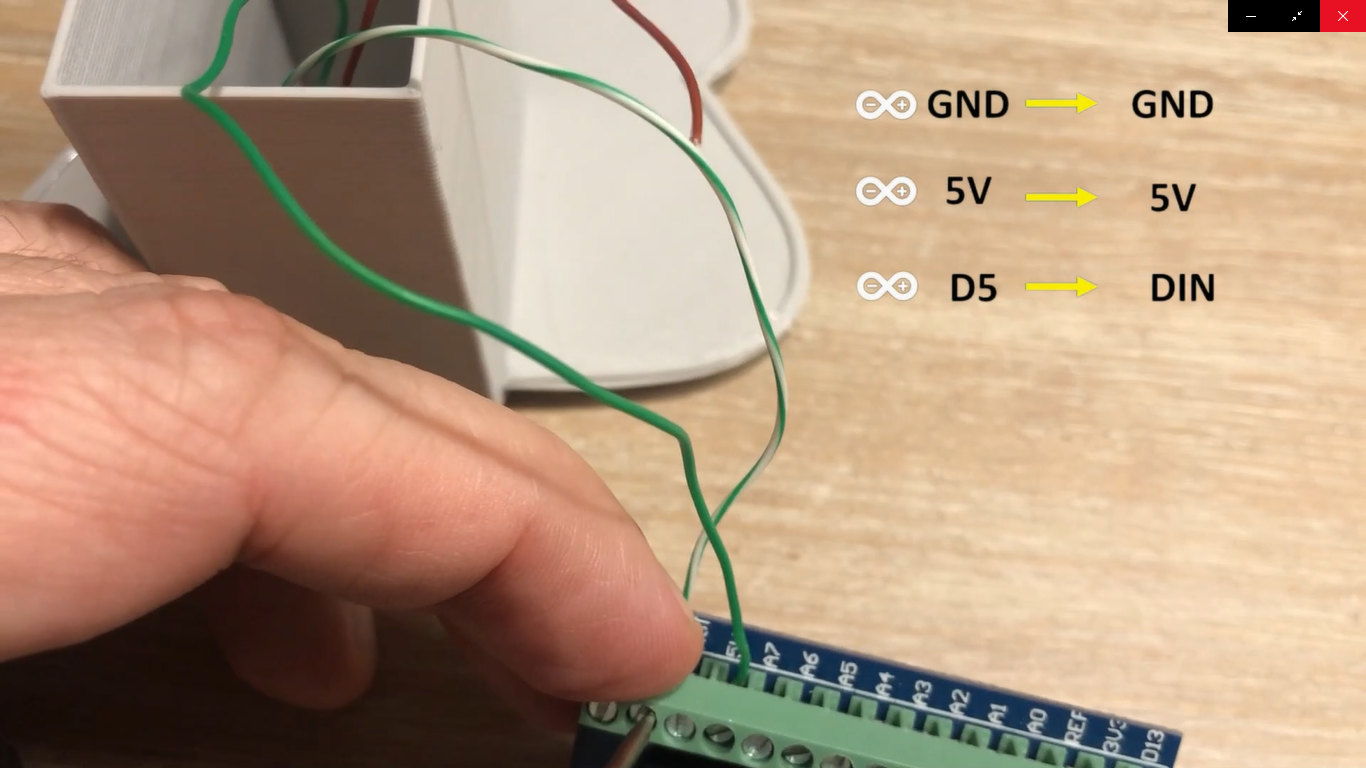
Connecting LED strip to Arduino

Comments
Only logged in users can leave comments