Devices & Components
Arduino Uno Rev3
Breadboard (generic)
Standard LCD - 16x2 White on Blue
Rotary potentiometer (generic)
Pushbutton switch 12mm
Jumper wires (generic)
Resistor 220 ohm
Project description
Code
Code
arduino
1#include "LiquidCrystal.h" 2 3// This defines the LCD wiring to the DIGITALpins 4const int rs = 12, en = 11, d4 = 5, d5 = 4, d6 = 3, d7 = 2; 5LiquidCrystal lcd(rs, en, d4, d5, d6, d7); 6 7// Digital LCD Constrast setting 8int cs=9;// pin 9 for contrast PWM 9const int contrast = 100;// default contrast 10 11// initial Time display is 24:59:45 PM 12int h=24; 13int m=59; 14int s=45; 15int flag=1; //PM 16 17// Time Set Buttons 18int button1; 19int button2; 20 21// Pins definition for Time Set Buttons 22int hs=0;// pin 0 for Hours Setting 23int ms=1;// pin 1 for Minutes/Preset Seconds(0) Setting 24 25// Backlight Time Out 26const int Time_light=150; 27int bl_TO=Time_light;// Backlight Time-Out 28int bl=10; // Backlight pin 29const int backlight=120; // no more then 7mA !!! 30 31// For accurate Time reading, use Arduino Real Time Clock and not just delay() 32static uint32_t last_time, now = 0; // RTC 33 34 35void setup() 36{ 37 lcd.begin(16,2); 38 pinMode(hs,INPUT_PULLUP);// avoid external Pullup resistors for Button 1 39 pinMode(ms,INPUT_PULLUP);// and Button 2 40 analogWrite(cs,contrast);// Adjust Contrast VO 41 analogWrite(bl,backlight);// Turn on Backlight 42 now=millis(); // read RTC initial value 43 44 45} 46 47 48void loop() 49{ 50 lcd.begin(16,2);// every second 51// Update LCD Display 52// Print TIME in Hour, Min, Sec 53 lcd.setCursor(0,0); 54 lcd.print("Time "); 55 if(h<10)lcd.print("0");// always 2 digits 56 lcd.print(h); 57 lcd.print(":"); 58 if(m<10)lcd.print("0"); 59 lcd.print(m); 60 lcd.print(":"); 61 if(s<10)lcd.print("0"); 62 lcd.print(s); 63 64 65 66 67 lcd.setCursor(0,1);// for Line 2 68 lcd.print("ClockDePrecision"); 69 70 71// improved replacement of delay(1000) 72// Much better accuracy, no more dependant of loop execution time 73 74for ( int i=0 ;i<5 ;i++)// make 5 time 200ms loop, for faster Button response 75{ 76 77 while ((now-last_time)<200) //delay200ms 78 { 79 now=millis(); 80 } 81 // inner 200ms loop 82 last_time=now; // prepare for next loop 83 84 // read Setting Buttons 85 button1=digitalRead(hs);// Read Buttons 86 button2=digitalRead(ms); 87 88 //Backlight time out 89 bl_TO--; 90 if(bl_TO==0) 91 { 92 analogWrite(bl,0);// Backlight OFF 93 bl_TO++; 94 } 95 96 // Hit any to activate Backlight 97 if( ((button1==0)|(button2==0)) & (bl_TO==1) ) 98 { 99 bl_TO=Time_light; 100 analogWrite(bl,backlight); 101 // wait until Button released 102 while ((button1==0)|(button2==0)) 103 { 104 button1=digitalRead(hs);// Read Buttons 105 button2=digitalRead(ms); 106 } 107 } 108 else 109 // Process Button 1 or Button 2 when hit while Backlight on 110 { 111 if(button1==0){ 112 h=h+1; 113 bl_TO=Time_light; 114 analogWrite(bl,backlight); 115 } 116 117 if(button2==0){ 118 s=0; 119 m=m+1; 120 bl_TO=Time_light; 121 analogWrite(bl,backlight); 122 } 123 124/* ---- manage seconds, minutes, hours overflow ----*/ 125 if(s==60){ 126 s=0; 127 m=m+1; 128 } 129 if(m==60) 130 { 131 m=0; 132 h=h+1; 133 } 134 if(h==24) 135 { 136 h=0; 137 flag=flag; 138 139 } 140 141 142 if((button1==0)|(button2==0))// Update display if time set button pressed 143 { 144 // Update LCD Display 145 // Print TIME in Hour, Min, Sec 146 lcd.setCursor(0,0); 147 lcd.print("Time "); 148 if(h<10)lcd.print("0");// always 2 digits 149 lcd.print(h); 150 lcd.print(":"); 151 if(m<10)lcd.print("0"); 152 lcd.print(m); 153 lcd.print(":"); 154 if(s<10)lcd.print("0"); 155 lcd.print(s); 156 157 158 lcd.setCursor(0,1);// for Line 2 159 lcd.print("Precision clock"); 160 } 161 162 163 } // end if else 164}// end for 165 166 167 168// outer 1000ms loop 169 170 s=s+1; //increment sec. counting 171 172 173// ---- manage seconds, minutes, hours am/pm overflow ---- 174 if(s==60){ 175 s=0; 176 m=m+1; 177 } 178 if(m==60) 179 { 180 m=0; 181 h=h+1; 182 } 183 if(h==24) 184 { 185 h=0; 186 flag=flag; 187 } 188 189 190 191// Loop end 192}
Downloadable files
Circuit diagram (with resistor and potentiometer) (prefarable)

Circuit diagram (without resistor and potentiometer)
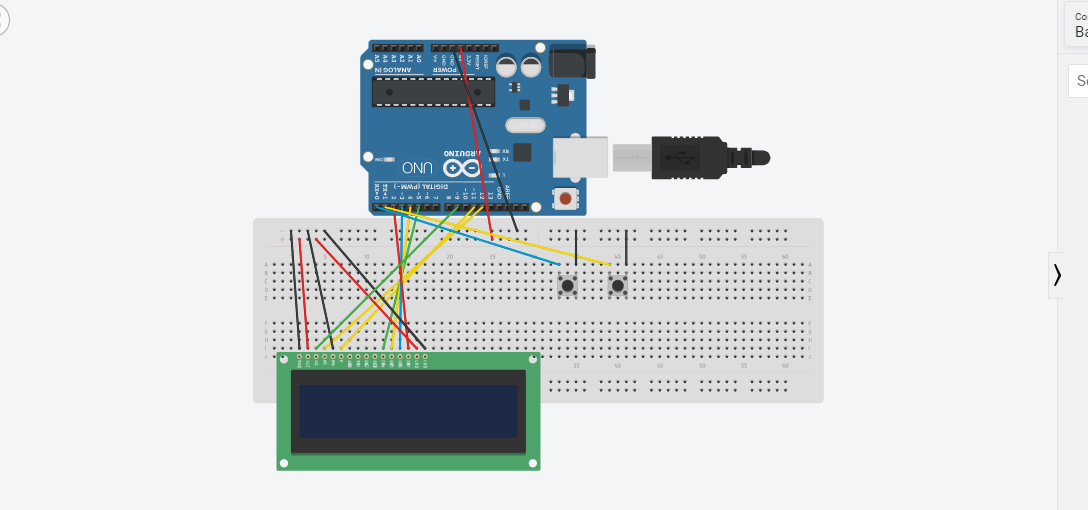
Circuit diagram (with resistor and potentiometer) (prefarable)

Circuit diagram (without resistor and potentiometer)

Comments
Only logged in users can leave comments