Smoke/Fire alarm IoT interface
Get smoke or fire alarms anywhere in the world through a simple interface without hacking the detector
Devices & Components
1
Arduino MKR WiFi 1010
1
Arduino MKR Connector Carrier (Grove compatible)
1
18650 battery holder
1
First Alert SA3210 Dual Sensor Smoke and Fire Alarm
1
18650 3.7 Volt 4200 mAh Lithium Ion Battery
1
Grove Sound Sensor/Noise Detector for Arduino
Software & Tools
1
PushSafer website
1
PushSafer app
Project description
Code
Smoke Detector Interface
arduino
Simple interface between Arduino MKR WiFi 1010 and any commercially available smoke/fire detector without hacking the detector
1/*This sketch uses the Arduino MKR WiFi 1010, Arduino MKR Connector Carrier  and Seeed Studios Grove Sound Sensor
2to sense the audible alarm output of a traditional  smoke, fire or carbon monoxide alarm and send an Internet push notification the  the Pushsafer web
3service to the Pushsafer smart phone app.
4
5Created July  8, 2022 13:31 by Andy Meranda*/
6
7//Include libraries
8#include <RTCZero.h>
9#include  <WiFiNINA.h>
10#include <WiFiClient.h>
11#include <Pushsafer.h>
12#include "arduino_secrets.h"
13
14//Constants
15const  long EDT = -14400; //Eastern Daylight Time adjustment
16const long EST = -18000;  //Eastern Standard Time adjustment
17const long TIMEADJUST = EDT; //Set time adjustment
18const  int sensorThreshold = 475; //Sound sensor threshold level
19
20//Private credentials  for wifi and Pushsafer from arduino_secrets.h
21String dev = SECRET_DEV; //Device  name for notification
22String msg = SECRET_MSG; //Message for notification
23char  ssid[] = SECRET_SSID;     // wifi network SSID (name)
24char password[] = SECRET_PASS;  // wifi network password
25char PushsaferKey[] = SECRET_KEY; // pushsafer private  key
26
27//Object declarations
28WiFiClient client; // The wifi client object  is used for pushsafer notification
29Pushsafer pushsafer(PushsaferKey, client);  // Pushsafer object to send event
30RTCZero rtc; // Real time clock object
31
32//variables
33uint32_t  epoch; //Used to get WiFiNINA time
34unsigned long int lastpush = 0; //Timestamp  of last push notification to limit number of notifications
35String dtstg = String(__DATE__);  //Compiler date for initial RTC setting
36String tmstg = String(__TIME__); //Compiler  time for initial RTC setting
37
38// Executes once on startup
39void setup()
40{
41  pinMode(A0,INPUT); //Sound sensor is on pin A0 as input
42  pinMode(LED_BUILTIN,OUTPUT);  //Set LED output pin
43  Serial.begin(9600); //Serial monitor output for debugging
44
45  rtc.begin(); //Start the real time clock;
46  rtcSet(); //Set the RTC from the  compile time
47}
48
49// Executes continuously after startup
50void loop()
51{
52  // This is the structure of the pushsafer input object
53  // Change the  values for different notifications
54  struct PushSaferInput input;
55  input.sound  = "8";
56  input.vibration = "1";
57  input.icon = "1";
58  input.iconcolor  = "#FFCCCC";
59  input.priority = "1";
60  input.device = "a";
61  input.url  = "https://www.pushsafer.com";
62  input.urlTitle = "Open Pushsafer.com";
63  input.picture = "";
64  input.picture2 = "";
65  input.picture3 = "";
66  input.time2live = "";
67  input.retry = "";
68  input.expire = "";
69  input.answer = "";
70
71  int soundLevel = analogRead(A0); //Read the sound  sensor
72  /*If the sound sensor level is high enough and the last notification  was more than 5 seconds ago,
73  then connect to wifi, issue a PushSafer notification  and flash the built-in LED 3 times.*/
74  if (soundLevel > sensorThreshold && (millis()  - lastpush) > 5000) {
75  // Try to connect to wifi up to 20 times at half second  intervals
76    WiFi.begin(ssid, password);
77    int wifiTries = 0;
78    while  (WiFi.status() != WL_CONNECTED && wifiTries < 20)
79    {
80      delay(500);
81      wifiTries++;
82    }
83
84    //Get time from WiFiNINA module and sync  RTC
85    epoch = WiFi.getTime();
86    if (epoch > 0) {
87      rtc.setEpoch(epoch+TIMEADJUST);
88    }
89
90    //Send the PushSafer notification
91    input.message = msg; //PushSafer  message body
92    input.title = dev+" "+getTime(); //PushSafer message title  and time
93    input.sound = "8"; //PushSafer notification sound
94    pushsafer.sendEvent(input);  //Send the PushSafer notification
95    lastpush = millis(); //Timestamp the last  notification sent
96    flashLED(3,150); //Flash the LED repetitions and duration  to signal notification sent
97
98    //Serial print debugging message showing  sound sensor level
99    Serial.print("Fire alarm sound level: ");
100    Serial.println(soundLevel);
101  }
102  delay(1000); //1 second delay between sound sensor reads
103}
104
105//Flashes  LED specified repetitions and duration
106void flashLED(int x, int y) {
107  for  (int i=1;i <= x;i++) {
108    digitalWrite(LED_BUILTIN,HIGH);
109    delay(y);
110    digitalWrite(LED_BUILTIN,LOW);
111    delay(y);
112  }
113}
114
115// Sets the  real time clock from the compile date and time
116void rtcSet()
117{
118  String  months = "JanFebMarAprMayJunJulAugSepOctNovDec"; // Month identifier array
119
120  // Parses the compiler DATE string into separate substrings needed to set the  RTC
121  String mm = dtstg.substring(0,3);
122  String dd = dtstg.substring(4,7);
123  String yy = dtstg.substring(8,11);
124
125  // Convert the date strings to integers  needed to set the RTC
126  int ddnbr = dd.toInt();
127  int mmnbr = int((months.indexOf(mm)/3)+1);
128  int yynbr = yy.toInt();
129
130  // Parses the compiler TIME string into separate  substrings needed to set the RTC
131  String hh = tmstg.substring(0,2);
132  String  mn = tmstg.substring(3,5);
133  String ss = tmstg.substring(6,8);
134
135  // Convert  the time strings to integers needed to set the RTC
136  int hhnbr = hh.toInt();
137  int mnnbr = mn.toInt();
138  int ssnbr = mn.toInt();
139
140  // Set the RTC date  and time
141  rtc.setDate(ddnbr,mmnbr,yynbr);
142  rtc.setTime(hhnbr,mnnbr,ssnbr);
143}
144
145//  Gets human readable time from the real time clock
146String getTime()
147{
148  String  yy,mm,dd,hr,mn,se; // String variables to hold the elements of the RTC timestamp
149  yy = String(rtc.getYear()); // Get the timestamp year from the RTC
150  if (rtc.getMonth()  < 10) // Add a leading month zero if < 10
151  {
152    mm = String("0")+String(rtc.getMonth());
153  } else {
154    mm = String(rtc.getMonth());
155  }
156  if (rtc.getDay() < 10)  // Add a leading day zero if < 10
157  {
158    dd = String("0")+String(rtc.getDay());
159  } else {
160    dd = String(rtc.getDay());
161  }
162  if (rtc.getHours() < 10)  // Add a leading hour zero if < 10
163  {
164    hr = String("0")+String(rtc.getHours());
165  } else {
166    hr = String(rtc.getHours());
167  }
168  if (rtc.getMinutes()  < 10) // Add a leading minute zero if < 10
169  {
170    mn = String("0")+String(rtc.getMinutes());
171  } else {
172    mn = String(rtc.getMinutes());
173  }
174  if (rtc.getSeconds()  < 10) // Add a leading second zero if < 10
175  {
176    se = String("0")+String(rtc.getSeconds());
177  } else {
178    se = String(rtc.getSeconds());
179  }
180  // Combine the RTC  timestamp elements into a single string
181  String timestr = mm+"-"+dd+"-"+yy+"  "+hr + ":" + mn + ":" + se;
182  return timestr;
183}
Downloadable files
Wiring photo
Wiring photo
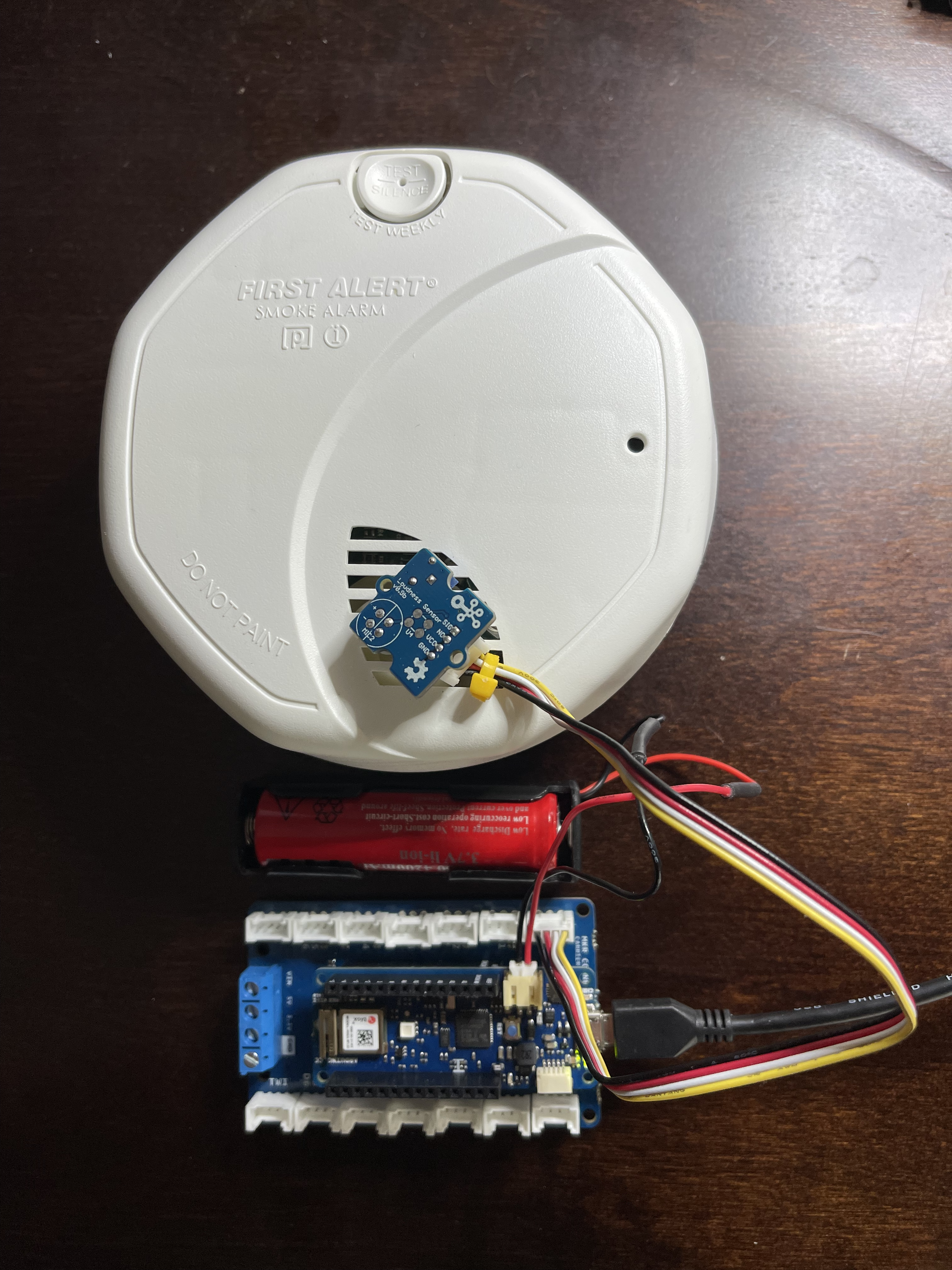
Wiring photo
Wiring photo
Comments
Only logged in users can leave comments