Air Monitor with 24h graph. CO2, Humidity & Temperature
A simple project to measure the CO2 levels in ppm using an MH-Z19C-PH sensor and an AHT10 sensor to measure humidity and temperature.
Devices & Components
1
Arduino Uno Rev3
4
Through Hole Resistor, 6.8 kohm
1
Geekcreit 0.91 Inch 128x32 IIC I2C Blue OLED LCD Display DIY Module SSD1306 Driver IC DC 3.3V 5V
1
MH-Z19c-PH
1
AHT10
1
Tactile Switch, Top Actuated
1
Jumper wires (generic)
1
Breadboard (generic)
Project description
Code
Arduino Code
arduino
Library to download: MH-Z19-master Adafruit_AHT10 Adafruit_SSD1306-master Adafruit-GFX-Library-master
1#include <SPI.h>
2#include <Wire.h>
3#include <Adafruit_GFX.h>
4#include  <Adafruit_SSD1306.h>
5
6
7#include <Arduino.h>
8#include "MHZ19.h"
9#include  <SoftwareSerial.h>                                // Remove if using HardwareSerial
10
11#define  RX_PIN 10                                          // Rx pin which the MHZ19 Tx  pin is attached to
12#define TX_PIN 11                                          //  Tx pin which the MHZ19 Rx pin is attached to
13#define BAUDRATE 9600                                      //  Device to MH-Z19 Serial baudrate (should not be changed)
14
15#define buttonPin  2     // the number of the pushbutton pin
16
17
18MHZ19 myMHZ19;                                             //  Constructor for library
19SoftwareSerial mySerial(RX_PIN, TX_PIN);                   //  (Uno example) create device to MH-Z19 serial
20
21unsigned long getDataTimer =  0;
22unsigned long getDataHour = 0;
23
24
25
26#define SCREEN_WIDTH 128 //  OLED display width, in pixels
27#define SCREEN_HEIGHT 32 // OLED display height,  in pixels
28
29// Declaration for an SSD1306 display connected to I2C (SDA, SCL  pins)
30// The pins for I2C are defined by the Wire-library.
31// On an arduino  UNO:       A4(SDA), A5(SCL)
32// On an arduino MEGA 2560: 20(SDA), 21(SCL)
33//  On an arduino LEONARDO:   2(SDA),  3(SCL), ...
34#define OLED_RESET     4 // Reset  pin # (or -1 if sharing Arduino reset pin)
35#define SCREEN_ADDRESS 0x3C ///< See  datasheet for Address; 0x3D for 128x64, 0x3C for 128x32
36Adafruit_SSD1306 display(SCREEN_WIDTH,  SCREEN_HEIGHT, &Wire, OLED_RESET);
37
38#include <Adafruit_AHT10.h>
39Adafruit_AHT10  aht;
40
41
42
43
44void setup() {
45  Serial.begin(9600);
46
47  // SSD1306_SWITCHCAPVCC  = generate display voltage from 3.3V internally
48  if(!display.begin(SSD1306_SWITCHCAPVCC,  SCREEN_ADDRESS)) {
49    //Serial.println(F("SSD1306 allocation failed"));
50    for(;;); // Don't proceed, loop forever
51  }
52
53  // Show initial display  buffer contents on the screen --
54  // the library initializes this with an Adafruit  splash screen.
55  display.display();
56  delay(2000); // Pause for 2 seconds
57
58  // Clear the buffer
59  display.clearDisplay();
60
61
62  if (! aht.begin())  {
63    //Serial.println("Could not find AHT10? Check wiring");
64    while  (1) delay(10);
65  }
66  //Serial.println("AHT10 found");
67
68
69  mySerial.begin(BAUDRATE);                               // (Uno example) device to MH-Z19 serial start
70  myMHZ19.begin(mySerial);                                // *Serial(Stream) refence  must be passed to library begin().
71
72  myMHZ19.autoCalibration();                              //  Turn auto calibration ON (OFF autoCalibration(false))
73
74  pinMode(buttonPin,  INPUT);
75}
76
77char CO2String[10];
78char outstr[6];
79
80void loop()  {
81  // put your main code here, to run repeatedly:
82  static int buttonState  = 0;         // variable for reading the pushbutton status
83  static int level  = 0; //level 0 normal working, level 1 graph, level 2 off
84
85  buttonState  = digitalRead(buttonPin);
86
87
88  // determina livello in cui mi trovo alla  rpessione del bottone
89  if (buttonState == HIGH) {
90    level++;
91  }
92  if(level==3) {
93    level=0;
94  }
95
96
97    static int CO2=0;
98    if  (millis() - getDataTimer >= 2000)
99    {
100        CO2 = myMHZ19.getCO2();  //  Request CO2 (as ppm)
101        //Serial.print("CO2 (ppm): ");Serial.println(CO2);
102        getDataTimer = millis();
103    }
104
105    if (level==0){ //operazione normale
106      display.clearDisplay();
107
108       sensors_event_t humidity, temp;
109       aht.getEvent(&humidity, &temp);//  populate temp and humidity objects with fresh data
110
111       ScreenPrint("Temperature:",4,3,1,false);
112       dtostrf(temp.temperature,5, 2, outstr);
113       ScreenPrint(outstr,78,3,1,false);
114       ScreenPrint("*C",112,3,1,false);
115
116       ScreenPrint("Humidity:",4,11,1,false);
117       dtostrf(humidity.relative_humidity,5, 2, outstr);
118       ScreenPrint(outstr,59,11,1,false);
119       ScreenPrint("%rH",95,11,1,false);
120
121       ScreenPrint("CO2:",4,21,1,false);
122       sprintf (CO2String, "%i", CO2);
123       ScreenPrint(CO2String,30,21,1,false);
124       ScreenPrint("ppm",60,21,1,false);
125
126      display.drawRect(1,1,126,31,WHITE);
127      display.display();
128    }
129    if (level==1){ //mostra grafico
130      display.clearDisplay();
131      printGraph();
132    }
133    if (level==2){ //spegne schermo
134      blackScreen();
135    }
136
137    if (millis() - getDataHour >= 1800000){ //se  passa un ora salva dati(3600000) /1800000 mezzora
138       SaveDataGraph(CO2);//salva  dati CO2
139       getDataHour = millis();
140    }
141
142
143  delay(500);
144
145
146}
147
148  int graph[23]={400,400,400,400,400,400,400,400,400,400,400,400,400,400,400,400,400,400,400,400,400,400,400};
149
150uint8_t moment=0; //momento in cui mi trovo
151
152void SaveDataGraph(int  data){
153  graph[moment]=data;
154  moment++;
155  if (moment==23){
156  moment=0;
157  }
158  }
159
160void printGraph(void){
161  static int tempo=0;
162  int resizeData;
163  int PosizioneX=0;
164  while(tempo!=23){
165    resizeData = 30-(graph[tempo]*0.012);  //range da 0 a 2500
166    display.drawLine(PosizioneX+4,resizeData,PosizioneX+4,32,WHITE);  // draw a rectangle from x1,y1 to x2,y2
167    PosizioneX=PosizioneX+5;
168    tempo++;
169  }
170  display.drawLine(0,24,1,24,WHITE);  // linea 500ppm
171  display.drawLine(0,18,128,18,WHITE);  // linea 1000ppm
172  display.drawLine(0,12,1,12,WHITE);  // linea 1500ppm
173  display.drawLine(0,6,128,6,WHITE);  // linea 2000ppm
174
175  display.drawLine((moment+1)*5,0,(moment+1)*5,1,WHITE);  // linea riferimento mom corrente
176
177  display.display(); // Update screen
178  PosizioneX=0;
179  tempo=0;
180  }
181
182
183void blackScreen(void){
184    display.clearDisplay();
185    display.display();
186  }
187
188
189void ScreenPrint(String text, int x, int  y, int size, bool d){
190
191  display.setTextSize(size);
192  display.setTextColor(WHITE);
193  display.setCursor(x,y);
194  display.println(text); //testo da mandare a display
195  if(d){
196    display.display(); //se voglio stampare subito d=1
197    }
198  }
199
Downloadable files
Hand Drawn Wiring Schematic
Hand Drawn Wiring Schematic
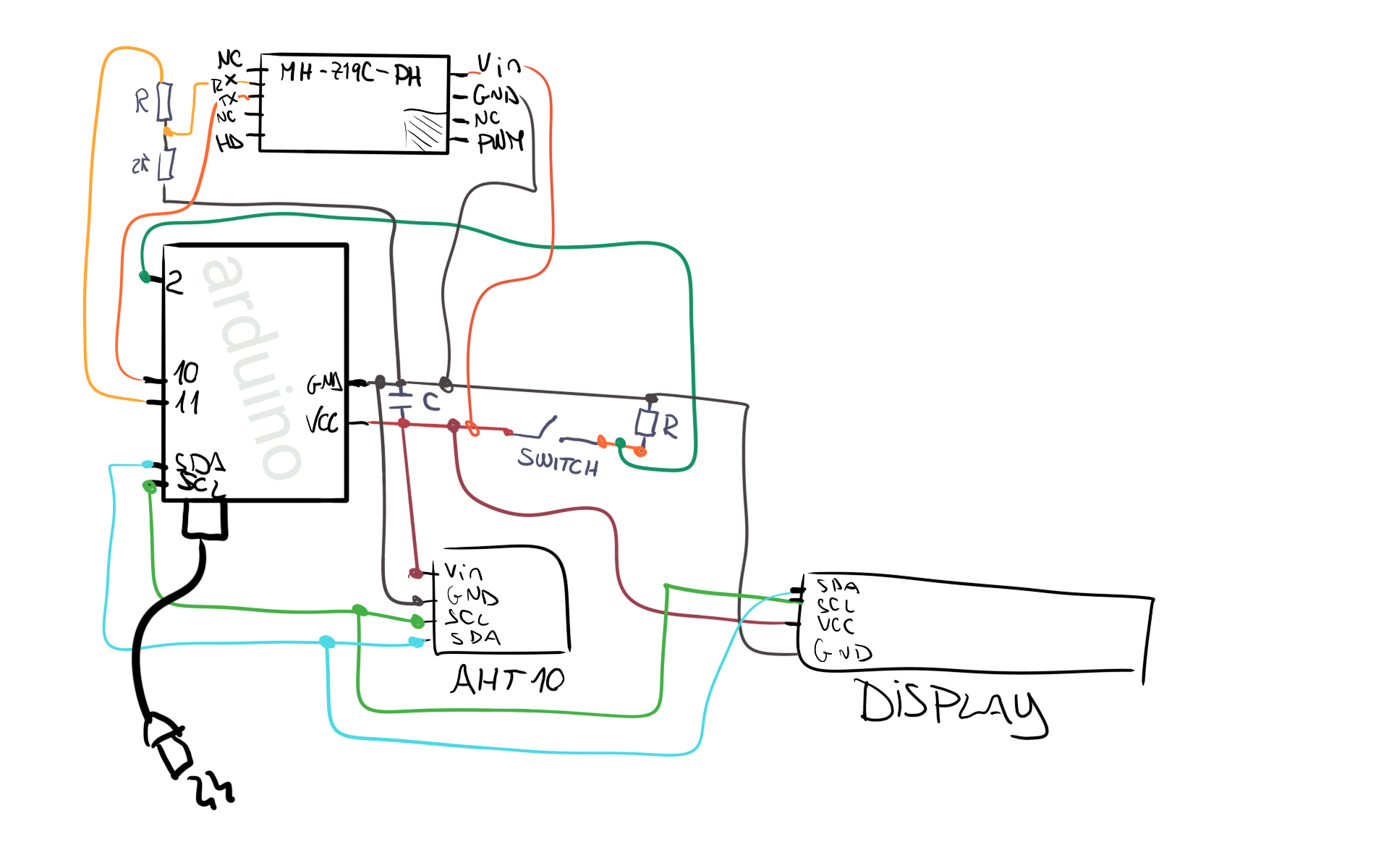
Hand Drawn Wiring Schematic
Hand Drawn Wiring Schematic
Comments
Only logged in users can leave comments