Devices & Components
Arduino Nano
Jumper wires (generic)
Resistor 10k ohm
Resistor 100k ohm
Software & Tools
Arduino IDE
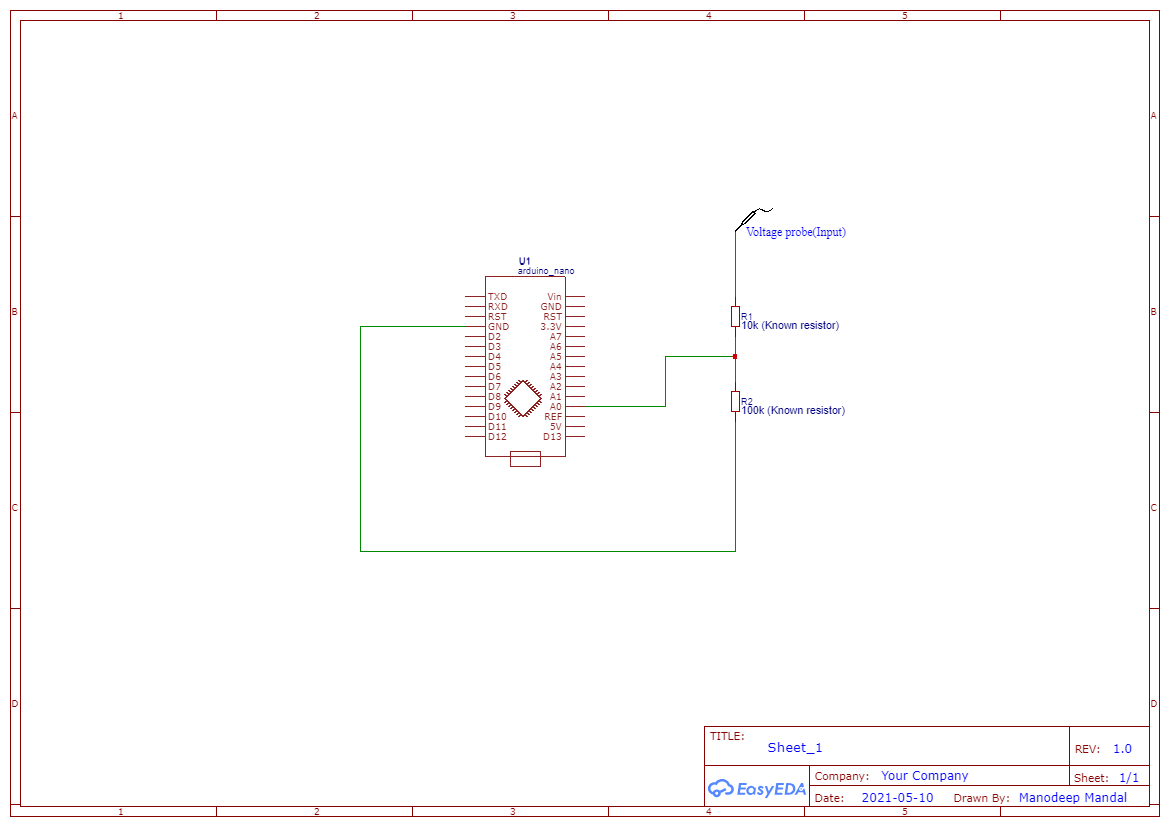
Project description
Code
Voltage measurement using Arduino
arduino
1float input_volt = 0.0; 2float temp=0.0; 3float r1=10000.0; //r1 value 4float r2=100000.0; //r2 value 5 6void setup() 7{ 8 Serial.begin(9600); // opens serial port, sets data rate to 9600 bps 9} 10 11void loop() 12{ 13 int analogvalue = analogRead(A0); 14 temp = (analogvalue * 5.0) / 1024.0; // FORMULA USED TO CONVERT THE VOLTAGE 15 input_volt = temp / (r2/(r1+r2)); 16 if (input_volt < 0.1) 17 { 18 input_volt=0.0; 19 } 20 Serial.print("Voltage= "); // prints the voltage value in the serial monitor 21 Serial.print(input_volt); 22 Serial.println(" Volts"); 23 delay(1000); 24} 25
Voltage measurement using Arduino
arduino
1float input_volt = 0.0; 2float temp=0.0; 3float r1=10000.0; //r1 value 4float r2=100000.0; //r2 value 5 6void setup() 7{ 8 Serial.begin(9600); // opens serial port, sets data rate to 9600 bps 9} 10 11void loop() 12{ 13 int analogvalue = analogRead(A0); 14 temp = (analogvalue * 5.0) / 1024.0; // FORMULA USED TO CONVERT THE VOLTAGE 15 input_volt = temp / (r2/(r1+r2)); 16 if (input_volt < 0.1) 17 { 18 input_volt=0.0; 19 } 20 Serial.print("Voltage= "); // prints the voltage value in the serial monitor 21 Serial.print(input_volt); 22 Serial.println(" Volts"); 23 delay(1000); 24} 25
Downloadable files
Voltage measurement using Arduino
Comments
Only logged in users can leave comments