Devices & Components
10 jumper wires 150mm male
Arduino Nano Every
Small push buttons momentary
LED
220 ohm resistor
Servo Motor Micro SG90 180 Degree Rotation
Active buzzer
Software & Tools
Arduino IDE
Project description
Code
button Servo Project
cpp
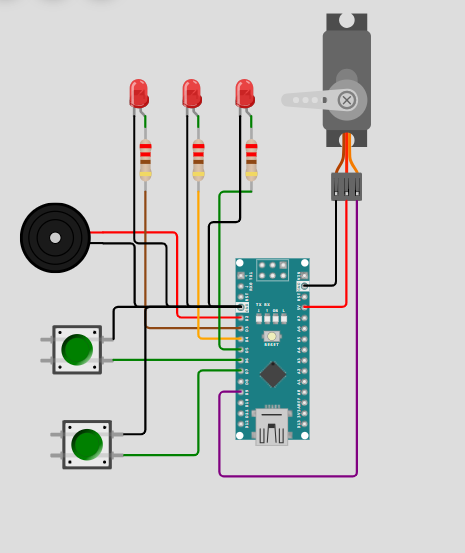
Verify Shematic & Code
1#include <Servo.h> // Library to control servo motors 2 3Servo driveServo; // Create servo object 4 5// Button pins (using internal pull-ups) 6int buttonUp = 12; // Increase angle 7int buttonDown = 10; // Decrease angle 8 9int dt = 100; // Loop delay (ms) 10 11// LED indicators 12int yellowLed = 8; // Mid / transition indicator 13int greenLed = 6; // Lower angle indicator 14int redLed = 3; // Limit / warning indicator 15 16// Servo configuration 17int Servopin = 9; 18int angle = 92; // Start near center position 19 20int angleMin = 0; // Minimum servo angle 21int angleMax = 180; // Maximum servo angle 22 23// Buzzer pin 24int buzzer = 5; 25 26void setup() { 27 28 // Configure buttons with internal pull-up resistors 29 pinMode(buttonUp, INPUT_PULLUP); 30 pinMode(buttonDown, INPUT_PULLUP); 31 32 // Configure outputs 33 pinMode(yellowLed, OUTPUT); 34 pinMode(greenLed, OUTPUT); 35 pinMode(redLed, OUTPUT); 36 pinMode(buzzer, OUTPUT); 37 38 // Attach servo to pin 39 driveServo.attach(Servopin); 40 41 // Start serial communication for debugging 42 Serial.begin(9600); 43} 44 45void loop() { 46 47 // Increase servo angle when UP button is pressed 48 if (digitalRead(buttonUp) == LOW) { 49 if (angle < angleMax) { 50 angle++; 51 } 52 } 53 54 // Decrease servo angle when DOWN button is pressed 55 if (digitalRead(buttonDown) == LOW) { 56 if (angle > angleMin) { 57 angle--; 58 } 59 } 60 61 // Send angle command to servo 62 driveServo.write(angle); 63 64 // LED logic based on servo position 65 if (angle < 91) { 66 digitalWrite(yellowLed, LOW); 67 digitalWrite(greenLed, HIGH); 68 } 69 else if (angle > 97) { 70 digitalWrite(redLed, HIGH); 71 digitalWrite(yellowLed, HIGH); 72 digitalWrite(greenLed, LOW); 73 } 74 else { 75 // Neutral zone 76 digitalWrite(greenLed, LOW); 77 digitalWrite(yellowLed, LOW); 78 } 79 80 // Buzzer and warning LED at mechanical limits 81 if (angle == angleMin || angle == angleMax) { 82 digitalWrite(buzzer, HIGH); 83 digitalWrite(redLed, HIGH); 84 } 85 else { 86 digitalWrite(buzzer, LOW); 87 digitalWrite(redLed, LOW); 88 } 89 90 // Debug output 91 Serial.print("angle = "); 92 Serial.println(angle); 93 94 delay(dt); // Small delay to control speed 95}
Downloadable files
Push button Servo project
Verify the schematic & code
Pushbutton servo schematic.png
Comments
Only logged in users can leave comments