Devices & Components
Arduino Uno Rev3
Single Turn Potentiometer- 10k ohms
USB-A to Micro-USB Cable
DHT11 Temperature & Humidity Sensor (3 pins)
Solderless Breadboard Full Size
Standard LCD - 16x2 White on Blue
Jumper wires (generic)
Software & Tools
Arduino IDE
Project description
Code
code
c_cpp
1#include<LiquidCrystal.h> 2#include "DHT.h" 3#define DHTPIN 8 4#define DHTTYPE DHT11 5DHT dht(DHTPIN,DHTTYPE); 6LiquidCrystal lcd(7,6,5,4,3,2);//CONNECT THESE PINS ON LCD 7void setup(){ 8delay(2000); 9Serial.begin(9600); 10lcd.begin(16,2); 11dht.begin(); 12lcd.print("LCD IS STARTING"); 13delay(1000); 14lcd.clear(); 15} 16void loop(){ 17float h= dht.readHumidity(); // FUNCTION FOR READING HUMIDITY DATA 18float t= dht.readTemperature();// FUNCTION FOR READING TEMPERATURE DATA 19if(isnan(h) || isnan(t)){ 20Serial.print("Failed to get data"); 21lcd.setCursor(0,1); 22lcd.print("FAILED! TRY AGAIN"); 23} 24else{ 25// For printing the humidity data on SERIAL MONITOR 26Serial.print("CURRENT HUMIDITY_"); 27Serial.print(h); 28Serial.print("%"); 29Serial.print("||"); 30// FOR PRINTING THE TEMPERATURE DATA O0N SERIAL MONITOR 31Serial.print("CURRENT TEMPERATURE_"); 32Serial.print(t); 33Serial.println("C"); 34// FOR PRINTING THE HUMIDITY DATA ON LCD 35lcd.setCursor(0,0); 36lcd.print("HUMIDITY_"); 37lcd.setCursor(10,0); 38lcd.print(h); 39lcd.setCursor(14,0); 40lcd.print("%"); 41// FOR PRINTING THE TEMPERATURE DATA ON LCD 42lcd.setCursor(0,1); 43lcd.print("TEMPERATURE_"); 44lcd.setCursor(12,1); 45lcd.print(t); 46lcd.setCursor(15,1); 47lcd.print("C"); 48//MADE BY HOX DIPAN NEW 49} 50} 51
Downloadable files
Schematics For This Project.
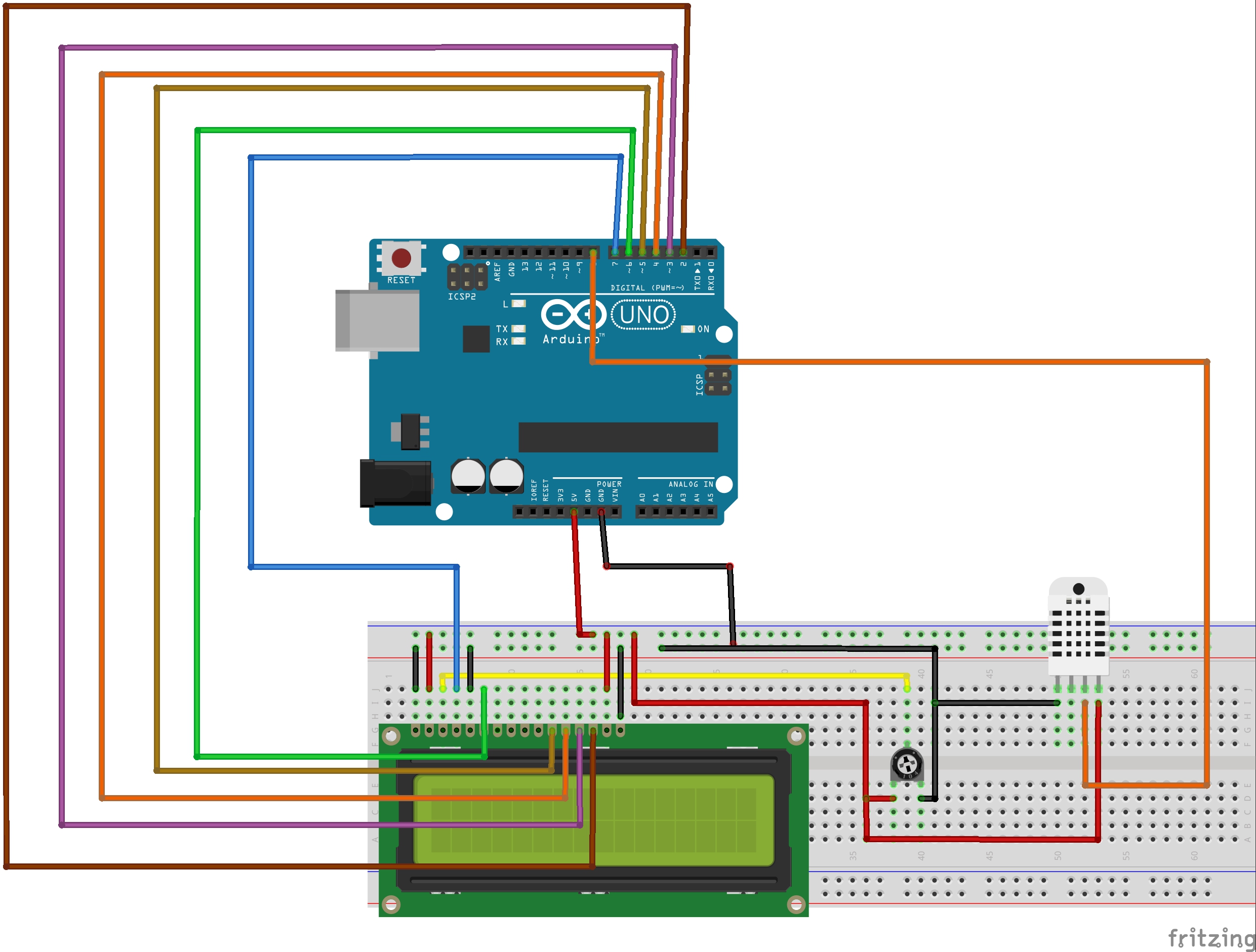
Schematics For This Project.

Comments
Only logged in users can leave comments