Devices & Components
Arduino Nano
Resistor 10k ohm
BNC Female Panel Mount
Tantalum Capacitor, 1 µF
DC/DC Converter, Step Down
Micro USB Jack
Toggle Switch, Toggle
LoRa SX1278
Capacitor 100 nF
LED Strip
Through Hole Resistor, 1.5 kohm
9V Battery Clip
22 AWG solid wire
Buzzer
P-Channel Power MOSFET
XL6009 Step Up Converter
Tantalum Capacitor, 10 µF
Perfboard 5x10cm
Toggle Switch, SPDT
DC jack
Arduino Pro Mini 328 - 3.3V/8MHz
3 mm LED: Red
Hardware & Tools
Multimeter
Project description
Code
TC Lightbox - transmitter
c_cpp
1#include <SPI.h> 2#include <LoRa.h> 3 4// Define the number of samples to keep track of. The higher the number, the 5// more the readings will be smoothed, but the slower the output will respond to 6// the input. Using a constant rather than a normal variable lets us use this 7// value to determine the size of the readings array. 8const int numReadings = 10; 9 10int readings[numReadings]; // the readings from the analog input 11int readIndex = 0; // the index of the current reading 12int total = 0; // the running total 13int average = 0; // the average 14int inputPin = A0; // pino em que está conectado o TC 15 16//variables 17int counter = 0; 18const int pinoBotao = 4; 19const int ligaBotao = 2; 20const int led = 8; 21int statusBotao = 0; 22 23// starts setup 24void setup() { 25 26 // initialize all the readings to 0: 27 for (int thisReading = 0; thisReading < numReadings; thisReading++) { 28 readings[thisReading] = 0; 29 30 //Ins and outs 31 pinMode(pinoBotao, INPUT); 32 pinMode(ligaBotao, OUTPUT); 33 pinMode(led, OUTPUT); 34 35 //starts the serial port 36 Serial.begin(9600); 37 while (!Serial); 38 39 Serial.println("LoRa Sender"); 40 41 //check if the module is propperly connected 42 if (!LoRa.begin(915E6)) { 43 Serial.println("Starting LoRa failed!"); 44 while (1); 45 } 46 } 47} 48 49//starts the loop 50void loop() { 51 52 statusBotao = digitalRead(pinoBotao); 53 digitalWrite(ligaBotao, HIGH); 54 55 56 // subtract the last reading: 57 total = total - readings[readIndex]; 58 // read from the sensor: 59 readings[readIndex] = analogRead(inputPin); 60 // add the reading to the total: 61 total = total + readings[readIndex]; 62 // advance to the next position in the array: 63 readIndex = readIndex + 1; 64 65 // if we're at the end of the array... 66 if (readIndex >= numReadings) { 67 // ...wrap around to the beginning: 68 readIndex = 0; 69 } 70 71 // calculate the average: 72 average = total / numReadings; 73 74 if (average < 0) 75 { 76 average = - average; 77 } 78 // send it to the computer as ASCII digits 79 80 // if there is TC on input A0 81 if (average > 100) 82 { 83 //prints in the serial monitor 84 Serial.println(average); 85 // sends the packet 86 LoRa.beginPacket(); 87 LoRa.print("1"); 88 LoRa.endPacket(); 89 digitalWrite (led, HIGH); 90 delay(300); 91 } 92 93 // if there is no TC and the button is not pressed 94 if (average == 0 && statusBotao == LOW) { 95 //prints on the serial monitor 96 Serial.println("0"); 97 // sends the packet 98 LoRa.beginPacket(); 99 LoRa.print("0"); 100 LoRa.endPacket(); 101 digitalWrite (led, LOW); 102 delay(300); 103 } 104 delay(10); // delay in between reads for stability 105 106 107 // if the button is pressed, sends the message "1" 108 if (statusBotao == HIGH) 109 { 110 //prints on the serial monitor 111 Serial.println("1"); 112 // sends the packet 113 LoRa.beginPacket(); 114 LoRa.print("1"); 115 LoRa.endPacket(); 116 digitalWrite (led, HIGH); 117 delay(100); 118 } 119 120 121}
TC Lightbox - transmitter
c_cpp
1#include <SPI.h> 2#include <LoRa.h> 3 4// Define the number of samples to keep track of. The higher the number, the 5// more the readings will be smoothed, but the slower the output will respond to 6// the input. Using a constant rather than a normal variable lets us use this 7// value to determine the size of the readings array. 8const int numReadings = 10; 9 10int readings[numReadings]; // the readings from the analog input 11int readIndex = 0; // the index of the current reading 12int total = 0; // the running total 13int average = 0; // the average 14int inputPin = A0; // pino em que está conectado o TC 15 16//variables 17int counter = 0; 18const int pinoBotao = 4; 19const int ligaBotao = 2; 20const int led = 8; 21int statusBotao = 0; 22 23// starts setup 24void setup() { 25 26 // initialize all the readings to 0: 27 for (int thisReading = 0; thisReading < numReadings; thisReading++) { 28 readings[thisReading] = 0; 29 30 //Ins and outs 31 pinMode(pinoBotao, INPUT); 32 pinMode(ligaBotao, OUTPUT); 33 pinMode(led, OUTPUT); 34 35 //starts the serial port 36 Serial.begin(9600); 37 while (!Serial); 38 39 Serial.println("LoRa Sender"); 40 41 //check if the module is propperly connected 42 if (!LoRa.begin(915E6)) { 43 Serial.println("Starting LoRa failed!"); 44 while (1); 45 } 46 } 47} 48 49//starts the loop 50void loop() { 51 52 statusBotao = digitalRead(pinoBotao); 53 digitalWrite(ligaBotao, HIGH); 54 55 56 // subtract the last reading: 57 total = total - readings[readIndex]; 58 // read from the sensor: 59 readings[readIndex] = analogRead(inputPin); 60 // add the reading to the total: 61 total = total + readings[readIndex]; 62 // advance to the next position in the array: 63 readIndex = readIndex + 1; 64 65 // if we're at the end of the array... 66 if (readIndex >= numReadings) { 67 // ...wrap around to the beginning: 68 readIndex = 0; 69 } 70 71 // calculate the average: 72 average = total / numReadings; 73 74 if (average < 0) 75 { 76 average = - average; 77 } 78 // send it to the computer as ASCII digits 79 80 // if there is TC on input A0 81 if (average > 100) 82 { 83 //prints in the serial monitor 84 Serial.println(average); 85 // sends the packet 86 LoRa.beginPacket(); 87 LoRa.print("1"); 88 LoRa.endPacket(); 89 digitalWrite (led, HIGH); 90 delay(300); 91 } 92 93 // if there is no TC and the button is not pressed 94 if (average == 0 && statusBotao == LOW) { 95 //prints on the serial monitor 96 Serial.println("0"); 97 // sends the packet 98 LoRa.beginPacket(); 99 LoRa.print("0"); 100 LoRa.endPacket(); 101 digitalWrite (led, LOW); 102 delay(300); 103 } 104 delay(10); // delay in between reads for stability 105 106 107 // if the button is pressed, sends the message "1" 108 if (statusBotao == HIGH) 109 { 110 //prints on the serial monitor 111 Serial.println("1"); 112 // sends the packet 113 LoRa.beginPacket(); 114 LoRa.print("1"); 115 LoRa.endPacket(); 116 digitalWrite (led, HIGH); 117 delay(100); 118 } 119 120 121}
TC Lightbox - receiver
c_cpp
1#include <SPI.h> 2#include <LoRa.h> 3 4// variables 5int LED = 5; 6int MOSFET = 4; 7int buzzer = 3; 8char msg; 9int msgAtual = 0; 10int msgAntiga = 0; 11 12// starts setup 13void setup() { 14 15// Ins and outs 16 17 pinMode(LED, OUTPUT); 18 pinMode(MOSFET, OUTPUT); 19 pinMode(buzzer, OUTPUT); 20 21// starts the serial monitor 22 Serial.begin(9600); 23 24 while (!Serial); 25 Serial.println("LoRa Receiver"); 26 27//check if the module is propperly connected 28 if (!LoRa.begin(915E6)) { 29 Serial.println("Starting LoRa failed!"); 30 while (1); 31 } 32} 33 34// starts the loop 35void loop() { 36 37 // try to receive a package 38 int packetSize = LoRa.parsePacket(); 39 if (packetSize) { 40 41 // if the package was received 42 Serial.print("msg = "); 43 44 // updates the variable with the value of LoRa.read 45 msg = (char)LoRa.read(); 46 47 //prints msg 48 Serial.print(msg); 49 50 // //prints the signal strenght (RSSI) 51 Serial.print(", com RSSI "); 52 Serial.println(LoRa.packetRssi()); 53 54 } 55 56// section that commands the LED strip 57// if the messagem is higher than 0 (or 48 em ASCII), turn ON the LED strip 58 if (msg > 48){ 59 digitalWrite(MOSFET, HIGH); 60 } 61 62// sif not, turns it OFF 63 else { 64 digitalWrite(MOSFET, LOW); 65 } 66 67// seccion that controls the Buzzer 68// defines msgAtualas msg 69msgAtual = msg; 70 71// compares if msgAtual equals msgAntiga 72if (msgAtual != msgAntiga) { 73 //if they ar not equal and e msg equals to 1 (stop >> rec) 74 75 if (msgAtual == 49){ 76 tone(buzzer, 440); 77 delay(100); 78 noTone(buzzer); 79 } 80 if (msgAtual == 48 && millis() > 1000){ 81 tone(buzzer, 261); 82 delay(70); 83 noTone(buzzer); 84 delay(100); 85 tone(buzzer, 261); 86 delay(70); 87 noTone(buzzer); 88 } 89 // a litle bit of delay... 90 delay(50); 91} 92 93 //updates msgAntiga as msgAtual 94 msgAntiga = msgAtual; 95}
Downloadable files
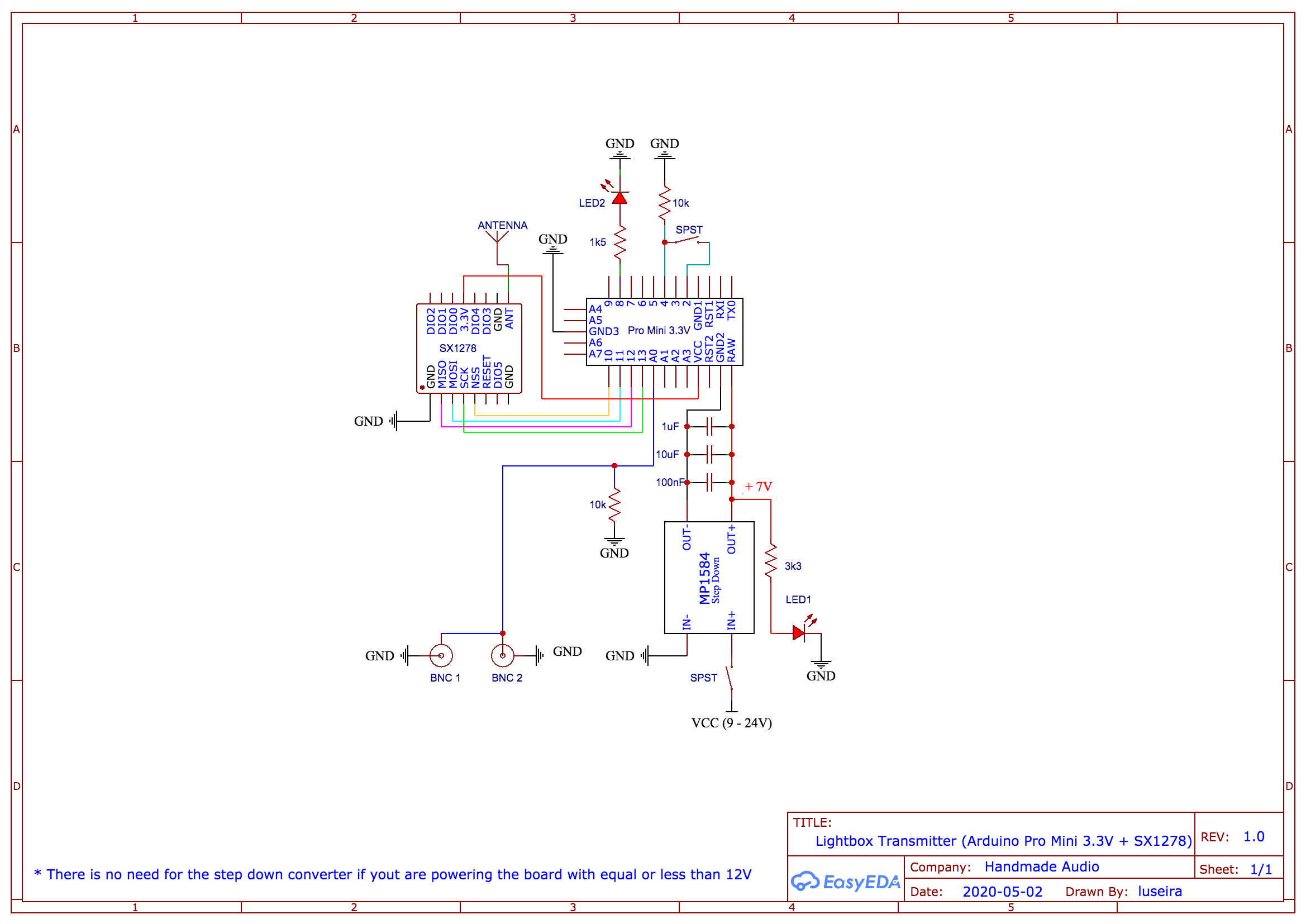
TC Lightbox - transmitter schematics
TC Lightbox - receiver schematics

TC Lightbox - transmitter schematics

TC Lightbox - receiver schematics

Documentation
TC Lightbox - receiver base
This is the base of the receiver
TC Lightbox - receiver base
TC Lightbox - transmitter cover
This is the top part of the transmitter enclosure
TC Lightbox - transmitter cover
TC Lightbox - receiver cover
This is the top part of the receiver
TC Lightbox - receiver cover
TC Lightbox - transmitter base
This is the base of the transmitter enclosure
TC Lightbox - transmitter base
TC Lightbox - transmitter cover
This is the top part of the transmitter enclosure
TC Lightbox - transmitter cover
TC Lightbox - receiver cover
This is the top part of the receiver
TC Lightbox - receiver cover
TC Lightbox - transmitter base
This is the base of the transmitter enclosure
TC Lightbox - transmitter base
TC Lightbox - receiver base
This is the base of the receiver
TC Lightbox - receiver base
Comments
Only logged in users can leave comments