Devices & Components
Grove Shield for Arduino Nano
Arduino Nano
9V battery (generic)
Jumper wires (generic)
9V Battery Clip
MyoWare Muscle Sensor Development Kit
SG90 Micro-servo motor
Hardware & Tools
nylon thread roll
Hot glue gun (generic)
Solder Wire, Lead Free
Soldering iron (generic)
3D Printer (generic)
Project description
Code
Control the protestic hand with myoelectric sensor.
c_cpp
1#include <Servo.h> 2 3//Threshold for servo motor control with muscle sensor. 4//You can set a threshold according to the maximum and minimum values of the muscle sensor. 5#define THRESHOLD 200 6 7//Pin number where the sensor is connected. (Analog 0) 8#define EMG_PIN 0 9 10//Define Servo motor 11 12const int servoPinA = 4; 13Servo servoA; 14 15const int servoPinB = 5; 16Servo servoB; 17 18const int servoPinC = 6; 19Servo servoC; 20 21const int servoPinD = 7; 22Servo servoD; 23 24/*-------------------------------- void setup ------------------------------------------------*/ 25 26void setup() { 27 28 //BAUDRATE set to 115200, remember it to set monitor serial properly. 29 //Used this Baud Rate and "NL&CR" option to visualize the values correctly. 30 Serial.begin(115200); 31 32 servoA.attach(servoPinA); 33 servoB.attach(servoPinB); 34 servoC.attach(servoPinC); 35 servoD.attach(servoPinD);// damos um "start" nos pulsos do servomotor, associando o pino de controle com a gerao de pulsos promovida pela funo e mtodo - "servo.attach()" 36 37 38 openGripper(); 39 //servoA.write(90); // Definimos o ngulo inicial do servo em 90 graus (posio central do servomotor) 40 //servoB.write(90); 41 //servoC.write(90); 42 //servoD.write(90); 43} 44 45/*-------------------------------- void loop ------------------------------------------------*/ 46 47void loop() { 48 49 //The "Value" variable reads the value from the analog pin to which the sensor is connected. 50 int value = analogRead(EMG_PIN); 51 52 //If the sensor value is GREATER than the THRESHOLD, the servo motor will turn to 170 degrees. 53 if (Serial.available()) 54 { 55 if (value > THRESHOLD) { 56 closeGripper(); 57 } else { 58 openGripper(); 59 } 60 } 61 62 //You can use serial monitor to set THRESHOLD properly, comparing the values shown when you open and close your hand. 63 Serial.println(value); 64} 65 66void openGripper() { 67 68 servoB.write(150); 69 servoC.write(0); 70 delay(500); 71 servoA.write(150); 72 servoD.write(0); 73 74} 75 76void closeGripper() { 77 78 servoB.write(0); 79 servoC.write(150); 80 delay(500); 81 servoA.write(0); 82 servoD.write(150); 83} 84
Control the protestic hand with myoelectric sensor.
c_cpp
1#include <Servo.h> 2 3//Threshold for servo motor control with muscle sensor. 4//You can set a threshold according to the maximum and minimum values of the muscle sensor. 5#define THRESHOLD 200 6 7//Pin number where the sensor is connected. (Analog 0) 8#define EMG_PIN 0 9 10//Define Servo motor 11 12const int servoPinA = 4; 13Servo servoA; 14 15const int servoPinB = 5; 16Servo servoB; 17 18const int servoPinC = 6; 19Servo servoC; 20 21const int servoPinD = 7; 22Servo servoD; 23 24/*-------------------------------- void setup ------------------------------------------------*/ 25 26void setup() { 27 28 //BAUDRATE set to 115200, remember it to set monitor serial properly. 29 //Used this Baud Rate and "NL&CR" option to visualize the values correctly. 30 Serial.begin(115200); 31 32 servoA.attach(servoPinA); 33 servoB.attach(servoPinB); 34 servoC.attach(servoPinC); 35 servoD.attach(servoPinD);// damos um "start" nos pulsos do servomotor, associando o pino de controle com a gerao de pulsos promovida pela funo e mtodo - "servo.attach()" 36 37 38 openGripper(); 39 //servoA.write(90); // Definimos o ngulo inicial do servo em 90 graus (posio central do servomotor) 40 //servoB.write(90); 41 //servoC.write(90); 42 //servoD.write(90); 43} 44 45/*-------------------------------- void loop ------------------------------------------------*/ 46 47void loop() { 48 49 //The "Value" variable reads the value from the analog pin to which the sensor is connected. 50 int value = analogRead(EMG_PIN); 51 52 //If the sensor value is GREATER than the THRESHOLD, the servo motor will turn to 170 degrees. 53 if (Serial.available()) 54 { 55 if (value > THRESHOLD) { 56 closeGripper(); 57 } else { 58 openGripper(); 59 } 60 } 61 62 //You can use serial monitor to set THRESHOLD properly, comparing the values shown when you open and close your hand. 63 Serial.println(value); 64} 65 66void openGripper() { 67 68 servoB.write(150); 69 servoC.write(0); 70 delay(500); 71 servoA.write(150); 72 servoD.write(0); 73 74} 75 76void closeGripper() { 77 78 servoB.write(0); 79 servoC.write(150); 80 delay(500); 81 servoA.write(0); 82 servoD.write(150); 83} 84
Downloadable files
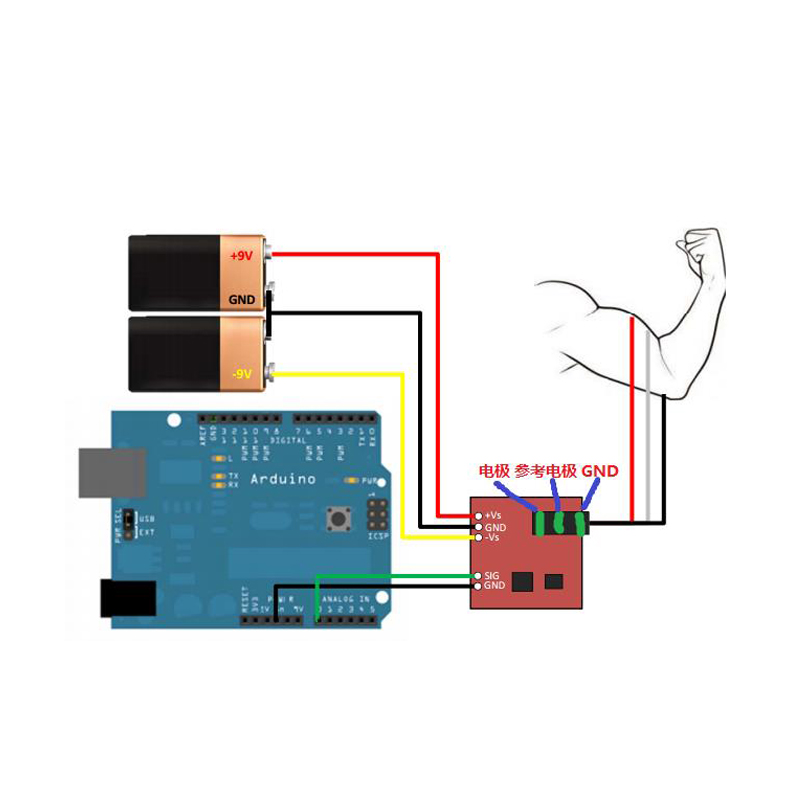
Myoeletric sensor schema.
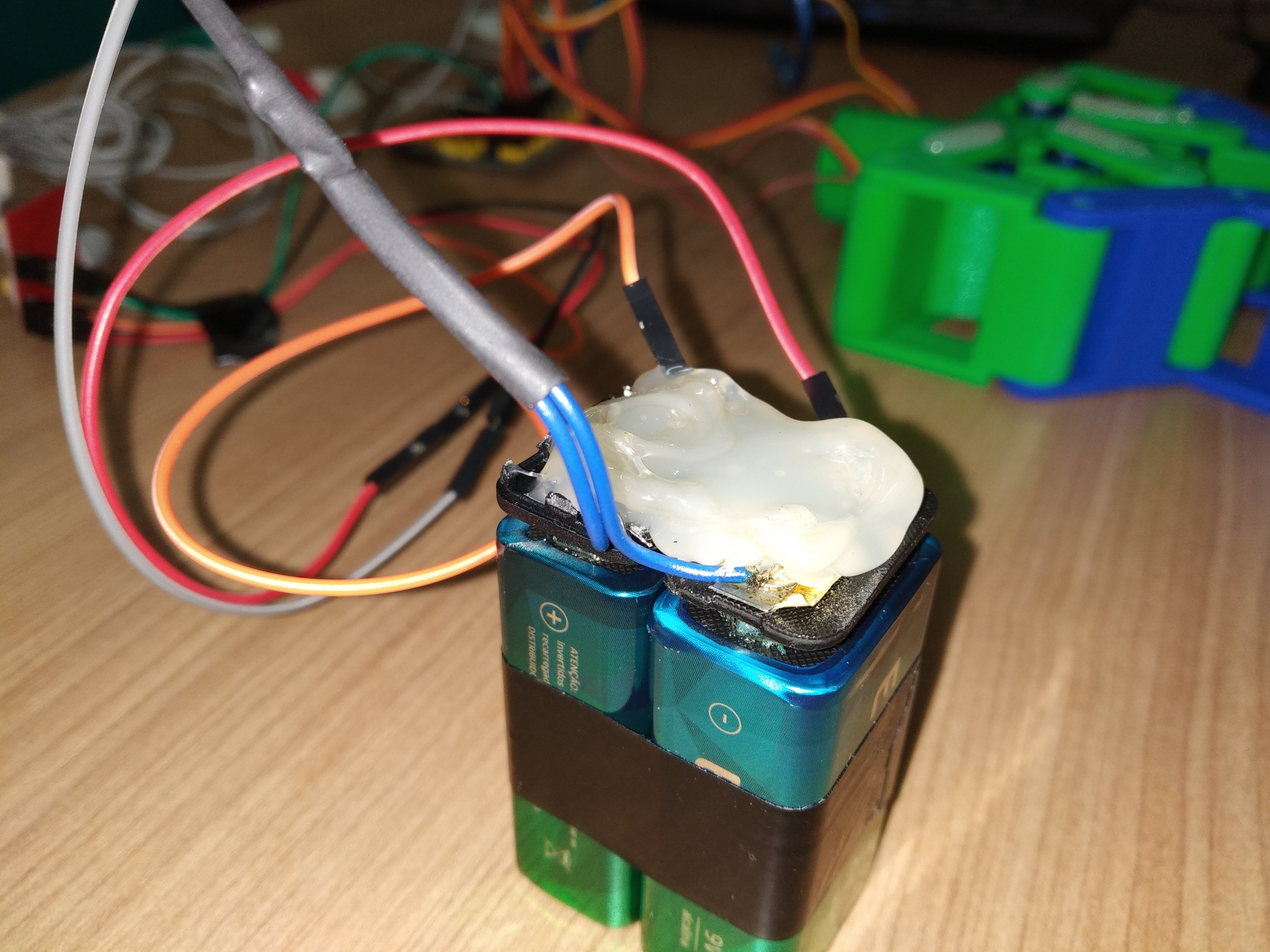
Battery connection pic2
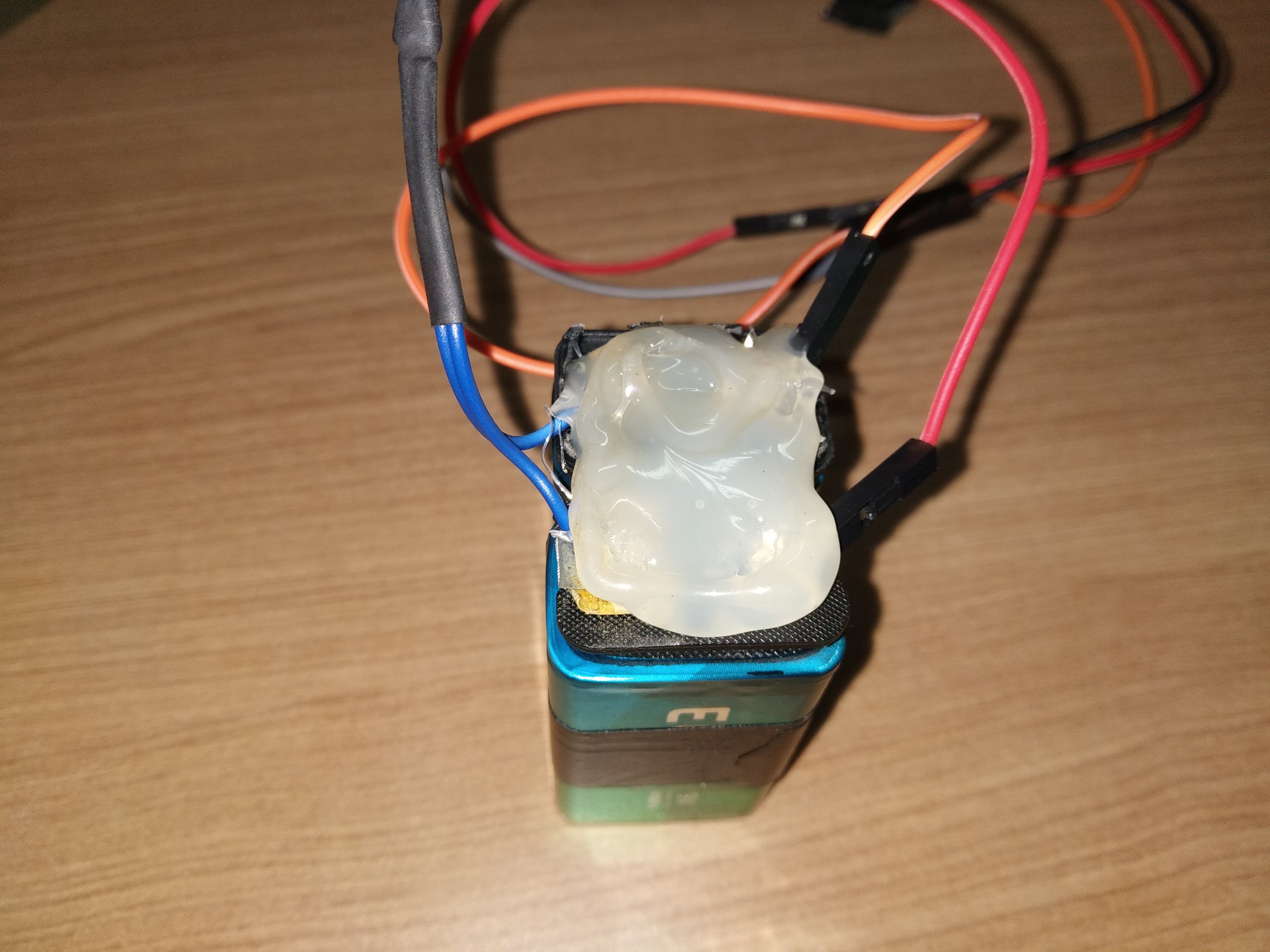
Battery connection pic1
Myoelectric sensor connection
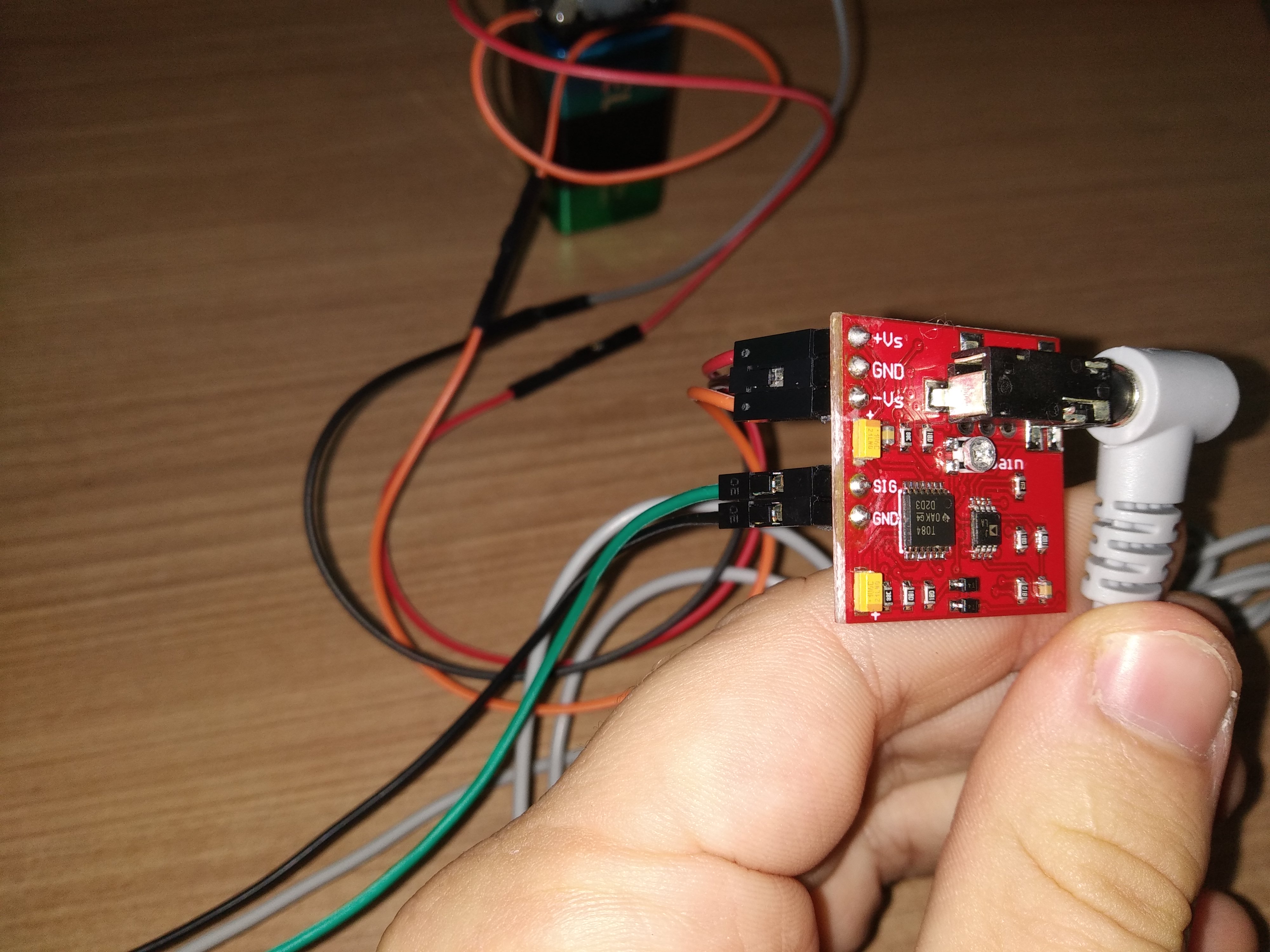
Myoelectric sensor connection

Myoeletric sensor schema.

Battery connection pic2

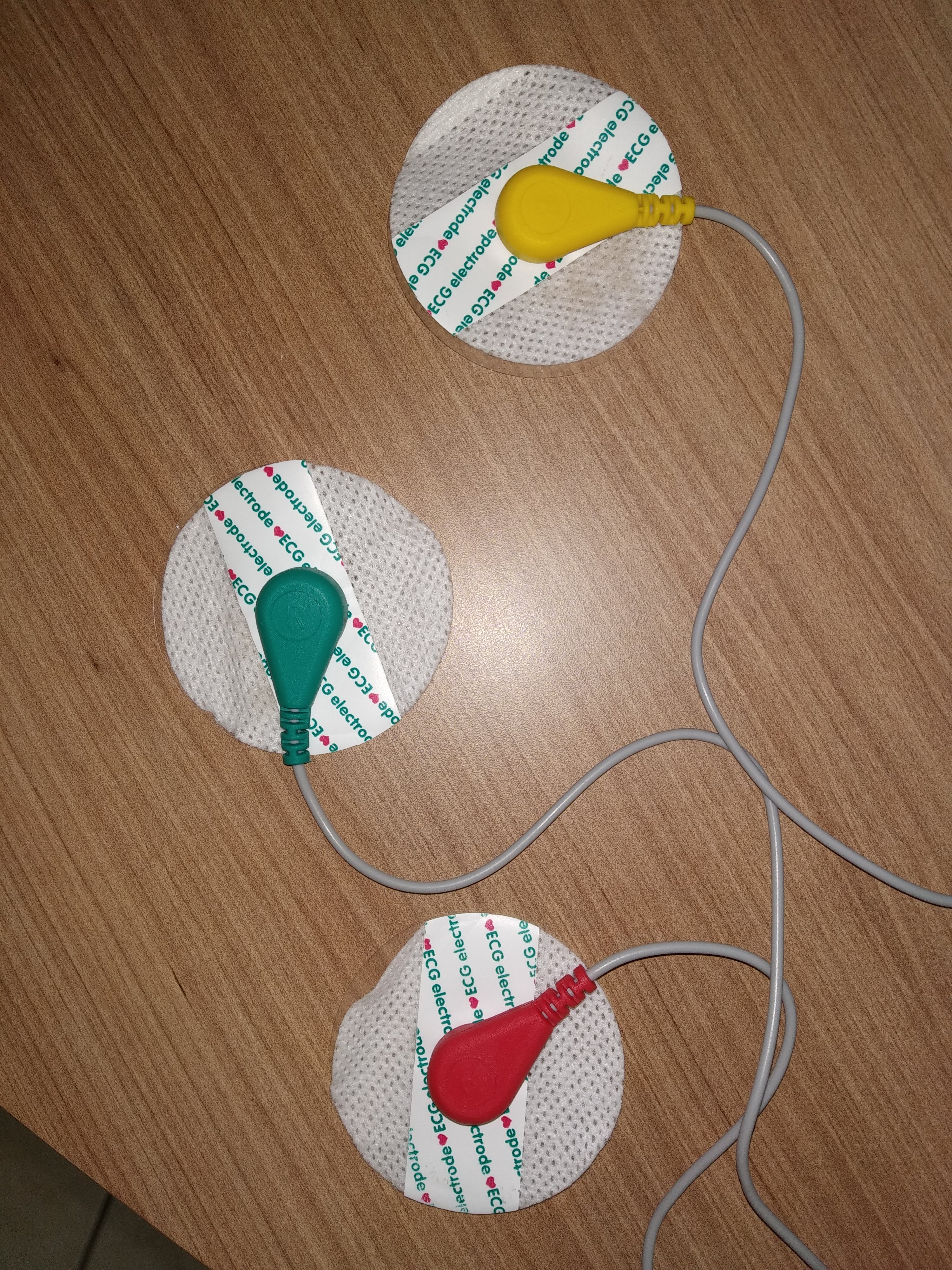
Order of muscle connectors
Place one electrode in the middle of the muscle body, connect this electrode to the RED snap connector. Place a second electrode at one end of the muscle body, connect this electrode to the GREEN snap connector. Place a third electrode on a bony or non-muscular part of your body near the targeted muscle, connect this electrode to the YELLOW snap connector.
Order of muscle connectors
Battery connection pic1

Documentation
Hand prosthesis CAD.
Modeling of the hand parts in Solid Works.
Hand prosthesis CAD.
Modeling of the hand parts in Solid Works.
Hand prosthesis CAD.
Comments
Only logged in users can leave comments