Control LED RGB WS2812B using Bluetooth and Android
How to control LED RGB WS2812B (Neo Pixel/ Addressable LED) using Arduino, Bluetooth Modul HC05 and and Android Application made by MIT APP
Devices & Components
1
Arduino Uno Rev3
1
HC-05 Bluetooth Module
1
WS2812 Addressable LED Strip
Hardware & Tools
1
Soldering iron (generic)
Software & Tools
1
MIT App Inventor

Arduino IDE
Project description
Code
Code
arduino
1#include <Adafruit_NeoPixel.h>
2#ifdef __AVR__
3#include <avr/power.h>
4#endif
5#define LED_PIN    2
6#define LED_COUNT 13
7Adafruit_NeoPixel   strip(LED_COUNT, LED_PIN, NEO_GRB + NEO_KHZ800);
8int k;
9int val;
10
11void   setup()
12{
13Serial.begin(9600);
14#if defined(__AVR_ATtiny85__) && (F_CPU ==   16000000)
15  clock_prescale_set(clock_div_1);
16#endif
17  strip.begin();
18   strip.show();
19  strip.setBrightness(50);
20}
21
22void loop()
23{
24   if (Serial.available())
25  {
26   val = Serial.read();
27       if (val ==   'R') //Rainbow
28       {
29        rainbow(10);
30       }
31       if (val   == 'r') // red
32       {
33        colorWipe(strip.Color(255, 0, 0), 50);
34        }
35       if (val == 'g') // green
36       {
37        colorWipe(strip.Color(0,   255, 0), 50);
38       }
39        if (val == 'b') // blue
40       {
41         colorWipe(strip.Color(0, 0, 255), 50);
42       }
43        if (val   == 'w') // white
44       {
45        colorWipe(strip.Color(255, 255, 255), 50);
46       }
47        if (val == 'y') //yellow
48       {
49        colorWipe(strip.Color(255,   255, 0), 50);
50       }
51        if (val == 'm') //magenta
52       {
53         colorWipe(strip.Color(255, 0, 255), 50);
54       }
55        if (val   == 'c') //cyan
56       {
57        colorWipe(strip.Color(0, 255, 255), 50);
58        }
59        if (val == 'o') //off
60       {
61        colorWipe(strip.Color(0,   0, 0), 50);
62       }
63  }
64}
65
66void rainbow(int wait) {
67    for(long   firstPixelHue = 0; firstPixelHue < 5*65536; firstPixelHue += 256) {
68    for(int   i=0; i<strip.numPixels(); i++) {
69    int pixelHue = firstPixelHue + (i * 65536L   / strip.numPixels());
70    strip.setPixelColor(i, strip.gamma32(strip.ColorHSV(pixelHue)));
71     }
72    strip.show();
73    delay(wait);
74  }
75}
76
77
78void colorWipe(uint32_t   color, int wait) {
79  for(int i=0; i<strip.numPixels(); i++) {
80    strip.setPixelColor(i,   color);
81    strip.show();
82    delay(wait);
83  }
84}
85
86
Code
arduino
1#include <Adafruit_NeoPixel.h>
2#ifdef __AVR__
3#include <avr/power.h>
4#endif
5#define LED_PIN    2
6#define LED_COUNT 13
7Adafruit_NeoPixel  strip(LED_COUNT, LED_PIN, NEO_GRB + NEO_KHZ800);
8int k;
9int val;
10
11void  setup()
12{
13Serial.begin(9600);
14#if defined(__AVR_ATtiny85__) && (F_CPU ==  16000000)
15  clock_prescale_set(clock_div_1);
16#endif
17  strip.begin();
18  strip.show();
19  strip.setBrightness(50);
20}
21
22void loop()
23{
24  if (Serial.available())
25  {
26   val = Serial.read();
27       if (val ==  'R') //Rainbow
28       {
29        rainbow(10);
30       }
31       if (val  == 'r') // red
32       {
33        colorWipe(strip.Color(255, 0, 0), 50);
34       }
35       if (val == 'g') // green
36       {
37        colorWipe(strip.Color(0,  255, 0), 50);
38       }
39        if (val == 'b') // blue
40       {
41        colorWipe(strip.Color(0, 0, 255), 50);
42       }
43        if (val  == 'w') // white
44       {
45        colorWipe(strip.Color(255, 255, 255), 50);
46       }
47        if (val == 'y') //yellow
48       {
49        colorWipe(strip.Color(255,  255, 0), 50);
50       }
51        if (val == 'm') //magenta
52       {
53        colorWipe(strip.Color(255, 0, 255), 50);
54       }
55        if (val  == 'c') //cyan
56       {
57        colorWipe(strip.Color(0, 255, 255), 50);
58       }
59        if (val == 'o') //off
60       {
61        colorWipe(strip.Color(0,  0, 0), 50);
62       }
63  }
64}
65
66void rainbow(int wait) {
67    for(long  firstPixelHue = 0; firstPixelHue < 5*65536; firstPixelHue += 256) {
68    for(int  i=0; i<strip.numPixels(); i++) {
69    int pixelHue = firstPixelHue + (i * 65536L  / strip.numPixels());
70    strip.setPixelColor(i, strip.gamma32(strip.ColorHSV(pixelHue)));
71    }
72    strip.show();
73    delay(wait);
74  }
75}
76
77
78void colorWipe(uint32_t  color, int wait) {
79  for(int i=0; i<strip.numPixels(); i++) {
80    strip.setPixelColor(i,  color);
81    strip.show();
82    delay(wait);
83  }
84}
85
86
Downloadable files
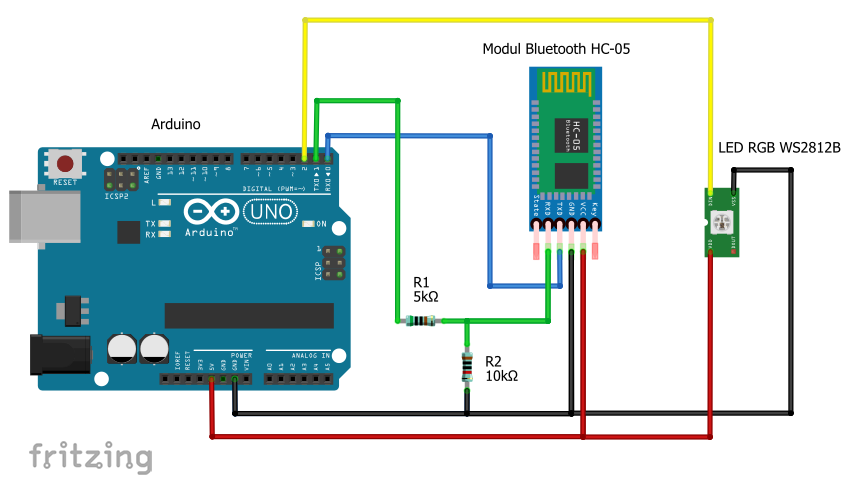
Schematic
Schematic
Comments
Only logged in users can leave comments