Devices & Components
Arduino Uno Rev3
Relay (generic)
HC-05 Bluetooth Module
LED Light Bulb, Frosted GLS
Wire, Wrapping Wire
Breadboard (generic)
Jumper wires (generic)
Software & Tools
Blynk
Arduino IDE
Project description
Code
Code for Home Automation
h
1/************************************************************* 2 Blynk is a platform with iOS and Android apps to control 3 Arduino, Raspberry Pi and the likes over the Internet. 4 You can easily build graphic interfaces for all your 5 projects by simply dragging and dropping widgets. 6 7 Downloads, docs, tutorials: http://www.blynk.cc 8 Sketch generator: http://examples.blynk.cc 9 Blynk community: http://community.blynk.cc 10 Social networks: http://www.fb.com/blynkapp 11 http://twitter.com/blynk_app 12 13 Blynk library is licensed under MIT license 14 This example code is in public domain. 15 16 ************************************************************* 17 This example shows how to use Arduino with HC-06/HC-05 18 Bluetooth 2.0 Serial Port Profile (SPP) module 19 to connect your project to Blynk. 20 21 Note: This only works on Android! iOS does not support SPP :( 22 You may need to pair the module with your smartphone 23 via Bluetooth settings. Default pairing password is 1234 24 25 Feel free to apply it to any other example. It's simple! 26 27 NOTE: Bluetooth support is in beta! 28 29 *************************************************************/ 30 31#define BLYNK_USE_DIRECT_CONNECT 32 33// You could use a spare Hardware Serial on boards that have it (like Mega) 34#include <SoftwareSerial.h> 35SoftwareSerial DebugSerial(2, 3); // RX, TX 36 37#define BLYNK_PRINT DebugSerial 38#include <BlynkSimpleSerialBLE.h> 39 40// You should get Auth Token in the Blynk App. 41// Go to the Project Settings (nut icon). 42char auth[] = "YourAuthToken"; 43 44void setup() 45{ 46 // Debug console 47 DebugSerial.begin(9600); 48 49 DebugSerial.println("Waiting for connections..."); 50 51 // Blynk will work through Serial 52 // 9600 is for HC-06. For HC-05 default speed is 38400 53 // Do not read or write this serial manually in your sketch 54 Serial.begin(9600); 55 Blynk.begin(Serial, auth); 56} 57 58void loop() 59{ 60 Blynk.run(); 61} 62
Code for Home Automation
h
1/************************************************************* 2 Blynk 3 is a platform with iOS and Android apps to control 4 Arduino, Raspberry Pi and 5 the likes over the Internet. 6 You can easily build graphic interfaces for all 7 your 8 projects by simply dragging and dropping widgets. 9 10 Downloads, 11 docs, tutorials: http://www.blynk.cc 12 Sketch generator: http://examples.blynk.cc 13 14 Blynk community: http://community.blynk.cc 15 Social networks: 16 http://www.fb.com/blynkapp 17 http://twitter.com/blynk_app 18 19 20 Blynk library is licensed under MIT license 21 This example code is in public 22 domain. 23 24 ************************************************************* 25 26 This example shows how to use Arduino with HC-06/HC-05 27 Bluetooth 2.0 Serial 28 Port Profile (SPP) module 29 to connect your project to Blynk. 30 31 Note: 32 This only works on Android! iOS does not support SPP :( 33 You may need 34 to pair the module with your smartphone 35 via Bluetooth settings. Default 36 pairing password is 1234 37 38 Feel free to apply it to any other example. It's 39 simple! 40 41 NOTE: Bluetooth support is in beta! 42 43 *************************************************************/ 44 45#define 46 BLYNK_USE_DIRECT_CONNECT 47 48// You could use a spare Hardware Serial on boards 49 that have it (like Mega) 50#include <SoftwareSerial.h> 51SoftwareSerial DebugSerial(2, 52 3); // RX, TX 53 54#define BLYNK_PRINT DebugSerial 55#include <BlynkSimpleSerialBLE.h> 56 57// 58 You should get Auth Token in the Blynk App. 59// Go to the Project Settings (nut 60 icon). 61char auth[] = "YourAuthToken"; 62 63void setup() 64{ 65 // Debug 66 console 67 DebugSerial.begin(9600); 68 69 DebugSerial.println("Waiting for 70 connections..."); 71 72 // Blynk will work through Serial 73 // 9600 is for 74 HC-06. For HC-05 default speed is 38400 75 // Do not read or write this serial 76 manually in your sketch 77 Serial.begin(9600); 78 Blynk.begin(Serial, auth); 79} 80 81void 82 loop() 83{ 84 Blynk.run(); 85} 86
Downloadable files
Final Working
Final Working

Final Working
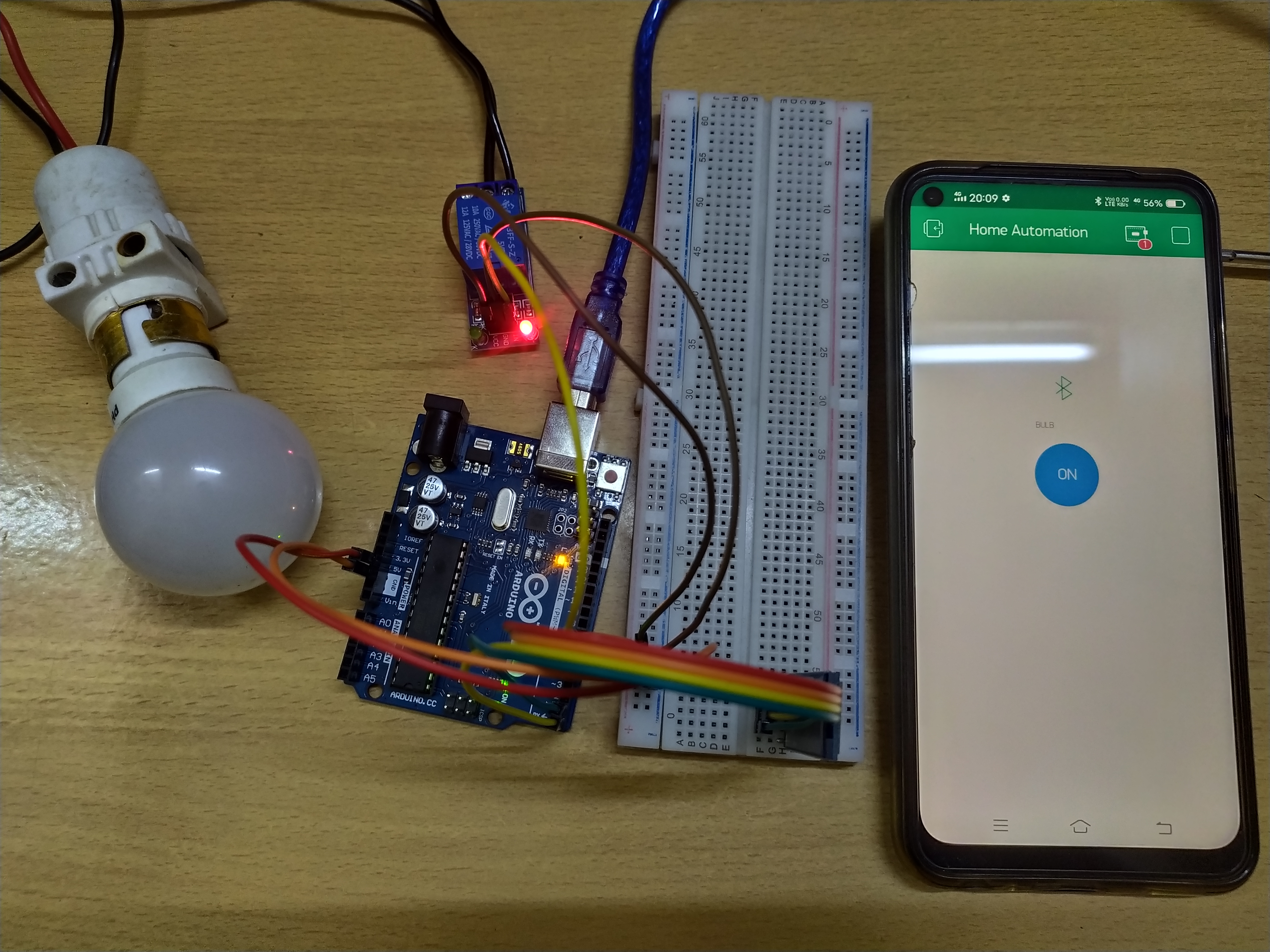
Final Working

Final Working
Final Working

Comments
Only logged in users can leave comments