Control Servo Motor using Bluetooth Module using BLYNK App
Using Servo Motor we can do lot's of cool stuff, but what when we can control our Servo motor using an Android or IOS. Let me help you
Devices & Components
1
Arduino Uno Rev3
1
Breadboard (generic)
1
Jumper wires (generic)
1
SG90 Micro-servo motor
1
HC-05 Bluetooth Module
Project description
Code
Code
h
1/*************************************************************
2  Blynk  is a platform with iOS and Android apps to control
3  Arduino, Raspberry Pi and  the likes over the Internet.
4  You can easily build graphic interfaces for all  your
5  projects by simply dragging and dropping widgets.
6
7    Downloads,  docs, tutorials: http://www.blynk.cc
8    Sketch generator:           http://examples.blynk.cc
9    Blynk community:            http://community.blynk.cc
10    Social networks:            http://www.fb.com/blynkapp
11                                http://twitter.com/blynk_app
12
13  Blynk library is licensed under MIT license
14  This example code is in public  domain.
15
16 *************************************************************
17  This example shows how to use Arduino with HC-06/HC-05
18  Bluetooth 2.0 Serial  Port Profile (SPP) module
19  to connect your project to Blynk.
20
21  Note:  This only works on Android! iOS does not support SPP :(
22        You may need  to pair the module with your smartphone
23        via Bluetooth settings. Default  pairing password is 1234
24
25  Feel free to apply it to any other example. It's  simple!
26
27  NOTE: Bluetooth support is in beta!
28
29 *************************************************************/
30
31#define  BLYNK_USE_DIRECT_CONNECT
32
33// You could use a spare Hardware Serial on boards  that have it (like Mega)
34#include <SoftwareSerial.h>
35SoftwareSerial DebugSerial(2,  3); // RX, TX
36
37#define BLYNK_PRINT DebugSerial
38#include <BlynkSimpleSerialBLE.h>
39#include  <Servo.h>
40
41// You should get Auth Token in the Blynk App.
42// Go to the  Project Settings (nut icon).
43char auth[] = "Your token";
44
45Servo servo1;
46Servo  servo2;
47
48BLYNK_WRITE(V3)
49{
50  servo1.write(param.asInt());
51}
52BLYNK_WRITE(V4)
53{
54  servo2.write(param.asInt());
55}
56
57
58void setup()
59{
60  // Debug console
61  DebugSerial.begin(9600);
62
63  DebugSerial.println("Waiting for connections...");
64
65  // Blynk will work through Serial
66  // 9600 is for HC-06. For HC-05 default  speed is 38400
67  // Do not read or write this serial manually in your sketch
68  Serial.begin(9600);
69  Blynk.begin(Serial, auth);
70  servo1.attach(4);
71  servo2.attach(5);
72}
73
74void loop()
75{
76  Blynk.run();
77}
78
Code
h
1/*************************************************************
2  Blynk   is a platform with iOS and Android apps to control
3  Arduino, Raspberry Pi and   the likes over the Internet.
4  You can easily build graphic interfaces for all   your
5  projects by simply dragging and dropping widgets.
6
7    Downloads,   docs, tutorials: http://www.blynk.cc
8    Sketch generator:           http://examples.blynk.cc
9     Blynk community:            http://community.blynk.cc
10    Social networks:             http://www.fb.com/blynkapp
11                                http://twitter.com/blynk_app
12
13   Blynk library is licensed under MIT license
14  This example code is in public   domain.
15
16 *************************************************************
17   This example shows how to use Arduino with HC-06/HC-05
18  Bluetooth 2.0 Serial   Port Profile (SPP) module
19  to connect your project to Blynk.
20
21  Note:   This only works on Android! iOS does not support SPP :(
22        You may need   to pair the module with your smartphone
23        via Bluetooth settings. Default   pairing password is 1234
24
25  Feel free to apply it to any other example. It's   simple!
26
27  NOTE: Bluetooth support is in beta!
28
29 *************************************************************/
30
31#define   BLYNK_USE_DIRECT_CONNECT
32
33// You could use a spare Hardware Serial on boards   that have it (like Mega)
34#include <SoftwareSerial.h>
35SoftwareSerial DebugSerial(2,   3); // RX, TX
36
37#define BLYNK_PRINT DebugSerial
38#include <BlynkSimpleSerialBLE.h>
39#include   <Servo.h>
40
41// You should get Auth Token in the Blynk App.
42// Go to the   Project Settings (nut icon).
43char auth[] = "Your token";
44
45Servo servo1;
46Servo   servo2;
47
48BLYNK_WRITE(V3)
49{
50  servo1.write(param.asInt());
51}
52BLYNK_WRITE(V4)
53{
54   servo2.write(param.asInt());
55}
56
57
58void setup()
59{
60  // Debug console
61   DebugSerial.begin(9600);
62
63  DebugSerial.println("Waiting for connections...");
64
65   // Blynk will work through Serial
66  // 9600 is for HC-06. For HC-05 default   speed is 38400
67  // Do not read or write this serial manually in your sketch
68   Serial.begin(9600);
69  Blynk.begin(Serial, auth);
70  servo1.attach(4);
71   servo2.attach(5);
72}
73
74void loop()
75{
76  Blynk.run();
77}
78
Downloadable files
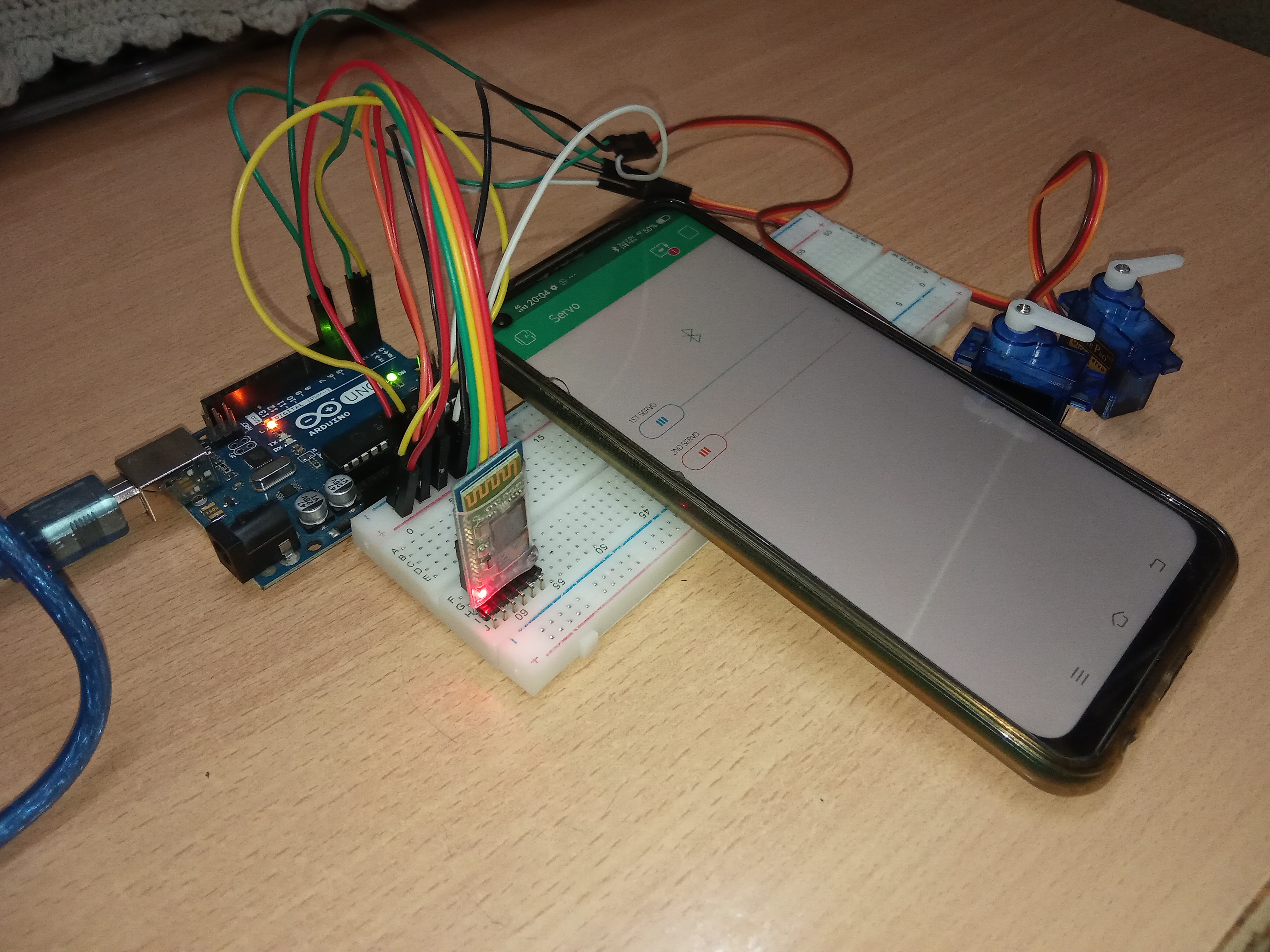
Final Look
Final Look
Comments
Only logged in users can leave comments