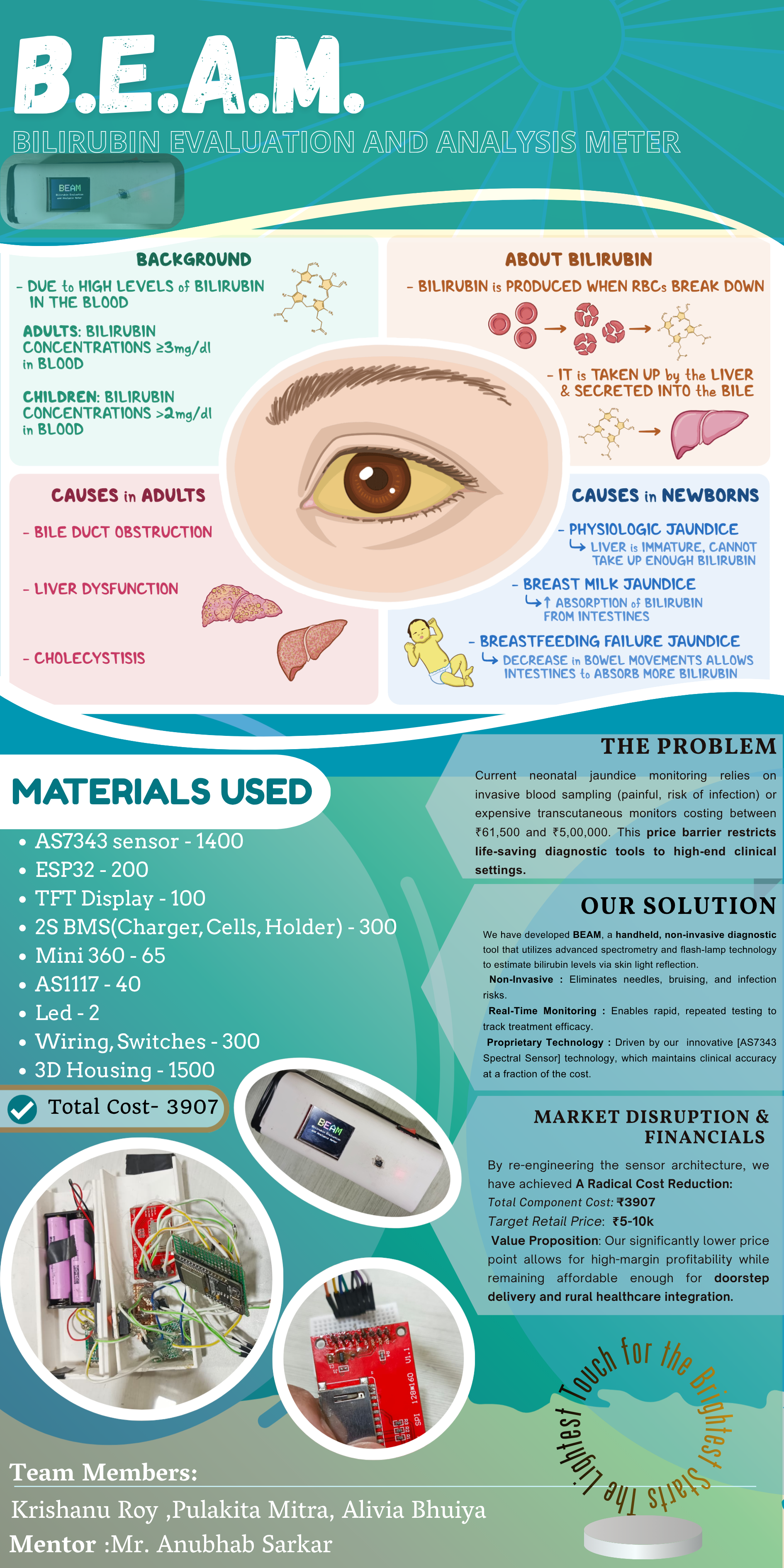
B.E.A.M. - Bilirubin Evaluation and Analysis Meter
Handheld Rechargeable Bilirubin Meter to detect blood bilirubin levels using light spectroscopy
Devices & Components
1
40 colored male-female jumper wires
1
SPST Slide Switch
1
Mini360_DC-DC_Buck
1
ASM1117_LDO
1
Tactile Push button
1
ESP32_Development_Board
1
1.8Inch SPI TFT LCD
1
AS7343_Sensor
1
White_LED
Software & Tools

Arduino IDE
Project description
Code
Bilirubin
cpp
1#include <WiFi.h>
2#include <WiFiMulti.h>
3#include <ArduinoOTA.h>
4#include <Wire.h>
5#include <Adafruit_GFX.h>
6#include <Adafruit_ST7735.h>
7#include <SPI.h>
8#include <SparkFun_AS7343.h>
9#include <HTTPClient.h>
10
11#define TFT_CS     5
12#define TFT_RST    4
13#define TFT_DC     2
14#define LED_PIN    26
15#define BTN_PIN    27
16
17Adafruit_ST7735 tft = Adafruit_ST7735(TFT_CS, TFT_DC, TFT_RST);
18WiFiMulti wifiMulti;
19SfeAS7343ArdI2C sensor;
20
21unsigned long last_heartbeat = 0;
22bool heartbeat_state = false;
23bool sensorReady = false;
24
25float scanHistory[3] = {-1.0, -1.0, -1.0};
26
27// ── Calibration state ─────────────────────────────────────────────────────────
28// ref_blue / ref_red hold the white-paper baseline.
29// hasReference = false → next button press does a calibration scan (white paper).
30// hasReference = true  → next button press does a bilirubin measurement.
31float ref_blue = 0.0;
32float ref_red  = 0.0;
33bool  hasReference = false;
34
35// ── AS7343 channel helpers ────────────────────────────────────────────────────
36// The AS7343 is an 18-channel spectral sensor.  getBlue()/getRed() do not exist
37// on this chip and always return 0.  We must read named spectral channels.
38//
39// Channel map (SparkFun library, AUTOSMUX_18_CHANNELS mode):
40//   getCh0()  → F1  ~405 nm  (violet)
41//   getCh1()  → F2  ~425 nm  (violet-blue)   ← closest to bilirubin peak ~460nm
42//   getCh2()  → F3  ~450 nm  (blue)           ← USE THIS for blue absorption
43//   getCh3()  → F4  ~515 nm  (cyan-green)
44//   getCh4()  → F5  ~555 nm  (green)
45//   getCh5()  → F6  ~590 nm  (amber)
46//   getCh6()  → F7  ~630 nm  (orange-red)
47//   getCh7()  → F8  ~680 nm  (red)            ← USE THIS for red reference
48//   getCh8()  → NIR ~910 nm
49//   getCh9()  → CLEAR (broadband)
50//   getCh10() → DARK (offset)
51//   ... (remaining are duplicates / FD channels)
52//
53// Bilirubin absorbs strongly at ~460 nm and is transparent at ~680 nm.
54// We measure how much blue is lost compared to our white-paper baseline,
55// then subtract any red drift to cancel LED/geometry noise.
56//
57// If your SparkFun library version uses different method names, check:
58//   sensor.getF1(), sensor.getF2() … sensor.getF8()
59// Both naming schemes refer to the same physical channels.
60
61inline float readBlueChannel() {
62  // F3 ~450 nm — sits right on the bilirubin absorption peak
63  return (float) sensor.getCh2();
64}
65
66inline float readRedChannel() {
67  // F8 ~680 nm — bilirubin is optically transparent here; used as reference
68  return (float) sensor.getCh7();
69}
70// ─────────────────────────────────────────────────────────────────────────────
71
72void drawTopBar() {
73  tft.fillRect(0, 0, 160, 15, ST77XX_BLACK);
74  tft.drawLine(0, 16, 160, 16, ST77XX_WHITE);
75
76  tft.setTextSize(1);
77  tft.setTextColor(ST77XX_WHITE);
78  tft.setCursor(2, 4);
79  tft.print("Prev: ");
80  for(int i=0; i<3; i++) {
81    if(scanHistory[i] >= 0) {
82      tft.print(scanHistory[i], 1);
83    } else {
84      tft.print("--");
85    }
86    if(i < 2) tft.print(" ");
87  }
88
89  if (WiFi.status() == WL_CONNECTED) {
90    tft.fillRect(144, 10, 2, 2, ST77XX_GREEN);
91    tft.fillRect(148, 8,  2, 4, ST77XX_GREEN);
92    tft.fillRect(152, 6,  2, 6, ST77XX_GREEN);
93    tft.fillRect(156, 4,  2, 8, ST77XX_GREEN);
94  }
95}
96
97void drawReadyScreen() {
98  tft.fillScreen(ST77XX_BLACK);
99  drawTopBar();
100  tft.setTextSize(1);
101  tft.setTextColor(ST77XX_WHITE);
102  tft.setCursor(10, 50);
103
104  if (!hasReference) {
105    // Prompt user to calibrate first
106    tft.setTextColor(ST77XX_YELLOW);
107    tft.println("Place WHITE paper");
108    tft.setCursor(10, 62);
109    tft.println("then press button");
110    tft.setCursor(10, 74);
111    tft.setTextColor(ST77XX_CYAN);
112    tft.println("to calibrate");
113  } else {
114    tft.setTextColor(ST77XX_WHITE);
115    tft.println("Ready for Scan");
116    tft.setCursor(10, 65);
117    tft.setTextColor(ST77XX_CYAN);
118    tft.println("Press button to begin");
119  }
120}
121
122// ── Raw channel read (LED on, stabilise, read, LED off) ───────────────────────
123// Returns false if sensor.readSpectraDataFromSensor() fails.
124bool readRawChannels(float &outBlue, float &outRed) {
125  digitalWrite(LED_PIN, HIGH);
126  delay(300);  // let LED reach steady state before triggering integration
127
128  bool ok = sensor.readSpectraDataFromSensor();
129
130  digitalWrite(LED_PIN, LOW);
131
132  if (!ok) return false;
133
134  outBlue = readBlueChannel();
135  outRed  = readRedChannel();
136
137  // Debug — always print to Serial so you can verify non-zero values
138  Serial.printf("[RAW] Blue(~450nm): %.0f  Red(~680nm): %.0f\n", outBlue, outRed);
139
140  return true;
141}
142
143// ── Calibration scan (white paper) ────────────────────────────────────────────
144void doCalibration() {
145  tft.fillScreen(ST77XX_BLACK);
146  drawTopBar();
147  tft.setCursor(10, 50);
148  tft.setTextSize(2);
149  tft.setTextColor(ST77XX_YELLOW);
150  tft.println("CALIBRATING");
151
152  float b, r;
153  if (!readRawChannels(b, r)) {
154    tft.fillScreen(ST77XX_BLACK);
155    drawTopBar();
156    tft.setTextColor(ST77XX_RED);
157    tft.setTextSize(2);
158    tft.setCursor(10, 50);
159    tft.println("SENSOR ERR");
160    delay(3000);
161    drawReadyScreen();
162    return;
163  }
164
165  // Guard against a dark/blocked sensor returning 0
166  if (b < 10 || r < 10) {
167    tft.fillScreen(ST77XX_BLACK);
168    drawTopBar();
169    tft.setTextColor(ST77XX_RED);
170    tft.setTextSize(1);
171    tft.setCursor(10, 50);
172    tft.println("Readings too low!");
173    tft.setCursor(10, 62);
174    tft.println("Check LED & sensor tunnel");
175    Serial.printf("[CAL FAIL] b=%.0f r=%.0f — values suspiciously low\n", b, r);
176    delay(4000);
177    drawReadyScreen();
178    return;
179  }
180
181  ref_blue = b + 1.0;   // +1 prevents log10(0) if channel ever reads 0
182  ref_red  = r + 1.0;
183  hasReference = true;
184
185  Serial.printf("[CAL OK]  ref_blue=%.1f  ref_red=%.1f\n", ref_blue, ref_red);
186
187  tft.fillScreen(ST77XX_BLACK);
188  drawTopBar();
189  tft.setCursor(10, 35);
190  tft.setTextSize(1);
191  tft.setTextColor(ST77XX_GREEN);
192  tft.println("Calibration OK!");
193  tft.setCursor(10, 50);
194  tft.setTextColor(ST77XX_WHITE);
195  tft.printf("Ref B: %.0f", ref_blue);
196  tft.setCursor(10, 62);
197  tft.printf("Ref R: %.0f", ref_red);
198  tft.setCursor(10, 80);
199  tft.setTextColor(ST77XX_CYAN);
200  tft.println("Now place sample &");
201  tft.setCursor(10, 92);
202  tft.println("press button to scan");
203
204  delay(3000);
205  drawReadyScreen();
206}
207
208// ── Bilirubin measurement scan ────────────────────────────────────────────────
209void doMeasurement() {
210  tft.fillScreen(ST77XX_BLACK);
211  drawTopBar();
212  tft.setCursor(10, 50);
213  tft.setTextSize(2);
214  tft.setTextColor(ST77XX_CYAN);
215  tft.println("SCANNING...");
216
217  float blueRaw, redRaw;
218  if (!readRawChannels(blueRaw, redRaw)) {
219    tft.fillScreen(ST77XX_BLACK);
220    drawTopBar();
221    tft.setTextColor(ST77XX_RED);
222    tft.setTextSize(2);
223    tft.setCursor(10, 50);
224    tft.println("SENSOR ERR");
225    delay(3000);
226    drawReadyScreen();
227    return;
228  }
229
230  // Beer-Lambert absorbance relative to white-paper baseline:
231  //   A = log10(I_reference / I_sample)
232  //   Positive A → sample absorbed that wavelength compared to white paper.
233  //
234  // A_blue  > 0 when blue is absorbed (bilirubin present, or yellow pigment).
235  // A_red  ≈ 0 when nothing absorbs red (bilirubin is transparent at 680nm).
236  //
237  // Differential index = A_blue - A_red cancels:
238  //   • ambient light leakage (affects both channels equally)
239  //   • LED intensity drift  (affects both channels equally)
240  // leaving only bilirubin-specific blue absorption.
241
242  float A_blue = log10(ref_blue / (blueRaw + 1.0));
243  float A_red  = log10(ref_red  / (redRaw  + 1.0));
244  float bilirubinIndex = A_blue - A_red;
245
246  if (bilirubinIndex < 0) bilirubinIndex = 0;
247
248  // Empirical scale factor k: maps the dimensionless index → mg/dL.
249  // k = 15 is a reasonable starting point; calibrate against a known
250  // bilirubin standard or a clinical bilirubinometer to refine it.
251  const float k = 15.0;
252  float estimatedTcB = bilirubinIndex * k;
253
254  Serial.printf("[RESULT] A_blue=%.4f  A_red=%.4f  index=%.4f  TcB=%.2f mg/dL\n",
255                A_blue, A_red, bilirubinIndex, estimatedTcB);
256
257  // Shift history
258  scanHistory[2] = scanHistory[1];
259  scanHistory[1] = scanHistory[0];
260  scanHistory[0] = estimatedTcB;
261
262  // POST to Vercel endpoint if connected
263  if (WiFi.status() == WL_CONNECTED) {
264    HTTPClient http;
265    http.begin("https://your-vercel-app-url.vercel.app/api/readings");
266    http.addHeader("Content-Type", "application/json");
267    String payload = "{\"b_raw\":" + String(blueRaw, 0)
268                   + ",\"r_raw\":"  + String(redRaw,  0)
269                   + ",\"a_blue\":" + String(A_blue,  4)
270                   + ",\"a_red\":"  + String(A_red,   4)
271                   + ",\"index\":"  + String(bilirubinIndex, 4)
272                   + ",\"tcb\":"    + String(estimatedTcB, 2) + "}";
273    int httpCode = http.POST(payload);
274    Serial.printf("[HTTP] POST → %d\n", httpCode);
275    http.end();
276  }
277
278  // ── Display results ──────────────────────────────────────────────────────
279  tft.fillScreen(ST77XX_BLACK);
280  drawTopBar();
281
282  tft.setCursor(10, 22);
283  tft.setTextSize(1);
284  tft.setTextColor(ST77XX_CYAN);
285  tft.printf("B(450): %.0f  A=%.3f", blueRaw, A_blue);
286
287  tft.setCursor(10, 34);
288  tft.setTextColor(ST77XX_RED);
289  tft.printf("R(680): %.0f  A=%.3f", redRaw, A_red);
290
291  tft.setCursor(10, 46);
292  tft.setTextColor(ST77XX_WHITE);
293  tft.printf("Index: %.4f", bilirubinIndex);
294
295  tft.setCursor(20, 65);
296  tft.setTextSize(4);
297  tft.setTextColor(ST77XX_YELLOW);
298  tft.printf("%.1f", estimatedTcB);
299
300  tft.setTextSize(1);
301  tft.setCursor(20, 110);
302  tft.println("mg/dL (Bilirubin)");
303
304  delay(6000);
305  drawReadyScreen();
306}
307
308// =============================================================================
309void setup() {
310  Serial.begin(115200);
311  pinMode(LED_PIN, OUTPUT);
312  pinMode(BTN_PIN, INPUT_PULLUP);
313  digitalWrite(LED_PIN, LOW);
314
315  tft.initR(INITR_GREENTAB);
316  tft.setRotation(1);
317  tft.fillScreen(ST77XX_BLACK);
318
319  // ── Splash screen (unchanged) ──────────────────────────────────────────────
320  tft.setTextSize(4);
321  tft.setCursor(35, 25);
322  tft.setTextColor(ST77XX_CYAN);    tft.print("B");
323  tft.setTextColor(ST77XX_MAGENTA); tft.print("E");
324  tft.setTextColor(ST77XX_YELLOW);  tft.print("A");
325  tft.setTextColor(ST77XX_GREEN);   tft.print("M");
326
327  tft.setTextSize(1);
328  tft.setTextColor(ST77XX_WHITE);
329  tft.setCursor(20, 65);
330  tft.println("Bilirubin Evaluation");
331  tft.setCursor(25, 80);
332  tft.println("and Analysis Meter");
333  delay(3000);
334
335  // ── Sensor init ───────────────────────────────────────────────────────────
336  Wire.begin(21, 22);
337  tft.fillScreen(ST77XX_BLACK);
338  tft.setCursor(10, 10);
339
340  if (sensor.begin(0x39, Wire) == false) {
341    tft.setTextColor(ST77XX_RED);
342    tft.println("Sensor: NOT FOUND");
343    sensorReady = false;
344  } else {
345    sensor.powerOn();
346    sensor.setAutoSmux(AUTOSMUX_18_CHANNELS);
347    sensor.enableSpectralMeasurement();
348
349    tft.setTextColor(ST77XX_GREEN);
350    tft.println("Sensor: OK");
351    sensorReady = true;
352  }
353
354  // ── WiFi (unchanged) ──────────────────────────────────────────────────────
355  tft.setTextColor(ST77XX_WHITE);
356  tft.println("Connecting WiFi...");
357  wifiMulti.addAP("WPA2-Home", "your_wifi_password");
358  wifiMulti.addAP("WPA2-Office", "your_wifi_password");
359
360  int attempts = 0;
361  while (wifiMulti.run() != WL_CONNECTED && attempts < 6) {
362    delay(500);
363    tft.print(".");
364    attempts++;
365  }
366
367  if (WiFi.status() == WL_CONNECTED) {
368    tft.println("\nWiFi: Connected");
369
370    ArduinoOTA.onStart([]() {
371      tft.fillScreen(ST77XX_BLACK);
372      tft.setTextColor(ST77XX_MAGENTA);
373      tft.setTextSize(2);
374      tft.setCursor(10, 40);
375      tft.println("UPDATING...");
376    });
377    ArduinoOTA.onEnd([]() {
378      tft.fillScreen(ST77XX_BLUE);
379      tft.setCursor(10, 50);
380      tft.setTextColor(ST77XX_WHITE);
381      tft.println("UPDATE DONE!");
382    });
383    ArduinoOTA.onProgress([](unsigned int progress, unsigned int total) {
384      int percentage = (progress / (total / 100));
385      tft.fillRect(10, 80, 140, 10, ST77XX_BLACK);
386      tft.drawRect(10, 80, 140, 10, ST77XX_WHITE);
387      tft.fillRect(10, 80, (1.4 * percentage), 10, ST77XX_GREEN);
388    });
389    ArduinoOTA.setPassword("kris");
390    ArduinoOTA.begin();
391  } else {
392    tft.setTextColor(ST77XX_YELLOW);
393    tft.println("\nWiFi: Offline Mode");
394  }
395
396  delay(1500);
397  drawReadyScreen();  // will prompt "Place WHITE paper" since hasReference=false
398}
399
400// =============================================================================
401void loop() {
402  if (WiFi.status() == WL_CONNECTED) {
403    ArduinoOTA.handle();
404  }
405
406  // Heartbeat dot (unchanged)
407  if (millis() - last_heartbeat > 1000) {
408    last_heartbeat = millis();
409    heartbeat_state = !heartbeat_state;
410    tft.fillCircle(150, 120, 2, heartbeat_state ? ST77XX_GREEN : ST77XX_BLACK);
411  }
412
413  // Button with debounce
414  if (digitalRead(BTN_PIN) == LOW) {
415    delay(50);
416    if (digitalRead(BTN_PIN) == LOW) {
417
418      if (!sensorReady) {
419        // Sensor never initialised — show error and bail
420        tft.fillScreen(ST77XX_BLACK);
421        drawTopBar();
422        tft.setTextColor(ST77XX_RED);
423        tft.setTextSize(1);
424        tft.setCursor(10, 50);
425        tft.println("Sensor not ready");
426        delay(2000);
427        drawReadyScreen();
428        return;
429      }
430
431      if (!hasReference) {
432        // ── First press: calibrate with white paper ──────────────────────
433        doCalibration();
434      } else {
435        // ── Subsequent presses: measure bilirubin ────────────────────────
436        doMeasurement();
437      }
438
439      // Wait for button release before returning to loop
440      while (digitalRead(BTN_PIN) == LOW) delay(10);
441    }
442  }
443}
Downloadable files
Bilirubin Github
https://github.com/KrishanuRoyEng/BEAM
BilliRubinPCBGerber
BilliRubinPCBGerber.zip
BiliRubinParts
BiliRubinParts.stl
Documentation
Bilirubin Details
Your paragraph text (1).png
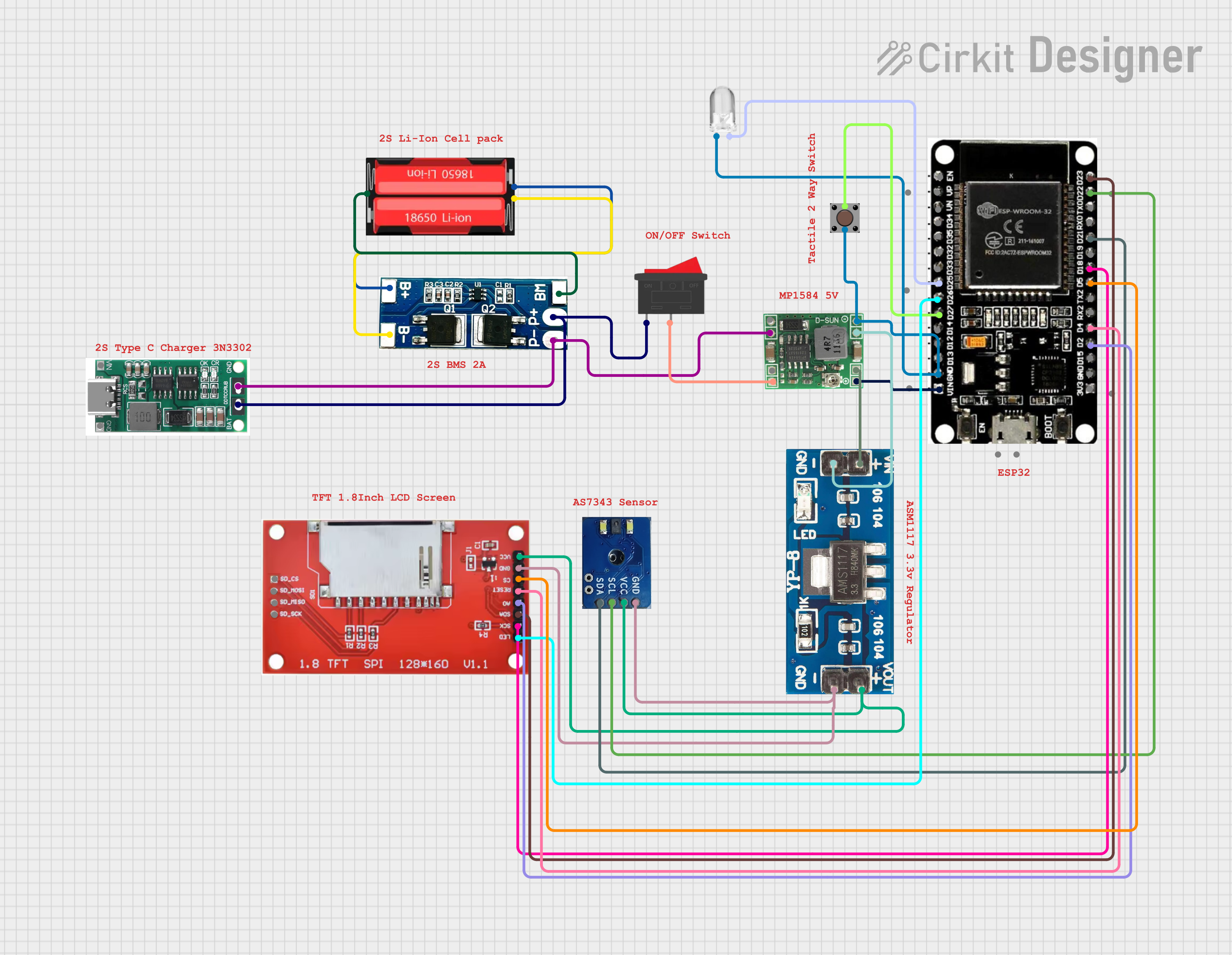
circuit_image (2)
circuit_image (2).png
Comments
Only logged in users can leave comments