Devices & Components
Arduino Uno Rev3
Breadboard (generic)
2x2 Female Header Connector
Resistor 100k ohm
Male/Male Jumper Wires
DIP-8 socket
Resistor 100 ohm
Resistor 2.21k ohm
Capacitor 100 nF
HC-06 Bluetooth Module
LED (generic)
Universal PCB
Tactile Switch, Top Actuated
ATtiny85
Resistor 1k ohm
Hardware & Tools
Solder Flux, Soldering
Desoldering Pump, Metal
Soldering iron (generic)
Solder Wire, 40/60
Software & Tools
Arduino IDE
Project description
Code
Volume control program for the Attiny
arduino
A program that simulates the rotary encoder by sending appropriate volume up and down signal cycles and communicates with a Bluetooth module to receive "volume up" and "volume down" messages from it.
1//THIS IS FOR ATTINY85 ONLY! 2#include <SoftwareSerial.h> //Software Serial Port 3 4//vol cntrl pins 5#define VOL_A 0 6#define VOL_B 1 7 8//buttons pin 9#define BTNS A1 10 11//bluetooth pins 12#define RxD 3 13#define TxD 4 14 15//bluetooth connection 16SoftwareSerial blueToothSerial(RxD,TxD); 17 18//signal segment timing (ms) 19#define SIGNAL_DELAY 80 20 21//it takes ~64 cycles to take the volume from min to max 22 23void setup() { 24 //init buttons 25 pinMode(BTNS, INPUT); 26 27 //init volume outputs 28 pinMode(VOL_A, OUTPUT); 29 pinMode(VOL_B, OUTPUT); 30 digitalWrite(VOL_A, HIGH); 31 digitalWrite(VOL_B, HIGH); 32 33 //init BT 34 pinMode(RxD, INPUT); 35 pinMode(TxD, OUTPUT); 36 setupBlueToothConnection(); 37} 38 39void loop() { 40 //read buttons state & send appropriate signals to the stereo 41 int btnState = analogRead(BTNS); 42 if(btnState < 300) { 43 volDown(); 44 } else { 45 if(btnState < 700) { 46 volUp(); 47 } 48 } 49 50 //read remote commands over BT & send appropriate signals to the stereo 51 char recvChar; 52 while (blueToothSerial.available() > 0 ) { 53 recvChar = blueToothSerial.read(); 54 if (recvChar == '1') { 55 volUp(); 56 } else { 57 if (recvChar == '2') { 58 volDown(); 59 } 60 } 61 } 62} 63 64void volDown() 65{ 66 digitalWrite(VOL_B, LOW); 67 delay(SIGNAL_DELAY); 68 digitalWrite(VOL_B, HIGH); 69 digitalWrite(VOL_A, LOW); 70 delay(SIGNAL_DELAY); 71 digitalWrite(VOL_A, HIGH); 72 delay(SIGNAL_DELAY); 73} 74 75void volUp() 76{ 77 digitalWrite(VOL_A, LOW); 78 delay(SIGNAL_DELAY); 79 digitalWrite(VOL_A, HIGH); 80 digitalWrite(VOL_B, LOW); 81 delay(SIGNAL_DELAY); 82 digitalWrite(VOL_B, HIGH); 83 delay(SIGNAL_DELAY); 84} 85 86void setupBlueToothConnection() 87{ 88 blueToothSerial.begin(9600); //using the default baud rate of HC-06 89 blueToothSerial.print("AT+NAMEdupa1"); //set the name - in fact it would be enough to do it just once, also a reset is needed after the change 90 91 delay(2000); //a delay just to make sure that the setup is completed 92 blueToothSerial.flush(); 93} 94
Volume control program for the Attiny
arduino
A program that simulates the rotary encoder by sending appropriate volume up and down signal cycles and communicates with a Bluetooth module to receive "volume up" and "volume down" messages from it.
1//THIS IS FOR ATTINY85 ONLY! 2#include <SoftwareSerial.h> //Software Serial Port 3 4//vol cntrl pins 5#define VOL_A 0 6#define VOL_B 1 7 8//buttons pin 9#define BTNS A1 10 11//bluetooth pins 12#define RxD 3 13#define TxD 4 14 15//bluetooth connection 16SoftwareSerial blueToothSerial(RxD,TxD); 17 18//signal segment timing (ms) 19#define SIGNAL_DELAY 80 20 21//it takes ~64 cycles to take the volume from min to max 22 23void setup() { 24 //init buttons 25 pinMode(BTNS, INPUT); 26 27 //init volume outputs 28 pinMode(VOL_A, OUTPUT); 29 pinMode(VOL_B, OUTPUT); 30 digitalWrite(VOL_A, HIGH); 31 digitalWrite(VOL_B, HIGH); 32 33 //init BT 34 pinMode(RxD, INPUT); 35 pinMode(TxD, OUTPUT); 36 setupBlueToothConnection(); 37} 38 39void loop() { 40 //read buttons state & send appropriate signals to the stereo 41 int btnState = analogRead(BTNS); 42 if(btnState < 300) { 43 volDown(); 44 } else { 45 if(btnState < 700) { 46 volUp(); 47 } 48 } 49 50 //read remote commands over BT & send appropriate signals to the stereo 51 char recvChar; 52 while (blueToothSerial.available() > 0 ) { 53 recvChar = blueToothSerial.read(); 54 if (recvChar == '1') { 55 volUp(); 56 } else { 57 if (recvChar == '2') { 58 volDown(); 59 } 60 } 61 } 62} 63 64void volDown() 65{ 66 digitalWrite(VOL_B, LOW); 67 delay(SIGNAL_DELAY); 68 digitalWrite(VOL_B, HIGH); 69 digitalWrite(VOL_A, LOW); 70 delay(SIGNAL_DELAY); 71 digitalWrite(VOL_A, HIGH); 72 delay(SIGNAL_DELAY); 73} 74 75void volUp() 76{ 77 digitalWrite(VOL_A, LOW); 78 delay(SIGNAL_DELAY); 79 digitalWrite(VOL_A, HIGH); 80 digitalWrite(VOL_B, LOW); 81 delay(SIGNAL_DELAY); 82 digitalWrite(VOL_B, HIGH); 83 delay(SIGNAL_DELAY); 84} 85 86void setupBlueToothConnection() 87{ 88 blueToothSerial.begin(9600); //using the default baud rate of HC-06 89 blueToothSerial.print("AT+NAMEdupa1"); //set the name - in fact it would be enough to do it just once, also a reset is needed after the change 90 91 delay(2000); //a delay just to make sure that the setup is completed 92 blueToothSerial.flush(); 93} 94
Downloadable files
A full variant of the volume control (with LEDs and Bluetooth)
Connect it to your stereo system's volume encoder A and B signals and 5V line + GND
A full variant of the volume control (with LEDs and Bluetooth)
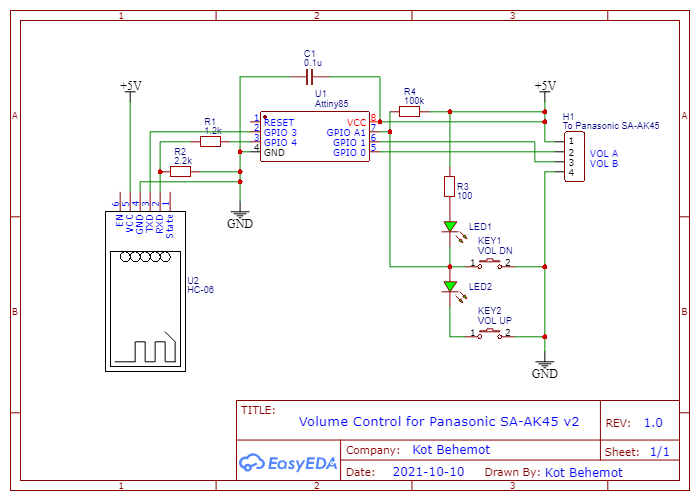
A full variant of the volume control (with LEDs and Bluetooth)
Connect it to your stereo system's volume encoder A and B signals and 5V line + GND
A full variant of the volume control (with LEDs and Bluetooth)

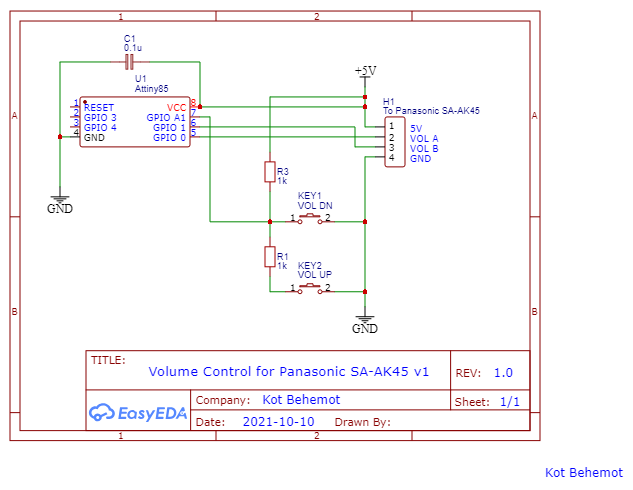
A simple variant of the volume control (without LEDs and Bluetooth)
Connect it to your stereo system's volume encoder A and B signals and 5V line + GND
A simple variant of the volume control (without LEDs and Bluetooth)
Comments
Only logged in users can leave comments