Arduino LED Display with custom character
How to display custom character on LCD Display with I2C Module
Devices & Components
1
Arduino Uno Rev3
1
16x2 LCD display with I²C interface
Software & Tools

Arduino IDE
Project description
Code
Arduino LED Display with custom character
c_cpp
Arduino LED Display with custom character
1//..................JEHANKANDY....................................
2
3//  include the library code:
4#include <LiquidCrystal.h>
5
6// initialize the  library with the numbers of the interface pins
7LiquidCrystal lcd(12, 11, 5, 4,  3, 2);
8
9// make some custom characters:
10byte Heart[8] = {
110b00000,
120b01010,
130b11111,
140b11111,
150b01110,
160b00100,
170b00000,
180b00000
19};
20
21byte  Bell[8] = {
220b00100,
230b01110,
240b01110,
250b01110,
260b11111,
270b00000,
280b00100,
290b00000
30};
31
32
33byte  Alien[8] = {
340b11111,
350b10101,
360b11111,
370b11111,
380b01110,
390b01010,
400b11011,
410b00000
42};
43
44byte  Check[8] = {
450b00000,
460b00001,
470b00011,
480b10110,
490b11100,
500b01000,
510b00000,
520b00000
53};
54
55byte  Speaker[8] = {
560b00001,
570b00011,
580b01111,
590b01111,
600b01111,
610b00011,
620b00001,
630b00000
64};
65
66
67byte  Sound[8] = {
680b00001,
690b00011,
700b00101,
710b01001,
720b01001,
730b01011,
740b11011,
750b11000
76};
77
78
79byte  Skull[8] = {
800b00000,
810b01110,
820b10101,
830b11011,
840b01110,
850b01110,
860b00000,
870b00000
88};
89
90byte  Lock[8] = {
910b01110,
920b10001,
930b10001,
940b11111,
950b11011,
960b11011,
970b11111,
980b00000
99};
100
101void  setup()
102{
103  // initialize LCD and set up the number of columns and rows:
104  lcd.begin(16, 2);
105
106  // create a new character
107  lcd.createChar(0,  Heart);
108  // create a new character
109  lcd.createChar(1, Bell);
110  // create  a new character
111  lcd.createChar(2, Alien);
112  // create a new character
113  lcd.createChar(3, Check);
114  // create a new character
115  lcd.createChar(4,  Speaker);
116  // create a new character
117  lcd.createChar(5, Sound);
118  //  create a new character
119  lcd.createChar(6, Skull);
120  // create a new character
121  lcd.createChar(7, Lock);
122
123  // Clears the LCD screen
124  lcd.clear();
125
126  // Print a message to the lcd.
127  lcd.print("Custom Character");
128}
129
130//  Print All the custom characters
131void loop()
132{
133  lcd.setCursor(0, 1);
134  lcd.write(byte(0));
135
136  lcd.setCursor(2, 1);
137  lcd.write(byte(1));
138
139  lcd.setCursor(4, 1);
140  lcd.write(byte(2));
141
142  lcd.setCursor(6, 1);
143  lcd.write(byte(3));
144
145  lcd.setCursor(8, 1);
146  lcd.write(byte(4));
147
148  lcd.setCursor(10, 1);
149  lcd.write(byte(5));
150
151  lcd.setCursor(12, 1);
152  lcd.write(byte(6));
153
154  lcd.setCursor(14, 1);
155  lcd.write(byte(7));
156}
157
Arduino LED Display with custom character
c_cpp
Arduino LED Display with custom character
1//..................JEHANKANDY....................................
2
3//
4  include the library code:
5#include <LiquidCrystal.h>
6
7// initialize the
8  library with the numbers of the interface pins
9LiquidCrystal lcd(12, 11, 5, 4,
10  3, 2);
11
12// make some custom characters:
13byte Heart[8] = {
140b00000,
150b01010,
160b11111,
170b11111,
180b01110,
190b00100,
200b00000,
210b00000
22};
23
24byte
25  Bell[8] = {
260b00100,
270b01110,
280b01110,
290b01110,
300b11111,
310b00000,
320b00100,
330b00000
34};
35
36
37byte
38  Alien[8] = {
390b11111,
400b10101,
410b11111,
420b11111,
430b01110,
440b01010,
450b11011,
460b00000
47};
48
49byte
50  Check[8] = {
510b00000,
520b00001,
530b00011,
540b10110,
550b11100,
560b01000,
570b00000,
580b00000
59};
60
61byte
62  Speaker[8] = {
630b00001,
640b00011,
650b01111,
660b01111,
670b01111,
680b00011,
690b00001,
700b00000
71};
72
73
74byte
75  Sound[8] = {
760b00001,
770b00011,
780b00101,
790b01001,
800b01001,
810b01011,
820b11011,
830b11000
84};
85
86
87byte
88  Skull[8] = {
890b00000,
900b01110,
910b10101,
920b11011,
930b01110,
940b01110,
950b00000,
960b00000
97};
98
99byte
100  Lock[8] = {
1010b01110,
1020b10001,
1030b10001,
1040b11111,
1050b11011,
1060b11011,
1070b11111,
1080b00000
109};
110
111void
112  setup()
113{
114  // initialize LCD and set up the number of columns and rows:
115
116  lcd.begin(16, 2);
117
118  // create a new character
119  lcd.createChar(0,
120  Heart);
121  // create a new character
122  lcd.createChar(1, Bell);
123  // create
124  a new character
125  lcd.createChar(2, Alien);
126  // create a new character
127
128  lcd.createChar(3, Check);
129  // create a new character
130  lcd.createChar(4,
131  Speaker);
132  // create a new character
133  lcd.createChar(5, Sound);
134  //
135  create a new character
136  lcd.createChar(6, Skull);
137  // create a new character
138
139  lcd.createChar(7, Lock);
140
141  // Clears the LCD screen
142  lcd.clear();
143
144
145  // Print a message to the lcd.
146  lcd.print("Custom Character");
147}
148
149//
150  Print All the custom characters
151void loop()
152{
153  lcd.setCursor(0, 1);
154
155  lcd.write(byte(0));
156
157  lcd.setCursor(2, 1);
158  lcd.write(byte(1));
159
160
161  lcd.setCursor(4, 1);
162  lcd.write(byte(2));
163
164  lcd.setCursor(6, 1);
165
166  lcd.write(byte(3));
167
168  lcd.setCursor(8, 1);
169  lcd.write(byte(4));
170
171
172  lcd.setCursor(10, 1);
173  lcd.write(byte(5));
174
175  lcd.setCursor(12, 1);
176
177  lcd.write(byte(6));
178
179  lcd.setCursor(14, 1);
180  lcd.write(byte(7));
181}
182
Downloadable files
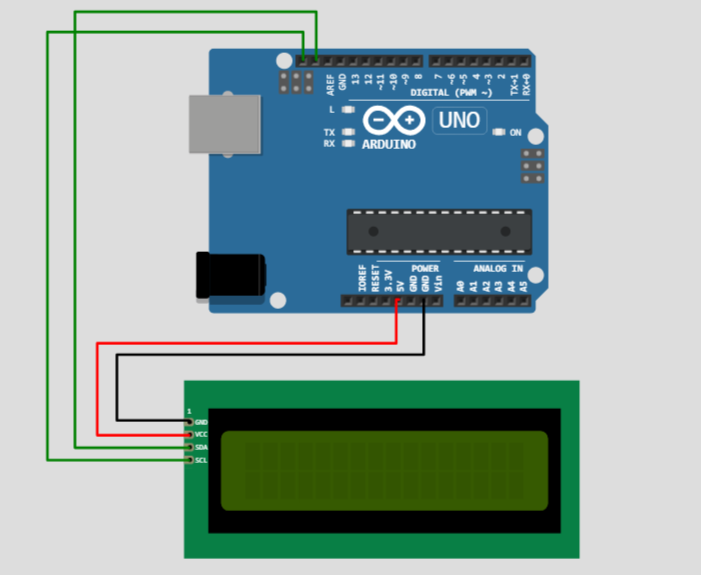
Arduino LED Display with custom character
Arduino LED Display with custom character
Arduino LED Display with custom character
Comments
Only logged in users can leave comments