Devices & Components

Arduino Uno Rev3
ProtoCentral Pulse Oximeter & Heart Rate Sensor based on MAX30100
Pushbutton switch 12mm
Battery, 3.7 V
Jumper wires (generic)
ESP8266 ESP-12E
6 DOF Sensor - MPU6050
Hardware & Tools
Soldering iron (generic)
Software & Tools
SMS Messaging API

Arduino IDE
Project description
Code
Arduino Uno health emergency detection
arduino
This code is uploaded to Arduino Uno to detect: 1. Fall measured by accelerometer 2. Unusual heart rate measured by pulse sensor 3. Emergency button pushed Once one of three above is triggered, the code sends HIGH output to the WiFi module and the LED bulb. I incorporated fall detection code from https://create.arduino.cc/projecthub/Technovation/health-band-a-smart-assistant-for-the-elderly-0fed12 since it gives accurate result by monitoring a 3-stage change in G.
1#define USE_ARDUINO_INTERRUPTS true // Set-up low-level interrupts for   most acurate BPM math
2#include <PulseSensorPlayground.h>
3#include <Wire.h>
4
5const   int PulseWire = 0; // 'S' Signal pin connected to A0
6// const int LED13 = 13;           // The on-board Arduino LED
7int Threshold = 550; // Determine which   Signal to "count as a beat" and which to ignore
8PulseSensorPlayground pulseSensor;
9
10const   int MPU_addr = 0x68; // I2C address of the MPU-6050
11int16_t AcX, AcY, AcZ, Tmp,   GyX, GyY, GyZ;
12float ax = 0, ay = 0, az = 0, gx = 0, gy = 0, gz = 0;
13const   int buttonPin = 6;
14const int ledPin = 3;
15
16// int data[STORE_SIZE][5]; //array   for saving past data
17// byte currentIndex=0; //stores current data array index   (0-255)
18boolean fall = false;     // stores if a fall has occurred
19boolean   trigger1 = false; // stores if first trigger (lower threshold) has occurred
20boolean   trigger2 = false; // stores if second trigger (upper threshold) has occurred
21boolean   trigger3 = false; // stores if third trigger (orientation change) has occurred
22
23byte   trigger1count = 0; // stores the counts past since trigger 1 was set true
24byte   trigger2count = 0; // stores the counts past since trigger 2 was set true
25byte   trigger3count = 0; // stores the counts past since trigger 3 was set true
26int   angleChange = 0;
27
28// variable for storing the pushbutton status
29int buttonState   = 0;
30int ledState = 0;
31
32int fall_message_ouput = 7;
33
34void setup()
35{
36   Wire.begin();
37  Wire.beginTransmission(MPU_addr);
38  Wire.write(0x6B); //   PWR_MGMT_1 register
39  Wire.write(0);    // set to zero (wakes up the MPU-6050)
40   Wire.endTransmission(true);
41  Serial.begin(9600);
42
43  // set output   pins to send fall alert to ESP8266
44  pinMode(fall_message_ouput, OUTPUT);
45   pinMode(11, OUTPUT);
46  pinMode(0, OUTPUT);
47  digitalWrite(11, HIGH);
48
49  // set input pin of button and output pin of led
50  pinMode(buttonPin,   INPUT);
51  pinMode(ledPin, OUTPUT);
52
53  // Configure the PulseSensor object,   by assigning our variables to it
54  pulseSensor.analogInput(PulseWire);
55  //   pulseSensor.blinkOnPulse(LED13);       // Blink on-board LED with heartbeat
56   pulseSensor.setThreshold(Threshold);
57
58  if (pulseSensor.begin())
59  {
60     Serial.println("PulseSensor object created!");
61  }
62}
63
64void loop()
65{
66   // read the state of the pushbutton value
67  buttonState = digitalRead(buttonPin);
68   // check if the pushbutton is pressed.
69  // if it is, the buttonState is HIGH
70   if (buttonState == HIGH)
71  {
72    ledState = !ledState;
73  }
74  if (ledState   == HIGH)
75  {
76    // turn LED on
77    digitalWrite(ledPin, HIGH);
78  }
79   else
80  {
81    // turn LED off
82    digitalWrite(ledPin, LOW);
83  }
84
85   // heartbeat sensor
86  int myBPM = pulseSensor.getBeatsPerMinute(); // Calculates   BPM
87
88  if (pulseSensor.sawStartOfBeat())
89  {                                             //   Constantly test to see if a beat happened
90    Serial.println("Heartbeat  BPM:   " + myBPM); // If true, print a message                       // Print the BPM   value
91  }
92  if (myBPM > 170)
93  { // high heart rate detection
94    Serial.println("High   Heartrate Alert: Your heart rate is above 200!");
95    digitalWrite(fall_message_ouput,   HIGH);
96    digitalWrite(ledPin, HIGH);
97    delay(1000);
98    digitalWrite(fall_message_ouput,   LOW);
99  }
100  if (myBPM < 27)
101  { // high heart rate detection
102    Serial.println("Low   Heartrate Alert: Your heart rate is below 27!");
103    digitalWrite(fall_message_ouput,   HIGH);
104    digitalWrite(ledPin, HIGH);
105    delay(1000);
106    digitalWrite(fall_message_ouput,   LOW);
107  }
108
109  // accelerator
110  mpu_read();
111  // 2050, 77, 1947 are   values for calibration of accelerometer
112  //  values may be different for you
113   ax = (AcX - 2050) / 16384.00;
114  ay = (AcY - 77) / 16384.00;
115  az = (AcZ   - 1947) / 16384.00;
116
117  // 270, 351, 136 for gyroscope
118  gx = (GyX + 270)   / 131.07;
119  gy = (GyY - 351) / 131.07;
120  gz = (GyZ + 136) / 131.07;
121
122   // calculating Amplitute vactor for 3 axis
123  float Raw_AM = pow(pow(ax, 2)   + pow(ay, 2) + pow(az, 2), 0.5);
124  int AM = Raw_AM * 10; // as values are within   0 to 1, I multiplied
125                        // it by for using if else conditions
126                         // Serial.println(analogRead(A1));
127  // if(digitalRead(A3)   == HIGH)
128  //{
129  //   Serial.println("A3: SOS"+digitalRead(A3));
130  //   }
131
132  Serial.println(AM);
133  // Serial.println(PM);
134  // delay(5);
135
136   if (trigger3 == true)
137  {
138    trigger3count++;
139    // Serial.println(trigger3count);
140     if (trigger3count >= 10)
141    {
142      angleChange = pow(pow(gx, 2) + pow(gy,   2) + pow(gz, 2), 0.5);
143      // delay(10);
144      Serial.println(angleChange);
145       if ((angleChange >= 0) && (angleChange <= 10))
146      { // if orientation   changes remains between 0-10 degrees
147        fall = true;
148        trigger3   = false;
149        trigger3count = 0;
150        Serial.println(angleChange);
151       }
152      else
153      { // user regained normal orientation
154        trigger3   = false;
155        trigger3count = 0;
156        Serial.println("TRIGGER 3 DEACTIVATED");
157       }
158    }
159  }
160  if (fall == true)
161  { // in event of a fall detection
162     Serial.println("FALL DETECTED");
163    digitalWrite(fall_message_ouput, HIGH);
164     digitalWrite(ledPin, HIGH);
165    delay(1000);
166    digitalWrite(fall_message_ouput,   LOW);
167    fall = false;
168    // exit(1);
169  }
170  if (trigger2count >= 6)
171   { // allow 0.5s for orientation change
172    trigger2 = false;
173    trigger2count   = 0;
174    Serial.println("TRIGGER 2 DECACTIVATED");
175  }
176  if (trigger1count   >= 6)
177  { // allow 0.5s for AM to break upper threshold
178    trigger1 = false;
179     trigger1count = 0;
180    Serial.println("TRIGGER 1 DECACTIVATED");
181  }
182   if (trigger2 == true)
183  {
184    trigger2count++;
185    // angleChange=acos(((double)x*(double)bx+(double)y*(double)by+(double)z*(double)bz)/(double)AM/(double)BM);
186     angleChange = pow(pow(gx, 2) + pow(gy, 2) + pow(gz, 2), 0.5);
187    Serial.println(angleChange);
188     if (angleChange >= 30 && angleChange <= 400)
189    { // if orientation changes   by between 80-100 degrees
190      trigger3 = true;
191      trigger2 = false;
192       trigger2count = 0;
193      Serial.println(angleChange);
194      Serial.println("TRIGGER   3 ACTIVATED");
195    }
196  }
197  if (trigger1 == true)
198  {
199    trigger1count++;
200     if (AM >= 12)
201    { // if AM breaks upper threshold (3g)
202      trigger2   = true;
203      Serial.println("TRIGGER 2 ACTIVATED");
204      trigger1 = false;
205       trigger1count = 0;
206    }
207  }
208  if (AM <= 2 && trigger2 == false)
209   { // if AM breaks lower threshold (0.4g)
210    trigger1 = true;
211    Serial.println("TRIGGER   1 ACTIVATED");
212  }
213  // It appears that delay is needed in order not to clog   the port
214  delay(100);
215}
216
217void mpu_read()
218{
219  Wire.beginTransmission(MPU_addr);
220   Wire.write(0x3B); // starting with register 0x3B (ACCEL_XOUT_H)
221  Wire.endTransmission(false);
222   Wire.requestFrom(MPU_addr, 14, true); // request a total of 14 registers
223  AcX   = Wire.read() << 8 | Wire.read(); // 0x3B (ACCEL_XOUT_H) & 0x3C (ACCEL_XOUT_L)
224   AcY = Wire.read() << 8 | Wire.read(); // 0x3D (ACCEL_YOUT_H) & 0x3E (ACCEL_YOUT_L)
225   AcZ = Wire.read() << 8 | Wire.read(); // 0x3F (ACCEL_ZOUT_H) & 0x40 (ACCEL_ZOUT_L)
226   Tmp = Wire.read() << 8 | Wire.read(); // 0x41 (TEMP_OUT_H) & 0x42 (TEMP_OUT_L)
227   GyX = Wire.read() << 8 | Wire.read(); // 0x43 (GYRO_XOUT_H) & 0x44 (GYRO_XOUT_L)
228   GyY = Wire.read() << 8 | Wire.read(); // 0x45 (GYRO_YOUT_H) & 0x46 (GYRO_YOUT_L)
229   GyZ = Wire.read() << 8 | Wire.read(); // 0x47 (GYRO_ZOUT_H) & 0x48 (GYRO_ZOUT_L)
230}
231
WiFi module sends SMS with location
arduino
This code is uploaded to ESP8266 12E to 1. Get the wearer's location triangulated by WiFi position system using UnwiredLab Geolocation API 2. Send SMS with the location to the wearer's emergency contact using Twilio SMS API Both actions are triggered when ESP8266 receives pin input from Arduino Uno.
1/*
2 * Twilio SMS and MMS on ESP8266 Example.
3 */
4
5#include   <Wire.h>
6#include <ESP8266WiFi.h>
7#include <WiFiClientSecure.h>
8#include   <ESP8266WebServer.h>
9
10#include "twilio.hpp"
11
12// Use software serial   for debugging?
13#define USE_SOFTWARE_SERIAL 0
14
15// Print debug messages over   serial?
16#define USE_SERIAL 1
17
18//
19// UnwiredLab Geolocation API info
20//
21//   your network SSID (name) & network password
22char myssid[] = "UCLA_WEB";
23char   mypass[] = "";
24
25// unwiredlabs Hostname & Geolocation Endpoint url
26const   char *host = "us1.unwiredlabs.com";
27String endpoint = "/v2/process.php";
28const   int httpsPort = 443;
29
30const char *fingerprint = "41 3F 95 84 0A E3 74 F6   2B C3 19 27 C9 67 F3 0C 38 D4 6F B6";
31
32// UnwiredLabs API_Token. Signup here   to get a free token https://unwiredlabs.com/trial
33String geolocation_api_key   = "pk.73d4083cea6ff7527b49262ee534f8f1";
34String jsonString = "{\
35";
36
37//   Variables to store unwiredlabs response
38double latitude = 0.0;
39double longitude   = 0.0;
40double accuracy = 0.0;
41
42int GPIO = 5;
43
44// Your network SSID   and password
45const char *ssid = "UCLA_WEB";
46const char *password = "";
47
48//   Find the api.twilio.com SHA1 fingerprint, this one was valid as
49// of July 2020.   This will change, please see
50// https://www.twilio.com/docs/sms/tutorials/how-to-send-sms-messages-esp8266-cpp
51//   to see how to update the fingerprint.
52const char fingerprint[] = "72 1C 17 31   85 E2 7E 0D F9 D4 C2 5B A0 0E BD B7 E2 06 26 ED";
53
54// Twilio account specific   details, from https://twilio.com/console
55// Please see the article:
56// https://www.twilio.com/docs/guides/receive-and-reply-sms-and-mms-messages-esp8266-c-and-ngrok
57
58//   If this device is deployed in the field you should only deploy a revocable
59//   key. This code is only suitable for prototyping or if you retain physical
60//   control of the installation.
61const char *account_sid = "ACb63f3d2be8ed9c87832c49302c30a636";
62const   char *auth_token = "63bee244f52b6f923f0b9b719598c530";
63
64// Details for the   SMS we'll send with Twilio.  Should be a number you own
65// (check the console,   link above).
66String to_number = "+12134682703";
67String from_number = "+15205025995";
68String   user_name = "Jeffrey";
69String message_body = "Cura - " + user_name + " alerts   a health emergency!!! He's at latitude: " + String(loc_longitude, 6) + ", longitude:   " + String(loc_latitude, 6) + ". Call 911 if you need any emergent medical help.";
70
71//   The 'authorized number' to text the ESP8266 for our example
72String master_number   = "+12134682703";
73
74// Optional - a url to an image.  See 'MediaUrl' here:
75//   https://www.twilio.com/docs/api/rest/sending-messages
76String media_url = "";
77
78//   Global twilio objects
79Twilio *twilio;
80ESP8266WebServer twilio_server(8000);
81twilio   = new Twilio(account_sid, auth_token, fingerprint);
82
83//  Optional software   serial debugging
84#if USE_SOFTWARE_SERIAL == 1
85#include <SoftwareSerial.h>
86//   You'll need to set pin numbers to match your setup if you
87// do use Software   Serial
88extern SoftwareSerial swSer(14, 4, false, 256);
89#else
90#define swSer   Serial
91#endif
92
93/*
94 * Callback function when we hit the /message route   with a webhook.
95 * Use the global 'twilio_server' object to respond.
96 */
97void   handle_message()
98{
99#if USE_SERIAL == 1
100  swSer.println("Incoming connection!   Printing body:");
101#endif
102  bool authorized = false;
103  char command =   '\\0';
104
105  // Parse Twilio's request to the ESP
106  for (int i = 0; i < twilio_server.args();   ++i)
107  {
108#if USE_SERIAL == 1
109    swSer.print(twilio_server.argName(i));
110     swSer.print(": ");
111    swSer.println(twilio_server.arg(i));
112#endif
113
114     if (twilio_server.argName(i) == "From" and
115        twilio_server.arg(i)   == master_number)
116    {
117      authorized = true;
118    }
119    else if (twilio_server.argName(i)   == "Body")
120    {
121      if (twilio_server.arg(i) == "?" or
122          twilio_server.arg(i)   == "0" or
123          twilio_server.arg(i) == "1")
124      {
125        command   = twilio_server.arg(i)[0];
126      }
127    }
128  } // end for loop parsing Twilio's   request
129
130  // Logic to handle the incoming SMS
131  // (Some board are active   low so the light will have inverse logic)
132  String response = "<?xml version=\\"1.0\\"   encoding=\\"UTF-8\\"?>";
133  if (command != '\\0')
134  {
135    if (authorized)
136     {
137      switch (command)
138      {
139      case '0':
140        digitalWrite(LED_BUILTIN,   LOW);
141        response += "<Response><Message>"
142                    "Turning   light off!"
143                    "</Message></Response>";
144        break;
145       case '1':
146        digitalWrite(LED_BUILTIN, HIGH);
147        response   += "<Response><Message>"
148                    "Turning light on!"
149                    "</Message></Response>";
150         break;
151      case '?':
152      default:
153        response += "<Response><Message>"
154                     "0 - Light off, 1 - Light On, "
155                    "?   - Help\
156"
157                    "The light is currently: ";
158        response   += digitalRead(LED_BUILTIN);
159        response += "</Message></Response>";
160         break;
161      }
162    }
163    else
164    {
165      response += "<Response><Message>"
166                   "Unauthorized!"
167                  "</Message></Response>";
168     }
169  }
170  else
171  {
172    response += "<Response><Message>"
173                "Look:   a SMS response from an ESP8266!"
174                "</Message></Response>";
175   }
176
177  twilio_server.send(200, "application/xml", response);
178}
179
180//
181//   Get current location from UnwiredLab Geolocation API
182//
183void getLocation()
184{
185   char bssid[6];
186  DynamicJsonBuffer jsonBuffer;
187
188  // WiFi.scanNetworks   will return the number of networks found
189  int n = WiFi.scanNetworks();
190  Serial.println("scan   done");
191
192  if (n == 0)
193  {
194    Serial.println("No networks available");
195   }
196  else
197  {
198    Serial.print(n);
199    Serial.println(" networks found");
200   }
201
202  // now build the jsonString...
203  jsonString = "{\
204";
205  jsonString   += "\\"token\\" : \\"";
206  jsonString += geolocation_api_key;
207  jsonString   += "\\",\
208";
209  jsonString += "\\"id\\" : \\"saikirandevice01\\",\
210";
211   jsonString += "\\"wifi\\": [\
212";
213  for (int j = 0; j < n; ++j)
214  {
215     jsonString += "{\
216";
217    jsonString += "\\"bssid\\" : \\"";
218    jsonString   += (WiFi.BSSIDstr(j));
219    jsonString += "\\",\
220";
221    jsonString += "\\"signal\\":   ";
222    jsonString += WiFi.RSSI(j);
223    jsonString += "\
224";
225    if (j   < n - 1)
226    {
227      jsonString += "},\
228";
229    }
230    else
231    {
232       jsonString += "}\
233";
234    }
235  }
236  jsonString += ("]\
237");
238   jsonString += ("}\
239");
240  Serial.println(jsonString);
241
242  WiFiClientSecure   client;
243
244  // Connect to the client and make the api call
245  Serial.println("Requesting   URL: https://" + (String)Host + endpoint);
246  if (client.connect(Host, 443))
247   {
248    Serial.println("Connected");
249    client.println("POST " + endpoint   + " HTTP/1.1");
250    client.println("Host: " + (String)Host);
251    client.println("Connection:   close");
252    client.println("Content-Type: application/json");
253    client.println("User-Agent:   Arduino/1.0");
254    client.print("Content-Length: ");
255    client.println(jsonString.length());
256     client.println();
257    client.print(jsonString);
258    delay(500);
259  }
260
261   // Read and parse all the lines of the reply from server
262  while (client.available())
263   {
264    String line = client.readStringUntil('\
');
265    JsonObject &root   = jsonBuffer.parseObject(line);
266    if (root.success())
267    {
268      latitude   = root["lat"];
269      longitude = root["lon"];
270      accuracy = root["accuracy"];
271
272       Serial.print("Latitude = ");
273      Serial.println(latitude, 6);
274      Serial.print("Longitude   = ");
275      Serial.println(longitude, 6);
276      Serial.print("Accuracy =   ");
277      Serial.println(accuracy);
278
279      loc_latitude = latitude;
280       loc_longitude = longitude;
281      loc_accuracy = accuracy;
282    }
283   }
284
285  Serial.println("closing connection");
286  Serial.println();
287   client.stop();
288}
289
290/*
291 * Setup function for ESP8266 Twilio Example.
292   *
293 * Here we connect to a friendly wireless network, set the time, instantiate
294   * our twilio object, optionally set up software serial, then send a SMS
295 * or   MMS message.
296 */
297void setup()
298{
299  pinMode(GPIO, INPUT);
300  Wire.begin(9);   // 9 here is the address(Mentioned even in the master board code)
301
302  WiFi.begin(ssid,   password);
303  //        twilio = new Twilio(account_sid, auth_token, fingerprint);
304
305#if   USE_SERIAL == 1
306  swSer.begin(115200);
307  while (WiFi.status() != WL_CONNECTED)
308   {
309    delay(1000);
310    swSer.print(".");
311  }
312  swSer.println("");
313   swSer.println("Connected to WiFi, IP address: ");
314  swSer.println(WiFi.localIP());
315#else
316   while (WiFi.status() != WL_CONNECTED)
317    delay(1000);
318#endif
319}
320
321/*
322   *  In our main loop, we listen for connections from Twilio in handleClient().
323   */
324void loop()
325{
326  twilio_server.handleClient();
327
328  if (digitalRead(GPIO)   == HIGH)
329  {
330    Serial.println("Health emergency detected!");
331    getLocation();
332
333     // Response will be filled with connection info and Twilio API responses
334     // from this initial SMS send.
335    String response;
336    bool success =   twilio->send_message(
337        to_number,
338        from_number,
339        message_body,
340         response,
341        media_url);
342
343    // Set up a route to /message   which will be the webhook url
344    twilio_server.on("/message", handle_message);
345     twilio_server.begin();
346
347    // Use LED_BUILTIN to find the LED pin and   set the GPIO to output
348    pinMode(LED_BUILTIN, OUTPUT);
349
350#if USE_SERIAL   == 1
351    swSer.println(response);
352#endif
353  }
354}
355
Arduino Uno health emergency detection
arduino
This code is uploaded to Arduino Uno to detect: 1. Fall measured by accelerometer 2. Unusual heart rate measured by pulse sensor 3. Emergency button pushed Once one of three above is triggered, the code sends HIGH output to the WiFi module and the LED bulb. I incorporated fall detection code from https://create.arduino.cc/projecthub/Technovation/health-band-a-smart-assistant-for-the-elderly-0fed12 since it gives accurate result by monitoring a 3-stage change in G.
1#define USE_ARDUINO_INTERRUPTS true // Set-up low-level interrupts for  most acurate BPM math
2#include <PulseSensorPlayground.h>
3#include <Wire.h>
4
5const  int PulseWire = 0; // 'S' Signal pin connected to A0
6// const int LED13 = 13;          // The on-board Arduino LED
7int Threshold = 550; // Determine which  Signal to "count as a beat" and which to ignore
8PulseSensorPlayground pulseSensor;
9
10const  int MPU_addr = 0x68; // I2C address of the MPU-6050
11int16_t AcX, AcY, AcZ, Tmp,  GyX, GyY, GyZ;
12float ax = 0, ay = 0, az = 0, gx = 0, gy = 0, gz = 0;
13const  int buttonPin = 6;
14const int ledPin = 3;
15
16// int data[STORE_SIZE][5]; //array  for saving past data
17// byte currentIndex=0; //stores current data array index  (0-255)
18boolean fall = false;     // stores if a fall has occurred
19boolean  trigger1 = false; // stores if first trigger (lower threshold) has occurred
20boolean  trigger2 = false; // stores if second trigger (upper threshold) has occurred
21boolean  trigger3 = false; // stores if third trigger (orientation change) has occurred
22
23byte  trigger1count = 0; // stores the counts past since trigger 1 was set true
24byte  trigger2count = 0; // stores the counts past since trigger 2 was set true
25byte  trigger3count = 0; // stores the counts past since trigger 3 was set true
26int  angleChange = 0;
27
28// variable for storing the pushbutton status
29int buttonState  = 0;
30int ledState = 0;
31
32int fall_message_ouput = 7;
33
34void setup()
35{
36  Wire.begin();
37  Wire.beginTransmission(MPU_addr);
38  Wire.write(0x6B); //  PWR_MGMT_1 register
39  Wire.write(0);    // set to zero (wakes up the MPU-6050)
40  Wire.endTransmission(true);
41  Serial.begin(9600);
42
43  // set output  pins to send fall alert to ESP8266
44  pinMode(fall_message_ouput, OUTPUT);
45  pinMode(11, OUTPUT);
46  pinMode(0, OUTPUT);
47  digitalWrite(11, HIGH);
48
49  // set input pin of button and output pin of led
50  pinMode(buttonPin,  INPUT);
51  pinMode(ledPin, OUTPUT);
52
53  // Configure the PulseSensor object,  by assigning our variables to it
54  pulseSensor.analogInput(PulseWire);
55  //  pulseSensor.blinkOnPulse(LED13);       // Blink on-board LED with heartbeat
56  pulseSensor.setThreshold(Threshold);
57
58  if (pulseSensor.begin())
59  {
60    Serial.println("PulseSensor object created!");
61  }
62}
63
64void loop()
65{
66  // read the state of the pushbutton value
67  buttonState = digitalRead(buttonPin);
68  // check if the pushbutton is pressed.
69  // if it is, the buttonState is HIGH
70  if (buttonState == HIGH)
71  {
72    ledState = !ledState;
73  }
74  if (ledState  == HIGH)
75  {
76    // turn LED on
77    digitalWrite(ledPin, HIGH);
78  }
79  else
80  {
81    // turn LED off
82    digitalWrite(ledPin, LOW);
83  }
84
85  // heartbeat sensor
86  int myBPM = pulseSensor.getBeatsPerMinute(); // Calculates  BPM
87
88  if (pulseSensor.sawStartOfBeat())
89  {                                             //  Constantly test to see if a beat happened
90    Serial.println("Heartbeat  BPM:  " + myBPM); // If true, print a message                       // Print the BPM  value
91  }
92  if (myBPM > 170)
93  { // high heart rate detection
94    Serial.println("High  Heartrate Alert: Your heart rate is above 200!");
95    digitalWrite(fall_message_ouput,  HIGH);
96    digitalWrite(ledPin, HIGH);
97    delay(1000);
98    digitalWrite(fall_message_ouput,  LOW);
99  }
100  if (myBPM < 27)
101  { // high heart rate detection
102    Serial.println("Low  Heartrate Alert: Your heart rate is below 27!");
103    digitalWrite(fall_message_ouput,  HIGH);
104    digitalWrite(ledPin, HIGH);
105    delay(1000);
106    digitalWrite(fall_message_ouput,  LOW);
107  }
108
109  // accelerator
110  mpu_read();
111  // 2050, 77, 1947 are  values for calibration of accelerometer
112  //  values may be different for you
113  ax = (AcX - 2050) / 16384.00;
114  ay = (AcY - 77) / 16384.00;
115  az = (AcZ  - 1947) / 16384.00;
116
117  // 270, 351, 136 for gyroscope
118  gx = (GyX + 270)  / 131.07;
119  gy = (GyY - 351) / 131.07;
120  gz = (GyZ + 136) / 131.07;
121
122  // calculating Amplitute vactor for 3 axis
123  float Raw_AM = pow(pow(ax, 2)  + pow(ay, 2) + pow(az, 2), 0.5);
124  int AM = Raw_AM * 10; // as values are within  0 to 1, I multiplied
125                        // it by for using if else conditions
126                        // Serial.println(analogRead(A1));
127  // if(digitalRead(A3)  == HIGH)
128  //{
129  //   Serial.println("A3: SOS"+digitalRead(A3));
130  //  }
131
132  Serial.println(AM);
133  // Serial.println(PM);
134  // delay(5);
135
136  if (trigger3 == true)
137  {
138    trigger3count++;
139    // Serial.println(trigger3count);
140    if (trigger3count >= 10)
141    {
142      angleChange = pow(pow(gx, 2) + pow(gy,  2) + pow(gz, 2), 0.5);
143      // delay(10);
144      Serial.println(angleChange);
145      if ((angleChange >= 0) && (angleChange <= 10))
146      { // if orientation  changes remains between 0-10 degrees
147        fall = true;
148        trigger3  = false;
149        trigger3count = 0;
150        Serial.println(angleChange);
151      }
152      else
153      { // user regained normal orientation
154        trigger3  = false;
155        trigger3count = 0;
156        Serial.println("TRIGGER 3 DEACTIVATED");
157      }
158    }
159  }
160  if (fall == true)
161  { // in event of a fall detection
162    Serial.println("FALL DETECTED");
163    digitalWrite(fall_message_ouput, HIGH);
164    digitalWrite(ledPin, HIGH);
165    delay(1000);
166    digitalWrite(fall_message_ouput,  LOW);
167    fall = false;
168    // exit(1);
169  }
170  if (trigger2count >= 6)
171  { // allow 0.5s for orientation change
172    trigger2 = false;
173    trigger2count  = 0;
174    Serial.println("TRIGGER 2 DECACTIVATED");
175  }
176  if (trigger1count  >= 6)
177  { // allow 0.5s for AM to break upper threshold
178    trigger1 = false;
179    trigger1count = 0;
180    Serial.println("TRIGGER 1 DECACTIVATED");
181  }
182  if (trigger2 == true)
183  {
184    trigger2count++;
185    // angleChange=acos(((double)x*(double)bx+(double)y*(double)by+(double)z*(double)bz)/(double)AM/(double)BM);
186    angleChange = pow(pow(gx, 2) + pow(gy, 2) + pow(gz, 2), 0.5);
187    Serial.println(angleChange);
188    if (angleChange >= 30 && angleChange <= 400)
189    { // if orientation changes  by between 80-100 degrees
190      trigger3 = true;
191      trigger2 = false;
192      trigger2count = 0;
193      Serial.println(angleChange);
194      Serial.println("TRIGGER  3 ACTIVATED");
195    }
196  }
197  if (trigger1 == true)
198  {
199    trigger1count++;
200    if (AM >= 12)
201    { // if AM breaks upper threshold (3g)
202      trigger2  = true;
203      Serial.println("TRIGGER 2 ACTIVATED");
204      trigger1 = false;
205      trigger1count = 0;
206    }
207  }
208  if (AM <= 2 && trigger2 == false)
209  { // if AM breaks lower threshold (0.4g)
210    trigger1 = true;
211    Serial.println("TRIGGER  1 ACTIVATED");
212  }
213  // It appears that delay is needed in order not to clog  the port
214  delay(100);
215}
216
217void mpu_read()
218{
219  Wire.beginTransmission(MPU_addr);
220  Wire.write(0x3B); // starting with register 0x3B (ACCEL_XOUT_H)
221  Wire.endTransmission(false);
222  Wire.requestFrom(MPU_addr, 14, true); // request a total of 14 registers
223  AcX  = Wire.read() << 8 | Wire.read(); // 0x3B (ACCEL_XOUT_H) & 0x3C (ACCEL_XOUT_L)
224  AcY = Wire.read() << 8 | Wire.read(); // 0x3D (ACCEL_YOUT_H) & 0x3E (ACCEL_YOUT_L)
225  AcZ = Wire.read() << 8 | Wire.read(); // 0x3F (ACCEL_ZOUT_H) & 0x40 (ACCEL_ZOUT_L)
226  Tmp = Wire.read() << 8 | Wire.read(); // 0x41 (TEMP_OUT_H) & 0x42 (TEMP_OUT_L)
227  GyX = Wire.read() << 8 | Wire.read(); // 0x43 (GYRO_XOUT_H) & 0x44 (GYRO_XOUT_L)
228  GyY = Wire.read() << 8 | Wire.read(); // 0x45 (GYRO_YOUT_H) & 0x46 (GYRO_YOUT_L)
229  GyZ = Wire.read() << 8 | Wire.read(); // 0x47 (GYRO_ZOUT_H) & 0x48 (GYRO_ZOUT_L)
230}
231
WiFi module sends SMS with location
arduino
This code is uploaded to ESP8266 12E to 1. Get the wearer's location triangulated by WiFi position system using UnwiredLab Geolocation API 2. Send SMS with the location to the wearer's emergency contact using Twilio SMS API Both actions are triggered when ESP8266 receives pin input from Arduino Uno.
1/*
2 * Twilio SMS and MMS on ESP8266 Example.
3 */
4
5#include  <Wire.h>
6#include <ESP8266WiFi.h>
7#include <WiFiClientSecure.h>
8#include  <ESP8266WebServer.h>
9
10#include "twilio.hpp"
11
12// Use software serial  for debugging?
13#define USE_SOFTWARE_SERIAL 0
14
15// Print debug messages over  serial?
16#define USE_SERIAL 1
17
18//
19// UnwiredLab Geolocation API info
20//
21//  your network SSID (name) & network password
22char myssid[] = "UCLA_WEB";
23char  mypass[] = "";
24
25// unwiredlabs Hostname & Geolocation Endpoint url
26const  char *host = "us1.unwiredlabs.com";
27String endpoint = "/v2/process.php";
28const  int httpsPort = 443;
29
30const char *fingerprint = "41 3F 95 84 0A E3 74 F6  2B C3 19 27 C9 67 F3 0C 38 D4 6F B6";
31
32// UnwiredLabs API_Token. Signup here  to get a free token https://unwiredlabs.com/trial
33String geolocation_api_key  = "pk.73d4083cea6ff7527b49262ee534f8f1";
34String jsonString = "{\
35";
36
37//  Variables to store unwiredlabs response
38double latitude = 0.0;
39double longitude  = 0.0;
40double accuracy = 0.0;
41
42int GPIO = 5;
43
44// Your network SSID  and password
45const char *ssid = "UCLA_WEB";
46const char *password = "";
47
48//  Find the api.twilio.com SHA1 fingerprint, this one was valid as
49// of July 2020.  This will change, please see
50// https://www.twilio.com/docs/sms/tutorials/how-to-send-sms-messages-esp8266-cpp
51//  to see how to update the fingerprint.
52const char fingerprint[] = "72 1C 17 31  85 E2 7E 0D F9 D4 C2 5B A0 0E BD B7 E2 06 26 ED";
53
54// Twilio account specific  details, from https://twilio.com/console
55// Please see the article:
56// https://www.twilio.com/docs/guides/receive-and-reply-sms-and-mms-messages-esp8266-c-and-ngrok
57
58//  If this device is deployed in the field you should only deploy a revocable
59//  key. This code is only suitable for prototyping or if you retain physical
60//  control of the installation.
61const char *account_sid = "ACb63f3d2be8ed9c87832c49302c30a636";
62const  char *auth_token = "63bee244f52b6f923f0b9b719598c530";
63
64// Details for the  SMS we'll send with Twilio.  Should be a number you own
65// (check the console,  link above).
66String to_number = "+12134682703";
67String from_number = "+15205025995";
68String  user_name = "Jeffrey";
69String message_body = "Cura - " + user_name + " alerts  a health emergency!!! He's at latitude: " + String(loc_longitude, 6) + ", longitude:  " + String(loc_latitude, 6) + ". Call 911 if you need any emergent medical help.";
70
71//  The 'authorized number' to text the ESP8266 for our example
72String master_number  = "+12134682703";
73
74// Optional - a url to an image.  See 'MediaUrl' here:
75//  https://www.twilio.com/docs/api/rest/sending-messages
76String media_url = "";
77
78//  Global twilio objects
79Twilio *twilio;
80ESP8266WebServer twilio_server(8000);
81twilio  = new Twilio(account_sid, auth_token, fingerprint);
82
83//  Optional software  serial debugging
84#if USE_SOFTWARE_SERIAL == 1
85#include <SoftwareSerial.h>
86//  You'll need to set pin numbers to match your setup if you
87// do use Software  Serial
88extern SoftwareSerial swSer(14, 4, false, 256);
89#else
90#define swSer  Serial
91#endif
92
93/*
94 * Callback function when we hit the /message route  with a webhook.
95 * Use the global 'twilio_server' object to respond.
96 */
97void  handle_message()
98{
99#if USE_SERIAL == 1
100  swSer.println("Incoming connection!  Printing body:");
101#endif
102  bool authorized = false;
103  char command =  '\\0';
104
105  // Parse Twilio's request to the ESP
106  for (int i = 0; i < twilio_server.args();  ++i)
107  {
108#if USE_SERIAL == 1
109    swSer.print(twilio_server.argName(i));
110    swSer.print(": ");
111    swSer.println(twilio_server.arg(i));
112#endif
113
114    if (twilio_server.argName(i) == "From" and
115        twilio_server.arg(i)  == master_number)
116    {
117      authorized = true;
118    }
119    else if (twilio_server.argName(i)  == "Body")
120    {
121      if (twilio_server.arg(i) == "?" or
122          twilio_server.arg(i)  == "0" or
123          twilio_server.arg(i) == "1")
124      {
125        command  = twilio_server.arg(i)[0];
126      }
127    }
128  } // end for loop parsing Twilio's  request
129
130  // Logic to handle the incoming SMS
131  // (Some board are active  low so the light will have inverse logic)
132  String response = "<?xml version=\\"1.0\\"  encoding=\\"UTF-8\\"?>";
133  if (command != '\\0')
134  {
135    if (authorized)
136    {
137      switch (command)
138      {
139      case '0':
140        digitalWrite(LED_BUILTIN,  LOW);
141        response += "<Response><Message>"
142                    "Turning  light off!"
143                    "</Message></Response>";
144        break;
145      case '1':
146        digitalWrite(LED_BUILTIN, HIGH);
147        response  += "<Response><Message>"
148                    "Turning light on!"
149                    "</Message></Response>";
150        break;
151      case '?':
152      default:
153        response += "<Response><Message>"
154                    "0 - Light off, 1 - Light On, "
155                    "?  - Help\
156"
157                    "The light is currently: ";
158        response  += digitalRead(LED_BUILTIN);
159        response += "</Message></Response>";
160        break;
161      }
162    }
163    else
164    {
165      response += "<Response><Message>"
166                  "Unauthorized!"
167                  "</Message></Response>";
168    }
169  }
170  else
171  {
172    response += "<Response><Message>"
173                "Look:  a SMS response from an ESP8266!"
174                "</Message></Response>";
175  }
176
177  twilio_server.send(200, "application/xml", response);
178}
179
180//
181//  Get current location from UnwiredLab Geolocation API
182//
183void getLocation()
184{
185  char bssid[6];
186  DynamicJsonBuffer jsonBuffer;
187
188  // WiFi.scanNetworks  will return the number of networks found
189  int n = WiFi.scanNetworks();
190  Serial.println("scan  done");
191
192  if (n == 0)
193  {
194    Serial.println("No networks available");
195  }
196  else
197  {
198    Serial.print(n);
199    Serial.println(" networks found");
200  }
201
202  // now build the jsonString...
203  jsonString = "{\
204";
205  jsonString  += "\\"token\\" : \\"";
206  jsonString += geolocation_api_key;
207  jsonString  += "\\",\
208";
209  jsonString += "\\"id\\" : \\"saikirandevice01\\",\
210";
211  jsonString += "\\"wifi\\": [\
212";
213  for (int j = 0; j < n; ++j)
214  {
215    jsonString += "{\
216";
217    jsonString += "\\"bssid\\" : \\"";
218    jsonString  += (WiFi.BSSIDstr(j));
219    jsonString += "\\",\
220";
221    jsonString += "\\"signal\\":  ";
222    jsonString += WiFi.RSSI(j);
223    jsonString += "\
224";
225    if (j  < n - 1)
226    {
227      jsonString += "},\
228";
229    }
230    else
231    {
232      jsonString += "}\
233";
234    }
235  }
236  jsonString += ("]\
237");
238  jsonString += ("}\
239");
240  Serial.println(jsonString);
241
242  WiFiClientSecure  client;
243
244  // Connect to the client and make the api call
245  Serial.println("Requesting  URL: https://" + (String)Host + endpoint);
246  if (client.connect(Host, 443))
247  {
248    Serial.println("Connected");
249    client.println("POST " + endpoint  + " HTTP/1.1");
250    client.println("Host: " + (String)Host);
251    client.println("Connection:  close");
252    client.println("Content-Type: application/json");
253    client.println("User-Agent:  Arduino/1.0");
254    client.print("Content-Length: ");
255    client.println(jsonString.length());
256    client.println();
257    client.print(jsonString);
258    delay(500);
259  }
260
261  // Read and parse all the lines of the reply from server
262  while (client.available())
263  {
264    String line = client.readStringUntil('\r');
265    JsonObject &root  = jsonBuffer.parseObject(line);
266    if (root.success())
267    {
268      latitude  = root["lat"];
269      longitude = root["lon"];
270      accuracy = root["accuracy"];
271
272      Serial.print("Latitude = ");
273      Serial.println(latitude, 6);
274      Serial.print("Longitude  = ");
275      Serial.println(longitude, 6);
276      Serial.print("Accuracy =  ");
277      Serial.println(accuracy);
278
279      loc_latitude = latitude;
280      loc_longitude = longitude;
281      loc_accuracy = accuracy;
282    }
283  }
284
285  Serial.println("closing connection");
286  Serial.println();
287  client.stop();
288}
289
290/*
291 * Setup function for ESP8266 Twilio Example.
292  *
293 * Here we connect to a friendly wireless network, set the time, instantiate
294  * our twilio object, optionally set up software serial, then send a SMS
295 * or  MMS message.
296 */
297void setup()
298{
299  pinMode(GPIO, INPUT);
300  Wire.begin(9);  // 9 here is the address(Mentioned even in the master board code)
301
302  WiFi.begin(ssid,  password);
303  //        twilio = new Twilio(account_sid, auth_token, fingerprint);
304
305#if  USE_SERIAL == 1
306  swSer.begin(115200);
307  while (WiFi.status() != WL_CONNECTED)
308  {
309    delay(1000);
310    swSer.print(".");
311  }
312  swSer.println("");
313  swSer.println("Connected to WiFi, IP address: ");
314  swSer.println(WiFi.localIP());
315#else
316  while (WiFi.status() != WL_CONNECTED)
317    delay(1000);
318#endif
319}
320
321/*
322  *  In our main loop, we listen for connections from Twilio in handleClient().
323  */
324void loop()
325{
326  twilio_server.handleClient();
327
328  if (digitalRead(GPIO)  == HIGH)
329  {
330    Serial.println("Health emergency detected!");
331    getLocation();
332
333    // Response will be filled with connection info and Twilio API responses
334    // from this initial SMS send.
335    String response;
336    bool success =  twilio->send_message(
337        to_number,
338        from_number,
339        message_body,
340        response,
341        media_url);
342
343    // Set up a route to /message  which will be the webhook url
344    twilio_server.on("/message", handle_message);
345    twilio_server.begin();
346
347    // Use LED_BUILTIN to find the LED pin and  set the GPIO to output
348    pinMode(LED_BUILTIN, OUTPUT);
349
350#if USE_SERIAL  == 1
351    swSer.println(response);
352#endif
353  }
354}
355
Downloadable files
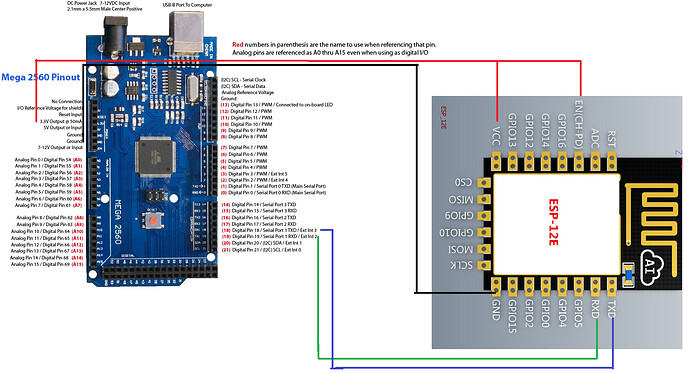
ESP8266 12E wire
ESP8266 12E wire
Pulse sensor wire
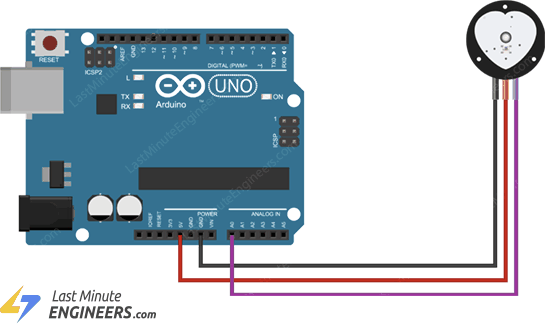
Pulse sensor wire
MPU6050 wire
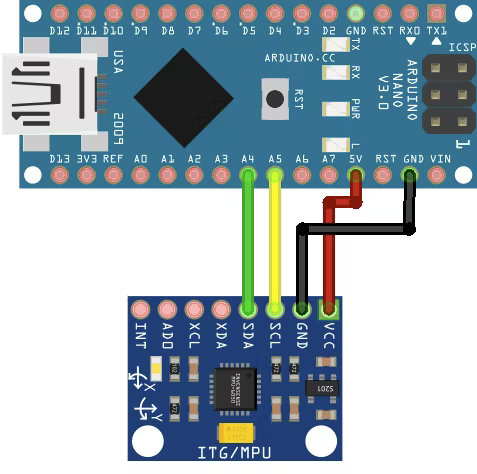
MPU6050 wire
Pulse sensor wire
Pulse sensor wire
ESP8266 12E wire
ESP8266 12E wire
Comments
Only logged in users can leave comments