Devices & Components
10 jumper wires 150mm male
Arduino Uno Rev3
Resistor 330 ohm
Push Button
Piezo Buzzer
Breadboard 100x70
LED (generic)
Software & Tools
Arduino IDE
Project description
Code
Simple pedestrian crossing traffic light
cpp
Here is the code for this project .Have fun!
1int green=8; 2int yellow=9; 3int red=10; 4int push=1; 5int buttonstate=1; 6int buzzer=2; 7void setup() { 8 // put your setup code here, to run once: 9pinMode(green,OUTPUT); 10pinMode(yellow,OUTPUT); 11pinMode(red,OUTPUT); 12pinMode(push,INPUT); 13pinMode(buzzer,OUTPUT); 14 15} 16 17void loop() { 18 // put your main code here, to run repeatedly: 19digitalWrite(green,HIGH); 20buttonstate=digitalRead(push); 21if(buttonstate==0){ 22 delay(500); 23 digitalWrite(green,LOW); 24 digitalWrite(yellow,HIGH); 25 delay(2000); 26 digitalWrite(yellow,LOW); 27 digitalWrite(red,HIGH); 28 for(int i=0;i<8;i++){ 29 digitalWrite(buzzer,HIGH); 30 delay(500); 31 digitalWrite(buzzer,LOW); 32 delay(500); 33 } 34 delay(500); 35 digitalWrite(red,LOW); 36 digitalWrite(yellow,HIGH); 37 delay(2000); 38 digitalWrite(yellow,LOW); 39 40 41} 42}
Documentation
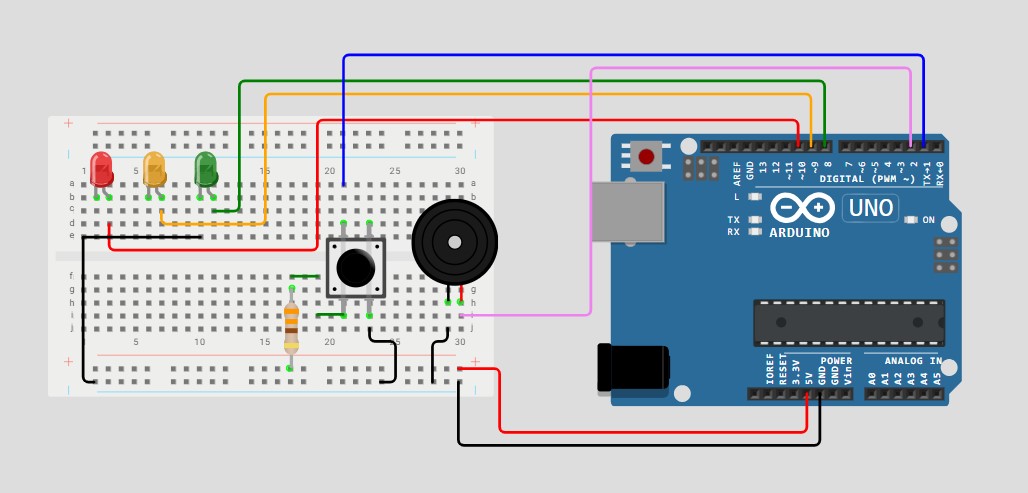
Diagram
Simple pedestrian crossing traffic light diagram
traffic light diagram.jpg
Comments
Only logged in users can leave comments