Marine signalling light using the Morse symbols
How you can upgrade your searching light in your boat as an signaling light too. You can use computer or even mobile phone as a terminal.
Devices & Components
1
Arduino Uno Rev3
1
Power MOSFET N-Channel
1
USB OTG cable for cell phone
Software & Tools
1
Serial USB Terminal by Kai Morich
Project description
Code
Maritime Signalling Light Software
arduino
You can send signals with your mobile phone with signalling light using Morse code.
1//                      MARITIME SIGNALLING LIGHT SOFTWARE
2//
3//                      Tested with Arduino Uno and Nano Every
4//
5// The International   Code of Signals (ICS) is an international system of signals and codes
6// for   use by vessels to communicate important messages regarding safety of navigation   and
7// related matters. Signals can be sent by flaghoist, signal lamp ("blinker"),   flag
8// semaphore, radiotelegraphy, and radiotelephony. The International Code   is the most
9// recent evolution of a wide variety of maritime flag signalling   systems.
10//
11// See International Code of Signals, 2005 ed. (IMO IA994E),   IMO  International Maritime
12// Organization, 2005, ISBN 978-92-801-4198-6
13//
14//   This program can be used for flashing light signalling by morse codes.
15// You   don't have to be familiar with morse code in order to send a message.
16//
17//   You need an Arduino, a mosfet, signalling lamp and computer / or mobile phone with
18//   USB OTG cable and for example Kai Morich's (Gerhart-Hauptmann-Str. 13, 68766 Hockenheim,
19// Germany) "Serial USB Terminal" -program for Android phones from Google   Play.
20//
21// I found no signalling lamp for my boat so I made it by myself.
22//
23//   Jarmo Kiuru OH8JK - Oulu, Finland.
24
25const int mosfet = 2; // The pin the mosfet   is connected to.
26
27
28void setup() {
29    // Initialize digital pin as an   output.
30    pinMode(mosfet, OUTPUT);
31
32}
33
34void loop() {
35
36    //   Delays of morse code - you can adjust for your needs.
37    const int dotMorse   = 300; //A dot is one unit
38    const int dashMorse = 900; //A dash is three units
39     const int breakMorse = 300; //The space between same letter is one unit
40     const int spaceletterMorse = 900; //The space between letters is three units
41     const int breakwordsMorse = 2100; //The space between words is seven units
42
43     String merkki = "";
44    char lahete[] = "";
45    char MorseCode[8]   = "";
46
47    // HOX! SMALL LETTERS
48    char LATIN_CHARACTERS[] = {
49         // Numbers
50        '0', '1', '2', '3', '4',
51        '5', '6', '7',   '8', '9',
52        // Letters
53        'a', 'b', 'c', 'd', 'e',
54        'f',   'g', 'h', 'i', 'j',
55        'k', 'l', 'm', 'n', 'o',
56        'p', 'q', 'r',   's', 't',
57        'u', 'v', 'w', 'x', 'y', 'z',
58        // Special
59        '.',   '?', '@', ' '
60    };
61
62    //MORSE_CHARACTERS are all eight letters long   filled with spaces at the end
63    String MORSE_CHARACTERS[] = {
64        //   Numbers
65        "-----   ", ".----   ", "..---   ", "...--   ", "....-    ",
66        ".....   ", "-....   ", "--...   ", "---..   ", "----.    ",
67        // Letters
68        ".-      ",    "-...    ",  "-.-.     ",  "-..     ", ".       ",
69        "..-.    ",  "--.     ",   "....     ",  "..      ",  ".---    ",
70        "-.-     ",   ".-..    ",  "--       ",    "-.      ",  "---     ",
71        ".--.    ",  "--.-    ",   ".-.     ",   "...     ",  "-       ",
72        "..-     ",   "...-     ",  ".--     ",   "-..-    ", "-.--    ",  "--..    ",
73        //   Special
74        ".-.-.-  ", "..--..  ", ".--.-.  ", "        "
75    };
76
77
78   // This opens the serial port.
79  Serial.begin(9600);
80  delay(10);                        //   Wait for a 1/100 second
81
82  // Here the program get a character from the terminal   via serial port.
83  merkki = Serial.readString();
84  delay(10);                        //   Wait for a 1/100 second
85
86
87
88  // This goes thru all latin characters   and finds out what you have typed in.
89  for (int h=0; h < merkki.length();   h++) {
90      merkki.toCharArray(lahete, merkki.length());
91              for   (int i=0; i < 40; i++) {
92
93                    // This converts MORSE_CHARACTERS   as an char array and place the array into variabel MorseCode.
94                    MORSE_CHARACTERS[i].toCharArray(MorseCode,   8);
95
96                    // When this if sentence finds a match to   what you have typed in it sends it using the Morse code.
97                    if   (LATIN_CHARACTERS[i] == lahete[h]) {
98                    Serial.print("     ");
99                     Serial.print(LATIN_CHARACTERS[i]);
100                    Serial.print("      ");
101
102                        for (int j=0; j < 8; j = j+1) {
103
104                         if (MorseCode[j] == '-') {
105                          digitalWrite(mosfet,   HIGH);
106                          Serial.print('-');
107                          delay(dashMorse);
108                           digitalWrite(mosfet, LOW);
109                          delay(breakMorse);
110                         }
111                        else if (MorseCode[j] == '.')   {
112                          digitalWrite(mosfet, HIGH);
113                          Serial.print('.');
114                          delay(dotMorse);
115                          digitalWrite(mosfet,   LOW);
116                          delay(breakMorse);
117                        }
118                         else if (MorseCode[j] == ' ') {
119
120                               // If MorseCode's first character is space then it   separates two words.
121                              if (MorseCode[j] == ' ' &&   j == 0) {
122                              digitalWrite(mosfet, LOW);
123                              delay(breakwordsMorse);
124                               }
125
126                          //   All Morse symbols are eight character long and when the program finds first space
127                           // it interrupts the for sentence.
128                          break;
129                        }
130                        }
131                          Serial.println();
132                           delay(spaceletterMorse);
133        }
134  }
135}
136}
137
Maritime Signalling Light Software
arduino
You can send signals with your mobile phone with signalling light using Morse code.
1//                      MARITIME SIGNALLING LIGHT SOFTWARE
2//
3//                     Tested with Arduino Uno and Nano Every
4//
5// The International  Code of Signals (ICS) is an international system of signals and codes
6// for  use by vessels to communicate important messages regarding safety of navigation  and
7// related matters. Signals can be sent by flaghoist, signal lamp ("blinker"),  flag
8// semaphore, radiotelegraphy, and radiotelephony. The International Code  is the most
9// recent evolution of a wide variety of maritime flag signalling  systems.
10//
11// See International Code of Signals, 2005 ed. (IMO IA994E),  IMO  International Maritime
12// Organization, 2005, ISBN 978-92-801-4198-6
13//
14//  This program can be used for flashing light signalling by morse codes.
15// You  don't have to be familiar with morse code in order to send a message.
16//
17//  You need an Arduino, a mosfet, signalling lamp and computer / or mobile phone with
18//  USB OTG cable and for example Kai Morich's (Gerhart-Hauptmann-Str. 13, 68766 Hockenheim,
19// Germany) "Serial USB Terminal" -program for Android phones from Google  Play.
20//
21// I found no signalling lamp for my boat so I made it by myself.
22//
23//  Jarmo Kiuru OH8JK - Oulu, Finland.
24
25const int mosfet = 2; // The pin the mosfet  is connected to.
26
27
28void setup() {
29    // Initialize digital pin as an  output.
30    pinMode(mosfet, OUTPUT);
31
32}
33
34void loop() {
35
36    //  Delays of morse code - you can adjust for your needs.
37    const int dotMorse  = 300; //A dot is one unit
38    const int dashMorse = 900; //A dash is three units
39    const int breakMorse = 300; //The space between same letter is one unit
40    const int spaceletterMorse = 900; //The space between letters is three units
41    const int breakwordsMorse = 2100; //The space between words is seven units
42
43    String merkki = "";
44    char lahete[] = "";
45    char MorseCode[8]  = "";
46
47    // HOX! SMALL LETTERS
48    char LATIN_CHARACTERS[] = {
49        // Numbers
50        '0', '1', '2', '3', '4',
51        '5', '6', '7',  '8', '9',
52        // Letters
53        'a', 'b', 'c', 'd', 'e',
54        'f',  'g', 'h', 'i', 'j',
55        'k', 'l', 'm', 'n', 'o',
56        'p', 'q', 'r',  's', 't',
57        'u', 'v', 'w', 'x', 'y', 'z',
58        // Special
59        '.',  '?', '@', ' '
60    };
61
62    //MORSE_CHARACTERS are all eight letters long  filled with spaces at the end
63    String MORSE_CHARACTERS[] = {
64        //  Numbers
65        "-----   ", ".----   ", "..---   ", "...--   ", "....-   ",
66        ".....   ", "-....   ", "--...   ", "---..   ", "----.   ",
67        // Letters
68        ".-      ",    "-...    ",  "-.-.    ",  "-..     ", ".       ",
69        "..-.    ",  "--.     ",   "....    ",  "..      ",  ".---    ",
70        "-.-     ",   ".-..    ",  "--      ",    "-.      ",  "---     ",
71        ".--.    ",  "--.-    ",  ".-.     ",   "...     ",  "-       ",
72        "..-     ",   "...-    ",  ".--     ",   "-..-    ", "-.--    ",  "--..    ",
73        //  Special
74        ".-.-.-  ", "..--..  ", ".--.-.  ", "        "
75    };
76
77
78  // This opens the serial port.
79  Serial.begin(9600);
80  delay(10);                        //  Wait for a 1/100 second
81
82  // Here the program get a character from the terminal  via serial port.
83  merkki = Serial.readString();
84  delay(10);                        //  Wait for a 1/100 second
85
86
87
88  // This goes thru all latin characters  and finds out what you have typed in.
89  for (int h=0; h < merkki.length();  h++) {
90      merkki.toCharArray(lahete, merkki.length());
91              for  (int i=0; i < 40; i++) {
92
93                    // This converts MORSE_CHARACTERS  as an char array and place the array into variabel MorseCode.
94                    MORSE_CHARACTERS[i].toCharArray(MorseCode,  8);
95
96                    // When this if sentence finds a match to  what you have typed in it sends it using the Morse code.
97                    if  (LATIN_CHARACTERS[i] == lahete[h]) {
98                    Serial.print("     ");
99                    Serial.print(LATIN_CHARACTERS[i]);
100                    Serial.print("     ");
101
102                        for (int j=0; j < 8; j = j+1) {
103
104                        if (MorseCode[j] == '-') {
105                          digitalWrite(mosfet,  HIGH);
106                          Serial.print('-');
107                          delay(dashMorse);
108                          digitalWrite(mosfet, LOW);
109                          delay(breakMorse);
110                        }
111                        else if (MorseCode[j] == '.')  {
112                          digitalWrite(mosfet, HIGH);
113                          Serial.print('.');
114                          delay(dotMorse);
115                          digitalWrite(mosfet,  LOW);
116                          delay(breakMorse);
117                        }
118                        else if (MorseCode[j] == ' ') {
119
120                              // If MorseCode's first character is space then it  separates two words.
121                              if (MorseCode[j] == ' ' &&  j == 0) {
122                              digitalWrite(mosfet, LOW);
123                              delay(breakwordsMorse);
124                              }
125
126                          //  All Morse symbols are eight character long and when the program finds first space
127                          // it interrupts the for sentence.
128                          break;
129                        }
130                        }
131                          Serial.println();
132                          delay(spaceletterMorse);
133        }
134  }
135}
136}
137
Downloadable files
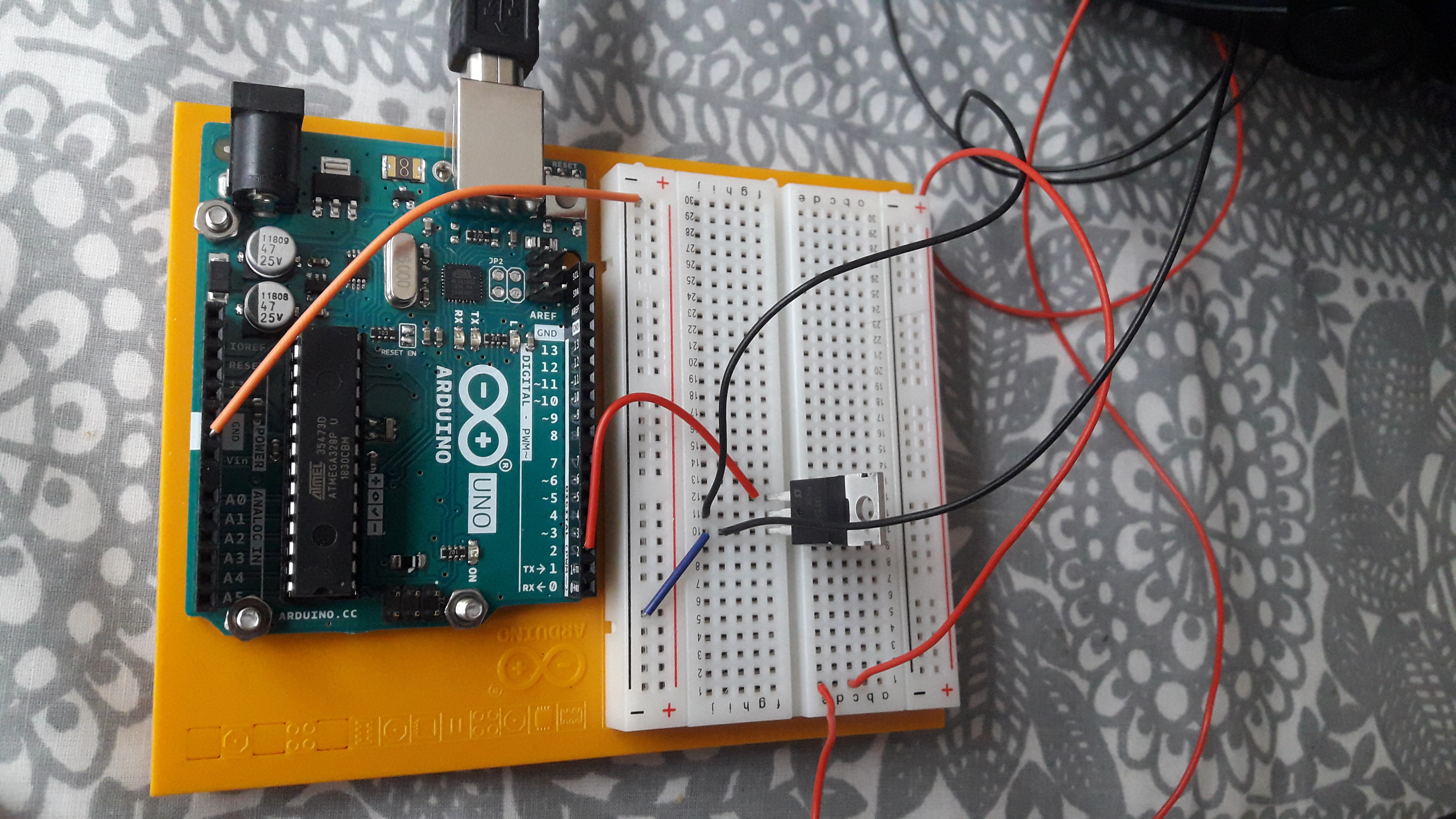
MOSFET
See forexample Arduino Starter Kit project 09 motorized pinwheel but I use digital pin number 2..
MOSFET
Comments
Only logged in users can leave comments