Devices & Components
1
USB-A to Mini-USB Cable
1
Jumper wires (generic)
1
DHT22 Temperature Sensor
1
ESP8266 ESP-12E
1
Switch Actuator, Head for spring return push-button
1
Resistor 10k ohm
1
Breadboard (generic)
1
5 mm LED: Red
Project description
Code
Code
c_cpp
Here is the project code...
1//----------------------------------------Include the NodeMCU ESP8266   Library
2//----------------------------------------see here: https://www.youtube.com/watch?v=8jMr94B8iN0   to add NodeMCU ESP12E ESP8266 library and board (ESP8266 Core SDK)
3#include <ESP8266WiFi.h>
4#include   <WiFiClientSecure.h>
5#include <DNSServer.h>
6#include <WiFiManager.h>
7#include   <DHT.h>
8//----------------------------------------
9
10int button = D3;
11int   led = D1;
12int temp = 0;
13
14#define DHTTYPE DHT22 //--> Defines the type of   DHT sensor used (DHT11, DHT21, and DHT22), in this project the sensor used is DHT11.
15
16const   int DHTPin = D2; //--> The pin used for the DHT11 sensor is Pin D1 = GPIO5
17DHT   dht(DHTPin, DHTTYPE); //--> Initialize DHT sensor, DHT dht(Pin_used, Type_of_DHT_Sensor);
18
19//----------------------------------------Host   & httpsPort
20const char* host = "script.google.com";
21const int httpsPort   = 443;
22//----------------------------------------
23
24WiFiClientSecure client;   //--> Create a WiFiClientSecure object.
25
26String GAS_ID = "AKfycbwriCAA9Gjh9V0sspRh8l_PPrfINCba-OwKsjBFoElH1B0ITnnGUqn9-1gTVRBLi3b-";   //--> spreadsheet script ID
27
28//--------------------------------------- void   setup
29void setup() {
30  // put your setup code here, to run once:
31  Serial.begin(115200);
32   delay(500);
33
34  pinMode(button, INPUT);
35  pinMode(led, OUTPUT);
36  Serial.begin(115200);
37
38   dht.begin();  //--> Start reading DHT11 sensors
39  delay(500);
40  //----------------------------------------Wait   for connection
41  Serial.print("Connecting");
42  while (WiFi.status() != WL_CONNECTED)   {
43    digitalWrite(D1, HIGH);
44    Serial.print(".");
45
46    WiFiManager   wifiManager;
47    wifiManager.autoConnect("Harun");
48    Serial.println("Connected");
49   }
50
51
52  //----------------------------------------If successfully connected   to the wifi router, the IP Address that will be visited is displayed in the serial   monitor
53  Serial.println("");
54  Serial.print("Successfully connected to   : ");
55  //  Serial.println(ssid);
56  Serial.print("IP address: ");
57  Serial.println(WiFi.localIP());
58   Serial.println();
59  //--------------------------------
60
61  client.setInsecure();
62}
63
64//-----------------resetfunction
65void   resetwifi() {
66  WiFiManager wm;
67  wm.resetSettings();
68  ESP.restart();
69}
70
71void   resetwifi() {
72  WiFiManager wm;
73  wm.resetSettings();
74  Serial.println("reset   Done");
75}
76
77
78//----------------------------------void loop
79void loop()   {
80
81  int temp = digitalRead(button);
82
83  if (temp == LOW) {
84    resetwifi();
85     ESP.restart();
86    Serial.println("LED ON");
87
88  }
89  else {
90     digitalWrite(led, LOW);
91    Serial.println("LED OFF");
92  }
93  // Reading   temperature or humidity takes about 250 milliseconds!
94  // Sensor readings may   also be up to 2 seconds 'old' (its a very slow sensor)
95  int h = dht.readHumidity();
96   // Read temperature as Celsius (the default)
97  float t = dht.readTemperature();
98
99   // Check if any reads failed and exit early (to try again).
100  if (isnan(h)   || isnan(t)) {
101    Serial.println("Failed to read from DHT sensor !");
102     delay(500);
103    return;
104  }
105  String Temp = "Temperature : " + String(t)   + " C";
106  String Humi = "Humidity : " + String(h) + " %";
107  Serial.println(Temp);
108   Serial.println(Humi);
109
110  sendData(t, h); //--> Calls the sendData Subroutine
111}
112//==============================================================================   void sendData
113// Subroutine for sending data to Google Sheets
114void sendData(float   tem, int hum) {
115  Serial.println("==========");
116  Serial.print("connecting   to ");
117  Serial.println(host);
118
119  //----------------------------------------Connect   to Google host
120  if (!client.connect(host, httpsPort)) {
121    Serial.println("connection   failed");
122    return;
123  }
124  //----------------------------------------
125
126   //----------------------------------------Processing data and sending data
127   String string_temperature =  String(tem);
128  // String string_temperature =   String(tem, DEC);
129  String string_humidity =  String(hum, DEC);
130  String   url = "/macros/s/" + GAS_ID + "/exec?temperature=" + string_temperature + "&humidity="   + string_humidity;
131  Serial.print("requesting URL: ");
132  Serial.println(url);
133
134   client.print(String("GET ") + url + " HTTP/1.1\
\
135" +
136               "Host:   " + host + "\
\
137" +
138               "User-Agent: BuildFailureDetectorESP8266\
\
139"   +
140               "Connection: close\
\
141\
\
142");
143
144  Serial.println("request   sent");
145  //----------------------------------------
146
147  //----------------------------------------Checking   whether the data was sent successfully or not
148  while (client.connected()) {
149     String line = client.readStringUntil('\
150');
151    if (line == "\
") {
152       Serial.println("headers received");
153      break;
154    }
155  }
156   String line = client.readStringUntil('\
157');
158  if (line.startsWith("{\\"state\\":\\"success\\""))   {
159    Serial.println("esp8266/Arduino CI successfull!");
160  } else {
161     Serial.println("esp8266/Arduino CI has failed");
162  }
163  Serial.print("reply   was : ");
164  Serial.println(line);
165  Serial.println("closing connection");
166   Serial.println("==========");
167  Serial.println();
168}
169
Code
c_cpp
Here is the project code...
1//----------------------------------------Include the NodeMCU ESP8266  Library
2//----------------------------------------see here: https://www.youtube.com/watch?v=8jMr94B8iN0  to add NodeMCU ESP12E ESP8266 library and board (ESP8266 Core SDK)
3#include <ESP8266WiFi.h>
4#include  <WiFiClientSecure.h>
5#include <DNSServer.h>
6#include <WiFiManager.h>
7#include  <DHT.h>
8//----------------------------------------
9
10int button = D3;
11int  led = D1;
12int temp = 0;
13
14#define DHTTYPE DHT22 //--> Defines the type of  DHT sensor used (DHT11, DHT21, and DHT22), in this project the sensor used is DHT11.
15
16const  int DHTPin = D2; //--> The pin used for the DHT11 sensor is Pin D1 = GPIO5
17DHT  dht(DHTPin, DHTTYPE); //--> Initialize DHT sensor, DHT dht(Pin_used, Type_of_DHT_Sensor);
18
19//----------------------------------------Host  & httpsPort
20const char* host = "script.google.com";
21const int httpsPort  = 443;
22//----------------------------------------
23
24WiFiClientSecure client;  //--> Create a WiFiClientSecure object.
25
26String GAS_ID = "AKfycbwriCAA9Gjh9V0sspRh8l_PPrfINCba-OwKsjBFoElH1B0ITnnGUqn9-1gTVRBLi3b-";  //--> spreadsheet script ID
27
28//--------------------------------------- void  setup
29void setup() {
30  // put your setup code here, to run once:
31  Serial.begin(115200);
32  delay(500);
33
34  pinMode(button, INPUT);
35  pinMode(led, OUTPUT);
36  Serial.begin(115200);
37
38  dht.begin();  //--> Start reading DHT11 sensors
39  delay(500);
40  //----------------------------------------Wait  for connection
41  Serial.print("Connecting");
42  while (WiFi.status() != WL_CONNECTED)  {
43    digitalWrite(D1, HIGH);
44    Serial.print(".");
45
46    WiFiManager  wifiManager;
47    wifiManager.autoConnect("Harun");
48    Serial.println("Connected");
49  }
50
51
52  //----------------------------------------If successfully connected  to the wifi router, the IP Address that will be visited is displayed in the serial  monitor
53  Serial.println("");
54  Serial.print("Successfully connected to  : ");
55  //  Serial.println(ssid);
56  Serial.print("IP address: ");
57  Serial.println(WiFi.localIP());
58  Serial.println();
59  //--------------------------------
60
61  client.setInsecure();
62}
63
64//-----------------resetfunction
65void  resetwifi() {
66  WiFiManager wm;
67  wm.resetSettings();
68  ESP.restart();
69}
70
71void  resetwifi() {
72  WiFiManager wm;
73  wm.resetSettings();
74  Serial.println("reset  Done");
75}
76
77
78//----------------------------------void loop
79void loop()  {
80
81  int temp = digitalRead(button);
82
83  if (temp == LOW) {
84    resetwifi();
85    ESP.restart();
86    Serial.println("LED ON");
87
88  }
89  else {
90    digitalWrite(led, LOW);
91    Serial.println("LED OFF");
92  }
93  // Reading  temperature or humidity takes about 250 milliseconds!
94  // Sensor readings may  also be up to 2 seconds 'old' (its a very slow sensor)
95  int h = dht.readHumidity();
96  // Read temperature as Celsius (the default)
97  float t = dht.readTemperature();
98
99  // Check if any reads failed and exit early (to try again).
100  if (isnan(h)  || isnan(t)) {
101    Serial.println("Failed to read from DHT sensor !");
102    delay(500);
103    return;
104  }
105  String Temp = "Temperature : " + String(t)  + " C";
106  String Humi = "Humidity : " + String(h) + " %";
107  Serial.println(Temp);
108  Serial.println(Humi);
109
110  sendData(t, h); //--> Calls the sendData Subroutine
111}
112//==============================================================================  void sendData
113// Subroutine for sending data to Google Sheets
114void sendData(float  tem, int hum) {
115  Serial.println("==========");
116  Serial.print("connecting  to ");
117  Serial.println(host);
118
119  //----------------------------------------Connect  to Google host
120  if (!client.connect(host, httpsPort)) {
121    Serial.println("connection  failed");
122    return;
123  }
124  //----------------------------------------
125
126  //----------------------------------------Processing data and sending data
127  String string_temperature =  String(tem);
128  // String string_temperature =  String(tem, DEC);
129  String string_humidity =  String(hum, DEC);
130  String  url = "/macros/s/" + GAS_ID + "/exec?temperature=" + string_temperature + "&humidity="  + string_humidity;
131  Serial.print("requesting URL: ");
132  Serial.println(url);
133
134  client.print(String("GET ") + url + " HTTP/1.1\
\
135" +
136               "Host:  " + host + "\
\
137" +
138               "User-Agent: BuildFailureDetectorESP8266\
\
139"  +
140               "Connection: close\
\
141\
\
142");
143
144  Serial.println("request  sent");
145  //----------------------------------------
146
147  //----------------------------------------Checking  whether the data was sent successfully or not
148  while (client.connected()) {
149    String line = client.readStringUntil('\n');
150    if (line == "\
") {
151      Serial.println("headers received");
152      break;
153    }
154  }
155  String line = client.readStringUntil('\n');
156  if (line.startsWith("{\\"state\\":\\"success\\""))  {
157    Serial.println("esp8266/Arduino CI successfull!");
158  } else {
159    Serial.println("esp8266/Arduino CI has failed");
160  }
161  Serial.print("reply  was : ");
162  Serial.println(line);
163  Serial.println("closing connection");
164  Serial.println("==========");
165  Serial.println();
166}
167
Downloadable files
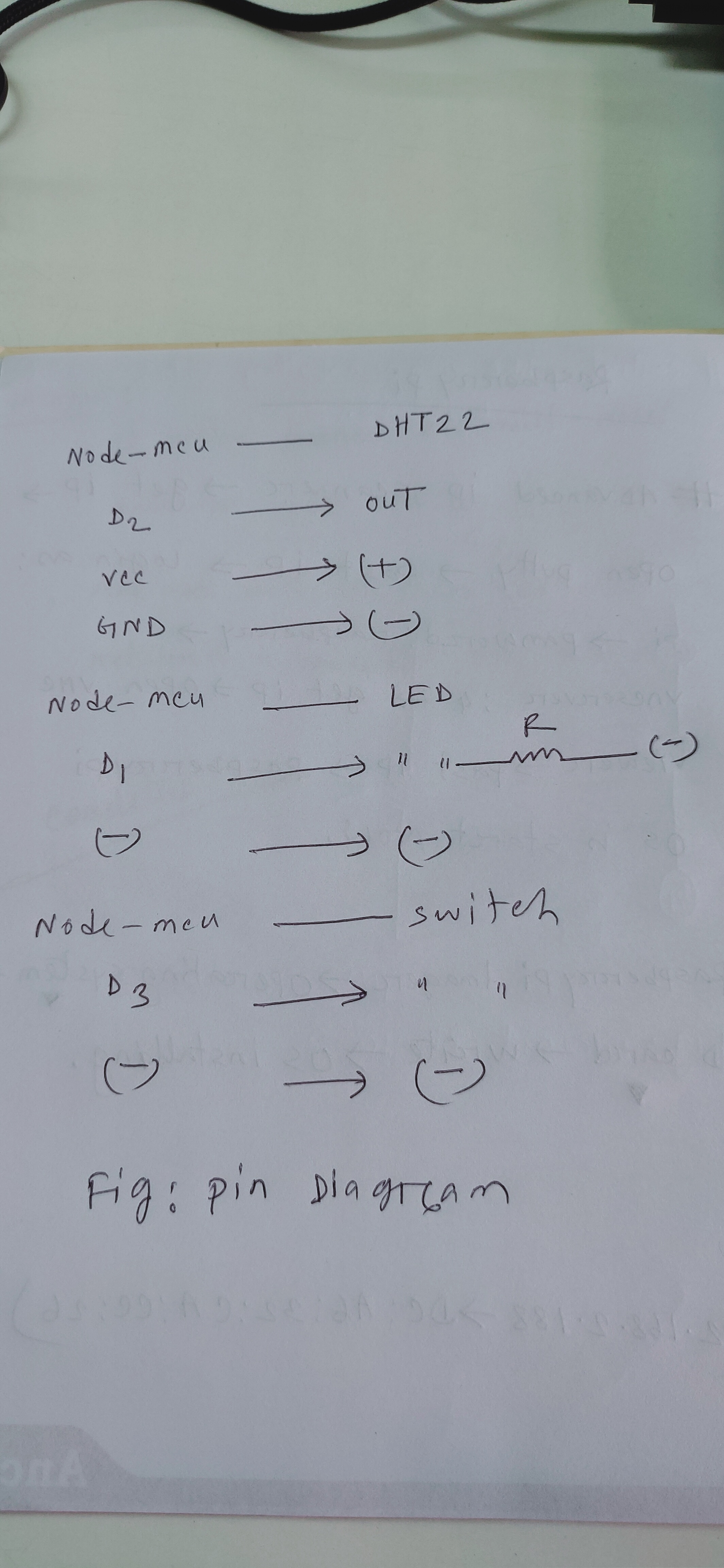
Pin Diagram
Here is the define all pin
Pin Diagram
Comments
Only logged in users can leave comments