DHT22 Data to Google sheet Using ESP8266 without credential.
Here the DHT22 sensor is connected to ESP8266 NodeMCU and ESP8266 NodeMCU is connected to Internet through WiFi to send the DHT22.
Devices & Components
1
Jumper wires (generic)
1
DHT22 Temperature Sensor
1
ESP8266 ESP-12E
1
Breadboard (generic)
Project description
Code
Code
c_cpp
Here is the project code.
1//----------------------------------------Include the NodeMCU ESP8266  Library
2//----------------------------------------see here: https://www.youtube.com/watch?v=8jMr94B8iN0  to add NodeMCU ESP12E ESP8266 library and board (ESP8266 Core SDK)
3#include <ESP8266WiFi.h>
4#include  <WiFiClientSecure.h>
5#include <DNSServer.h>
6#include <WiFiManager.h>
7//----------------------------------------
8//----------------------------------------Include  the DHT Library
9#include "DHT.h"
10//----------------------------------------
11
12#define  DHTTYPE DHT22 //--> Defines the type of DHT sensor used (DHT11, DHT21, and DHT22),  in this project the sensor used is DHT11.
13
14const int DHTPin = D1; //--> The  pin used for the DHT11 sensor is Pin D1 = GPIO5
15DHT dht(DHTPin, DHTTYPE); //-->  Initialize DHT sensor, DHT dht(Pin_used, Type_of_DHT_Sensor);
16
17#define ON_Board_LED  2  //--> Defining an On Board LED, used for indicators when the process of connecting  to a wifi router
18
19//----------------------------------------SSID and Password  of your WiFi router.
20//const char* ssid = "SDL AP1"; //--> Your wifi name or  SSID.
21//const char* password = "Systechd33"; //--> Your wifi password.
22//----------------------------------------
23
24//----------------------------------------Host  & httpsPort
25const char* host = "script.google.com";
26const int httpsPort  = 443;
27//----------------------------------------
28
29WiFiClientSecure client;  //--> Create a WiFiClientSecure object.
30
31String GAS_ID = "AKfycbwriCAA9Gjh9V0sspRh8l_PPrfINCba-OwKsjBFoElH1B0ITnnGUqn9-1gTVRBLi3b-";  //--> spreadsheet script ID
32
33//==============================================================================  void setup
34void setup() {
35  // put your setup code here, to run once:
36  Serial.begin(115200);
37  delay(500);
38
39  dht.begin();  //--> Start reading  DHT11 sensors
40  delay(500);
41
42//  WiFi.begin(ssid, password); //--> Connect  to your WiFi router
43  Serial.println("");
44
45  pinMode(ON_Board_LED,OUTPUT);  //--> On Board LED port Direction output
46  digitalWrite(ON_Board_LED, HIGH);  //--> Turn off Led On Board
47
48  //----------------------------------------Wait  for connection
49  Serial.print("Connecting");
50  while (WiFi.status() != WL_CONNECTED)  {
51    Serial.print(".");
52    //----------------------------------------Make  the On Board Flashing LED on the process of connecting to the wifi router.
53    digitalWrite(ON_Board_LED,  LOW);
54    delay(250);
55    digitalWrite(ON_Board_LED, HIGH);
56    delay(250);
57    //----------------------------------------
58  }
59  //----------------------------------------
60  digitalWrite(ON_Board_LED, HIGH); //--> Turn off the On Board LED when it is connected  to the wifi router.
61  //----------------------------------------If successfully  connected to the wifi router, the IP Address that will be visited is displayed in  the serial monitor
62  Serial.println("");
63  Serial.print("Successfully connected  to : ");
64//  Serial.println(ssid);
65  Serial.print("IP address: ");
66  Serial.println(WiFi.localIP());
67  Serial.println();
68  //----------------------------------------
69
70  client.setInsecure();
71}
72//==============================================================================
73//==============================================================================  void loop
74void loop() {
75  // Reading temperature or humidity takes about 250  milliseconds!
76  // Sensor readings may also be up to 2 seconds 'old' (its a very  slow sensor)
77  int h = dht.readHumidity();
78  // Read temperature as Celsius  (the default)
79  float t = dht.readTemperature();
80
81  // Check if any reads  failed and exit early (to try again).
82  if (isnan(h) || isnan(t)) {
83    Serial.println("Failed  to read from DHT sensor !");
84    delay(500);
85    return;
86  }
87  String  Temp = "Temperature : " + String(t) + " C";
88  String Humi = "Humidity :  " + String(h) + " %";
89  Serial.println(Temp);
90  Serial.println(Humi);
91
92  sendData(t, h); //--> Calls the sendData Subroutine
93}
94//==============================================================================
95//==============================================================================  void sendData
96// Subroutine for sending data to Google Sheets
97void sendData(float  tem, int hum) {
98  Serial.println("==========");
99  Serial.print("connecting  to ");
100  Serial.println(host);
101
102  //----------------------------------------Connect  to Google host
103  if (!client.connect(host, httpsPort)) {
104    Serial.println("connection  failed");
105    return;
106  }
107  //----------------------------------------
108
109  //----------------------------------------Processing data and sending data
110  String string_temperature =  String(tem);
111  // String string_temperature =  String(tem, DEC);
112  String string_humidity =  String(hum, DEC);
113  String  url = "/macros/s/" + GAS_ID + "/exec?temperature=" + string_temperature + "&humidity="  + string_humidity;
114  Serial.print("requesting URL: ");
115  Serial.println(url);
116
117  client.print(String("GET ") + url + " HTTP/1.1\
\
118" +
119         "Host:  " + host + "\
\
120" +
121         "User-Agent: BuildFailureDetectorESP8266\
\
122"  +
123         "Connection: close\
\
124\
\
125");
126
127  Serial.println("request  sent");
128  //----------------------------------------
129
130  //----------------------------------------Checking  whether the data was sent successfully or not
131  while (client.connected()) {
132    String line = client.readStringUntil('\n');
133    if (line == "\
") {
134      Serial.println("headers received");
135      break;
136    }
137  }
138  String line = client.readStringUntil('\n');
139  if (line.startsWith("{\\"state\\":\\"success\\""))  {
140    Serial.println("esp8266/Arduino CI successfull!");
141  } else {
142    Serial.println("esp8266/Arduino CI has failed");
143  }
144  Serial.print("reply  was : ");
145  Serial.println(line);
146  Serial.println("closing connection");
147  Serial.println("==========");
148  Serial.println();
149  //----------------------------------------
150}
151//==============================================================================
152
Downloadable files
Pin Diagram
Here is the circuit pin design for the device
Pin Diagram
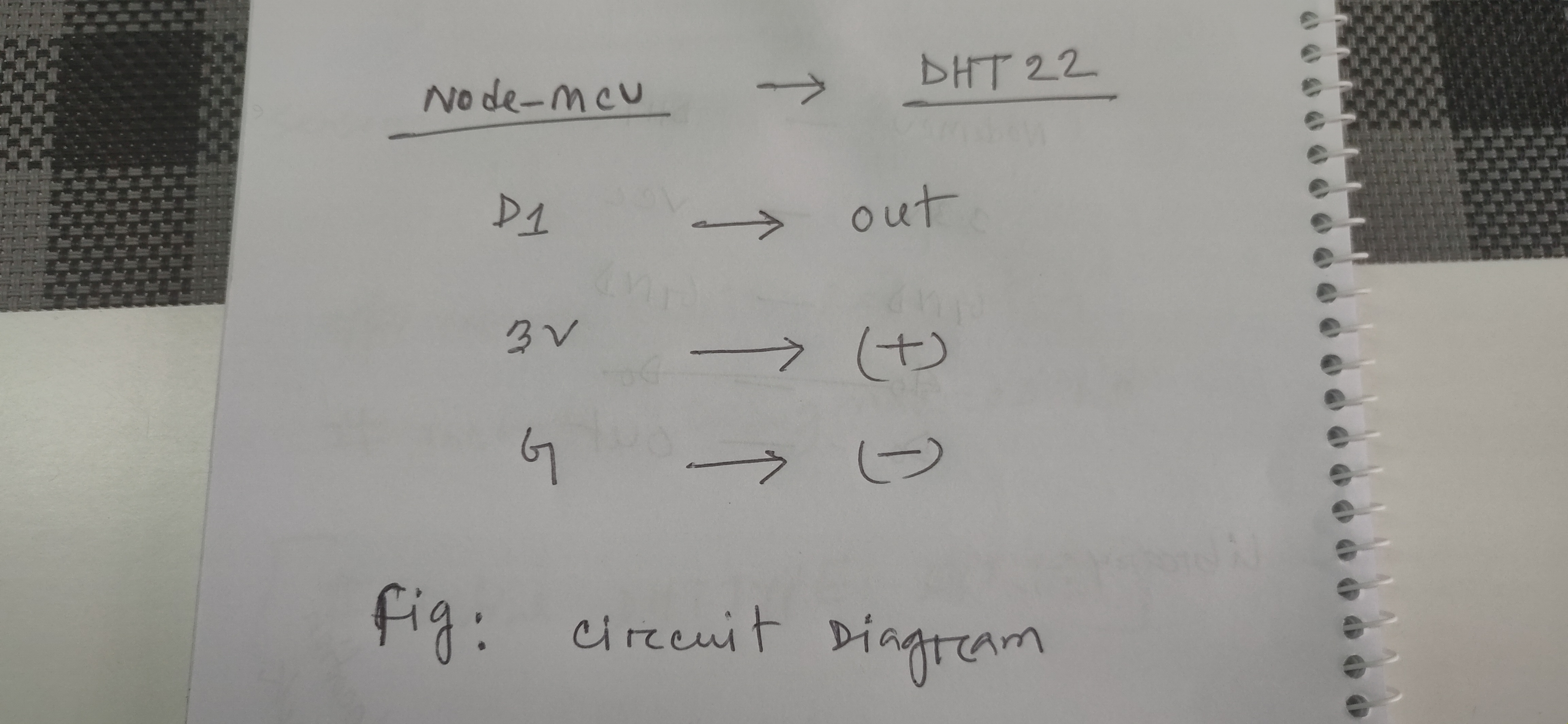
Pin Diagram
Here is the circuit pin design for the device
Pin Diagram
Comments
Only logged in users can leave comments