Devices & Components
Arduino Uno Rev3
Male/Male Jumper Wires
SG90 Micro-servo motor
Software & Tools
Arduino Web Editor
Project description
Code
CODE
java
just copie the code into web editor and upload it.
1 2 3#include <Servo.h> 4 5Servo myservo; 6int pos = 0; 7void setup() { 8 myservo.attach(9); // attaches the servo on pin 9 to the servo object 9} 10 11void loop() { 12 for (pos = 0; pos <= 180; pos += 1) { // goes from 0 degrees to 180 degrees 13 // in steps of 1 degree 14 myservo.write(pos); // tell servo to go to position in variable 'pos' 15 delay(15); // waits 15ms for the servo to reach the position 16 } 17 for (pos = 180; pos >= 0; pos -= 1) { // goes from 180 degrees to 0 degrees 18 myservo.write(pos); // tell servo to go to position in variable 'pos' 19 delay(15); // waits 15ms for the servo to reach the position 20 } 21}/* 22 23*/ 24 25
CODE
java
just copie the code into web editor and upload it.
1 2 3#include <Servo.h> 4 5Servo myservo; 6int pos = 0; 7void 8 setup() { 9 myservo.attach(9); // attaches the servo on pin 9 to the servo object 10} 11 12void 13 loop() { 14 for (pos = 0; pos <= 180; pos += 1) { // goes from 0 degrees to 180 15 degrees 16 // in steps of 1 degree 17 myservo.write(pos); // 18 tell servo to go to position in variable 'pos' 19 delay(15); // 20 waits 15ms for the servo to reach the position 21 } 22 for (pos = 180; pos >= 23 0; pos -= 1) { // goes from 180 degrees to 0 degrees 24 myservo.write(pos); 25 // tell servo to go to position in variable 'pos' 26 delay(15); 27 // waits 15ms for the servo to reach the position 28 } 29}/* 30 31*/ 32 33
Downloadable files
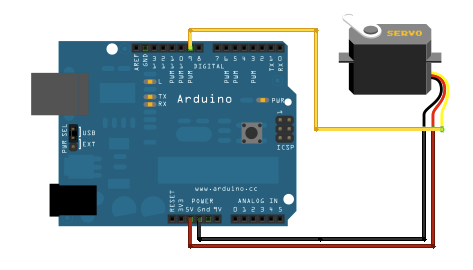
Diragram
connect the pins as shown yellow to negative 9 black to ground red to 5 volts
Diragram
Comments
Only logged in users can leave comments