Devices & Components
Arduino Uno Rev3
Single Turn Potentiometer- 10k ohms
SparkFun Serial Enabled 16x2 LCD - White on Black 3.3V
Jumper wires (generic)
Capacitive Moisture Sensor (v1.2)
Software & Tools
Arduino IDE
Project description
Code
Code
arduino
1// include LCD library 2#include <LiquidCrystal.h> 3 4// define constants for wet and dry sensor 5const int dry = 595; // value for dry sensor 6const int wet = 239; // value for wet sensor 7const int rs = 12, en = 11, d4 = 5, d5 = 4, d6 = 3, d7 = 2; // define pins corresponding with the above setup 8LiquidCrystal lcd(rs, en, d4, d5, d6, d7); // define which pins on the LCD are being used 9 10 11void setup() 12{ 13 Serial.begin(9600); // set serial monitor so values can be monitored via IDE 14 lcd.begin(16, 2); // set up the LCD's number of columns and rows 15 lcd.print("Soil Moisture: "); // Print a message to the LCD. 16 17 // set up LCD pins as follows (also see: https://www.arduino.cc/en/Tutorial/LibraryExamples/HelloWorld for setup of LCD): 18 // LCD RS pin to digital pin 12 19 // LCD Enable pin to digital pin 11 20 // LCD D4 pin to digital pin 5 21 // LCD D5 pin to digital pin 4 22 // LCD D6 pin to digital pin 3 23 // LCD D7 pin to digital pin 2 24 // LCD R/W pin to GND 25 // LCD VSS pin to GND 26 // LCD VCC pin to 5V 27 // LCD LED+ to 5V through a 220 ohm resistor 28 // LCD LED- to GND 29 30} 31 32void loop() 33{ 34 lcd.setCursor(0, 1); // set the LCD cursor to column 0, line 1 35 36 int sensorVal = analogRead(A0); // output analogue value as integer 37 int percentageHumididy = map(sensorVal, wet, dry, 100, 0); // set analogue value as percentage between 0% and 100% 38 Serial.print(percentageHumididy); // print output 39 Serial.println('%'); // add "%" sign after output to display as percentage 40 41 // SO FAR, THIS PRINTS VALUES IN THE SERIAL MONITOR. NOW WE HAVE TO PRINT TO THE LCD. Above, LCD library should be included in program. 42 43 lcd.print(percentageHumididy); // print the sensor value on LCD: 44 lcd.print('%'); // add "%" sign after output to display as percentage 45 46 delay(100); // restart loop after 1 second 47}
Code
arduino
1// include LCD library 2#include <LiquidCrystal.h> 3 4// define 5 constants for wet and dry sensor 6const int dry = 595; // value for dry sensor 7const 8 int wet = 239; // value for wet sensor 9const int rs = 12, en = 11, d4 = 5, d5 10 = 4, d6 = 3, d7 = 2; // define pins corresponding with the above setup 11LiquidCrystal 12 lcd(rs, en, d4, d5, d6, d7); // define which pins on the LCD are being used 13 14 15 16void setup() 17{ 18 Serial.begin(9600); // set serial monitor so values 19 can be monitored via IDE 20 lcd.begin(16, 2); // set up the LCD's number of columns 21 and rows 22 lcd.print("Soil Moisture: "); // Print a message to the LCD. 23 24 25 // set up LCD pins as follows (also see: https://www.arduino.cc/en/Tutorial/LibraryExamples/HelloWorld 26 for setup of LCD): 27 // LCD RS pin to digital pin 12 28 // LCD Enable pin to 29 digital pin 11 30 // LCD D4 pin to digital pin 5 31 // LCD D5 pin to digital 32 pin 4 33 // LCD D6 pin to digital pin 3 34 // LCD D7 pin to digital pin 2 35 36 // LCD R/W pin to GND 37 // LCD VSS pin to GND 38 // LCD VCC pin to 5V 39 40 // LCD LED+ to 5V through a 220 ohm resistor 41 // LCD LED- to GND 42 43} 44 45void 46 loop() 47{ 48 lcd.setCursor(0, 1); // set the LCD cursor to column 0, line 1 49 50 51 int sensorVal = analogRead(A0); // output analogue value as integer 52 int percentageHumididy 53 = map(sensorVal, wet, dry, 100, 0); // set analogue value as percentage between 54 0% and 100% 55 Serial.print(percentageHumididy); // print output 56 Serial.println('%'); 57 // add "%" sign after output to display as percentage 58 59 // SO FAR, THIS 60 PRINTS VALUES IN THE SERIAL MONITOR. NOW WE HAVE TO PRINT TO THE LCD. Above, LCD 61 library should be included in program. 62 63 lcd.print(percentageHumididy); // 64 print the sensor value on LCD: 65 lcd.print('%'); // add "%" sign after output 66 to display as percentage 67 68 delay(100); // restart loop after 1 second 69}
Downloadable files
Fritzing file
Fritzing compatible file containing breadboard design, schematic and code.
Fritzing file
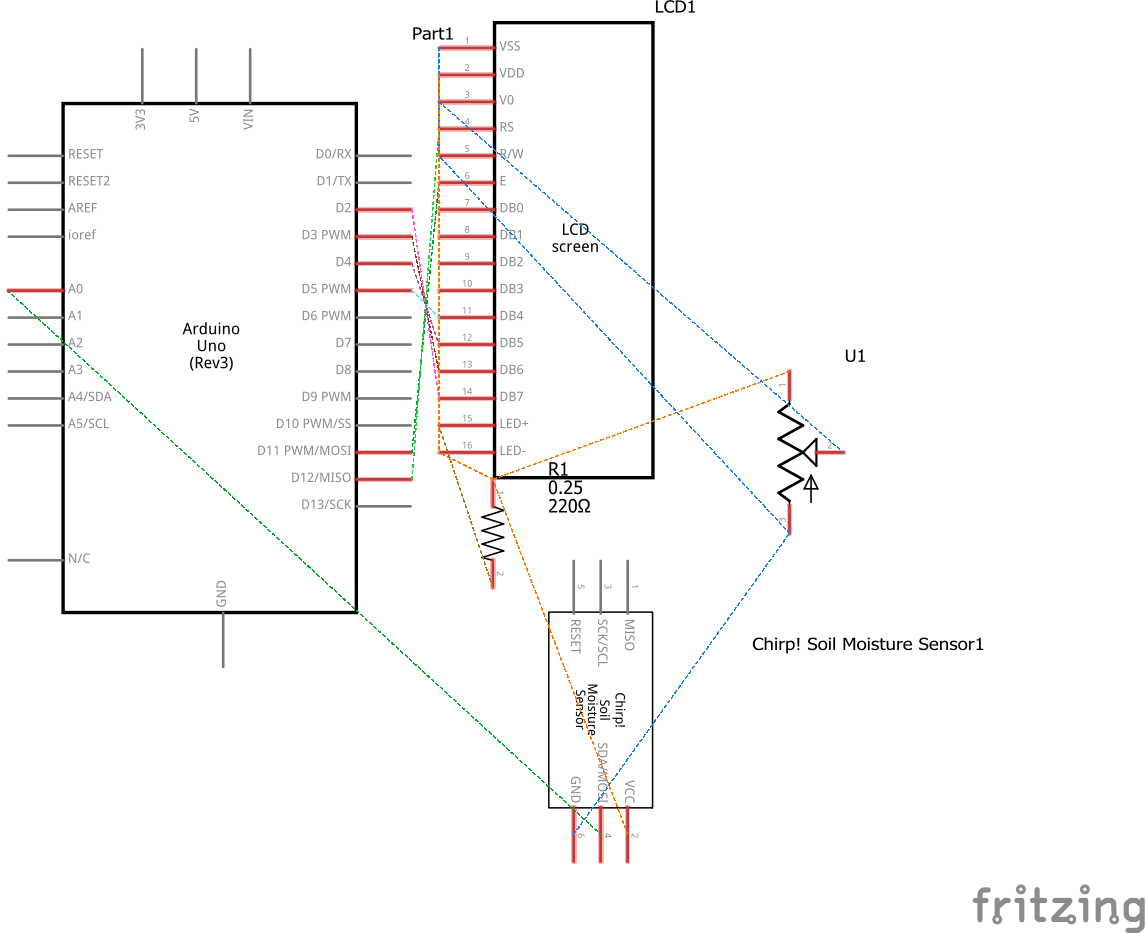
Schematic
Schematic
Fritzing file
Fritzing compatible file containing breadboard design, schematic and code.
Fritzing file
Schematic
Schematic

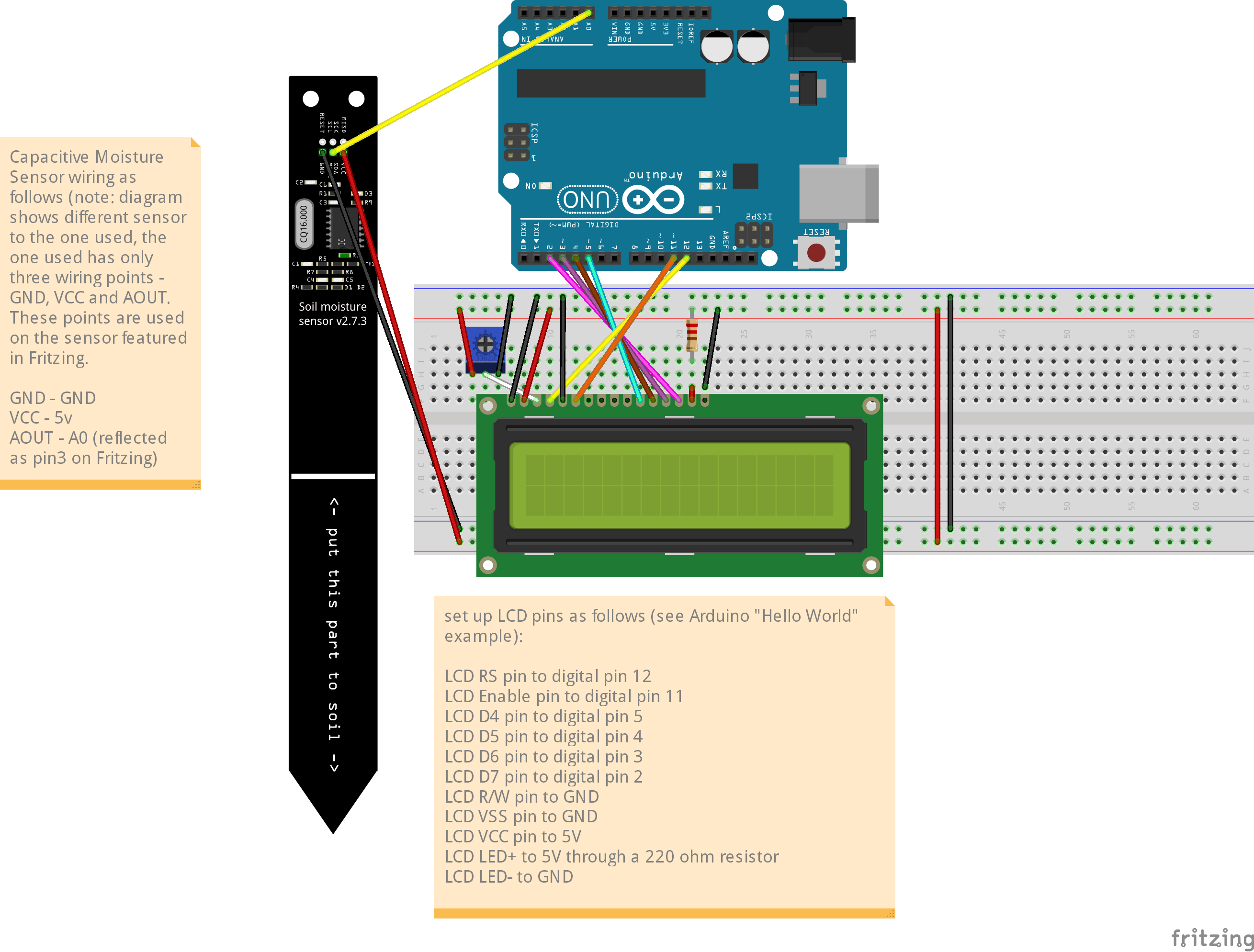
Breadboard design
Breadboard design
Comments
Only logged in users can leave comments