Devices & Components
Arduino Uno Rev3
10 jumper wires 150mm male
Jumper Male to Female 20 cm
Ultrasonic Sensor - HC-SR04
MG90 Micro Servo
Breadboard 100x160
Software & Tools
wokwi
Project description
Code
B_Scope
cpp
A Simple B Scope Display
1/* 2Code by Harshdeep Singh 3*/ 4#include <Wire.h> 5#include <Adafruit_GFX.h> 6#include <Adafruit_SSD1306.h> 7#include <Servo.h> 8 9// Define OLED width and height 10#define SCREEN_WIDTH 128 11#define SCREEN_HEIGHT 64 12 13// Define I2C address for the OLED 14#define OLED_RESET -1 15Adafruit_SSD1306 display(SCREEN_WIDTH, SCREEN_HEIGHT, &Wire, OLED_RESET); 16 17// Define pins for the ultrasonic sensor 18#define TRIG_PIN 9 19#define ECHO_PIN 10 20 21// Create a Servo object 22Servo myservo; 23 24void setup() { 25 // Initialize the servo motor 26 myservo.attach(6); // Attach the servo to pin 6 27 28 // Initialize the ultrasonic sensor pins 29 pinMode(TRIG_PIN, OUTPUT); 30 pinMode(ECHO_PIN, INPUT); 31 32 // Initialize the display 33 if (!display.begin(SSD1306_SWITCHCAPVCC, 0x3C)) { 34 Serial.println(F("SSD1306 allocation failed")); 35 for (;;); 36 } 37 38 // Clear the buffer 39 display.clearDisplay(); 40 41 // Draw the axes and labels 42 drawAxes(); 43 44 // Initialize serial communication for debugging 45 Serial.begin(9600); 46} 47 48void loop() { 49 // Erase the previous scan 50 display.clearDisplay(); 51 52 // Draw the axes and labels 53 drawAxes(); 54 55 // Sweep the servo from 0 to 180 degrees in 30 degree increments 56 for (int angle = 0; angle <= 180; angle += 30) { 57 myservo.write(angle); 58 delay(500); // Wait for the servo to reach the position 59 60 // Get the distance from the ultrasonic sensor 61 long distance = getDistance(); 62 63 // Plot the point on the OLED 64 plotPoint(angle, distance); 65 66 // Display the changes on the screen 67 display.display(); 68 } 69} 70 71void drawAxes() { 72 display.setTextSize(1); 73 display.setTextColor(SSD1306_WHITE); 74 75 // Draw x-axis (0 to 180) 76 display.drawLine(20, 50, 120, 50, SSD1306_WHITE); // X-axis line 77 78 // Draw x-axis tick marks 79 for (int i = 30; i <= 180; i += 30) { 80 int x = map(i, 0, 180, 20, 120); 81 display.drawLine(x, 48, x, 52, SSD1306_WHITE); 82 } 83 84 // Label origin and maximum for x-axis 85 display.setCursor(15, 52); 86 display.print(F("0")); 87 display.setCursor(110, 52); 88 display.print(F("180")); 89 90 // Draw y-axis (0 to 50) 91 display.drawLine(20, 10, 20, 50, SSD1306_WHITE); // Y-axis line 92 93 // Draw y-axis tick marks 94 for (int i = 10; i <= 50; i += 10) { 95 int y = map(i, 0, 50, 50, 10); 96 display.drawLine(18, y, 22, y, SSD1306_WHITE); 97 } 98 99 // Label origin and maximum for y-axis 100 display.setCursor(2, 45); 101 display.print(F("0")); 102 display.setCursor(2, 5); 103 display.print(F("50")); 104} 105 106long getDistance() { 107 // Send a 10us pulse to trigger the ultrasonic sensor 108 digitalWrite(TRIG_PIN, LOW); 109 delayMicroseconds(2); 110 digitalWrite(TRIG_PIN, HIGH); 111 delayMicroseconds(10); 112 digitalWrite(TRIG_PIN, LOW); 113 114 // Measure the duration of the echo pulse 115 long duration = pulseIn(ECHO_PIN, HIGH); 116 117 // Calculate the distance (cm) based on the duration 118 long distance = duration * 0.034 / 2; 119 120 // Cap the distance at 50 cm 121 distance = min(distance, 50); 122 123 return distance; 124} 125 126void plotPoint(int angle, long distance) { 127 // Map angle to x-axis (0 to 180) 128 int x = map(angle, 0, 180, 20, 120); 129 130 // Map distance to y-axis (0 to 50) 131 int y = map(distance, 0, 50, 50, 10); 132 133 // Draw a small box at the specified coordinate 134 display.fillRect(x - 1, y - 1, 3, 3, SSD1306_WHITE); 135}
Downloadable files
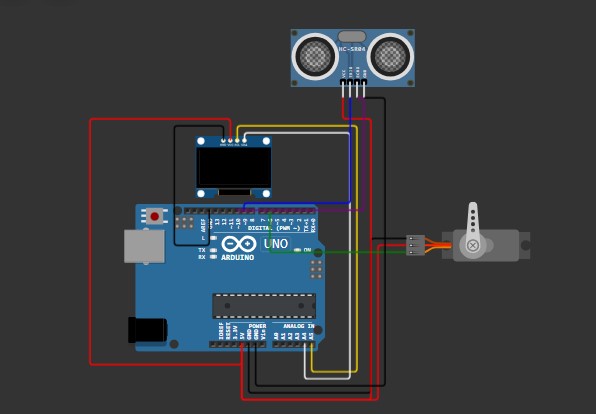
B Scope Circuit
Easy Circuit with less number of connections
Screenshot 2024-10-12 232641.jpg
Comments
Only logged in users can leave comments