Wemos D1 R32 Web Display of Temperature, Humidity and Barometric Pressure
A web-enabled weather station using a DHT22 temperature and humidity sensor, a BMP280 barometric pressure sensor and NTP time.
Devices & Components
1
Wemos D1 R32
1
DHT22 Digital Temperature & Humidity Sensor Module
1
BME280/BMP280
Software & Tools

Arduino IDE
1
NTP Pool Project
Project description
Code
Wemos DHT Web Header File
c
1#ifndef WEMOS_DHT_WEB_H
2#define WEMOS_DHT_WEB_H
3#define SSID_NAME "<YOUR SSID>"
4#define SSID_PASSWORD "<YOUR PASSWORD>"
5
6#define NTP_SERVER "pool.ntp.org"
7#define GMT_OFFSET -7 * 3600
8
9#define WEBSERVER_PORT 80
10
11#define TEMP_UPDATE_INTVL 30000
12#define CELCIUS_TO_FAHRENHEIT * 1.8 + 32
13
14// Data structure for timestamp, temperature and barometric pressure
15struct climate {
16  unsigned int month;
17  unsigned int day;
18  unsigned int year;
19  unsigned int hour;
20  unsigned int minute;
21  unsigned int second;
22  float tempF;
23  float humidity;
24  float heatIndex;
25  float dewPoint;
26  char comfortStatus[20];
27  float atmos_pressure;
28};
29
30#endif
Wemos DHT Web Application
c
1#include "DHTesp.h" // Click here to get the library: http://librarymanager/All#DHTesp
2#include <Wire.h>
3#include <WiFi.h>
4#include <WiFiUdp.h>
5#include <NTPClient.h>
6#include <TimeLib.h>
7#include <Adafruit_Sensor.h>
8#include <Adafruit_BMP280.h>
9#include "WemosDHTWeb.h"
10
11#ifndef ESP32
12#pragma message(THIS EXAMPLE IS FOR ESP32 ONLY!)
13#error Select ESP32 board.
14#endif
15
16DHTesp dht;
17Adafruit_BMP280 bmp;
18
19const char* ssid = SSID_NAME;
20const char* password = SSID_PASSWORD;
21const char* ntpServer = NTP_SERVER;
22const long  gmtOffset_sec = GMT_OFFSET;
23
24WiFiUDP ntpUDP;
25NTPClient timeClient(ntpUDP, ntpServer, gmtOffset_sec);
26
27int status = WL_IDLE_STATUS;
28WiFiClient client;
29
30WiFiServer server(WEBSERVER_PORT);
31
32climate cm;
33
34// Local Functions
35void initTemp();
36void getTemperature();
37void initWebServer();
38void sendWebClient();
39void initBarometer();
40void getPressure();
41
42/** Comfort profile */
43ComfortState cf;
44
45/** Pin number for DHT22 data pin */
46int dhtPin = 26;
47
48unsigned long currentMillis = 0;
49unsigned long intervalMillis = TEMP_UPDATE_INTVL;
50
51unsigned long time_now = millis();
52unsigned long updateTime = millis();
53
54
55/**
56 * initTemp
57 * Setup DHT library
58 */
59void initTemp() {
60  byte resultValue = 0;
61
62  // Initialize temperature sensor
63	dht.setup(dhtPin, DHTesp::DHT22);
64	Serial.println("DHT22 initiated");
65  return;
66}
67
68/**
69 * getTemperature
70 * Reads temperature from DHT22 sensor
71*/
72void getTemperature() {
73	// Reading temperature for humidity takes about 250 milliseconds!
74	// Sensor readings may also be up to 2 seconds 'old' (it's a very slow sensor)
75  TempAndHumidity newValues = dht.getTempAndHumidity();
76	// Check if any reads failed and exit early (to try again).
77	if (dht.getStatus() != 0) {
78		Serial.println("DHT22 error status: " + String(dht.getStatusString()));
79		return;
80	}
81
82	float heatIndex = dht.computeHeatIndex(newValues.temperature, newValues.humidity);
83  float dewPoint = dht.computeDewPoint(newValues.temperature, newValues.humidity);
84  float cr = dht.getComfortRatio(cf, newValues.temperature, newValues.humidity);
85
86  String comfortStatus;
87  switch(cf) {
88    case Comfort_OK:
89      comfortStatus = "Comfort_OK";
90      break;
91    case Comfort_TooHot:
92      comfortStatus = "Comfort_TooHot";
93      break;
94    case Comfort_TooCold:
95      comfortStatus = "Comfort_TooCold";
96      break;
97    case Comfort_TooDry:
98      comfortStatus = "Comfort_TooDry";
99      break;
100    case Comfort_TooHumid:
101      comfortStatus = "Comfort_TooHumid";
102      break;
103    case Comfort_HotAndHumid:
104      comfortStatus = "Comfort_HotAndHumid";
105      break;
106    case Comfort_HotAndDry:
107      comfortStatus = "Comfort_HotAndDry";
108      break;
109    case Comfort_ColdAndHumid:
110      comfortStatus = "Comfort_ColdAndHumid";
111      break;
112    case Comfort_ColdAndDry:
113      comfortStatus = "Comfort_ColdAndDry";
114      break;
115    default:
116      comfortStatus = "Unknown:";
117      break;
118  };
119
120  cm.month = month(timeClient.getEpochTime());
121  cm.day = day(timeClient.getEpochTime());
122  cm.year = year(timeClient.getEpochTime());
123  cm.hour = hour(timeClient.getEpochTime());
124  cm.minute = minute(timeClient.getEpochTime());
125  cm.second = second(timeClient.getEpochTime());
126
127  cm.tempF = newValues.temperature CELCIUS_TO_FAHRENHEIT;
128  cm.humidity = newValues.humidity;
129  cm.heatIndex = heatIndex CELCIUS_TO_FAHRENHEIT;
130  cm.dewPoint = dewPoint CELCIUS_TO_FAHRENHEIT;
131  sprintf(cm.comfortStatus, "%s", comfortStatus);
132	return;
133}
134
135/**
136 * initWebServer
137 * Setup Web Server library
138 */
139void initWebServer() {
140  byte resultValue = 0;
141
142  // Initialize web server
143  server.begin();
144	Serial.println("Web Server started");
145
146  return;
147}
148
149/**
150 * sendWebClient
151 * sends web client data
152*/
153void sendWebClient() {
154  WiFiClient client = server.available();
155  if (client)
156  {
157    Serial.println("New Client");
158    // an http request ends with a blank line
159    boolean currentLineIsBlank = true;
160    while (client.connected()) {
161      if (client.available()) {
162        char c = client.read();
163        Serial.write(c);
164        // if you've gotten to the end of the line (received a newline
165        // character) and the line is blank, the http request has ended,
166        // so you can send a reply
167        if (c == '\n' && currentLineIsBlank) {
168          // send a standard http response header
169          client.println("HTTP/1.1 200 OK");
170          client.println("Content-Type: text/html");
171          client.println("Connection: close");  // the connection will be closed after completion of the response
172          client.println("Refresh: 30");  // refresh the page automatically every 5 sec
173          client.println();
174          client.println("<!DOCTYPE HTML>");
175          client.println("<html>");
176
177          char timebuf[20];
178          sprintf(timebuf, "%02d/%02d/%04d %02d:%02d:%02d", cm.month, cm.day, cm.year, cm.hour, cm.minute, cm.second);
179          client.print(timebuf);
180          client.print("<br/>");
181          client.println("TempF:" + String(cm.tempF) + " Humidity:" + String(cm.humidity) + " Heat Index:" + String(cm.heatIndex) + " Dewpoint:" + String(cm.dewPoint) + " " + cm.comfortStatus  + "<br/>");
182          client.println("Barometric Pressure: " + String(cm.atmos_pressure) + "<br/>");
183          client.println("</html>");
184          break;
185        }
186        if (c == '\n') {
187          // you're starting a new line
188          currentLineIsBlank = true;
189        }
190        else if (c != '\r') {
191          // you've gotten a character on the current line
192          currentLineIsBlank = false;
193        }
194      }
195    }
196    delay(10);
197    client.stop();
198    Serial.println("Client disconnected.");
199  }
200  return;
201}
202
203/**
204 * initBarometer
205 * Setup Adafruit Library
206 */
207void initBarometer() {
208  byte resultValue = 0;
209
210  // Initialize temperature sensor
211  while (!bmp.begin(0x76))
212  {
213    Serial.println("Could not find a valid BMP280 sensor, check wiring!");
214    delay(10000);
215  }
216  return;
217}
218
219void getPressure()
220{
221  Serial.println("Barometric Pressure: " + String(bmp.readPressure()));
222  cm.atmos_pressure = bmp.readPressure() * 0.295299 / 1000;
223}
224
225void setup()
226{
227  Serial.begin(115200);
228  Serial.println();
229  Serial.println("DHT ESP32 example with tasks");
230
231  WiFi.begin();
232  while (WiFi.status() != WL_CONNECTED) {
233    delay(500);
234    Serial.print(".");
235  }
236  Serial.println("");
237  Serial.println("WiFi connected.");
238
239  Wire.begin();
240
241  printWifiStatus();
242
243  // Initialize Temperature
244  initTemp();
245
246  // Initialize Barometer
247  initBarometer();
248
249  // Initialize Web Server
250  initWebServer();
251
252  timeClient.begin();
253}
254
255void loop() {
256
257  sendWebClient();
258
259  if (millis() >= (updateTime + intervalMillis))
260  {
261    timeClient.update();
262    getTemperature();
263    getPressure();
264    updateTime = millis();
265  }
266  delay(100);
267}
268
269void printWifiStatus() {
270  // print the SSID of the network you're attached to:
271  Serial.print("SSID: ");
272  Serial.println(WiFi.SSID());
273
274  // print your WiFi shield's IP address:
275  IPAddress ip = WiFi.localIP();
276  Serial.print("IP Address: ");
277  Serial.println(ip);
278
279  // print the received signal strength:
280  long rssi = WiFi.RSSI();
281  Serial.print("Signal Strength (RSSI):");
282  Serial.print(rssi);
283  Serial.println(" dBm");
284}
Downloadable files
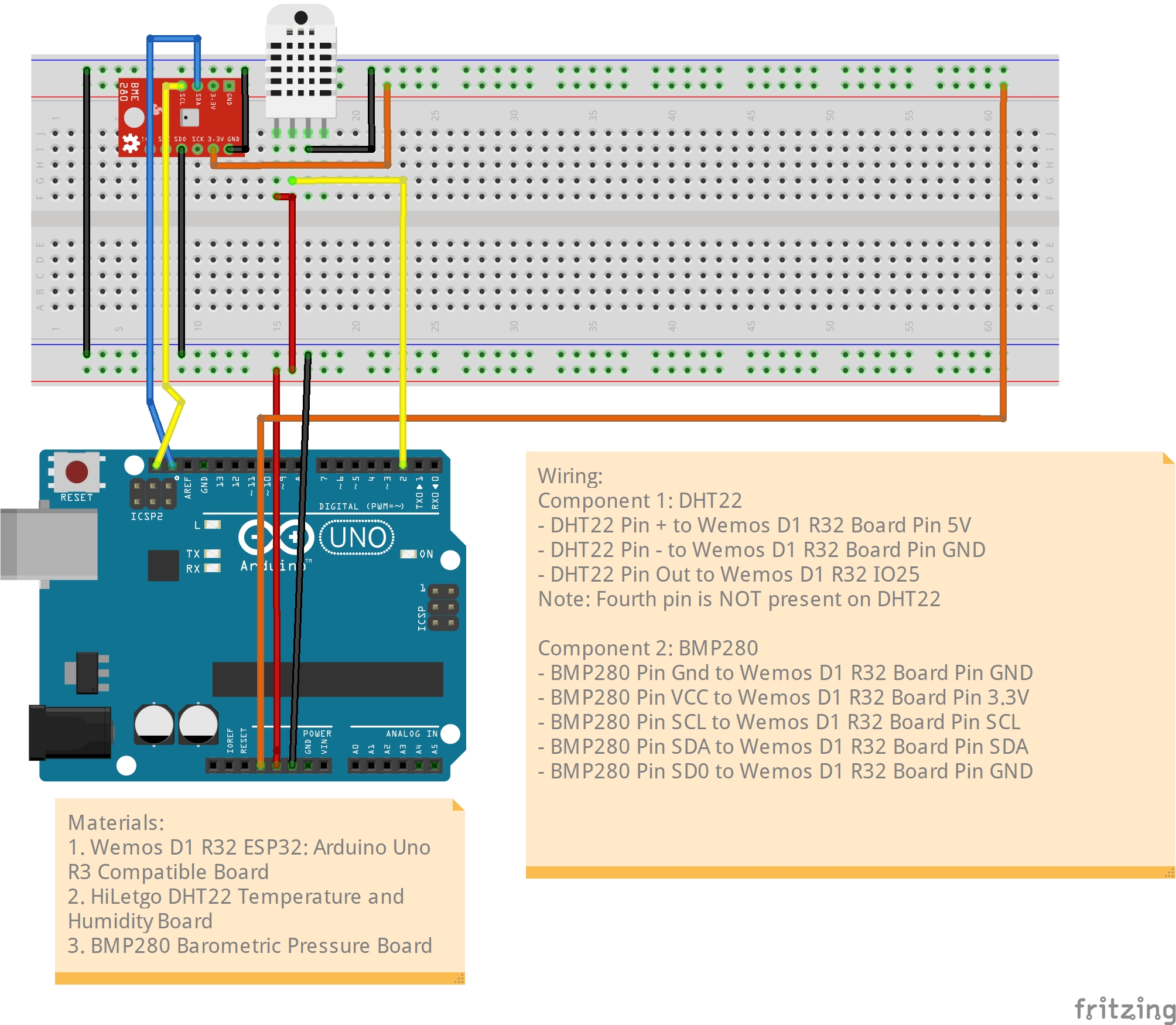
Wemos D1 R32 Weather Station Breadboard Design
WemosD1R32DHTandBMP280Sensors_bb.jpg
Documentation
ESP32 Pinout Reference
https://randomnerdtutorials.com/esp32-pinout-reference-gpios/
Wemos D1 R32 Board
https://designtech.blogs.auckland.ac.nz/d1-r32-esp32/
Comments
Only logged in users can leave comments