Devices & Components
Arduino Uno Rev3
10k Ohm Resistor
Mini Breadboard
Photoresistor
Oled display
Software & Tools
Arduino IDE
Project description
Code
Study Buddy: Code
cpp
Study Buddy: Code
1#include <Wire.h> 2#include <Adafruit_GFX.h> 3#include <Adafruit_SSD1306.h> 4 5#define SCREEN_WIDTH 128 // OLED display width, in pixels 6#define SCREEN_HEIGHT 64 // OLED display height, in pixels 7#define OLED_RESET -1 // Reset pin for OLED (no reset in this configuration) 8#define SCREEN_ADDRESS 0x3C // I2C address for the OLED display 9 10Adafruit_SSD1306 display(SCREEN_WIDTH, SCREEN_HEIGHT, &Wire, OLED_RESET); 11 12// Define the analog pin for reading light level 13int ReadPin = A0; 14// Variable to store the light level reading from the photoresistor 15int lightLevel = 0; 16 17// Function to draw neutral (open) eyes on the OLED display 18void drawNeutralEyes() { 19 display.clearDisplay(); 20 21 // Draw left eye (outer circle and pupil) 22 display.drawCircle(40, 32, 10, SSD1306_WHITE); // Outer circle 23 display.fillCircle(40, 32, 5, SSD1306_WHITE); // Pupil 24 25 // Draw right eye (outer circle and pupil) 26 display.drawCircle(88, 32, 10, SSD1306_WHITE); // Outer circle 27 display.fillCircle(88, 32, 5, SSD1306_WHITE); // Pupil 28 29 display.display(); // Update the display to show the eyes 30} 31 32// Function to draw closed eyes (used for both blinking and sleep mode) 33void drawClosedEyes() { 34 display.clearDisplay(); 35 36 // Draw left closed eye (horizontal line) 37 display.drawLine(30, 32, 50, 32, SSD1306_WHITE); 38 39 // Draw right closed eye (horizontal line) 40 display.drawLine(78, 32, 98, 32, SSD1306_WHITE); 41 42 display.display(); // Update the display to show closed eyes 43} 44 45// Function to simulate a blinking effect 46void blink() { 47 drawClosedEyes(); // Show closed eyes to mimic blinking 48 delay(200); // Brief delay to mimic blink duration 49 drawNeutralEyes(); // Return to open (neutral) eyes 50} 51 52void setup() { 53 // Initialize serial communication for debugging 54 Serial.begin(9600); 55 56 // Initialize the OLED display 57 if(!display.begin(SSD1306_SWITCHCAPVCC, SCREEN_ADDRESS)) { 58 Serial.println(F("SSD1306 allocation failed")); // Error message if display initialization fails 59 for(;;); // Halt program if initialization fails 60 } 61 62 // Set up the analog pin for input from the photoresistor 63 pinMode(ReadPin, INPUT); 64 65} 66 67void loop() { 68 // Read the light level from the photoresistor 69 lightLevel = analogRead(ReadPin); 70 71 // Check if the light level is above the threshold for study lighting 72 if (lightLevel > 650) { 73 blink(); // Show open and blinking eyes if lighting is adequate 74 delay(1500); // Delay between blinks 75 } else { 76 drawClosedEyes(); // Show closed eyes if lighting is too low 77 } 78}
Downloadable files
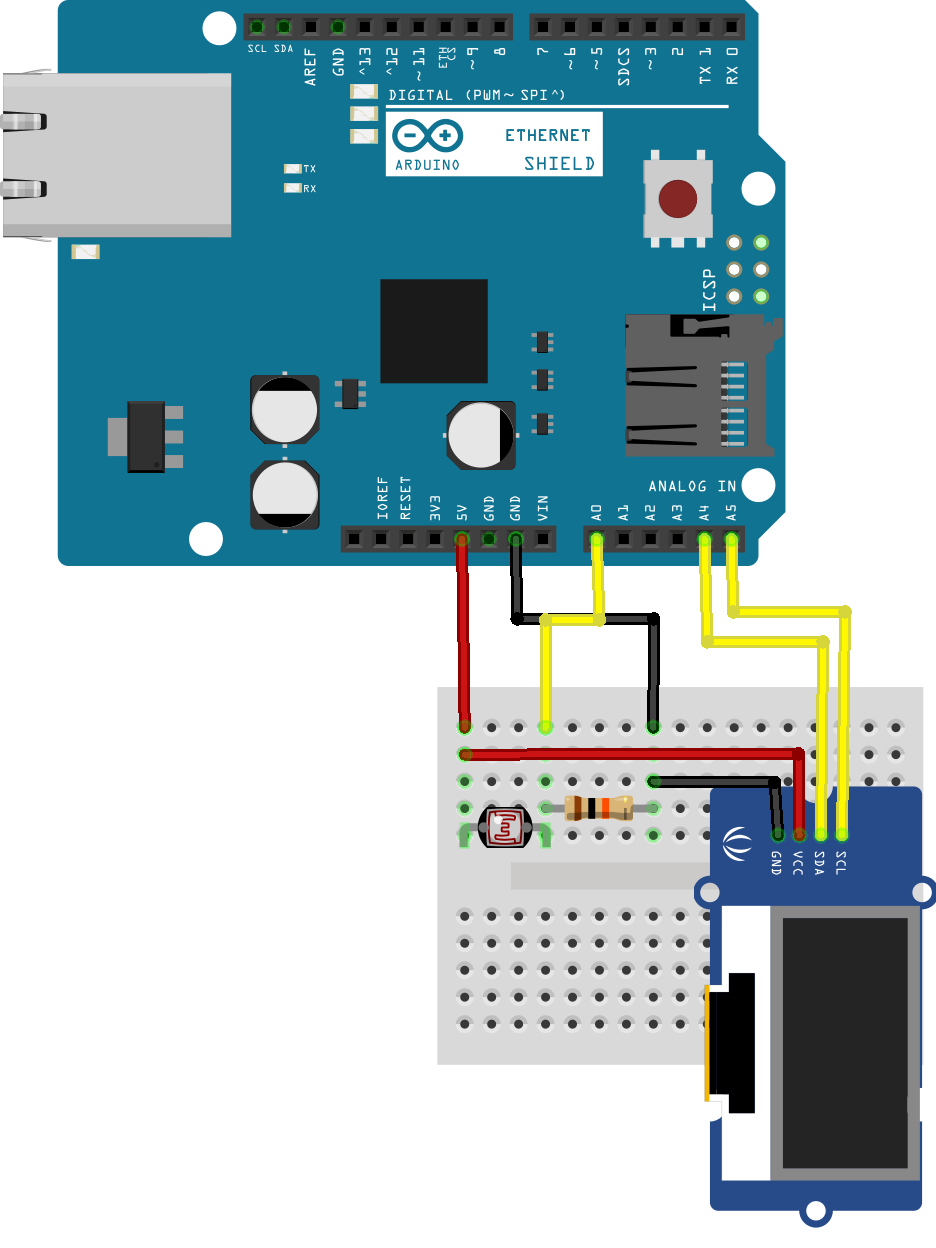
Circuit
Circuit diagram of this project
study_lights_check_bb.png

Documentation
Circuit
Circuit Diagram of this project
study_lights_check_bb.png
Comments
Only logged in users can leave comments