Devices & Components
1
Arduino Uno Rev3
1
Prototype shield (Stackable)
1
Piezo sounder
1
LCD shield with keyboard
Software & Tools

Arduino IDE
Project description
Code
Beep fitness test code
c_cpp
1
2//  Beep fitness test using Robot LCD keypad shield
3//  No ISR  version
4//  January 2021
5
6//CHECK TO SEE IF LCD IS ONE OF THE FAULTY ONES
7//MINE  HAD PROBLEMS SO I DESOLDERED AND REMOVED THE FAULTY PIN 10
8//REFERENCE - https://forum.arduino.cc/index.php?topic=96747.0  (Retrieved 7/June/2019)
9
10#include <LiquidCrystal.h>
11
12// select the pins  used on the LCD panel
13LiquidCrystal lcd(8, 9, 4, 5, 6, 7);
14// these have been  checked with http://www.robotshop.com/content/PDF/dfrobot-lcd-keypad-shield-schematic.pdf  and the working example above
15
16
17//------------------------------xxx
18const  int  buzzer_pin =3; //attach buzzer to this pin
19//------------------------------xxx
20
21//#define  test_me //Shortens the delays by a factor of 10 for test purposes
22
23
24void  setup()
25{
26//runs once - used for pin setup etc
27
28//set up display
29  lcd.begin(16, 2); // start the library
30  lcd.setCursor(0,0);
31  lcd.print("L----S----Vo2");
32
33  //dash out vo2 display at start up
34  lcd.setCursor(10,1);
35  lcd.write("-----");
36
37  pinMode (buzzer_pin,OUTPUT);
38
39}
40
41
42void loop()
43{
44
45//variables
46bool  buzzer_on = true;
47
48//number of shuttle repeats per level
49byte  shuttles[]={8,  8, 8, 9, 9, 10, 10, 11, 11, 11, 12, 12, 13, 13, 13, 14, 14, 15, 15, 16, 16, 16,  17, 17, 18};
50
51//shuttle times in hundredth seconds
52int shuttle_times[]={847,  800, 758, 720, 686, 655, 626, 600, 576, 554, 533, 514, 497, 480, 465, 450, 436,  424, 411, 400, 389, 379, 369, 360, 351};
53
54//vo2 display data
55float vo2[]={20.97,  23.86, 26.70, 29.84, 32.92, 36.28, 39.58, 43.12, 46.57, 49.94, 53.52, 57.00, 60.66,  64.20, 67.62, 71.17, 74.59, 78.09, 81.45, 84.85, 88.07, 91.12, 94.16, 96.99, 99.78};
56
57const  byte elements =25;//the number of elements in each of the arrays
58
59//variable  for vo2 data array counter
60int k=0;
61
62//variable for levels loop
63int  i=1;
64
65//Start beep
66tone(buzzer_pin,4000,100);//pin,frequency,duration in  milliseconds
67
68//levels loop
69while (i<=elements)
70{
71
72//write levels  (i)
73lcd.setCursor(0,1);
74lcd.print(i);
75
76
77//variable for shuttles  loop
78int j=1;
79
80//shuttles loop
81while (j<=shuttles[i-1])
82{
83
84//write  shuttles (j)
85lcd.setCursor(5,1);
86lcd.print(j);
87lcd.print(" ");
88
89//do  vo2 data write
90if (i==k+1 && j==shuttles[k] && k<elements)
91{
92  lcd.setCursor(10,1);
93  lcd.print(vo2[k]);
94  k++;
95  }
96
97//sound tone
98tone(buzzer_pin,4000,100);//doesn't  seem to affect timing of shuttle
99
100//wait for timer to finish - the delay is  shortened in test_me mode
101#ifdef test_me
102delay(shuttle_times[i]);
103#else
104delay((shuttle_times[i]*10));
105#endif
106
107
108//increment shuttle counter
109j++;
110
111}
112
113//increment level counter
114i++;
115
116  }
117
118
119//sound end beep
120tone(buzzer_pin,4000,3000);
121
122while(1){}//finished  so just hold here
123
124}//end of program
125
Beep fitness test code
c_cpp
1
2//  Beep fitness test using Robot LCD keypad shield
3//  No ISR
4  version
5//  January 2021
6
7//CHECK TO SEE IF LCD IS ONE OF THE FAULTY ONES
8//MINE
9  HAD PROBLEMS SO I DESOLDERED AND REMOVED THE FAULTY PIN 10
10//REFERENCE - https://forum.arduino.cc/index.php?topic=96747.0
11  (Retrieved 7/June/2019)
12
13#include <LiquidCrystal.h>
14
15// select the pins
16  used on the LCD panel
17LiquidCrystal lcd(8, 9, 4, 5, 6, 7);
18// these have been
19  checked with http://www.robotshop.com/content/PDF/dfrobot-lcd-keypad-shield-schematic.pdf
20  and the working example above
21
22
23//------------------------------xxx
24const
25  int  buzzer_pin =3; //attach buzzer to this pin
26//------------------------------xxx
27
28//#define
29  test_me //Shortens the delays by a factor of 10 for test purposes
30
31
32void
33  setup()
34{
35//runs once - used for pin setup etc
36
37//set up display
38
39  lcd.begin(16, 2); // start the library
40  lcd.setCursor(0,0);
41  lcd.print("L----S----Vo2");
42
43
44  //dash out vo2 display at start up
45  lcd.setCursor(10,1);
46  lcd.write("-----");
47
48
49  pinMode (buzzer_pin,OUTPUT);
50
51}
52
53
54void loop()
55{
56
57//variables
58bool
59  buzzer_on = true;
60
61//number of shuttle repeats per level
62byte  shuttles[]={8,
63  8, 8, 9, 9, 10, 10, 11, 11, 11, 12, 12, 13, 13, 13, 14, 14, 15, 15, 16, 16, 16,
64  17, 17, 18};
65
66//shuttle times in hundredth seconds
67int shuttle_times[]={847,
68  800, 758, 720, 686, 655, 626, 600, 576, 554, 533, 514, 497, 480, 465, 450, 436,
69  424, 411, 400, 389, 379, 369, 360, 351};
70
71//vo2 display data
72float vo2[]={20.97,
73  23.86, 26.70, 29.84, 32.92, 36.28, 39.58, 43.12, 46.57, 49.94, 53.52, 57.00, 60.66,
74  64.20, 67.62, 71.17, 74.59, 78.09, 81.45, 84.85, 88.07, 91.12, 94.16, 96.99, 99.78};
75
76const
77  byte elements =25;//the number of elements in each of the arrays
78
79//variable
80  for vo2 data array counter
81int k=0;
82
83//variable for levels loop
84int
85  i=1;
86
87//Start beep
88tone(buzzer_pin,4000,100);//pin,frequency,duration in
89  milliseconds
90
91//levels loop
92while (i<=elements)
93{
94
95//write levels
96  (i)
97lcd.setCursor(0,1);
98lcd.print(i);
99
100
101//variable for shuttles
102  loop
103int j=1;
104
105//shuttles loop
106while (j<=shuttles[i-1])
107{
108
109//write
110  shuttles (j)
111lcd.setCursor(5,1);
112lcd.print(j);
113lcd.print(" ");
114
115//do
116  vo2 data write
117if (i==k+1 && j==shuttles[k] && k<elements)
118{
119  lcd.setCursor(10,1);
120
121  lcd.print(vo2[k]);
122  k++;
123  }
124
125//sound tone
126tone(buzzer_pin,4000,100);//doesn't
127  seem to affect timing of shuttle
128
129//wait for timer to finish - the delay is
130  shortened in test_me mode
131#ifdef test_me
132delay(shuttle_times[i]);
133#else
134delay((shuttle_times[i]*10));
135#endif
136
137
138
139//increment shuttle counter
140j++;
141
142}
143
144//increment level counter
145i++;
146
147
148  }
149
150
151//sound end beep
152tone(buzzer_pin,4000,3000);
153
154while(1){}//finished
155  so just hold here
156
157}//end of program
158
Downloadable files
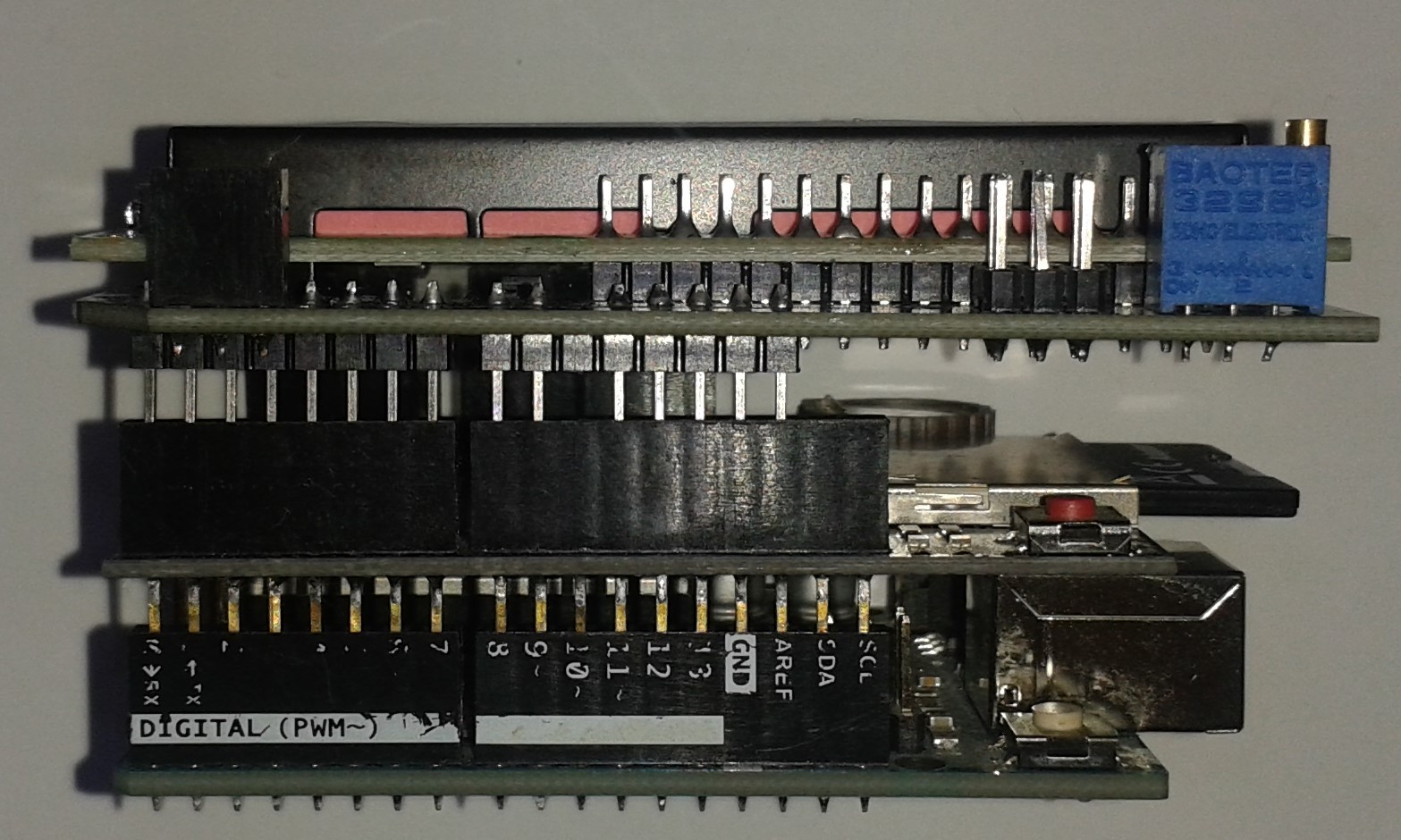
How everything fits together
How everything fits together
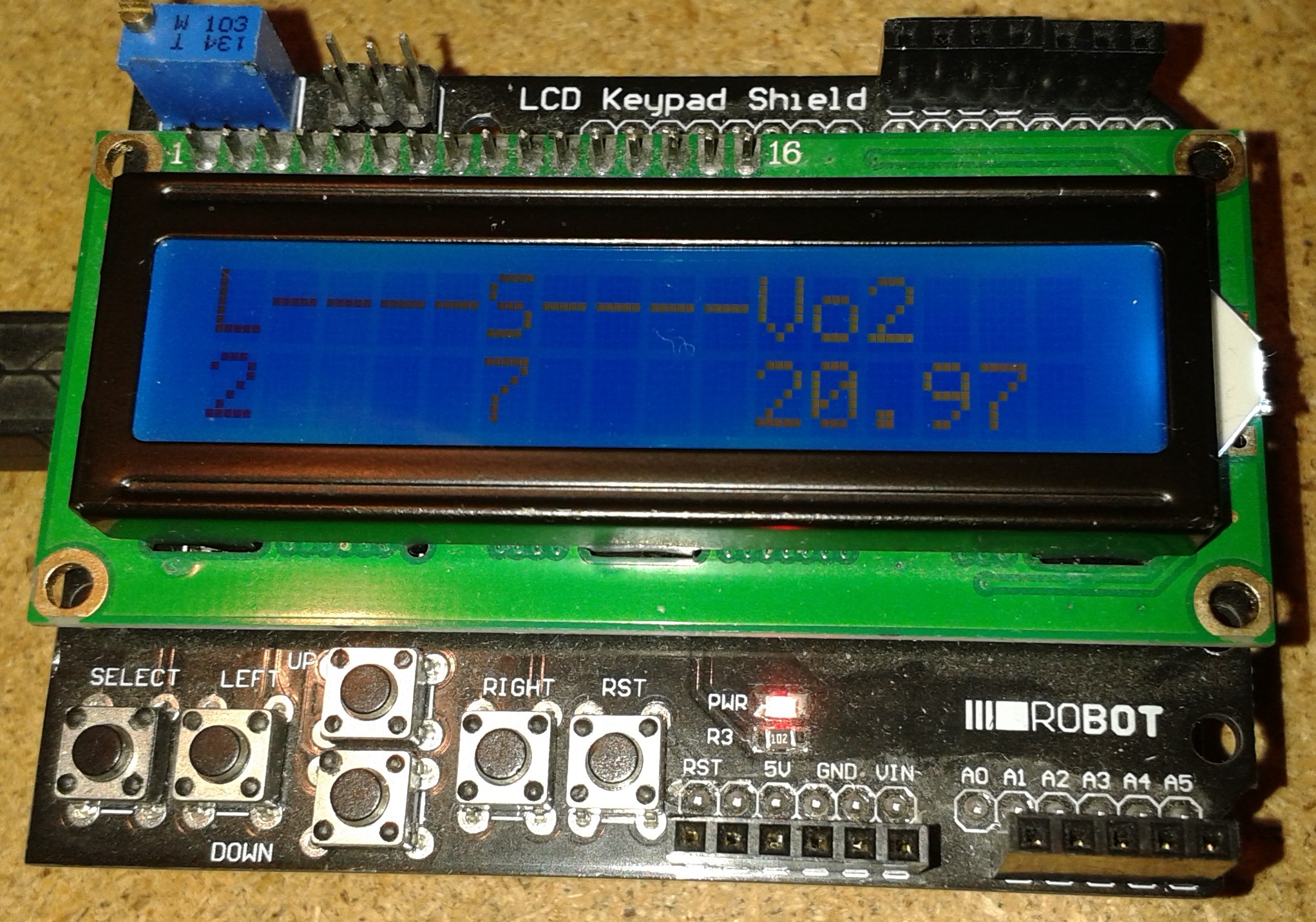
Working view
Working view
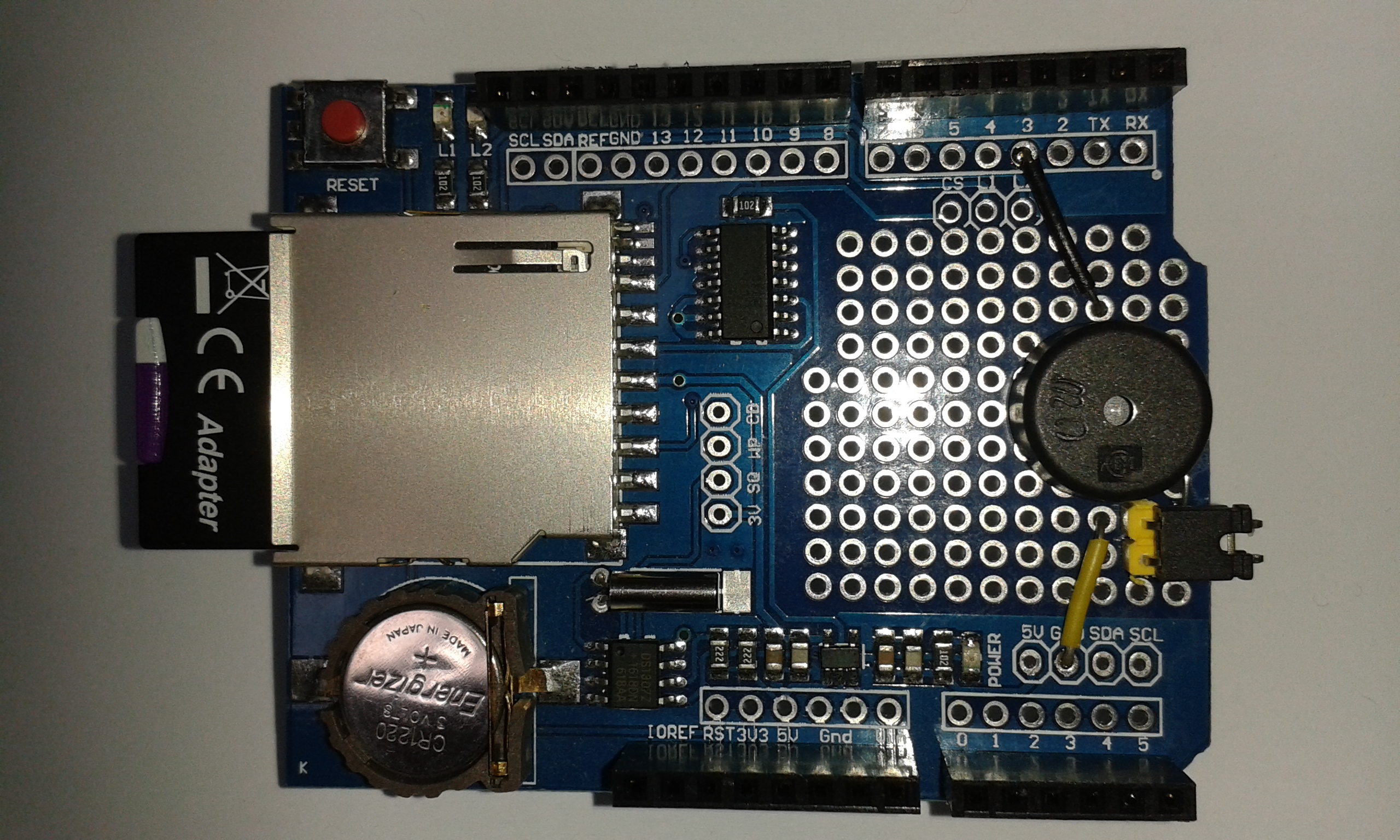
The piezo sounder
The piezo sounder
How everything fits together
How everything fits together
Working view
Working view
The piezo sounder
The piezo sounder
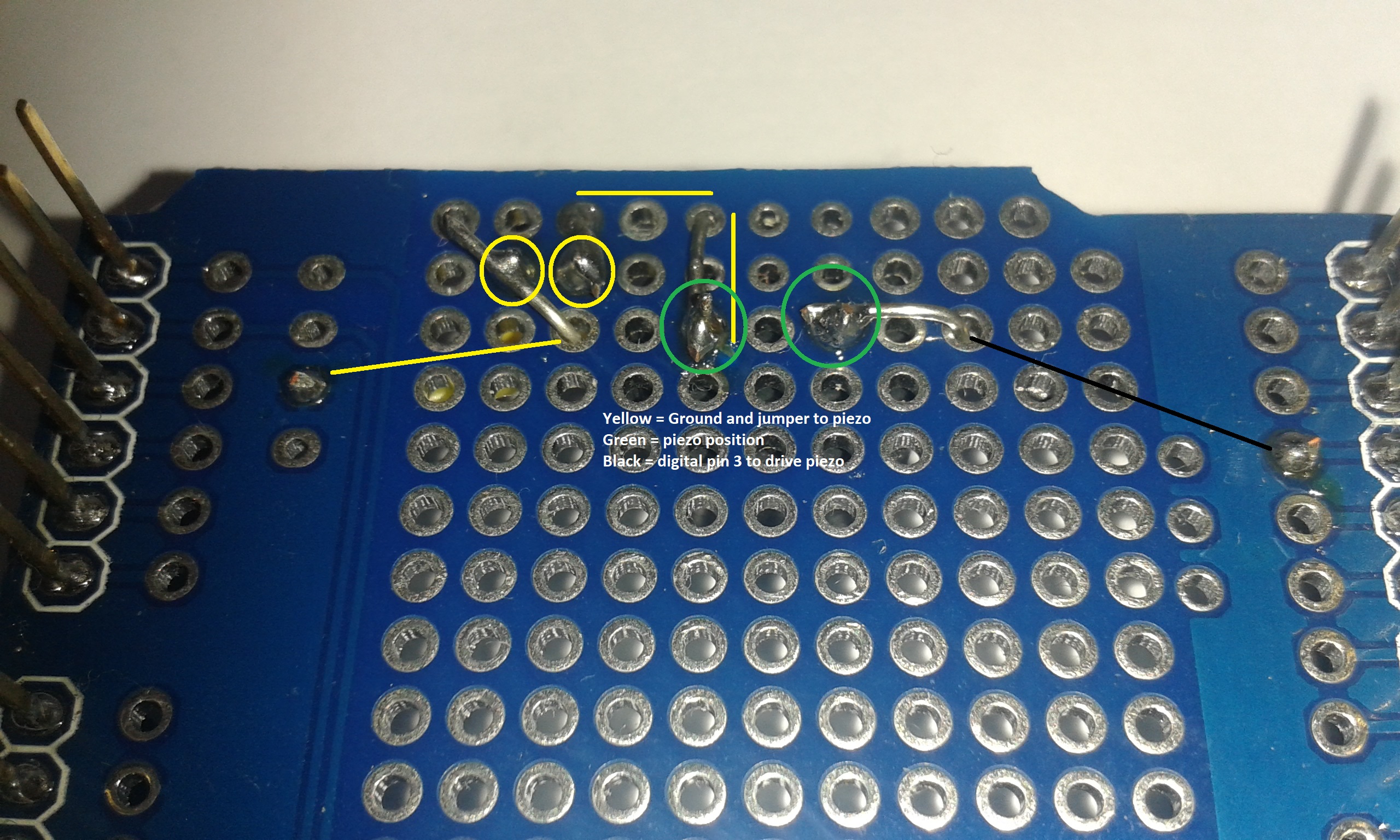
sounder wiring
sounder wiring
Comments
Only logged in users can leave comments