Contactless temperature measuring using mlx90614 ir
Measuring a body temperature using contactless sensor
Devices & Components
1
Arduino Uno Rev3
1
OLED Display, Blue on Black
1
5 mm LED: Red
1
mlx90614
1
Pushbutton Switch, Momentary
1
Jumper wires (generic)
Software & Tools

Arduino IDE
Project description
Code
mlx9014ir using Arduino code
c_cpp
1/***********************************
2Code for Arduino MLX90614 Contactless  thermometer
3MLX90614 I2C connection
4OLED 4-wire SPI connection
5Dated:  7-6-2022
6Code by: eyob million
7**********************************/
8
9#include  <Wire.h>
10#include <SparkFunMLX90614.h>
11
12#include <SPI.h>
13#include  <Adafruit_GFX.h>
14#include <Adafruit_SSD1306.h>
15
16// If using software SPI  (the default case):
17#define OLED_MOSI   9
18#define OLED_CLK   10
19#define  OLED_DC    11
20#define OLED_CS    12
21#define OLED_RESET 13
22Adafruit_SSD1306  display(OLED_MOSI, OLED_CLK, OLED_DC, OLED_RESET, OLED_CS);
23
24IRTherm therm;
25
26void  setup()
27{
28  Serial.begin(9600);
29  therm.begin();
30  therm.setUnit(TEMP_C);
31
32   display.begin(SSD1306_SWITCHCAPVCC);
33   display.clearDisplay();
34   display.setRotation(2);
35
36}
37
38String temperature;
39char runner;
40
41void  loop()
42{
43  if (therm.read()) // On success, read() will return 1, on fail  0.
44  {
45    temperature = String(therm.object(), 2);
46    Serial.print("Object:  ");
47    Serial.print(temperature); Serial.println("C");
48    display.clearDisplay();
49    runner++;
50    delay(5);
51  }
52
53  display.setTextSize(2);
54  display.setTextColor(WHITE);
55  display.setCursor(display.width()/4,display.height()/12);
56
57  if (therm.object()>=100)
58  display.setCursor(display.width()/4,display.height()/12);
59
60  display.println(temperature);
61
62  display.drawLine(display.width()/runner,display.height() - display.height()/2.5,  display.width()/runner+1, display.height() - display.height()/2.5, WHITE);
63
64  display.setCursor(0,display.height()-display.height()/4);
65  display.setTextSize(1);
66  display.println("   Arduino Thermlgun");
67  display.setCursor(display.width()-  display.width()/4,display.height()/12);
68  display.println("deg C");
69  display.display();
70
71  if (runner>20)
72  runner=0;
73}
74
75
mlx9014ir using Arduino code
c_cpp
1/***********************************
2Code for Arduino MLX90614 Contactless   thermometer
3MLX90614 I2C connection
4OLED 4-wire SPI connection
5Dated:   7-6-2022
6Code by: eyob million
7**********************************/
8
9#include   <Wire.h>
10#include <SparkFunMLX90614.h>
11
12#include <SPI.h>
13#include   <Adafruit_GFX.h>
14#include <Adafruit_SSD1306.h>
15
16// If using software SPI   (the default case):
17#define OLED_MOSI   9
18#define OLED_CLK   10
19#define   OLED_DC    11
20#define OLED_CS    12
21#define OLED_RESET 13
22Adafruit_SSD1306   display(OLED_MOSI, OLED_CLK, OLED_DC, OLED_RESET, OLED_CS);
23
24IRTherm therm;
25
26void   setup()
27{
28  Serial.begin(9600);
29  therm.begin();
30  therm.setUnit(TEMP_C);
31
32   display.begin(SSD1306_SWITCHCAPVCC);
33   display.clearDisplay();
34    display.setRotation(2);
35
36}
37
38String temperature;
39char runner;
40
41void   loop()
42{
43  if (therm.read()) // On success, read() will return 1, on fail   0.
44  {
45    temperature = String(therm.object(), 2);
46    Serial.print("Object:   ");
47    Serial.print(temperature); Serial.println("C");
48    display.clearDisplay();
49     runner++;
50    delay(5);
51  }
52
53  display.setTextSize(2);
54  display.setTextColor(WHITE);
55   display.setCursor(display.width()/4,display.height()/12);
56
57  if (therm.object()>=100)
58   display.setCursor(display.width()/4,display.height()/12);
59
60  display.println(temperature);
61
62   display.drawLine(display.width()/runner,display.height() - display.height()/2.5,   display.width()/runner+1, display.height() - display.height()/2.5, WHITE);
63
64   display.setCursor(0,display.height()-display.height()/4);
65  display.setTextSize(1);
66   display.println("   Arduino Thermlgun");
67  display.setCursor(display.width()-   display.width()/4,display.height()/12);
68  display.println("deg C");
69  display.display();
70
71   if (runner>20)
72  runner=0;
73}
74
75
Downloadable files
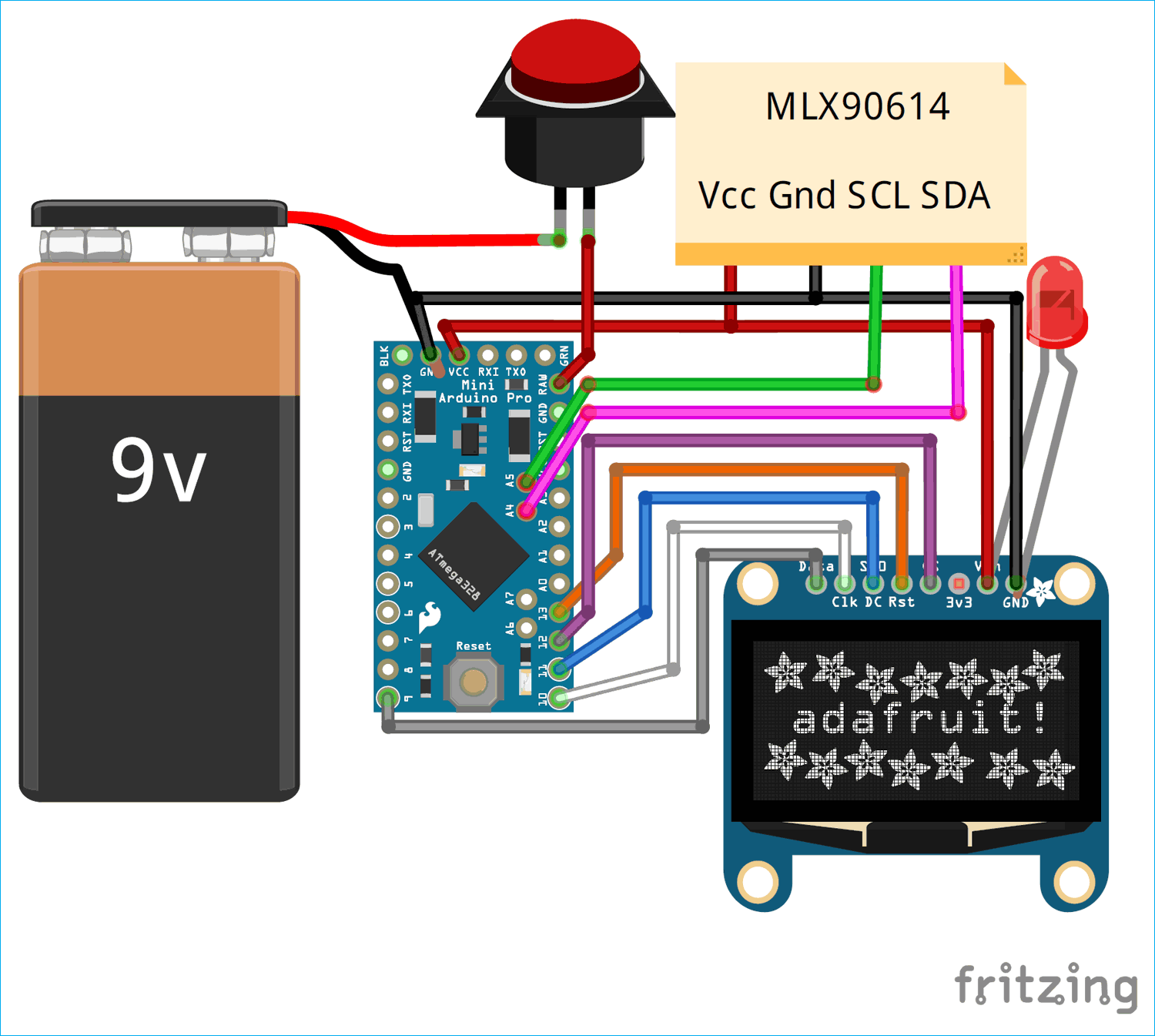
schematic
schematic
Comments
Only logged in users can leave comments