Controlling the Tello Drone with the Uno R4 Wi-Fi
This project uses an Uno R4 Wi-Fi to fly the Tello Drone with the Tello SDK.
Devices & Components
5
Box 180 mixed buttons
1
Breadboard - 830 contacts
1
Arduino® UNO R4 WiFi
5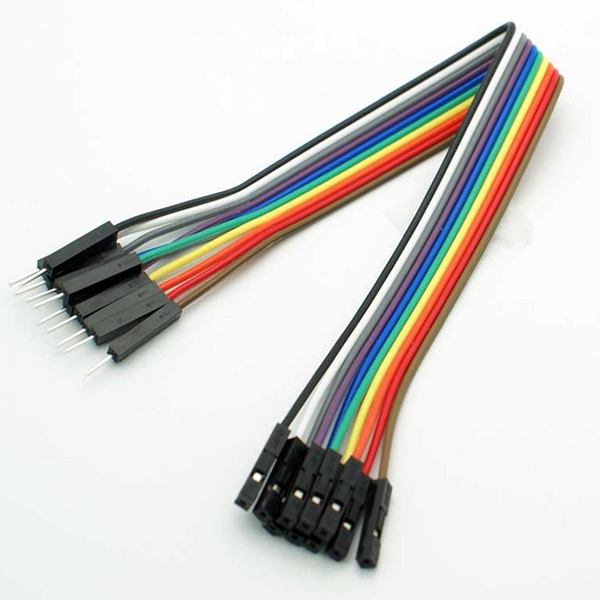
Wires (M-F)
1
Analog Joystick (2 - axis)
17
Wires (M-M)
6
Colored LEDs
Software & Tools

Arduino IDE
Project description
Code
Controlling Tello Drone
cpp
1/*
2Tello Drone Controller for Arduino WiFi R4
3*Joystick should be held with wires going down*
4Supplies:
5  Tello Drone
6  Arduino Uno R4 WiFi
7  Analog Joystick
8  5x Buttons
9  6x Leds - 1x Red, Green, Blue, White; 2x Yellow
10  6x 220Ω resistors
11  17x M-M wires
12  5x M-F wires
13*/
14
15#include <WiFiS3.h>
16#include <WiFiUdp.h>
17
18// --- Config ---
19// Change the following two lines to show your drone's name and password, if applicable
20const char* ssid = "TELLO-F0033D";        // Tello WiFi Network Name
21const char* pass = "";                    // Drone Password - leave empty if no password is set
22IPAddress drone_ip(192, 168, 10, 1);      // Default Tello IP
23unsigned int drone_port = 8889;           // Tello Control Port
24
25// --- Pins ---
26const int takeoff_button = 13, land_button = 12;                   // Take off and land
27const int emergency_button = 11;                                   // Emergency Stop
28const int battery_red = 10, battery_yellow = 9, battery_green = 8; // Battery status LEDs
29const int check_battery_button = 7;                                // Request battery level
30const int connected_blue_led = 6, not_connected_yellow_led = 5;    // WiFi status LEDs
31const int mode_button = 2, mode_white_led = 4;                     // Toggle for flight modes
32const int flip_button = 3;                                         // Flips
33const int joyX = A0, joyY = A1;                                    // Analog joystick pins
34const int speed_button = A3, low_speed_led = A4, high_speed_led = A5; // Toggle for speed modes
35
36
37// --- State Variables ---
38WiFiUDP Udp;
39int currentBat = 100;           // Stores last known battery percentage
40bool isAltMode = false;         // Switches joystick mapping between linear movement and up, down, and rotational movement
41bool isConnected = false;       // Connection status flag
42bool isFlipping = false;        // Drone Flipping flag
43
44unsigned long flip_lockout_start = 0;
45const long flip_lockout_duration = 2000; // 2 seconds to finish flip
46
47unsigned long last_cmd_time = 0; // Timer for RC command frequency
48int lastModeBtnState = HIGH;    // For debouncing mode button
49
50unsigned long last_battery_request = 0; // Tracks the last time we polled the drone
51const long battery_interval = 5000;    // How often to update (5000ms = 5 seconds)
52
53
54void setup() {
55  // Initialize digital pins
56  pinMode(mode_button, INPUT_PULLUP);
57  pinMode(mode_white_led, OUTPUT);
58  pinMode(takeoff_button, INPUT_PULLUP);
59  pinMode(land_button, INPUT_PULLUP);
60  pinMode(connected_blue_led, OUTPUT);
61  pinMode(not_connected_yellow_led, OUTPUT);
62  pinMode(battery_red, OUTPUT);
63  pinMode(battery_yellow, OUTPUT);
64  pinMode(battery_green, OUTPUT);
65  pinMode(check_battery_button, INPUT_PULLUP);
66  pinMode(flip_button, INPUT_PULLUP);
67  pinMode(emergency_button, INPUT_PULLUP);
68
69  connectToDrone();
70}
71
72void loop() {
73  // --- Connection safety check ---
74  if (WiFi.status() != WL_CONNECTED) connectToDrone();
75
76  // --- Update Battery ---
77  if (millis() - last_battery_request >= battery_interval) {
78    updateTelloBattery();
79    last_battery_request = millis();
80  }
81
82  handleButtons();    // Still checks for manual button presses
83  handleJoysticks();  // Keeps sending RC commands (every 50ms)
84  updateBatteryLEDs(); // Refreshes LED lights
85}
86
87void connectToDrone() {
88  // Show "searching" state
89  digitalWrite(not_connected_yellow_led, HIGH);
90  digitalWrite(connected_blue_led, LOW);
91
92  // Attempt WiFi connection
93  if (pass == "") {
94    WiFi.begin(ssid);
95  } else {
96    WiFi.begin(ssid, pass);
97  }
98
99  while (WiFi.status() != WL_CONNECTED) {
100    delay(500);
101  }
102
103  Udp.begin(drone_port);
104
105  // Enter SDK mode
106  sendRaw("command");
107  delay(500);
108
109  isConnected = true;
110  digitalWrite(connected_blue_led, HIGH);
111  digitalWrite(not_connected_yellow_led, LOW);
112}
113
114void handleButtons() {
115  // --- FLIP LOGIC ---
116  if (digitalRead(flip_button) == LOW && !isFlipping) isFlipping = true;
117
118  if (isFlipping) {
119    digitalWrite(mode_white_led, (millis() % 500 < 250) ? HIGH : LOW);
120    int valX = map(analogRead(joyX), 0, 1023, -100, 100);
121    int valY = map(analogRead(joyY), 0, 1023, 100, -100);
122    String flipCmd = "";
123
124    // Threshold of 60 to avoid accidental flips
125    if (valY > 60) flipCmd = "flip l";        // Y forward -> Flip Left
126    else if (valY < -60) flipCmd = "flip r";  // Y backward -> Flip Right
127    else if (valX > 60) flipCmd = "flip f";   // X right -> Flip Forward
128    else if (valX < -60) flipCmd = "flip b";  // X left -> Flip Backward
129
130    if (flipCmd != "") {
131    // 1. Force the drone to stop moving first
132    sendRaw("rc 0 0 0 0");
133    delay(10); // Tiny pause to ensure Tello processes the stop
134
135    // 2. Send the flip
136    sendRaw(flipCmd.c_str());
137
138    // 3. Lock out other commands immediately
139    isFlipping = false;
140    flip_lockout_start = millis();
141    }
142  }
143
144  // Toggle between Pitch/Roll and Yaw/Throttle modes
145  int modeBtn = digitalRead(mode_button);
146  if (modeBtn == LOW && lastModeBtnState == HIGH) {
147    isAltMode = !isAltMode;
148    digitalWrite(mode_white_led, isAltMode ? HIGH : LOW);
149    delay(50); // Simple debounce
150  }
151  lastModeBtnState = modeBtn;
152
153  // Execute Takeoff
154  if (digitalRead(takeoff_button) == LOW) sendRaw("takeoff");
155
156  // Execute Landing
157  if (digitalRead(land_button) == LOW) sendRaw("land");
158
159  // Execute Emergency Stop
160  if (digitalRead(emergency_button) == LOW) sendRaw("emergency");
161
162  // Manually poll for battery percentage
163  if (digitalRead(check_battery_button) == LOW) updateTelloBattery();
164}
165
166void handleJoysticks() {
167  // EXIT IMMEDIATELY if we are in a flip lockout.
168  // This prevents 'rc' commands from interrupting the flip animation.
169  if (millis() - flip_lockout_start < flip_lockout_duration) {
170    return;
171  }
172
173  // Send RC commands every 50ms to keep the drone active
174  if (millis() - last_cmd_time > 50) {
175    // Map 0-1023 analog range to -100 to 100 for Tello SDK
176    int valX = map(analogRead(joyX), 0, 1023, -100, 100);
177    int valY = map(analogRead(joyY), 0, 1023, -100, 100);
178
179    // Deadzone to prevent drifting
180    if (abs(valX) < 15) valX = 0;
181    if (abs(valY) < 15) valY = 0;
182
183    int r=0, p=0, t=0, y=0; // roll, pitch, throttle, yaw
184
185    if (isAltMode) {
186      y = valY; // Vertical movement
187      t = valX; // Rotation
188    } else {
189      r = valY; // Forward/Backward
190      p = valX; // Left/Right
191    }
192
193    // Format: "rc a b c d" (Roll, Pitch, Throttle, Yaw)
194    String cmd = "rc " + String(r) + " " + String(p) + " " + String(t) + " " + String(y);
195    sendRaw(cmd.c_str());
196    last_cmd_time = millis();
197  }
198}
199
200void updateTelloBattery() {
201  sendRaw("battery?");
202
203  // Briefly wait and check for UDP response
204  delay(100);
205  int packetSize = Udp.parsePacket();
206  if (packetSize) {
207    char buf[32];
208    int len = Udp.read(buf, 31);
209    if (len > 0) {
210      buf[len] = 0;
211      String resp = String(buf);
212      resp.trim();
213      int val = resp.toInt();
214      if (val > 0) currentBat = val;
215    }
216  }
217}
218
219void updateBatteryLEDs() {
220  // Reset all LEDs
221  digitalWrite(battery_green, LOW);
222  digitalWrite(battery_yellow, LOW);
223  digitalWrite(battery_red, LOW);
224
225  if (currentBat > 70) {
226    // Good battery
227    digitalWrite(battery_green, HIGH);
228  } else if (currentBat > 50) {
229    // Good enough for flips
230    digitalWrite(battery_green, HIGH);
231    digitalWrite(battery_yellow, HIGH);
232  } else if (currentBat > 30) {
233    // Medium battery, no flips
234    digitalWrite(battery_yellow, HIGH);
235  } else {
236    // Low or Critical Battery
237    if (currentBat < 15) {
238      // Critically Low Battery
239      digitalWrite(battery_red, (millis() % 500 < 250) ? HIGH : LOW);
240    } else {
241      // Low battery
242      digitalWrite(battery_red, HIGH);
243    }
244  }
245}
246
247void sendRaw(const char* c) {
248  Udp.beginPacket(drone_ip, drone_port);
249  Udp.write(c);
250  Udp.endPacket();
251}
Documentation
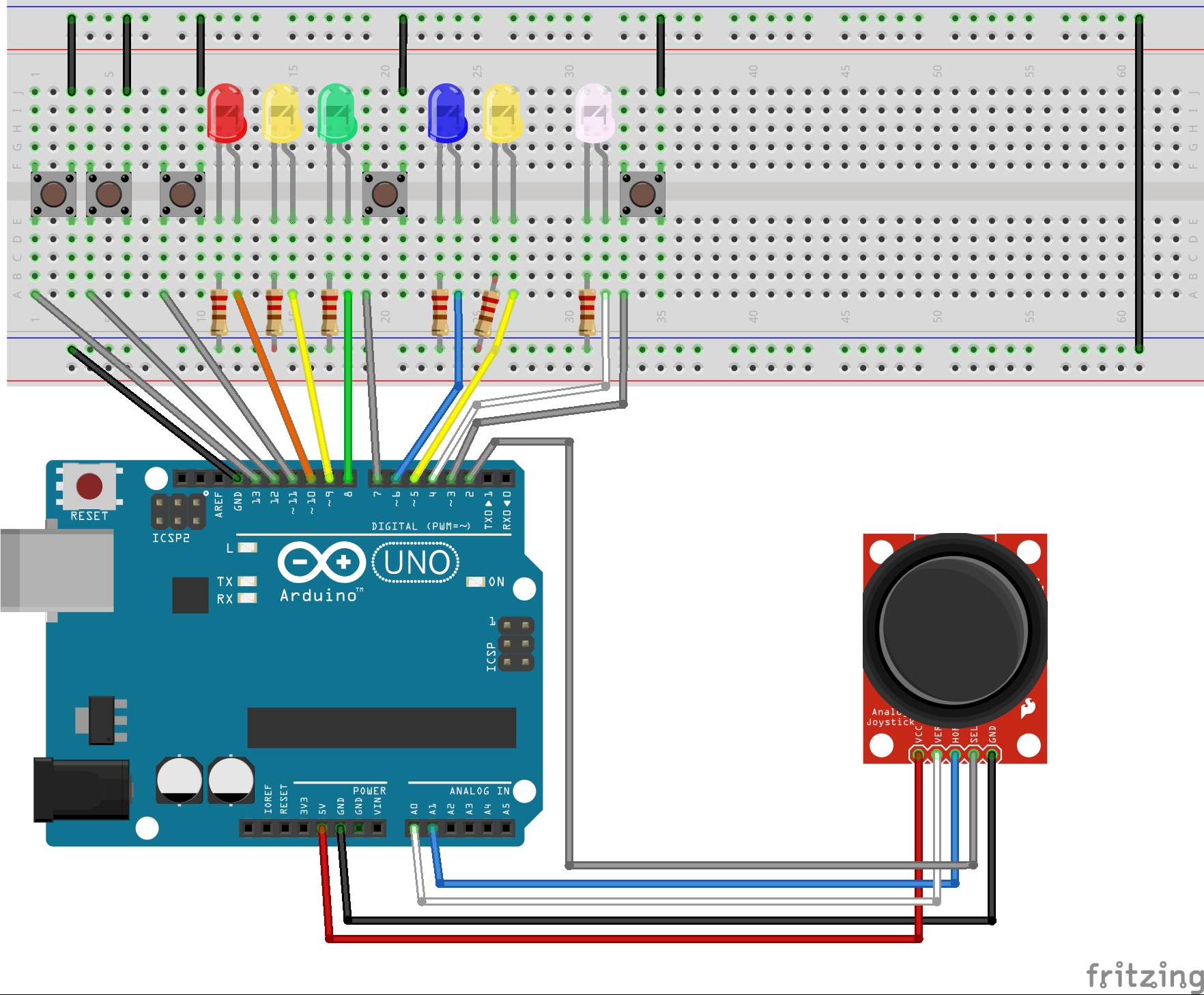
Controlling Tello Drone with Uno R4 Wi-Fi
Controlling Tello Drone with Uno R4 Wi-Fi_bb.jpg
Comments
Only logged in users can leave comments