Flood Detection Using IOT
The project is used to detect flood occurrence in flood prone areas near dams.
Devices & Components
1
Ultrasonic Sensor - HC-SR04 (Generic)
1
LED (generic)
1
Jumper wires (generic)
1
NodeMCU ESP8266 Breakout Board
Software & Tools
1
Maker service

Arduino IDE
Project description
Code
Code
c_cpp
1
2#include <ESP8266WiFi.h>
3
4WiFiClient client;
5
6String MakerIFTTT_Key   ;
7String MakerIFTTT_Event;
8char *append_str(char *here, String s) {  int i=0;   while (*here++ = s[i]){i++;};return here-1;}
9char *append_ul(char *here, unsigned   long u) { char buf[20]; return append_str(here, ultoa(u, buf, 10));}
10char post_rqst[256];char   *p;char *content_length_here;char *json_start;int compi;
11
12const int trigPin   = 2;  //D4
13const int echoPin = 0;  //D3
14const int ledred = 14;  //D5
15const   int ledgreen = 12;  //D6
16const int ledblue = 13;  //D7
17
18// defines variables
19long   duration;
20int distance;
21
22
23
24void setup()
25{
26pinMode(trigPin,   OUTPUT); // Sets the trigPin as an Output
27pinMode(echoPin, INPUT); // Sets the   echoPin as an Input
28Serial.begin(9600); // Starts the serial communication
29pinMode(ledred,   OUTPUT);
30pinMode(ledgreen, OUTPUT);
31pinMode(ledblue, OUTPUT);
32}
33
34
35void   loop()
36{
37digitalWrite(ledblue , LOW);
38digitalWrite(ledgreen , LOW);
39digitalWrite(ledred   , LOW);
40digitalWrite(trigPin, LOW);
41delayMicroseconds(2);
42
43// Sets the   trigPin on HIGH state for 10 micro seconds
44digitalWrite(trigPin, HIGH);
45delayMicroseconds(10);
46digitalWrite(trigPin,   LOW);
47
48// Reads the echoPin, returns the sound wave travel time in microseconds
49duration   = pulseIn(echoPin, HIGH);
50
51// Calculating the distance
52distance= duration*0.034/2;
53//   Prints the distance on the Serial Monitor
54Serial.print("Distance: ");
55Serial.println(distance);
56delay(2000);
57
58if(distance<40){
59   digitalWrite(ledblue , HIGH);
60  delay(1000);
61
62}
63if(distance<25){
64   digitalWrite(ledgreen , HIGH);
65  delay(1000);
66
67}
68if(distance<15){
69   digitalWrite(ledred , HIGH);
70  delay(1000);
71
72WiFi.disconnect();
73  delay(3000);
74   Serial.println("START");
75   WiFi.begin("flood","flood123");
76  while   ((!(WiFi.status() == WL_CONNECTED))){
77    delay(300);
78    Serial.print("..");
79
80   }
81  Serial.println("Connected");
82  Serial.println("Your IP is");
83   Serial.println((WiFi.localIP().toString()));
84  if (client.connect("maker.ifttt.com",80))   {
85    MakerIFTTT_Key ="jpfhqnUuTJfyLRYLltvb3EHr5PZhmxfdhWjz9fev1Rs";
86    MakerIFTTT_Event   ="sms";
87    p = post_rqst;
88    p = append_str(p, "POST /trigger/");
89     p = append_str(p, MakerIFTTT_Event);
90    p = append_str(p, "/with/key/");
91     p = append_str(p, MakerIFTTT_Key);
92    p = append_str(p, " HTTP/1.1\
\
93");
94     p = append_str(p, "Host: maker.ifttt.com\
\
95");
96    p = append_str(p,   "Content-Type: application/json\
\
97");
98    p = append_str(p, "Content-Length:   ");
99    content_length_here = p;
100    p = append_str(p, "NN\
\
101");
102     p = append_str(p, "\
\
103");
104    json_start = p;
105    p = append_str(p,   "{\\"value1\\":\\"");
106    p = append_str(p, "919619272445");
107    p   = append_str(p, "\\",\\"value2\\":\\"");
108    p = append_str(p, "A flood   has been forcasted");
109    p = append_str(p, "\\",\\"value3\\":\\"");
110     p = append_str(p, "");
111    p = append_str(p, "\\"}");
112
113    compi=   strlen(json_start);
114    content_length_here[0] = '0' + (compi/10);
115    content_length_here[1]   = '0' + (compi%10);
116    client.print(post_rqst);
117
118  }
119
120
121}
122else{
123   Serial.print("Distance: ");
124Serial.println(distance);
125}
126}
127
Code
c_cpp
1
2#include <ESP8266WiFi.h>
3
4WiFiClient client;
5
6String MakerIFTTT_Key  ;
7String MakerIFTTT_Event;
8char *append_str(char *here, String s) {  int i=0;  while (*here++ = s[i]){i++;};return here-1;}
9char *append_ul(char *here, unsigned  long u) { char buf[20]; return append_str(here, ultoa(u, buf, 10));}
10char post_rqst[256];char  *p;char *content_length_here;char *json_start;int compi;
11
12const int trigPin  = 2;  //D4
13const int echoPin = 0;  //D3
14const int ledred = 14;  //D5
15const  int ledgreen = 12;  //D6
16const int ledblue = 13;  //D7
17
18// defines variables
19long  duration;
20int distance;
21
22
23
24void setup()
25{
26pinMode(trigPin,  OUTPUT); // Sets the trigPin as an Output
27pinMode(echoPin, INPUT); // Sets the  echoPin as an Input
28Serial.begin(9600); // Starts the serial communication
29pinMode(ledred,  OUTPUT);
30pinMode(ledgreen, OUTPUT);
31pinMode(ledblue, OUTPUT);
32}
33
34
35void  loop()
36{
37digitalWrite(ledblue , LOW);
38digitalWrite(ledgreen , LOW);
39digitalWrite(ledred  , LOW);
40digitalWrite(trigPin, LOW);
41delayMicroseconds(2);
42
43// Sets the  trigPin on HIGH state for 10 micro seconds
44digitalWrite(trigPin, HIGH);
45delayMicroseconds(10);
46digitalWrite(trigPin,  LOW);
47
48// Reads the echoPin, returns the sound wave travel time in microseconds
49duration  = pulseIn(echoPin, HIGH);
50
51// Calculating the distance
52distance= duration*0.034/2;
53//  Prints the distance on the Serial Monitor
54Serial.print("Distance: ");
55Serial.println(distance);
56delay(2000);
57
58if(distance<40){
59  digitalWrite(ledblue , HIGH);
60  delay(1000);
61
62}
63if(distance<25){
64  digitalWrite(ledgreen , HIGH);
65  delay(1000);
66
67}
68if(distance<15){
69  digitalWrite(ledred , HIGH);
70  delay(1000);
71
72WiFi.disconnect();
73  delay(3000);
74  Serial.println("START");
75   WiFi.begin("flood","flood123");
76  while  ((!(WiFi.status() == WL_CONNECTED))){
77    delay(300);
78    Serial.print("..");
79
80  }
81  Serial.println("Connected");
82  Serial.println("Your IP is");
83  Serial.println((WiFi.localIP().toString()));
84  if (client.connect("maker.ifttt.com",80))  {
85    MakerIFTTT_Key ="jpfhqnUuTJfyLRYLltvb3EHr5PZhmxfdhWjz9fev1Rs";
86    MakerIFTTT_Event  ="sms";
87    p = post_rqst;
88    p = append_str(p, "POST /trigger/");
89    p = append_str(p, MakerIFTTT_Event);
90    p = append_str(p, "/with/key/");
91    p = append_str(p, MakerIFTTT_Key);
92    p = append_str(p, " HTTP/1.1\
\
93");
94    p = append_str(p, "Host: maker.ifttt.com\
\
95");
96    p = append_str(p,  "Content-Type: application/json\
\
97");
98    p = append_str(p, "Content-Length:  ");
99    content_length_here = p;
100    p = append_str(p, "NN\
\
101");
102    p = append_str(p, "\
\
103");
104    json_start = p;
105    p = append_str(p,  "{\\"value1\\":\\"");
106    p = append_str(p, "919619272445");
107    p  = append_str(p, "\\",\\"value2\\":\\"");
108    p = append_str(p, "A flood  has been forcasted");
109    p = append_str(p, "\\",\\"value3\\":\\"");
110    p = append_str(p, "");
111    p = append_str(p, "\\"}");
112
113    compi=  strlen(json_start);
114    content_length_here[0] = '0' + (compi/10);
115    content_length_here[1]  = '0' + (compi%10);
116    client.print(post_rqst);
117
118  }
119
120
121}
122else{
123  Serial.print("Distance: ");
124Serial.println(distance);
125}
126}
127
Downloadable files
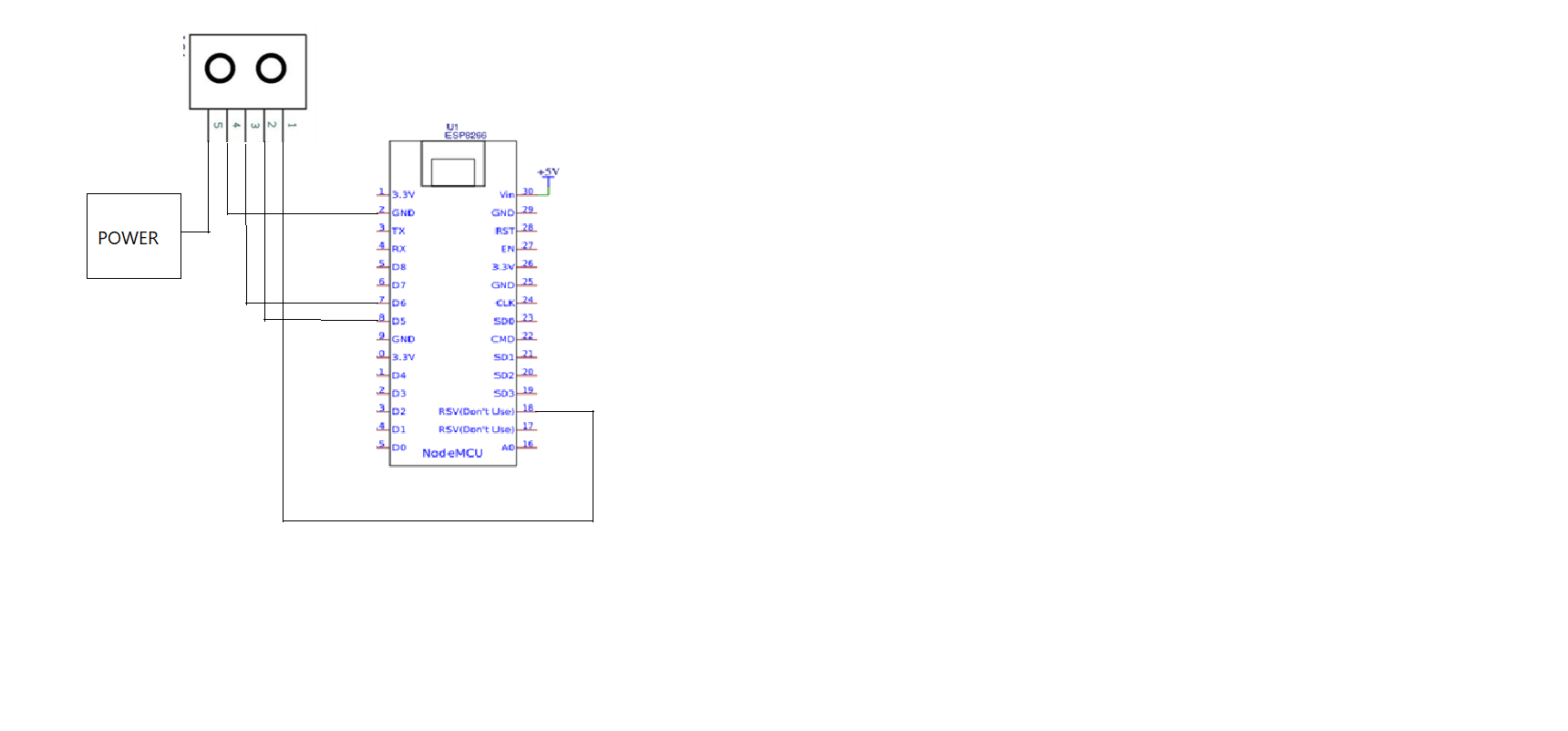
Circuit Diagram
Circuit Diagram
Comments
Only logged in users can leave comments