Servo controller using Arduino Bluetooth module
Control a servo motor wirelessly using Arduino and HC-05 Bluetooth module send angle commands straight from your smartphone, no wires needed.
Devices & Components
1
Grove - Servo
1
Arduino® UNO R4 WiFi
Software & Tools

Arduino IDE
Project description
Code
servo_bluetooth_controller
1/*
2  ============================================
3  Servo Controller via Bluetooth (HC-05/HC-06)
4  Arduino Uno + Bluetooth Module + Servo Motor
5  ============================================
6
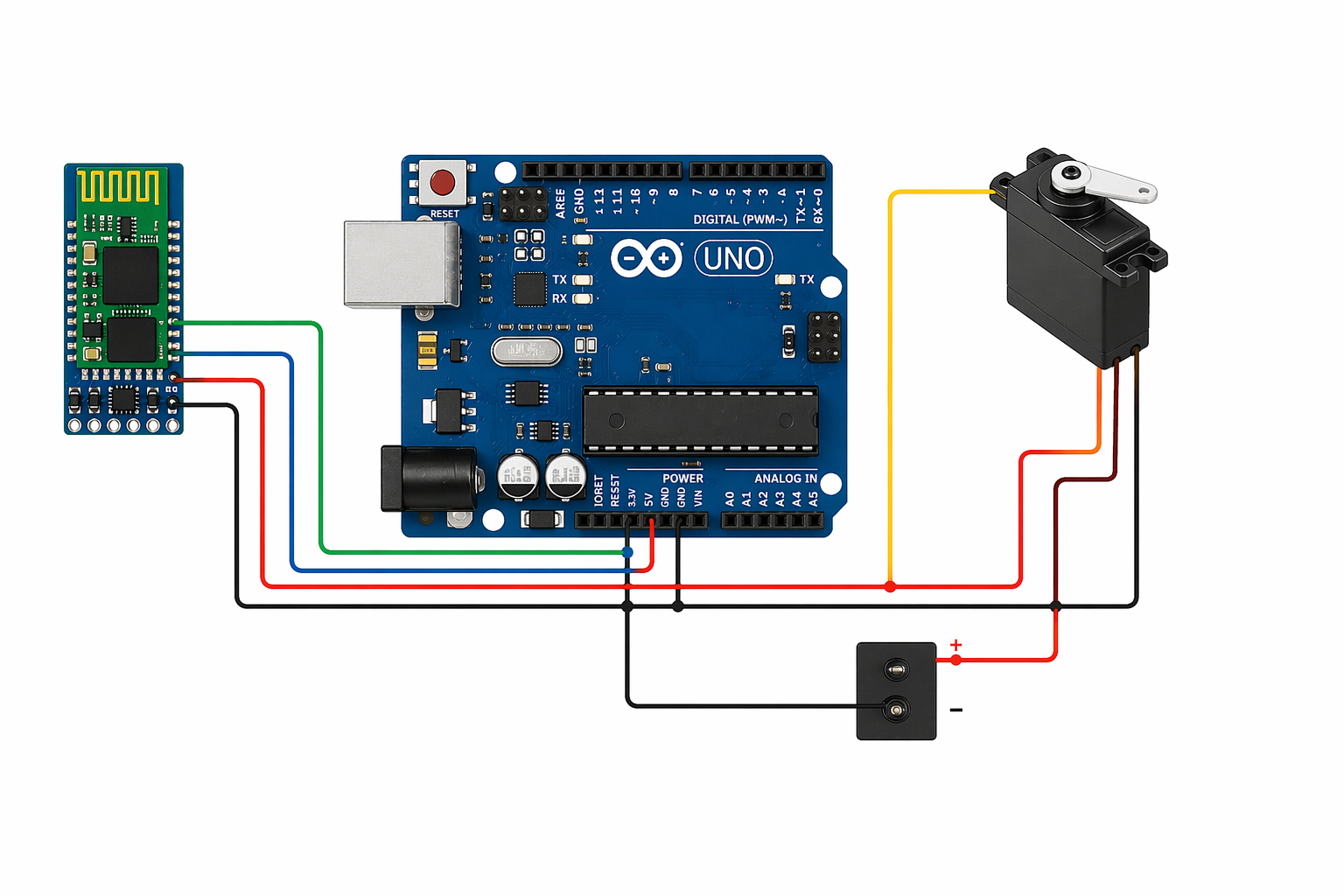
7  Connections:
8  - HC-05/HC-06 TX  --> Arduino Pin 10 (RX)
9  - HC-05/HC-06 RX  --> Arduino Pin 11 (TX) [via voltage divider]
10  - HC-05/HC-06 VCC --> 5V
11  - HC-05/HC-06 GND --> GND
12  - Servo Signal    --> Arduino Pin 9
13  - Servo VCC       --> 5V
14  - Servo GND       --> GND
15
16  Commands (send via Bluetooth terminal app):
17  - '0' to '9'  : Move to preset positions (0°, 20°, 40°...180°)
18  - 'A' to 'Z'  : Set angle directly (A=0°, Z=180°)
19  - 'F'         : Forward (increase angle by 10°)
20  - 'B'         : Backward (decrease angle by 10°)
21  - 'C'         : Center (90°)
22  - 'M'         : Min position (0°)
23  - 'X'         : Max position (180°)
24  - Number 0-180: Direct angle input (send followed by '#')
25
26  Example App: "Serial Bluetooth Terminal" (Android/iOS)
27*/
28
29#include <Servo.h>
30#include <SoftwareSerial.h>
31
32// Pin Definitions
33#define SERVO_PIN     9    // Servo signal pin
34#define BT_RX_PIN     10   // Connect to HC-05 TX
35#define BT_TX_PIN     11   // Connect to HC-05 RX
36
37// Servo angle limits
38#define MIN_ANGLE     0
39#define MAX_ANGLE     180
40#define CENTER_ANGLE  90
41#define STEP_SIZE     10   // Degrees per step for F/B command
42
43// Objects
44Servo myServo;
45SoftwareSerial bluetooth(BT_RX_PIN, BT_TX_PIN);
46
47// Variables
48int currentAngle = CENTER_ANGLE;
49String inputBuffer = "";
50bool readingNumber = false;
51
52void setup() {
53  // Initialize Serial Monitor
54  Serial.begin(9600);
55  Serial.println("=== Servo Bluetooth Controller ===");
56  Serial.println("Waiting for Bluetooth connection...");
57
58  // Initialize Bluetooth
59  bluetooth.begin(9600);  // Default baud rate for HC-05/HC-06
60
61  // Initialize Servo
62  myServo.attach(SERVO_PIN);
63  myServo.write(CENTER_ANGLE);
64  currentAngle = CENTER_ANGLE;
65
66  // Send welcome message via Bluetooth
67  delay(1000);
68  bluetooth.println("=== Servo Controller Ready ===");
69  bluetooth.println("Commands: F=Forward, B=Back, C=Center");
70  bluetooth.println("M=Min(0), X=Max(180), 0-9=Preset");
71  bluetooth.print("Current Angle: ");
72  bluetooth.println(currentAngle);
73}
74
75void loop() {
76  // Check for Bluetooth data
77  if (bluetooth.available()) {
78    char received = (char)bluetooth.read();
79    handleCommand(received);
80  }
81
82  // Check for Serial Monitor data (for testing)
83  if (Serial.available()) {
84    char received = (char)Serial.read();
85    handleCommand(received);
86  }
87}
88
89void handleCommand(char cmd) {
90  // Convert lowercase to uppercase
91  if (cmd >= 'a' && cmd <= 'z') {
92    cmd = cmd - 32;
93  }
94
95  Serial.print("Received: ");
96  Serial.println(cmd);
97
98  // Number input mode (for direct angle 0-180)
99  if (cmd == '#') {
100    // End of number input
101    if (readingNumber && inputBuffer.length() > 0) {
102      int angle = inputBuffer.toInt();
103      setServoAngle(angle);
104      inputBuffer = "";
105      readingNumber = false;
106    }
107    return;
108  }
109
110  if (cmd >= '0' && cmd <= '9' && readingNumber) {
111    inputBuffer += cmd;
112    return;
113  }
114
115  // Process single character commands
116  switch (cmd) {
117    case 'F':  // Forward - increase angle
118      moveForward();
119      break;
120
121    case 'B':  // Backward - decrease angle
122      moveBackward();
123      break;
124
125    case 'C':  // Center position
126      setServoAngle(CENTER_ANGLE);
127      sendStatus("Center");
128      break;
129
130    case 'M':  // Minimum position
131      setServoAngle(MIN_ANGLE);
132      sendStatus("Minimum");
133      break;
134
135    case 'X':  // Maximum position
136      setServoAngle(MAX_ANGLE);
137      sendStatus("Maximum");
138      break;
139
140    case 'S':  // Sweep mode
141      sweepServo();
142      break;
143
144    case '?':  // Status request
145      sendStatus("Status");
146      break;
147
148    // Preset positions 0-9 (maps to 0°, 20°, 40°...180°)
149    case '0': setServoAngle(0);   sendStatus("Preset 0"); break;
150    case '1': setServoAngle(20);  sendStatus("Preset 1"); break;
151    case '2': setServoAngle(40);  sendStatus("Preset 2"); break;
152    case '3': setServoAngle(60);  sendStatus("Preset 3"); break;
153    case '4': setServoAngle(80);  sendStatus("Preset 4"); break;
154    case '5': setServoAngle(90);  sendStatus("Preset 5"); break;
155    case '6': setServoAngle(100); sendStatus("Preset 6"); break;
156    case '7': setServoAngle(120); sendStatus("Preset 7"); break;
157    case '8': setServoAngle(150); sendStatus("Preset 8"); break;
158    case '9': setServoAngle(180); sendStatus("Preset 9"); break;
159
160    // Direct angle via letters (A=0° to Z=180°, ~7° per letter)
161    default:
162      if (cmd >= 'A' && cmd <= 'Z') {
163        int angle = map(cmd - 'A', 0, 25, 0, 180);
164        setServoAngle(angle);
165        sendStatus("Letter Command");
166      } else if (cmd >= '0' && cmd <= '9') {
167        // Start number input mode
168        readingNumber = true;
169        inputBuffer = String(cmd);
170      }
171      break;
172  }
173}
174
175void setServoAngle(int angle) {
176  // Constrain angle within limits
177  angle = constrain(angle, MIN_ANGLE, MAX_ANGLE);
178
179  // Move servo smoothly
180  smoothMove(currentAngle, angle);
181  currentAngle = angle;
182
183  // Send feedback
184  String msg = "Angle: " + String(currentAngle) + " degrees";
185  bluetooth.println(msg);
186  Serial.println(msg);
187}
188
189void smoothMove(int fromAngle, int toAngle) {
190  int step = (toAngle > fromAngle) ? 1 : -1;
191
192  for (int pos = fromAngle; pos != toAngle; pos += step) {
193    myServo.write(pos);
194    delay(15);  // Smooth movement delay
195  }
196  myServo.write(toAngle);
197}
198
199void moveForward() {
200  int newAngle = currentAngle + STEP_SIZE;
201  if (newAngle > MAX_ANGLE) {
202    newAngle = MAX_ANGLE;
203    bluetooth.println("Already at Maximum!");
204  } else {
205    setServoAngle(newAngle);
206    sendStatus("Forward");
207  }
208}
209
210void moveBackward() {
211  int newAngle = currentAngle - STEP_SIZE;
212  if (newAngle < MIN_ANGLE) {
213    newAngle = MIN_ANGLE;
214    bluetooth.println("Already at Minimum!");
215  } else {
216    setServoAngle(newAngle);
217    sendStatus("Backward");
218  }
219}
220
221void sweepServo() {
222  bluetooth.println("Sweeping...");
223  Serial.println("Sweep started");
224
225  // Sweep from current to max
226  smoothMove(currentAngle, MAX_ANGLE);
227  delay(500);
228
229  // Sweep from max to min
230  smoothMove(MAX_ANGLE, MIN_ANGLE);
231  delay(500);
232
233  // Return to center
234  smoothMove(MIN_ANGLE, CENTER_ANGLE);
235  currentAngle = CENTER_ANGLE;
236
237  bluetooth.println("Sweep complete! At Center.");
238  Serial.println("Sweep complete");
239}
240
241void sendStatus(String action) {
242  String status = "[" + action + "] Angle=" + String(currentAngle) + "°";
243  bluetooth.println(status);
244  Serial.println(status);
245}
Downloadable files
arduino uno
arduino uno.png
Comments
Only logged in users can leave comments