LTS-546AWC - Single Digit LED
This is a simple library for the common anode LTS 546AWC single digit display. Allows to turn on off segments and display digits.
Devices & Components

Arduino Uno Rev3
Resistor 221 ohm
LTS-546AWC
Project description
Code
GitHub repository
Library LTS546AWC


GitHub repository
Library LTS546AWC
Example sketch using the library
arduino
This example, using the library liblts546awc provided for this project, displays every segment of LTS-546AWC, and then numbers in ordinal and reverse order
Downloadable files
LTS-546AWC Arduino connection
Connection of arduino pins to led display. Connections from Arduino: ledPinDP = 9; // the number of the LED pin decimal point ledPinG = 8; // the number of the LED pin segment G ledPinF = 7; // the number of the LED pin segment F ledPinE = 6; // the numero of the LED pin segment E ledPinD = 5; // the segment of the LED pin segment D ledPinC = 4; // the number of the LED pin segment C ledPinB = 3; // the number of the LED pin segment B ledPinA = 2; // the number of the LED pin segment A
LTS-546AWC Arduino connection
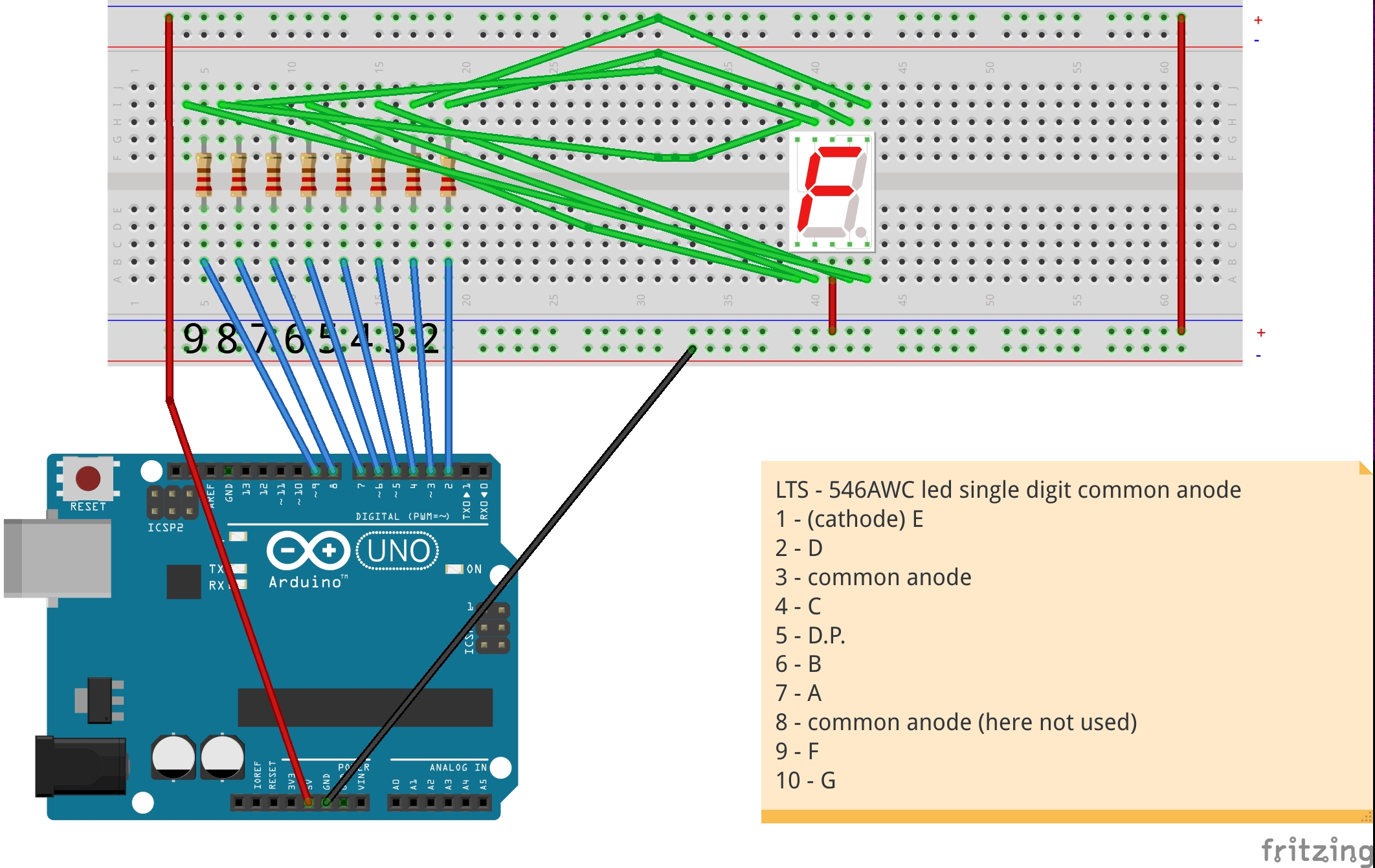
LTS-546AWC Arduino connection
Connection of arduino pins to led display. Connections from Arduino: ledPinDP = 9; // the number of the LED pin decimal point ledPinG = 8; // the number of the LED pin segment G ledPinF = 7; // the number of the LED pin segment F ledPinE = 6; // the numero of the LED pin segment E ledPinD = 5; // the segment of the LED pin segment D ledPinC = 4; // the number of the LED pin segment C ledPinB = 3; // the number of the LED pin segment B ledPinA = 2; // the number of the LED pin segment A
LTS-546AWC Arduino connection
Comments
Only logged in users can leave comments