Components and supplies
1
Arduino Nano 33 IoT
1
Resistor 75 Ohm
3
Resistor 120 Ohm
1
Resistor 10 kOhm
1
Jumper wires (generic)
4
High brightness LED white
2
Resistor 36 Ohm
3
High brightness LED red
Tools and machines
1
Solder Wire, Lead Free
1
Soldering iron (generic)
Project description
Code
Blinking LED light with 4 program modes changed with push button
csharp
1/*
2Program to switch trough 4 program modes by pressing a simple push   button.
3Mode 0 = All LEDs turned on
4Mode 1 = Blinking LEDs. The LEDs are   dividied into two groups. When one group is off, the other LED group is on and opposite.
5Mode   2 = All LEDs are blinking fast at the same time.
6Mode 3 = All LEDs turned off
7
8
9  The circuit:
10  - LED attached from pin 2, 3, 4, 5, 6, 7 to ground
11
12  - pushbutton attached from pin 12 to +5V with 10kOhm in between to lower   current
13
14
15  created 03 May 2020
16  by Thomas Wolters
17
18*/
19//   constants won't change. They're used here to set pin numbers of button and LEDs:
20const   int buttonPin = 12;    // the number of the pushbutton pin
21const int    ledPin2=   2;     // the number of the LED pin
22const int   ledPin3 =  3;     // the number   of the LED pin
23const int   ledPin4 =  4;     // the number of the LED pin
24const   int   ledPin5 =  5;     // the number of the LED pin
25const int   ledPin6 =  6;      // the number of the LED pin
26const int   ledPin7 =  7;     // the number   of the LED pin
27//
28enum ZUSTAENDE:byte {ON, Blink, Blink_fast,OFF};  //Definition   of program modes
29byte zustand = ON;
30// Variables will change:
31int  ledState;            // the current state of the output pin
32int  ledState2;         //   the current state of the output pin
33byte buttonState;             // the current   reading from the input pin
34byte counter = 0;
35byte lastcounter =0;
36byte   Mode = 0;
37int  lastButtonState = LOW;// the previous reading from the input pin
38//   the following variables are unsigned longs because the time, measured in
39// milliseconds,   will quickly become a bigger number than can be stored in an int.
40unsigned long   lastDebounceTime = 0;  // the last time the output pin was toggled
41unsigned long   debounceDelay = 50;    // the debounce time; increase if the output flickers
42
43const   long interval = 150;           // interval at which to blink at mode 1 (milliseconds)
44const   long interval_1 = 150;           // interval at which to blink at mode 2 (milliseconds)
45unsigned   long previousMillis = 0;        // will store last time LED was updated
46void   setup() {
47  pinMode(buttonPin,INPUT);
48  pinMode(ledPin2,  OUTPUT);
49  pinMode(ledPin3,   OUTPUT);
50  pinMode(ledPin4,  OUTPUT);
51  pinMode(ledPin5,  OUTPUT);
52  pinMode(ledPin6,   OUTPUT);
53  pinMode(ledPin7,  OUTPUT);
54 //set initial LED state
55  digitalWrite(ledPin2,   HIGH);
56  digitalWrite(ledPin3, HIGH);
57  digitalWrite(ledPin4, HIGH);
58  digitalWrite(ledPin5,   HIGH);
59  digitalWrite(ledPin6, HIGH);
60  digitalWrite(ledPin7, HIGH);
61}
62void   loop() {
63    // read the state of the switch into a local variable:
64  int   reading = digitalRead(buttonPin);
65  // check to see if you just pressed the button
66   // (i.e. the input went from LOW to HIGH), and you've waited long enough
67  //   since the last press to ignore any noise:
68
69  // If the switch changed, due   to noise or pressing:
70  if (reading != lastButtonState) {
71    // reset the   debouncing timer
72    lastDebounceTime = millis();
73       }
74  if ((millis()   - lastDebounceTime) > debounceDelay) {
75    // whatever the reading is at, it's   been there for longer than the debounce
76    // delay, so take it as the actual   current state:
77    // if the button state has changed:
78    if (reading !=   buttonState) {
79      buttonState = reading;
80           // only toggle the   LED if the new button state is HIGH
81      if (buttonState == HIGH) {
82  //   hier die cases einfügen        ledState = !ledState;
83                        counter   = counter+1;
84                        zustand = counter;
85                        if   (zustand ==4){
86                          zustand =0;
87                          }
88                         }
89    switch (zustand) {
90      case ON:
91           Mode   = 0;
92      break;
93      case Blink:
94           Mode = 1;
95      break;
96       case Blink_fast:
97           Mode = 2;
98      break;
99         case   OFF:
100           Mode = 3;
101      break;
102        }
103      }
104    }
105   if (counter == 4){
106 counter =0;
107   }
108// Second Whattodo
109  unsigned long   currentMillis = millis();
110    switch (Mode) {
111      case 0: //Turn light ON
112
113          digitalWrite(ledPin2,  HIGH);
114          digitalWrite(ledPin3,   HIGH);
115          digitalWrite(ledPin4,  HIGH);
116          digitalWrite(ledPin5,   HIGH);
117          digitalWrite(ledPin6,  HIGH);
118          digitalWrite(ledPin7,   HIGH);
119             break;
120      case 1: //Turn BLINK
121           if (currentMillis   - previousMillis >= interval) {
122    // save the last time you blinked the LED
123     previousMillis = currentMillis;
124      Serial.print("previousmillis is: ");
125   Serial.println(previousMillis);
126    Serial.print("currentmillis is: ");
127   Serial.println(currentMillis);
128    // if the LED is off turn it on and vice-versa:
129     if (ledState == LOW) {
130      ledState = HIGH;
131      ledState2 = LOW;
132     } else {
133      ledState = LOW;
134      ledState2 = HIGH;
135    }
136    //   set the LED with the ledState of the variable:
137   digitalWrite (ledPin2, ledState2);   //Vorderlicht 1 40mA
138   digitalWrite (ledPin3, ledState);  //Vorderlicht 2 40mA
139    digitalWrite (ledPin4, ledState2); //Vorderlichter Seite 2xparallel 38mA
140    digitalWrite (ledPin5, ledState);  //Rucklicht Haupt 40mA
141   digitalWrite   (ledPin6, ledState2);  //Rücklicht links 20mA
142   digitalWrite (ledPin7, ledState);   //Rücklicht rechts 20mA
143    }
144         break;
145      case 2: //BlinkFast
146   //  unsigned long currentMillis = millis();
147          if (currentMillis - previousMillis   >= interval_1) {
148    // save the last time you blinked the LED
149    previousMillis   = currentMillis;
150    // if the LED is off turn it on and vice-versa:
151    if   (ledState == LOW) {
152      ledState = HIGH;
153    } else {
154      ledState   = LOW;
155    }
156    // set the LED with the ledState of the variable:
157    digitalWrite   (ledPin2, ledState);
158   digitalWrite (ledPin3,  ledState);
159   digitalWrite   (ledPin4,  ledState);
160   digitalWrite (ledPin5,  ledState);
161   digitalWrite   (ledPin6,  ledState);
162   digitalWrite (ledPin7,  ledState);
163           break;
164          case 3: //Turn light OFF
165          digitalWrite(ledPin2,  LOW);
166           digitalWrite(ledPin3,  LOW);
167          digitalWrite(ledPin4,  LOW);
168           digitalWrite(ledPin5,  LOW);
169          digitalWrite(ledPin6,  LOW);
170           digitalWrite(ledPin7,  LOW);
171      }
172         break;
173    }
174   // save the reading. Next time through the loop, it'll be the lastButtonState:
175   lastButtonState = reading;
176  lastcounter = counter;
177}
Blinking LED light with 4 program modes changed with push button
csharp
1/*
2Program to switch trough 4 program modes by pressing a simple push  button.
3Mode 0 = All LEDs turned on
4Mode 1 = Blinking LEDs. The LEDs are  dividied into two groups. When one group is off, the other LED group is on and opposite.
5Mode  2 = All LEDs are blinking fast at the same time.
6Mode 3 = All LEDs turned off
7
8
9  The circuit:
10  - LED attached from pin 2, 3, 4, 5, 6, 7 to ground
11
12  - pushbutton attached from pin 12 to +5V with 10kOhm in between to lower  current
13
14
15  created 03 May 2020
16  by Thomas Wolters
17
18*/
19//  constants won't change. They're used here to set pin numbers of button and LEDs:
20const  int buttonPin = 12;    // the number of the pushbutton pin
21const int    ledPin2=  2;     // the number of the LED pin
22const int   ledPin3 =  3;     // the number  of the LED pin
23const int   ledPin4 =  4;     // the number of the LED pin
24const  int   ledPin5 =  5;     // the number of the LED pin
25const int   ledPin6 =  6;     // the number of the LED pin
26const int   ledPin7 =  7;     // the number  of the LED pin
27//
28enum ZUSTAENDE:byte {ON, Blink, Blink_fast,OFF};  //Definition  of program modes
29byte zustand = ON;
30// Variables will change:
31int  ledState;           // the current state of the output pin
32int  ledState2;         //  the current state of the output pin
33byte buttonState;             // the current  reading from the input pin
34byte counter = 0;
35byte lastcounter =0;
36byte  Mode = 0;
37int  lastButtonState = LOW;// the previous reading from the input pin
38//  the following variables are unsigned longs because the time, measured in
39// milliseconds,  will quickly become a bigger number than can be stored in an int.
40unsigned long  lastDebounceTime = 0;  // the last time the output pin was toggled
41unsigned long  debounceDelay = 50;    // the debounce time; increase if the output flickers
42
43const  long interval = 150;           // interval at which to blink at mode 1 (milliseconds)
44const  long interval_1 = 150;           // interval at which to blink at mode 2 (milliseconds)
45unsigned  long previousMillis = 0;        // will store last time LED was updated
46void  setup() {
47  pinMode(buttonPin,INPUT);
48  pinMode(ledPin2,  OUTPUT);
49  pinMode(ledPin3,  OUTPUT);
50  pinMode(ledPin4,  OUTPUT);
51  pinMode(ledPin5,  OUTPUT);
52  pinMode(ledPin6,  OUTPUT);
53  pinMode(ledPin7,  OUTPUT);
54 //set initial LED state
55  digitalWrite(ledPin2,  HIGH);
56  digitalWrite(ledPin3, HIGH);
57  digitalWrite(ledPin4, HIGH);
58  digitalWrite(ledPin5,  HIGH);
59  digitalWrite(ledPin6, HIGH);
60  digitalWrite(ledPin7, HIGH);
61}
62void  loop() {
63    // read the state of the switch into a local variable:
64  int  reading = digitalRead(buttonPin);
65  // check to see if you just pressed the button
66  // (i.e. the input went from LOW to HIGH), and you've waited long enough
67  //  since the last press to ignore any noise:
68
69  // If the switch changed, due  to noise or pressing:
70  if (reading != lastButtonState) {
71    // reset the  debouncing timer
72    lastDebounceTime = millis();
73       }
74  if ((millis()  - lastDebounceTime) > debounceDelay) {
75    // whatever the reading is at, it's  been there for longer than the debounce
76    // delay, so take it as the actual  current state:
77    // if the button state has changed:
78    if (reading !=  buttonState) {
79      buttonState = reading;
80           // only toggle the  LED if the new button state is HIGH
81      if (buttonState == HIGH) {
82  //  hier die cases einfügen        ledState = !ledState;
83                        counter  = counter+1;
84                        zustand = counter;
85                        if  (zustand ==4){
86                          zustand =0;
87                          }
88                        }
89    switch (zustand) {
90      case ON:
91           Mode  = 0;
92      break;
93      case Blink:
94           Mode = 1;
95      break;
96      case Blink_fast:
97           Mode = 2;
98      break;
99         case  OFF:
100           Mode = 3;
101      break;
102        }
103      }
104    }
105  if (counter == 4){
106 counter =0;
107   }
108// Second Whattodo
109  unsigned long  currentMillis = millis();
110    switch (Mode) {
111      case 0: //Turn light ON
112
113          digitalWrite(ledPin2,  HIGH);
114          digitalWrite(ledPin3,  HIGH);
115          digitalWrite(ledPin4,  HIGH);
116          digitalWrite(ledPin5,  HIGH);
117          digitalWrite(ledPin6,  HIGH);
118          digitalWrite(ledPin7,  HIGH);
119             break;
120      case 1: //Turn BLINK
121           if (currentMillis  - previousMillis >= interval) {
122    // save the last time you blinked the LED
123    previousMillis = currentMillis;
124      Serial.print("previousmillis is: ");
125  Serial.println(previousMillis);
126    Serial.print("currentmillis is: ");
127  Serial.println(currentMillis);
128    // if the LED is off turn it on and vice-versa:
129    if (ledState == LOW) {
130      ledState = HIGH;
131      ledState2 = LOW;
132    } else {
133      ledState = LOW;
134      ledState2 = HIGH;
135    }
136    //  set the LED with the ledState of the variable:
137   digitalWrite (ledPin2, ledState2);  //Vorderlicht 1 40mA
138   digitalWrite (ledPin3, ledState);  //Vorderlicht 2 40mA
139   digitalWrite (ledPin4, ledState2); //Vorderlichter Seite 2xparallel 38mA
140   digitalWrite (ledPin5, ledState);  //Rucklicht Haupt 40mA
141   digitalWrite  (ledPin6, ledState2);  //Rücklicht links 20mA
142   digitalWrite (ledPin7, ledState);  //Rücklicht rechts 20mA
143    }
144         break;
145      case 2: //BlinkFast
146  //  unsigned long currentMillis = millis();
147          if (currentMillis - previousMillis  >= interval_1) {
148    // save the last time you blinked the LED
149    previousMillis  = currentMillis;
150    // if the LED is off turn it on and vice-versa:
151    if  (ledState == LOW) {
152      ledState = HIGH;
153    } else {
154      ledState  = LOW;
155    }
156    // set the LED with the ledState of the variable:
157    digitalWrite  (ledPin2, ledState);
158   digitalWrite (ledPin3,  ledState);
159   digitalWrite  (ledPin4,  ledState);
160   digitalWrite (ledPin5,  ledState);
161   digitalWrite  (ledPin6,  ledState);
162   digitalWrite (ledPin7,  ledState);
163           break;
164         case 3: //Turn light OFF
165          digitalWrite(ledPin2,  LOW);
166          digitalWrite(ledPin3,  LOW);
167          digitalWrite(ledPin4,  LOW);
168          digitalWrite(ledPin5,  LOW);
169          digitalWrite(ledPin6,  LOW);
170          digitalWrite(ledPin7,  LOW);
171      }
172         break;
173    }
174  // save the reading. Next time through the loop, it'll be the lastButtonState:
175  lastButtonState = reading;
176  lastcounter = counter;
177}
Downloadable files
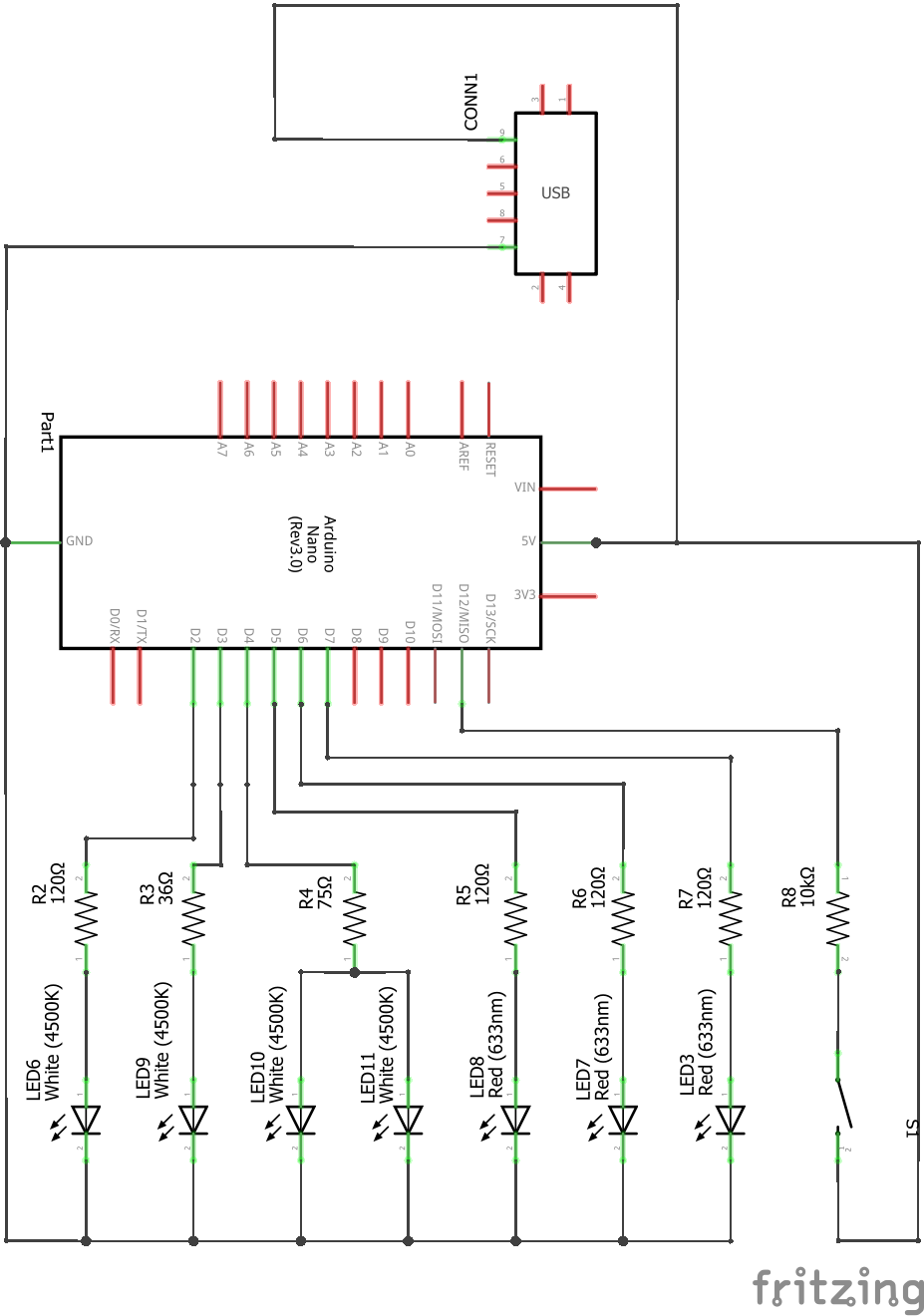
Scheme for blinking light
Scheme for blinking light
Scheme for blinking light
Comments
Only logged in users can leave comments