Devices & Components
1
Arduino Uno Rev3
1
RGB Diffused Common Cathode
1
Breadboard (generic)
1
Rotary Encoder with Push-Button
1
Jumper wires (generic)
1
Resistor 2.21k ohm
Project description
Code
ledGame.ino
java
1/*
2  LED Game
3  Chukwunonso Elumeze
4  03/07/2021
5*/
6#include
7  <millisDelay.h>
8//The pin buttons for the leds
9const int ledTwo = 2;
10const
11  int ledThree = 3;
12const int ledCorrect = 4; //Led to aim for
13const int ledFive
14  = 5;
15const int ledSix = 6;
16int redPin = 8;
17int greenPin = 10;
18int bluePin
19  = 11;
20//delay values
21int delay_Speed = 2000;
22int delay_Result = 500;
23const
24  int button = 13; //button Pin
25int buttonState;       //button state
26int difficult
27  = 1;     //difficulty
28millisDelay testDelay;
29// the setup function runs once
30  when you press reset or power the board
31void setup()
32{
33  // initialize
34  the pins as output.
35  pinMode(ledTwo, OUTPUT);
36  pinMode(ledThree, OUTPUT);
37
38  pinMode(ledCorrect, OUTPUT);
39  pinMode(ledFive, OUTPUT);
40  pinMode(ledSix,
41  OUTPUT);
42  pinMode(redPin, OUTPUT);
43  pinMode(greenPin, OUTPUT);
44  pinMode(bluePin,
45  OUTPUT);
46  pinMode(button, INPUT);
47}
48// the loop function runs over and
49  over again forever
50void loop()
51{
52  int amount = 2;
53  while (amount <
54  7)
55  {
56    //displays the LED for each pin
57    displayGame(amount);
58
59    amount++;
60  }
61}
62
63void setDifficulty(int state_Of_Difficulty)
64{
65
66  //sets the delay to a value depending on the level of the player
67  delay_Speed
68  = 2000 / state_Of_Difficulty;
69}
70void getButtonState()
71{
72  //gets the
73  state of the button
74  buttonState = digitalRead(button);
75}
76//if the button
77  was clicked at the wrong time
78void badInput()
79{
80  if (buttonState == HIGH)
81
82  {
83    failedTheLevel(); //display the LED that shows you failed
84    if (difficult
85  != 1)
86      difficult = difficult - 1;    //reset the difficulty
87  }
88}
89//if
90  the button was clicked at the right time
91void goodInput()
92{
93  if (buttonState
94  == HIGH)
95  {
96    passedTheLevel();          //display the LED that shows you
97  passed
98    difficult = difficult + 1; //increase the difficulty
99  }
100}
101//Switches
102  an LED ON/OFF to show that you passed the level
103void passedTheLevel()
104{
105
106  setColor(0, 255, 0);
107  delay(delay_Result);
108  setColor(0, 0, 0);
109}
110//Switches
111  an LED ON/OFF to show that you failed the level
112void failedTheLevel()
113{ setColor(255,
114  0, 0);
115  delay(delay_Result);
116  setColor(0, 0, 0);
117}
118//Switches on an
119  LED and checks if the button was pressed
120void displayGame(int ledTest)
121{
122
123  digitalWrite(ledTest, HIGH);
124  testDelay.start(delay_Speed);
125  while (testDelay.justFinished()
126  == false)
127  {
128    getButtonState();
129    if (ledTest != ledCorrect)
130
131      badInput();
132    else
133      goodInput();
134  };
135  digitalWrite(ledTest,
136  LOW);
137  setDifficulty(difficult);
138}
139//Displays the Color on the RGB LED
140void
141  setColor(int redValue, int greenValue, int blueValue) {
142  analogWrite(redPin,
143  redValue);
144  analogWrite(greenPin, greenValue);
145  analogWrite(bluePin, blueValue);
146}
ledGame.ino
java
1/*
2  LED Game
3  Chukwunonso Elumeze
4  03/07/2021
5*/
6#include  <millisDelay.h>
7//The pin buttons for the leds
8const int ledTwo = 2;
9const  int ledThree = 3;
10const int ledCorrect = 4; //Led to aim for
11const int ledFive  = 5;
12const int ledSix = 6;
13int redPin = 8;
14int greenPin = 10;
15int bluePin  = 11;
16//delay values
17int delay_Speed = 2000;
18int delay_Result = 500;
19const  int button = 13; //button Pin
20int buttonState;       //button state
21int difficult  = 1;     //difficulty
22millisDelay testDelay;
23// the setup function runs once  when you press reset or power the board
24void setup()
25{
26  // initialize  the pins as output.
27  pinMode(ledTwo, OUTPUT);
28  pinMode(ledThree, OUTPUT);
29  pinMode(ledCorrect, OUTPUT);
30  pinMode(ledFive, OUTPUT);
31  pinMode(ledSix,  OUTPUT);
32  pinMode(redPin, OUTPUT);
33  pinMode(greenPin, OUTPUT);
34  pinMode(bluePin,  OUTPUT);
35  pinMode(button, INPUT);
36}
37// the loop function runs over and  over again forever
38void loop()
39{
40  int amount = 2;
41  while (amount <  7)
42  {
43    //displays the LED for each pin
44    displayGame(amount);
45    amount++;
46  }
47}
48
49void setDifficulty(int state_Of_Difficulty)
50{
51  //sets the delay to a value depending on the level of the player
52  delay_Speed  = 2000 / state_Of_Difficulty;
53}
54void getButtonState()
55{
56  //gets the  state of the button
57  buttonState = digitalRead(button);
58}
59//if the button  was clicked at the wrong time
60void badInput()
61{
62  if (buttonState == HIGH)
63  {
64    failedTheLevel(); //display the LED that shows you failed
65    if (difficult  != 1)
66      difficult = difficult - 1;    //reset the difficulty
67  }
68}
69//if  the button was clicked at the right time
70void goodInput()
71{
72  if (buttonState  == HIGH)
73  {
74    passedTheLevel();          //display the LED that shows you  passed
75    difficult = difficult + 1; //increase the difficulty
76  }
77}
78//Switches  an LED ON/OFF to show that you passed the level
79void passedTheLevel()
80{
81  setColor(0, 255, 0);
82  delay(delay_Result);
83  setColor(0, 0, 0);
84}
85//Switches  an LED ON/OFF to show that you failed the level
86void failedTheLevel()
87{ setColor(255,  0, 0);
88  delay(delay_Result);
89  setColor(0, 0, 0);
90}
91//Switches on an  LED and checks if the button was pressed
92void displayGame(int ledTest)
93{
94  digitalWrite(ledTest, HIGH);
95  testDelay.start(delay_Speed);
96  while (testDelay.justFinished()  == false)
97  {
98    getButtonState();
99    if (ledTest != ledCorrect)
100      badInput();
101    else
102      goodInput();
103  };
104  digitalWrite(ledTest,  LOW);
105  setDifficulty(difficult);
106}
107//Displays the Color on the RGB LED
108void  setColor(int redValue, int greenValue, int blueValue) {
109  analogWrite(redPin,  redValue);
110  analogWrite(greenPin, greenValue);
111  analogWrite(bluePin, blueValue);
112}
Downloadable files
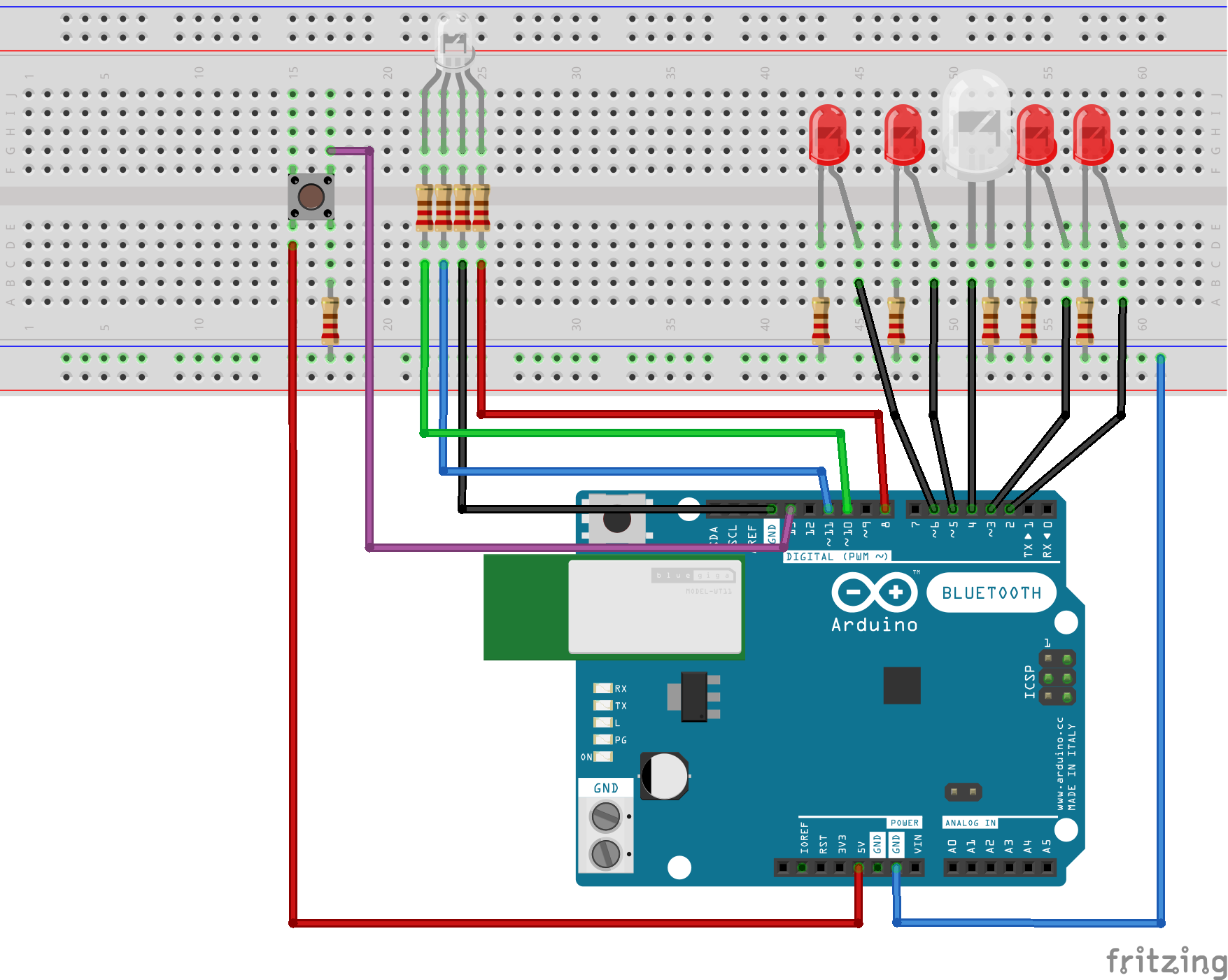
breadboard_Diagram.png
breadboard_Diagram.png
Comments
Only logged in users can leave comments