AGRITECH: eliminate manual labour in agricultural fields…
A smart scarecrow on the field to keep a track of climatic condition. For need of irrigation/pesticides a drone will be sent to the field.
Devices & Components

Arduino Nano
Solo Propellers
Slide Switch
Female/Female Jumper Wires
Toggle Switch, (On)-Off-(On)
Joystick, 2
9V battery (generic)
nRF24 Module (Generic)
Jumper wires (generic)
lipo Battery
Zero PCB
DHT11 Temperature & Humidity Sensor (4 pins)
Brushless Motor
Step-Up Voltage Regulator - 3.3V
Male-Header 36 Position 1 Row- Long (0.1")
Gas Detection Sensor, Methane
SparkFun Soil Moisture Sensor (with Screw Terminals)
6 DOF Sensor - MPU6050
NodeMCU ESP8266 Breakout Board
Electronic Speed Controller
Hardware & Tools
Mastech MS8217 Autorange Digital Multimeter
Soldering iron (generic)
Wire Stripper & Cutter, 18-10 AWG / 0.75-4mm² Capacity Wires
Software & Tools
Blynk

Arduino IDE
Project description
Code
Field Monitoring
c_cpp
1#define BLYNK_PRINT Serial
2#include <ESP8266WiFi.h>
3#include <BlynkSimpleEsp8266.h>
4#include   "DHT.h"           // including the library of DHT11 temperature and humidity sensor
5#include   <SimpleTimer.h>   //including the library of SimpleTimer
6#define DHTTYPE DHT11       // DHT 11
7
8#define dht_dpin 14
9DHT dht(dht_dpin, DHTTYPE);
10SimpleTimer   timer;
11char auth[] = "cT1dmlOyqPKItDGq2FJeWXOaM5YleN3c";
12char ssid[] =   "diksha";
13char pass[] = "diksha19";
14const int sensor_pin = A0;//* Connect   Soil moisture analog sensor pin to A0 of NodeMCU */
15float t;                                   //   Declare the variables
16float h;
17void setup() {
18  Serial.begin(9600);
19
20  Blynk.begin(auth,ssid,pass);  //wifi name and password
21  pinMode(sensor_pin,   INPUT);/* Define baud rate for serial communication */
22  dht.begin();
23  timer.setInterval(2000,   sendUptime);
24}
25
26void sendUptime()
27{
28
29  float h = dht.readHumidity();
30   float t = dht.readTemperature();
31  Serial.println("Humidity and temperature\
32\
33");
34   Serial.print("Current humidity = ");
35  Serial.print(h);
36  Serial.print("%   ");
37  Serial.print("temperature = ");
38  Serial.print(t);
39  Blynk.virtualWrite(V0,   t);
40  Blynk.virtualWrite(V1, h);
41
42}
43
44
45void loop()
46{
47Blynk.run();
48timer.run();
49
50   float moisture_percentage;
51
52  moisture_percentage = ( 100.00 - ( (analogRead(sensor_pin)/1023.00)   * 100.00 ) );
53
54  Serial.print("Soil Moisture(in Percentage) = ");
55  Serial.print(moisture_percentage);
56   Serial.println("%");
57  Blynk.virtualWrite(V4,moisture_percentage);
58
59   if (moisture_percentage<=50) {
60    Serial.println("i need water..");
61     Blynk.notify("I need water..");
62  }
63  else {
64  Serial.println("no   water needed");}
65
66  delay(1000);
67}
68
Drone Receiver
c_cpp
1#include <SPI.h>
2#include <nRF24L01.h>
3#include <RF24.h>
4const
5  uint64_t pipeIn = 0xE8E8F0F0E1LL; //Remember that this code is the same as in the
6  transmitter
7
8RF24 radio(9, 10);
9
10//We could use up to 32 channels
11struct
12  MyData {
13byte throttle; //We define each byte of data input, in this case just
14  6 channels
15byte yaw;
16byte pitch;
17byte roll;
18byte AUX1;
19byte AUX2;
20};
21
22MyData
23  data;
24
25void resetData()
26{
27//We define the inicial value of each data
28  input
29//3 potenciometers will be in the middle position so 127 is the middle
30  from 254
31data.throttle = 0;
32data.yaw = 127;
33data.pitch = 127;
34data.roll
35  = 127;
36data.AUX1 = 0;
37data.AUX2 = 0;
38
39}
40
41/**************************************************/
42
43void
44  setup()
45{
46Serial.begin(250000); //Set the speed to 9600 bauds if you want.
47//You
48  should always have the same speed selected in the serial monitor
49resetData();
50radio.begin();
51radio.setAutoAck(false);
52radio.setDataRate(RF24_250KBPS);
53
54radio.openReadingPipe(1,pipeIn);
55//we
56  start the radio comunication
57radio.startListening();
58
59}
60
61/**************************************************/
62
63unsigned
64  long lastRecvTime = 0;
65
66void recvData()
67{
68while ( radio.available()
69  ) {
70radio.read(&data, sizeof(MyData));
71lastRecvTime = millis(); //here we
72  receive the data
73}
74}
75
76/**************************************************/
77
78void
79  loop()
80{
81recvData();
82unsigned long now = millis();
83//Here we check if
84  we've lost signal, if we did we reset the values
85if ( now - lastRecvTime > 1000
86  ) {
87// Signal lost?
88resetData();
89}
90
91Serial.print("Throttle: ");
92  Serial.print(data.throttle);  Serial.print("    ");
93Serial.print("Yaw: ");
94      Serial.print(data.yaw);       Serial.print("    ");
95Serial.print("Pitch:
96  ");    Serial.print(data.pitch);     Serial.print("    ");
97Serial.print("Roll:
98  ");     Serial.print(data.roll);      Serial.print("    ");
99Serial.print("Aux1:
100  ");     Serial.print(data.AUX1);      Serial.print("    ");
101Serial.print("Aux2:
102  ");     Serial.print(data.AUX2);      Serial.print("\
103");
104
105
106
107}
108
109/**************************************************/
110
Drone Receiver
c_cpp
1#include <SPI.h>
2#include <nRF24L01.h>
3#include <RF24.h>
4const  uint64_t pipeIn = 0xE8E8F0F0E1LL; //Remember that this code is the same as in the  transmitter
5
6RF24 radio(9, 10);
7
8//We could use up to 32 channels
9struct  MyData {
10byte throttle; //We define each byte of data input, in this case just  6 channels
11byte yaw;
12byte pitch;
13byte roll;
14byte AUX1;
15byte AUX2;
16};
17
18MyData  data;
19
20void resetData()
21{
22//We define the inicial value of each data  input
23//3 potenciometers will be in the middle position so 127 is the middle  from 254
24data.throttle = 0;
25data.yaw = 127;
26data.pitch = 127;
27data.roll  = 127;
28data.AUX1 = 0;
29data.AUX2 = 0;
30
31}
32
33/**************************************************/
34
35void  setup()
36{
37Serial.begin(250000); //Set the speed to 9600 bauds if you want.
38//You  should always have the same speed selected in the serial monitor
39resetData();
40radio.begin();
41radio.setAutoAck(false);
42radio.setDataRate(RF24_250KBPS);
43
44radio.openReadingPipe(1,pipeIn);
45//we  start the radio comunication
46radio.startListening();
47
48}
49
50/**************************************************/
51
52unsigned  long lastRecvTime = 0;
53
54void recvData()
55{
56while ( radio.available()  ) {
57radio.read(&data, sizeof(MyData));
58lastRecvTime = millis(); //here we  receive the data
59}
60}
61
62/**************************************************/
63
64void  loop()
65{
66recvData();
67unsigned long now = millis();
68//Here we check if  we've lost signal, if we did we reset the values
69if ( now - lastRecvTime > 1000  ) {
70// Signal lost?
71resetData();
72}
73
74Serial.print("Throttle: ");  Serial.print(data.throttle);  Serial.print("    ");
75Serial.print("Yaw: ");      Serial.print(data.yaw);       Serial.print("    ");
76Serial.print("Pitch:  ");    Serial.print(data.pitch);     Serial.print("    ");
77Serial.print("Roll:  ");     Serial.print(data.roll);      Serial.print("    ");
78Serial.print("Aux1:  ");     Serial.print(data.AUX1);      Serial.print("    ");
79Serial.print("Aux2:  ");     Serial.print(data.AUX2);      Serial.print("\
80");
81
82
83
84}
85
86/**************************************************/
87
Transmitter
c_cpp
1#include <SPI.h>
2#include <nRF24L01.h>
3#include <RF24.h>
4
5/*Create  a unique pipe out. The receiver has to
6  wear the same unique code*/
7
8const  uint64_t pipeOut = 0xE8E8F0F0E1LL; //IMPORTANT: The same as in the receiver
9
10RF24  radio(9, 10); // select  CSN  pin
11
12// The sizeof this struct should not exceed  32 bytes
13// This gives us up to 32 8 bits channals
14struct MyData {
15  byte  throttle;
16  byte yaw;
17  byte pitch;
18  byte roll;
19  byte AUX1;
20  byte  AUX2;
21};
22
23MyData data;
24
25void resetData()
26{
27  //This are the  start values of each channal
28  // Throttle is 0 in order to s/..//. top the motors
29  //127 is the middle value of the 10ADC.
30
31  data.throttle = 0;
32  data.yaw  = 127;
33  data.pitch = 127;
34  data.roll = 127;
35  data.AUX1 = 0;
36  data.AUX2  = 0;
37}
38
39void setup()
40{
41  //Start everything up
42  radio.begin();
43  radio.setAutoAck(false);
44  radio.setDataRate(RF24_250KBPS);
45  radio.openWritingPipe(pipeOut);
46  resetData();
47}
48
49/**************************************************/
50
51//  Returns a corrected value for a joystick position that takes into account
52//  the values of the outer extents and the middle of the joystick range.
53int mapJoystickValues(int  val, int lower, int middle, int upper, bool reverse)
54{
55  val = constrain(val,  lower, upper);
56  if ( val < middle )
57    val = map(val, lower, middle, 0,  128);
58  else
59    val = map(val, middle, upper, 128, 255);
60  return ( reverse  ? 255 - val : val );
61}
62
63void loop()
64{
65  // The calibration numbers  used here should be measured
66  // for your joysticks till they send the correct  values.
67  data.throttle = mapJoystickValues( analogRead(A0), 13, 524, 1015, true  );
68  data.yaw      = mapJoystickValues( analogRead(A1),  1, 505, 1020, true );
69  data.pitch    = mapJoystickValues( analogRead(A2), 12, 544, 1021, true );
70  data.roll     = mapJoystickValues( analogRead(A3), 34, 522, 1020, true );
71  data.AUX1     = digitalRead(7); //The 2 toggle switches
72  data.AUX2     = digitalRead(8);
73
74  radio.write(&data, sizeof(MyData));
75}
76
Field Monitoring
c_cpp
1#define BLYNK_PRINT Serial
2#include <ESP8266WiFi.h>
3#include <BlynkSimpleEsp8266.h>
4#include  "DHT.h"           // including the library of DHT11 temperature and humidity sensor
5#include  <SimpleTimer.h>   //including the library of SimpleTimer
6#define DHTTYPE DHT11      // DHT 11
7
8#define dht_dpin 14
9DHT dht(dht_dpin, DHTTYPE);
10SimpleTimer  timer;
11char auth[] = "cT1dmlOyqPKItDGq2FJeWXOaM5YleN3c";
12char ssid[] =  "diksha";
13char pass[] = "diksha19";
14const int sensor_pin = A0;//* Connect  Soil moisture analog sensor pin to A0 of NodeMCU */
15float t;                                   //  Declare the variables
16float h;
17void setup() {
18  Serial.begin(9600);
19
20  Blynk.begin(auth,ssid,pass);  //wifi name and password
21  pinMode(sensor_pin,  INPUT);/* Define baud rate for serial communication */
22  dht.begin();
23  timer.setInterval(2000,  sendUptime);
24}
25
26void sendUptime()
27{
28
29  float h = dht.readHumidity();
30  float t = dht.readTemperature();
31  Serial.println("Humidity and temperature\
32\
33");
34  Serial.print("Current humidity = ");
35  Serial.print(h);
36  Serial.print("%  ");
37  Serial.print("temperature = ");
38  Serial.print(t);
39  Blynk.virtualWrite(V0,  t);
40  Blynk.virtualWrite(V1, h);
41
42}
43
44
45void loop()
46{
47Blynk.run();
48timer.run();
49
50  float moisture_percentage;
51
52  moisture_percentage = ( 100.00 - ( (analogRead(sensor_pin)/1023.00)  * 100.00 ) );
53
54  Serial.print("Soil Moisture(in Percentage) = ");
55  Serial.print(moisture_percentage);
56  Serial.println("%");
57  Blynk.virtualWrite(V4,moisture_percentage);
58
59  if (moisture_percentage<=50) {
60    Serial.println("i need water..");
61    Blynk.notify("I need water..");
62  }
63  else {
64  Serial.println("no  water needed");}
65
66  delay(1000);
67}
68
Downloadable files
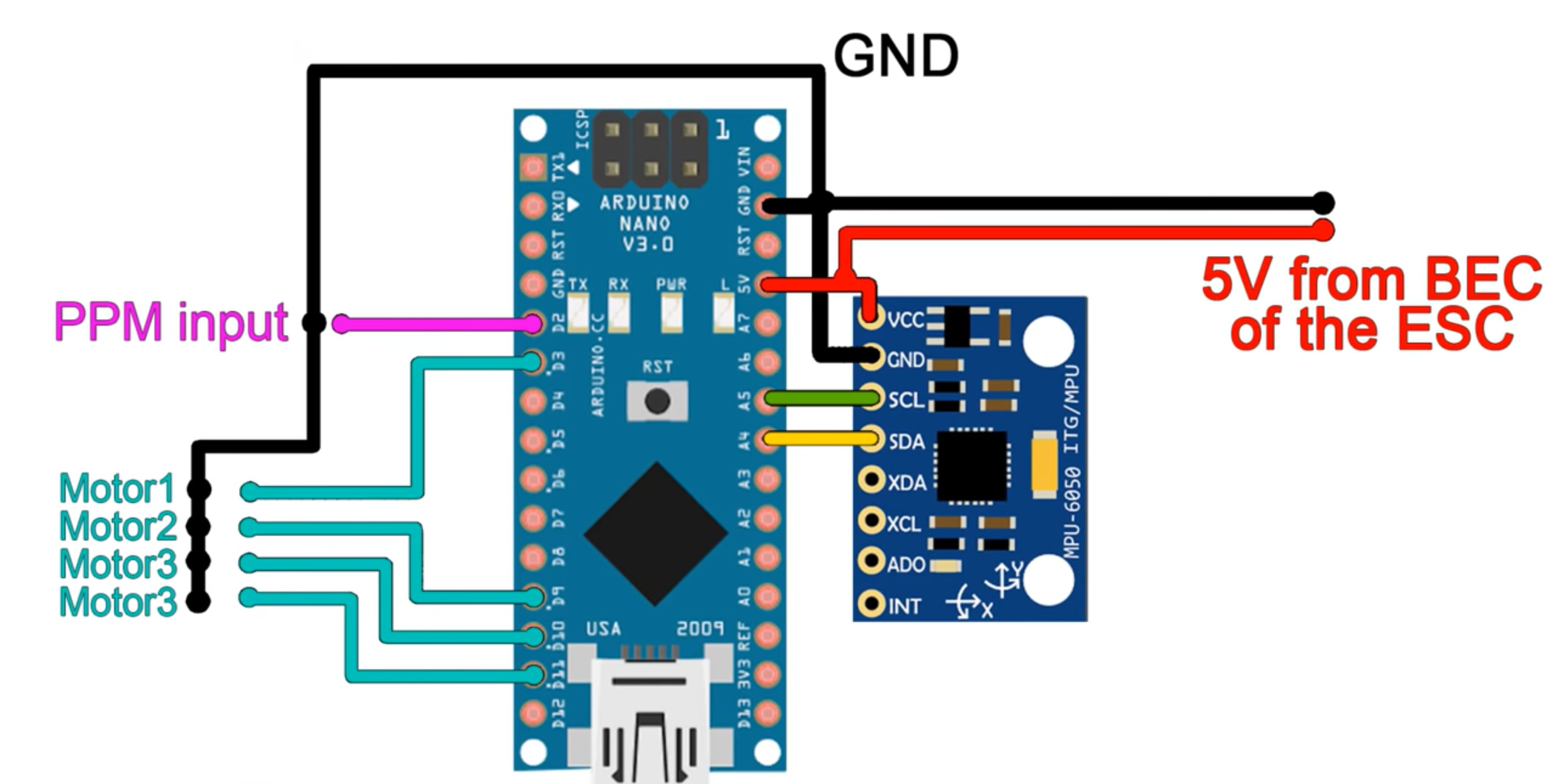
Flight Controller Circuit
Flight Controller Circuit
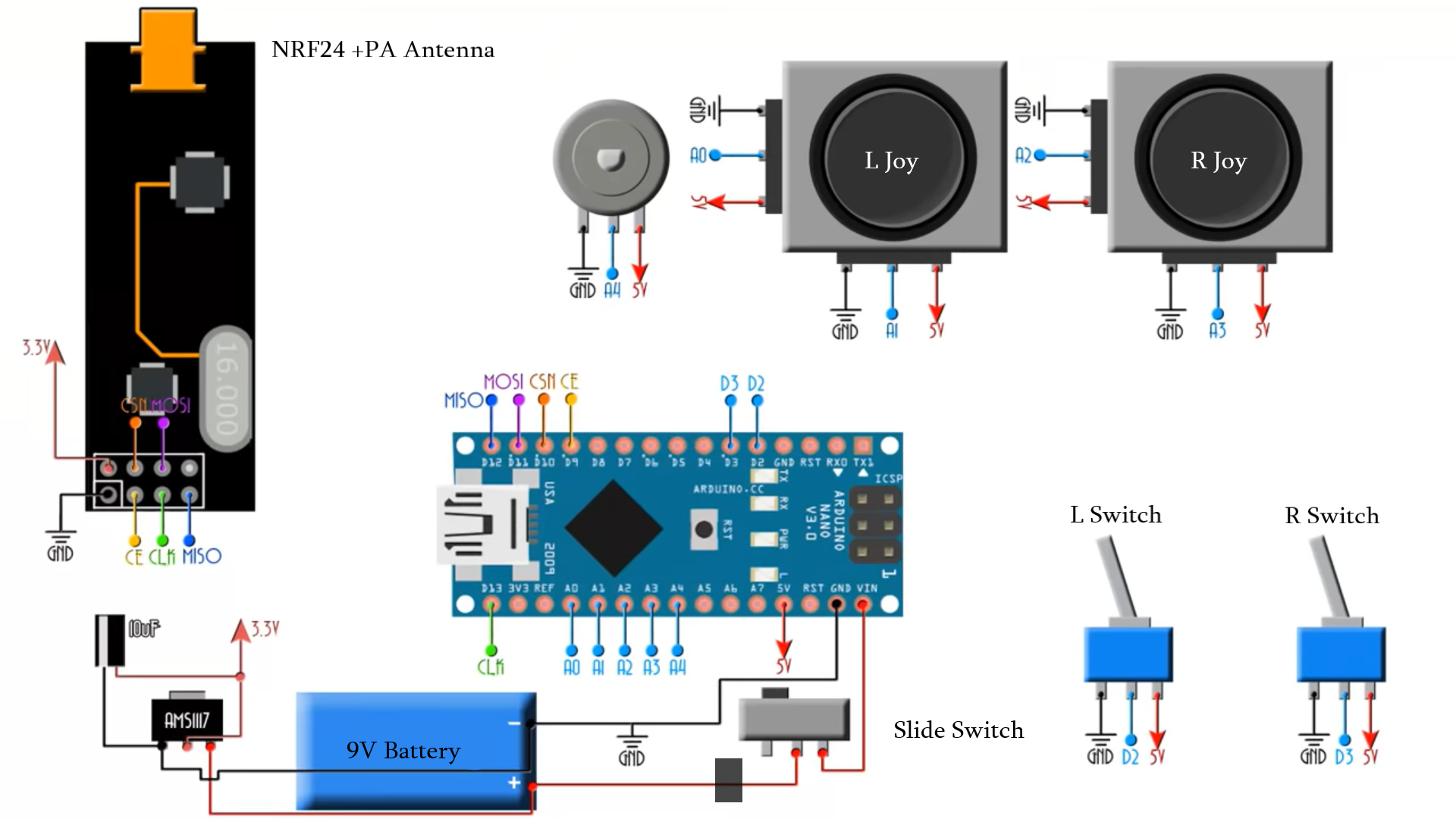
Transmitter Circuit
Transmitter Circuit
Transmitter Circuit
Transmitter Circuit
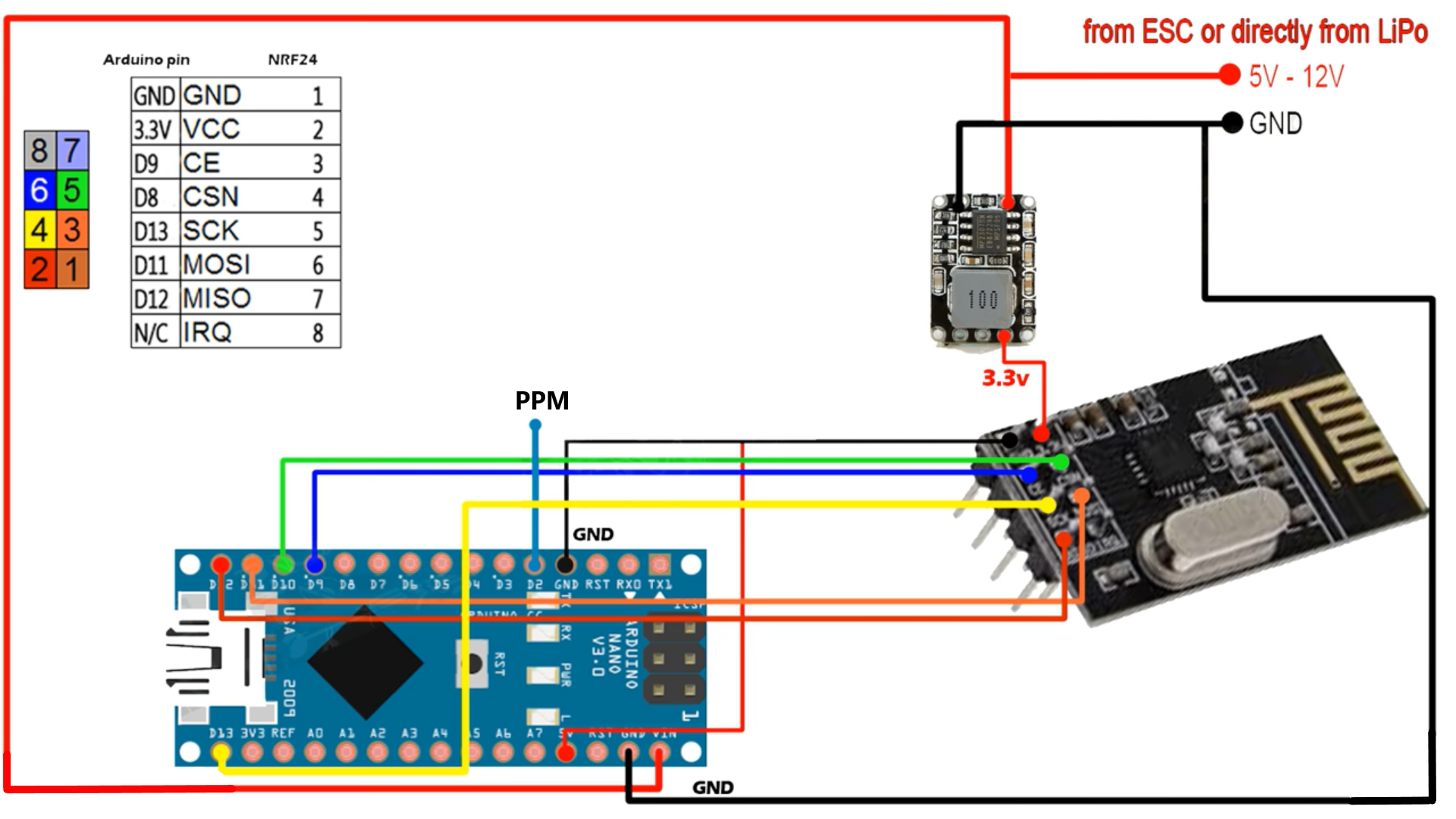
Receiver Circuit
Receiver Circuit
Receiver Circuit
Receiver Circuit
Flight Controller Circuit
Flight Controller Circuit
Comments
Only logged in users can leave comments