Vivarium Monitor and Controller
Control and monitor your terrarium or vivarium.
Devices & Components
1
Arduino 4 Relays Shield
1
Arduino Ethernet Shield 2
1
Arduino Mega 2560 Rev3
1
DHT22 Temperature Sensor
1
RGB Backlight LCD - 16x2
1
Single Turn Potentiometer- 10k ohms
1
Jumper wires (generic)
1
Resistor 10k ohm
1
Photo resistor
1
Breadboard (generic)
Software & Tools
1
Visual Studio 2015

Arduino IDE
Project description
Code
Arduino Sketch
arduino
1// Chuck Faranda chuck@ccdastro.net gleaned from numerous sources in the   public domain - use at your own risk :-)
2
3#include <Dhcp.h>
4#include <Dns.h>
5#include   <Ethernet.h>
6#include <EthernetClient.h>
7#include <EthernetServer.h>
8#include   <EthernetUdp.h>
9#include <SPI.h>
10#include <math.h>
11
12// include LCD library   code
13#include <LiquidCrystal.h>
14// include DHT library code
15#include <DHT.h>
16#include   <DHT_U.h>
17
18String serialin;
19String str;
20String str2;
21String str3;
22String   str4;
23
24//store relay states
25int relay1state;
26int relay2state;
27int   relay3state;
28int relay4state;
29
30int index = 0;                  // the index   of the current reading
31double total = 0;                  // the running total
32double   average = 0;                // the average
33//int average2 = 0;             //   the average
34float Temp1 = 00.0;
35int LDR_Pin = A1; //analog pin 1 for photoresistor
36#define   DHTPIN 2            // DHT22 data pin is connected to Arduino pin 8
37
38// LCD   module connections (RS, E, D4, D5, D6, D7)
39LiquidCrystal lcd(3, 14, 15, 16, 17,   18); // 8,9,10,11,12 for uno
40
41#define DHTTYPE DHT22      // DHT22 sensor   is used
42DHT dht(DHTPIN, DHTTYPE);   // Initialize DHT library
43
44#define   relay1 4
45#define relay2 5
46#define relay3 6
47#define relay4 7
48#define   opened 2
49#define closed 1
50
51// MAC address from Ethernet shield sticker   under board
52byte mac[] = { 0xDE, 0xAD, 0xBE, 0xEF, 0xFE, 0xED };
53// the router's   gateway address:
54byte gateway[] = { 192, 168, 1, 1 };// insert your gateway
55//   the subnet:
56byte subnet[] = { 255, 255, 255, 0 };
57IPAddress ip(192,168,1,88);   // IP address, may need to change depending on network
58EthernetServer server(80);   // create a server at port 80
59
60void setup() {
61    Ethernet.begin(mac,   ip, gateway, subnet);  // initialize Ethernet device
62    server.begin();           //   start to listen for clients
63
64  // set up the LCD's number of columns and rows
65   lcd.begin(16, 2);
66  dht.begin();
67
68  //Begin Serial Comunication(configured   for 9600baud)
69  Serial.begin(9600);
70  //Serial.setTimeout(5000);
71  //pin   relay as OUTPUT
72  pinMode(relay1, OUTPUT);
73  pinMode(relay2, OUTPUT);
74   pinMode(relay3, OUTPUT);
75  pinMode(relay4, OUTPUT);
76
77  pinMode(DHTPIN,   INPUT);
78
79  digitalWrite(relay1,LOW);
80  digitalWrite(relay2,LOW);
81  digitalWrite(relay3,LOW);
82   digitalWrite(relay4,LOW);
83
84  Serial.write("Viv#\
85");
86
87}
88boolean   isValidNumber(String str)
89{
90   boolean isNum=false;
91   if(!(str.charAt(0)   == '+' || str.charAt(0) == '-' || isDigit(str.charAt(0)))) return false;
92
93    for(byte i=1;i<str.length();i++)
94   {
95       if(!(isDigit(str.charAt(i))   || str.charAt(i) == '.')) return false;
96   }
97   return true;
98}
99void   loop() {
100
101EthernetClient client = server.available();  // try to get client
102
103relay1state   = digitalRead (relay1);
104relay2state = digitalRead (relay2);
105relay3state =   digitalRead (relay3);
106relay4state = digitalRead (relay4);
107
108//get temp &   hum from DTH22
109str = round(dht.readHumidity());
110Temp1 = (dht.readTemperature   ()* 1.8 +32);
111str2 = Temp1;
112str3 = analogRead(LDR_Pin);
113
114if ((str.length()   == 0) || (str2.length() == 0)){
115    lcd.clear();
116    lcd.setCursor(5, 0);
117     lcd.print("Error");
118    return;
119  }
120if (isValidNumber(str) == "false")   {
121    lcd.clear();
122    lcd.setCursor(5, 0);
123    lcd.print("Error");
124     return;
125  }
126if (isValidNumber(str2) == "false") {
127    lcd.clear();
128     lcd.setCursor(5, 0);
129    lcd.print("Error");
130    return;
131  }
132if   ((str.length()>= 8) || (str2.length()>= 8)){
133    lcd.clear();
134    lcd.setCursor(5,   0);
135    lcd.print("Error");
136    return;
137  }
138
139  // write data to   LCD
140  lcd.setCursor(0, 0);
141  lcd.print("Temp = ");
142  lcd.setCursor(7,   0);
143  lcd.print(Temp1,1);
144  lcd.print((char)223);         // degree symbol
145   lcd.print(" F");
146  lcd.setCursor(0, 1);
147  lcd.print("Hum  = ");
148   lcd.setCursor(7, 1);
149  lcd.print(str);
150  lcd.print(" %");
151
152  //Verify   connection by serial
153  if (Serial.available()>0) {
154    //Read Serial data   and alocate on serialin
155
156    serialin = Serial.readStringUntil('#');
157
158      if (serialin == "stop1"){
159        //digitalWrite(dewPin,LOW);
160        digitalWrite(relay1,LOW);
161      }
162     if (serialin == "stop2"){
163        //digitalWrite(dewPin,LOW);
164         digitalWrite(relay2,LOW);
165     }
166     if (serialin == "stop3"){
167         //digitalWrite(dewPin,LOW);
168        digitalWrite(relay3,LOW);
169     }
170      if (serialin == "stop4"){
171        //digitalWrite(dewPin,LOW);
172        digitalWrite(relay4,LOW);
173      }
174
175      if (serialin == "relay1"){ // Two Pipeines(||) to make   a boolean OR Comparission
176         digitalWrite(relay1,HIGH);
177        //val   = digitalRead(open);
178      }
179      if (serialin == "relay2"){ // Two Pipeines(||)   to make a boolean OR Comparission
180         digitalWrite(relay2,HIGH);
181      //val   = digitalRead(close);
182      }
183       if (serialin == "relay3"){ // Two Pipeines(||)   to make a boolean OR Comparission
184       digitalWrite(relay3,HIGH);
185       //val   = digitalRead(open);
186      }
187      if (serialin == "relay4"){ // Two Pipeines(||)   to make a boolean OR Comparission
188      digitalWrite(relay4,HIGH);
189      //val   = digitalRead(close);
190      }
191      if (serialin == "get"){
192       Serial.println   (str +"," + str2 +"," + str3 +"," + relay1state +"," + relay2state +","   + relay3state +"," + relay4state + "#");
193       //Serial.println(digitalRead   (relay1));
194       // delay(500);
195     }
196  }
197   if (client) {  // got   web client?
198        boolean currentLineIsBlank = true;
199        while (client.connected())   {
200            if (client.available()) {   // client data available to read
201                 char c = client.read(); // read 1 byte (character) from client
202                 // last line of client request is blank and ends with \
203
204                //   respond to client only after last line received
205                if (c == '\
206'   && currentLineIsBlank) {
207
208                    // send a standard http response   header
209client.println("HTTP/1.1 200 OK");
210client.println("Content-Type:   text/html");
211client.println("Connection: close"); // connection closed completion   of response
212client.println("Refresh: 10"); // refresh the page automatically   every 5 sec
213client.println();
214client.println("<!DOCTYPE HTML>");
215client.println("<html><body>");
216client.print("<h1>Vivarium Controller</h1>");
217client.print("<span style=\\"font-size:   26px\\";><br>  Temperature is ");
218client.print(str2);
219client.println("   \\xB0 F<br>");
220client.print("<br>  Humidity is ");
221client.print(str);
222client.println(" %<br>");
223client.println("</body></html>");
224
225                     break;
226                }
227                // every line   of text received from the client ends with \
\
228
229                if (c == '\
230')   {
231                    // last character on line of received text
232                    //   starting new line with next character read
233                    currentLineIsBlank   = true;
234                }
235                else if (c != '\
') {
236                    //   a text character was received from client
237                    currentLineIsBlank   = false;
238                }
239            } // end if (client.available())
240         } // end while (client.connected())
241        delay(1);      // give the   web browser time to receive the data
242        client.stop(); // close the connection
243     } // end if (client)
244}
245
Arduino Sketch
arduino
1// Chuck Faranda chuck@ccdastro.net gleaned from numerous sources in the  public domain - use at your own risk :-)
2
3#include <Dhcp.h>
4#include <Dns.h>
5#include  <Ethernet.h>
6#include <EthernetClient.h>
7#include <EthernetServer.h>
8#include  <EthernetUdp.h>
9#include <SPI.h>
10#include <math.h>
11
12// include LCD library  code
13#include <LiquidCrystal.h>
14// include DHT library code
15#include <DHT.h>
16#include  <DHT_U.h>
17
18String serialin;
19String str;
20String str2;
21String str3;
22String  str4;
23
24//store relay states
25int relay1state;
26int relay2state;
27int  relay3state;
28int relay4state;
29
30int index = 0;                  // the index  of the current reading
31double total = 0;                  // the running total
32double  average = 0;                // the average
33//int average2 = 0;             //  the average
34float Temp1 = 00.0;
35int LDR_Pin = A1; //analog pin 1 for photoresistor
36#define  DHTPIN 2            // DHT22 data pin is connected to Arduino pin 8
37
38// LCD  module connections (RS, E, D4, D5, D6, D7)
39LiquidCrystal lcd(3, 14, 15, 16, 17,  18); // 8,9,10,11,12 for uno
40
41#define DHTTYPE DHT22      // DHT22 sensor  is used
42DHT dht(DHTPIN, DHTTYPE);   // Initialize DHT library
43
44#define  relay1 4
45#define relay2 5
46#define relay3 6
47#define relay4 7
48#define  opened 2
49#define closed 1
50
51// MAC address from Ethernet shield sticker  under board
52byte mac[] = { 0xDE, 0xAD, 0xBE, 0xEF, 0xFE, 0xED };
53// the router's  gateway address:
54byte gateway[] = { 192, 168, 1, 1 };// insert your gateway
55//  the subnet:
56byte subnet[] = { 255, 255, 255, 0 };
57IPAddress ip(192,168,1,88);  // IP address, may need to change depending on network
58EthernetServer server(80);  // create a server at port 80
59
60void setup() {
61    Ethernet.begin(mac,  ip, gateway, subnet);  // initialize Ethernet device
62    server.begin();           //  start to listen for clients
63
64  // set up the LCD's number of columns and rows
65  lcd.begin(16, 2);
66  dht.begin();
67
68  //Begin Serial Comunication(configured  for 9600baud)
69  Serial.begin(9600);
70  //Serial.setTimeout(5000);
71  //pin  relay as OUTPUT
72  pinMode(relay1, OUTPUT);
73  pinMode(relay2, OUTPUT);
74  pinMode(relay3, OUTPUT);
75  pinMode(relay4, OUTPUT);
76
77  pinMode(DHTPIN,  INPUT);
78
79  digitalWrite(relay1,LOW);
80  digitalWrite(relay2,LOW);
81  digitalWrite(relay3,LOW);
82  digitalWrite(relay4,LOW);
83
84  Serial.write("Viv#\
85");
86
87}
88boolean  isValidNumber(String str)
89{
90   boolean isNum=false;
91   if(!(str.charAt(0)  == '+' || str.charAt(0) == '-' || isDigit(str.charAt(0)))) return false;
92
93   for(byte i=1;i<str.length();i++)
94   {
95       if(!(isDigit(str.charAt(i))  || str.charAt(i) == '.')) return false;
96   }
97   return true;
98}
99void  loop() {
100
101EthernetClient client = server.available();  // try to get client
102
103relay1state  = digitalRead (relay1);
104relay2state = digitalRead (relay2);
105relay3state =  digitalRead (relay3);
106relay4state = digitalRead (relay4);
107
108//get temp &  hum from DTH22
109str = round(dht.readHumidity());
110Temp1 = (dht.readTemperature  ()* 1.8 +32);
111str2 = Temp1;
112str3 = analogRead(LDR_Pin);
113
114if ((str.length()  == 0) || (str2.length() == 0)){
115    lcd.clear();
116    lcd.setCursor(5, 0);
117    lcd.print("Error");
118    return;
119  }
120if (isValidNumber(str) == "false")  {
121    lcd.clear();
122    lcd.setCursor(5, 0);
123    lcd.print("Error");
124    return;
125  }
126if (isValidNumber(str2) == "false") {
127    lcd.clear();
128    lcd.setCursor(5, 0);
129    lcd.print("Error");
130    return;
131  }
132if  ((str.length()>= 8) || (str2.length()>= 8)){
133    lcd.clear();
134    lcd.setCursor(5,  0);
135    lcd.print("Error");
136    return;
137  }
138
139  // write data to  LCD
140  lcd.setCursor(0, 0);
141  lcd.print("Temp = ");
142  lcd.setCursor(7,  0);
143  lcd.print(Temp1,1);
144  lcd.print((char)223);         // degree symbol
145  lcd.print(" F");
146  lcd.setCursor(0, 1);
147  lcd.print("Hum  = ");
148  lcd.setCursor(7, 1);
149  lcd.print(str);
150  lcd.print(" %");
151
152  //Verify  connection by serial
153  if (Serial.available()>0) {
154    //Read Serial data  and alocate on serialin
155
156    serialin = Serial.readStringUntil('#');
157
158     if (serialin == "stop1"){
159        //digitalWrite(dewPin,LOW);
160        digitalWrite(relay1,LOW);
161     }
162     if (serialin == "stop2"){
163        //digitalWrite(dewPin,LOW);
164        digitalWrite(relay2,LOW);
165     }
166     if (serialin == "stop3"){
167        //digitalWrite(dewPin,LOW);
168        digitalWrite(relay3,LOW);
169     }
170     if (serialin == "stop4"){
171        //digitalWrite(dewPin,LOW);
172        digitalWrite(relay4,LOW);
173     }
174
175      if (serialin == "relay1"){ // Two Pipeines(||) to make  a boolean OR Comparission
176         digitalWrite(relay1,HIGH);
177        //val  = digitalRead(open);
178      }
179      if (serialin == "relay2"){ // Two Pipeines(||)  to make a boolean OR Comparission
180         digitalWrite(relay2,HIGH);
181      //val  = digitalRead(close);
182      }
183       if (serialin == "relay3"){ // Two Pipeines(||)  to make a boolean OR Comparission
184       digitalWrite(relay3,HIGH);
185       //val  = digitalRead(open);
186      }
187      if (serialin == "relay4"){ // Two Pipeines(||)  to make a boolean OR Comparission
188      digitalWrite(relay4,HIGH);
189      //val  = digitalRead(close);
190      }
191      if (serialin == "get"){
192       Serial.println  (str +"," + str2 +"," + str3 +"," + relay1state +"," + relay2state +","  + relay3state +"," + relay4state + "#");
193       //Serial.println(digitalRead  (relay1));
194       // delay(500);
195     }
196  }
197   if (client) {  // got  web client?
198        boolean currentLineIsBlank = true;
199        while (client.connected())  {
200            if (client.available()) {   // client data available to read
201                char c = client.read(); // read 1 byte (character) from client
202                // last line of client request is blank and ends with \
203
204                //  respond to client only after last line received
205                if (c == '\n'  && currentLineIsBlank) {
206
207                    // send a standard http response  header
208client.println("HTTP/1.1 200 OK");
209client.println("Content-Type:  text/html");
210client.println("Connection: close"); // connection closed completion  of response
211client.println("Refresh: 10"); // refresh the page automatically  every 5 sec
212client.println();
213client.println("<!DOCTYPE HTML>");
214client.println("<html><body>");
215client.print("<h1>Vivarium Controller</h1>");
216client.print("<span style=\\"font-size:  26px\\";><br>  Temperature is ");
217client.print(str2);
218client.println("  \\xB0 F<br>");
219client.print("<br>  Humidity is ");
220client.print(str);
221client.println(" %<br>");
222client.println("</body></html>");
223
224                    break;
225                }
226                // every line  of text received from the client ends with \
\
227
228                if (c == '\n')  {
229                    // last character on line of received text
230                    //  starting new line with next character read
231                    currentLineIsBlank  = true;
232                }
233                else if (c != '\r') {
234                    //  a text character was received from client
235                    currentLineIsBlank  = false;
236                }
237            } // end if (client.available())
238        } // end while (client.connected())
239        delay(1);      // give the  web browser time to receive the data
240        client.stop(); // close the connection
241    } // end if (client)
242}
243
Downloadable files
Schematic
Schematic
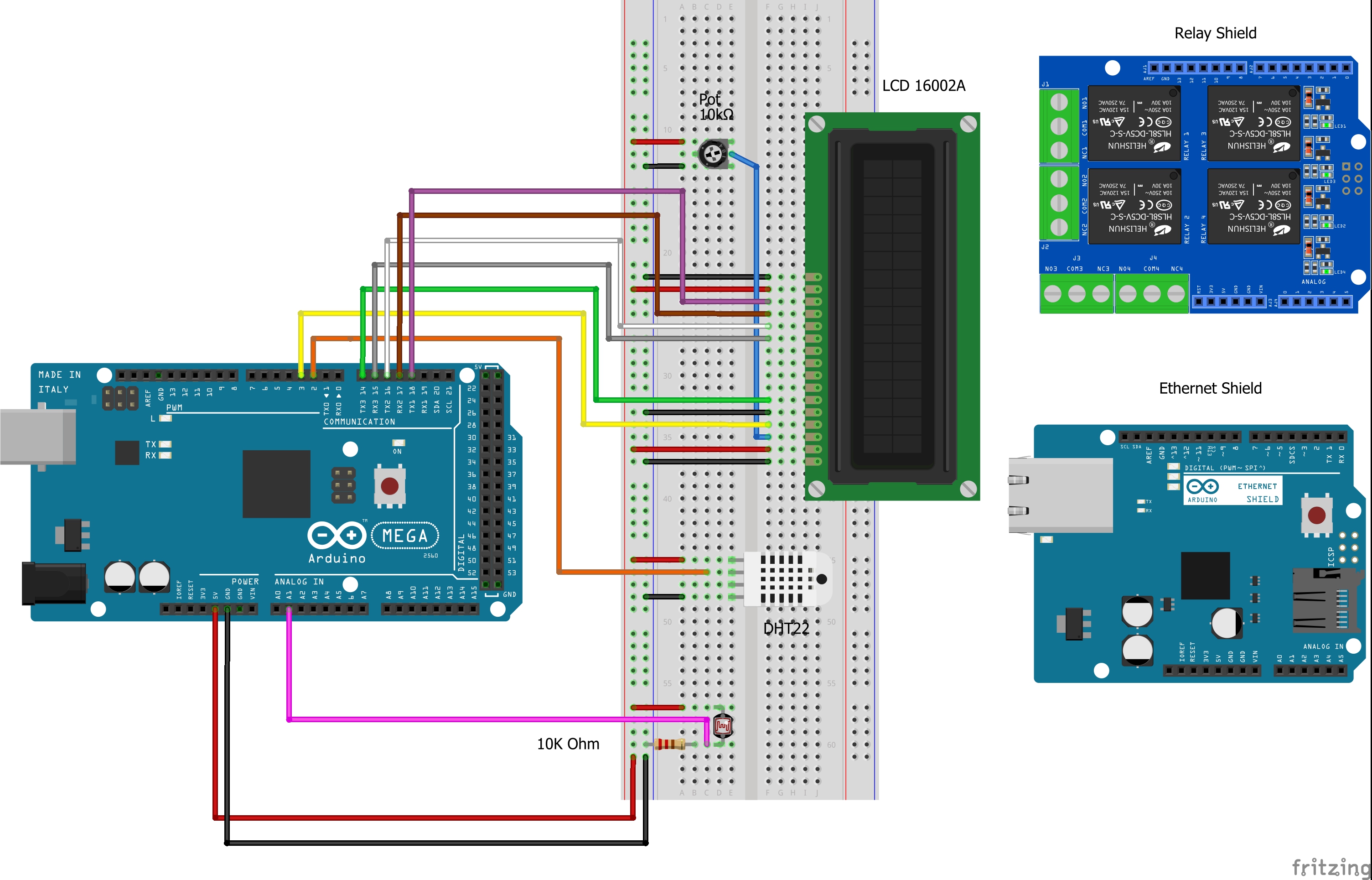
Schematic
Schematic
Schematic
Schematic
Comments
Only logged in users can leave comments