Devices & Components
Arduino Uno Rev3
I2C Serial 2004 20x4 LCD
Enclosure for Arduino Uno
Incremental Rotary Encoder Dc5-24V Wide Voltage Power Supply Shaft 6Mm
Hardware & Tools
AXMINSTER ENGINEER SERIES ZX30M MILL DRILL
Project description
Code
Z axis DRO
arduino
This is a sketch based on Practice Makes Better's original sketch for a lathe DRO .This is only my second Arduino project and I'm no expert on Arduino sketches but this one works for me. A lot of sketches I have seen have the line :- LiquidCrystal_I2C lcd(0x27, 2, 1, 0, 4, 5, 6, 7, 3, POSITIVE); I couldn't get this to work and after doing some research there seems to be quite a few people having problems. I couldn't find a reason... I have re-written some of the original code and it works for me.
1#include <Wire.h> 2#include <LiquidCrystal_I2C.h> 3#include <Encoder.h>// Encoder library. 4Encoder myEnc(2,3);// Connected to Digital pins 2 and 3. 5LiquidCrystal_I2C lcd(0x27,20,4); 6 7void setup() { 8 lcd.init(); // initialize the lcd 9 lcd.backlight(); 10 11} 12long oldPosition = -999; 13 14 15void loop() 16 { 17 const float Wv = (.1 * PI*.9848) / 600; // Math formula for 20 tooth pulley 18 //and 600 pulse/revolution encoder. 19 20 lcd.setCursor(7, 0); // (Column 7,ROW 0) (Column #0-19,Row #0-3 21 lcd.print("Z Axis"); 22 lcd.setCursor(2, 1); 23 lcd.print("inch"); 24 lcd.setCursor(14, 1); 25 lcd.print("mm"); 26 lcd.setCursor(5, 2); 27 lcd.print("Z Axis DRO");// Graphic symbols for a Z axis left and right travel. 28 long newPosition = myEnc.read(); 29 if (newPosition != oldPosition) 30 lcd.setCursor (0, 0); 31 lcd.print (newPosition); // Display number of pulses, 1"~=1902.2 pulses. 32 lcd.setCursor(2, 3); 33 lcd.print(Wv * newPosition, 3);//Math formula * Encoder reading ,3 decimals 34 lcd.setCursor(9, 1); 35 lcd.print("|");// Graphic symbol to separate imperial and metric display. 36 lcd.setCursor(9, 3); 37 lcd.print("|"); 38 lcd.setCursor(11, 3); 39 lcd.print(Wv * newPosition * 25.4, 2); // Formula to convert imperial 40 // and metric, 2 decimals. 41} 42
Z axis DRO
arduino
This is a sketch based on Practice Makes Better's original sketch for a lathe DRO .This is only my second Arduino project and I'm no expert on Arduino sketches but this one works for me. A lot of sketches I have seen have the line :- LiquidCrystal_I2C lcd(0x27, 2, 1, 0, 4, 5, 6, 7, 3, POSITIVE); I couldn't get this to work and after doing some research there seems to be quite a few people having problems. I couldn't find a reason... I have re-written some of the original code and it works for me.
1#include <Wire.h> 2#include <LiquidCrystal_I2C.h> 3#include <Encoder.h>// Encoder library. 4Encoder myEnc(2,3);// Connected to Digital pins 2 and 3. 5LiquidCrystal_I2C lcd(0x27,20,4); 6 7void setup() { 8 lcd.init(); // initialize the lcd 9 lcd.backlight(); 10 11} 12long oldPosition = -999; 13 14 15void loop() 16 { 17 const float Wv = (.1 * PI*.9848) / 600; // Math formula for 20 tooth pulley 18 //and 600 pulse/revolution encoder. 19 20 lcd.setCursor(7, 0); // (Column 7,ROW 0) (Column #0-19,Row #0-3 21 lcd.print("Z Axis"); 22 lcd.setCursor(2, 1); 23 lcd.print("inch"); 24 lcd.setCursor(14, 1); 25 lcd.print("mm"); 26 lcd.setCursor(5, 2); 27 lcd.print("Z Axis DRO");// Graphic symbols for a Z axis left and right travel. 28 long newPosition = myEnc.read(); 29 if (newPosition != oldPosition) 30 lcd.setCursor (0, 0); 31 lcd.print (newPosition); // Display number of pulses, 1"~=1902.2 pulses. 32 lcd.setCursor(2, 3); 33 lcd.print(Wv * newPosition, 3);//Math formula * Encoder reading ,3 decimals 34 lcd.setCursor(9, 1); 35 lcd.print("|");// Graphic symbol to separate imperial and metric display. 36 lcd.setCursor(9, 3); 37 lcd.print("|"); 38 lcd.setCursor(11, 3); 39 lcd.print(Wv * newPosition * 25.4, 2); // Formula to convert imperial 40 // and metric, 2 decimals. 41} 42
Downloadable files
Encoder wiring diagram
Schematic for connecting the rotary encoder to the Arduino Uno. Provided by PracticeMakesBetter
Encoder wiring diagram
Schematic for connecting the rotary encoder to the Arduino Uno. Provided by PracticeMakesBetter
Encoder wiring diagram
Documentation
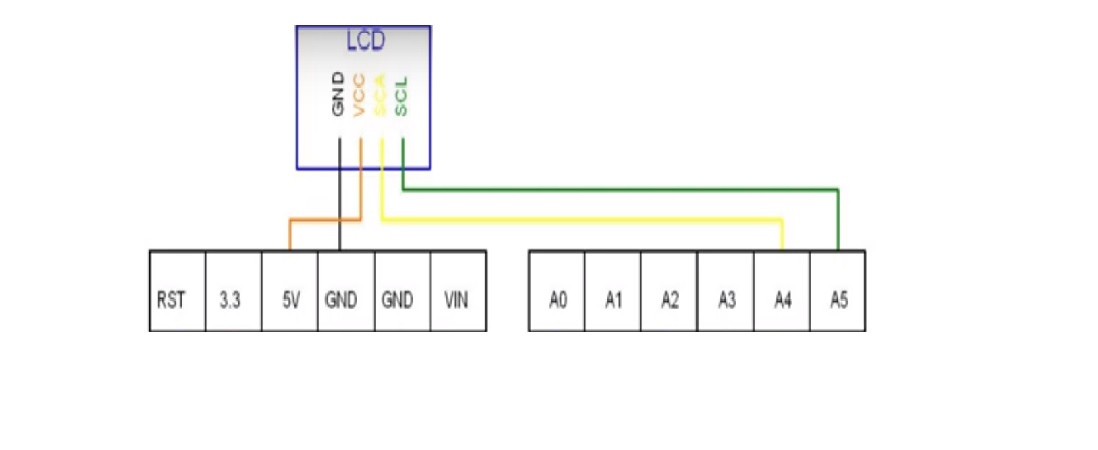
Schematic for LCD I2C to Arduino
How to connect an LCD I2C to Arduino
Schematic for LCD I2C to Arduino
Comments
Only logged in users can leave comments