Arduino 'Sandglass Wannabe' timer
Just a 5 minutes sandglass timer idea built differently!
Components and supplies
1
I2C 16x2 Arduino LCD Display Module
1
Resistor 220 ohm
1
Jumper wires (generic)
1
Buzzer
1
Tactile Switch, Top Actuated
1
Breadboard (generic)
1
Resistor 10k ohm
1
Analog Accelerometer: ADXL335
1
Arduino UNO
Project description
Code
Repository link:


Code:
arduino
1/* Arduino 'Sandglass-wannabe' timer project
2
3   Components:
4                - Arduino Uno
5                - ADXL335
6                -  I2C LCD screen (20x4)
7                - Passive Buzzer
8                - Push  button tactile switch
9                - 220Ohm resistor
10                -  10KOhm resistor
11                - Breadboard
12                - Some jumper  wires
13
14   Created on 31 October 2022 by c010blind3ngineer
15*/
16
17#include  <LiquidCrystal_I2C.h>
18
19LiquidCrystal_I2C lcd(0x27, 20, 4);
20
21/*
22  Nokia  Tune
23  Connect a piezo buzzer or speaker to pin 11 or select a new pin.
24  More  songs available at https://github.com/robsoncouto/arduino-songs
25
26                                              Robson  Couto, 2019
27*/
28#define NOTE_B0  31
29#define NOTE_C1  33
30#define NOTE_CS1  35
31#define NOTE_D1  37
32#define NOTE_DS1 39
33#define NOTE_E1  41
34#define  NOTE_F1  44
35#define NOTE_FS1 46
36#define NOTE_G1  49
37#define NOTE_GS1 52
38#define  NOTE_A1  55
39#define NOTE_AS1 58
40#define NOTE_B1  62
41#define NOTE_C2  65
42#define  NOTE_CS2 69
43#define NOTE_D2  73
44#define NOTE_DS2 78
45#define NOTE_E2  82
46#define  NOTE_F2  87
47#define NOTE_FS2 93
48#define NOTE_G2  98
49#define NOTE_GS2 104
50#define  NOTE_A2  110
51#define NOTE_AS2 117
52#define NOTE_B2  123
53#define NOTE_C3  131
54#define NOTE_CS3 139
55#define NOTE_D3  147
56#define NOTE_DS3 156
57#define  NOTE_E3  165
58#define NOTE_F3  175
59#define NOTE_FS3 185
60#define NOTE_G3  196
61#define NOTE_GS3 208
62#define NOTE_A3  220
63#define NOTE_AS3 233
64#define  NOTE_B3  247
65#define NOTE_C4  262
66#define NOTE_CS4 277
67#define NOTE_D4  294
68#define NOTE_DS4 311
69#define NOTE_E4  330
70#define NOTE_F4  349
71#define  NOTE_FS4 370
72#define NOTE_G4  392
73#define NOTE_GS4 415
74#define NOTE_A4  440
75#define NOTE_AS4 466
76#define NOTE_B4  494
77#define NOTE_C5  523
78#define  NOTE_CS5 554
79#define NOTE_D5  587
80#define NOTE_DS5 622
81#define NOTE_E5  659
82#define NOTE_F5  698
83#define NOTE_FS5 740
84#define NOTE_G5  784
85#define  NOTE_GS5 831
86#define NOTE_A5  880
87#define NOTE_AS5 932
88#define NOTE_B5  988
89#define NOTE_C6  1047
90#define NOTE_CS6 1109
91#define NOTE_D6  1175
92#define  NOTE_DS6 1245
93#define NOTE_E6  1319
94#define NOTE_F6  1397
95#define NOTE_FS6  1480
96#define NOTE_G6  1568
97#define NOTE_GS6 1661
98#define NOTE_A6  1760
99#define  NOTE_AS6 1865
100#define NOTE_B6  1976
101#define NOTE_C7  2093
102#define NOTE_CS7  2217
103#define NOTE_D7  2349
104#define NOTE_DS7 2489
105#define NOTE_E7  2637
106#define  NOTE_F7  2794
107#define NOTE_FS7 2960
108#define NOTE_G7  3136
109#define NOTE_GS7  3322
110#define NOTE_A7  3520
111#define NOTE_AS7 3729
112#define NOTE_B7  3951
113#define  NOTE_C8  4186
114#define NOTE_CS8 4435
115#define NOTE_D8  4699
116#define NOTE_DS8  4978
117#define REST      0
118
119// change this to make the song slower or faster
120int  tempo = 180;
121
122// notes of the moledy followed by the duration.
123// a 4 means  a quarter note, 8 an eighteenth , 16 sixteenth, so on
124// !!negative numbers are  used to represent dotted notes,
125// so -4 means a dotted quarter note, that is,  a quarter plus an eighteenth!!
126int melody[] = {
127
128  // Nokia Ringtone
129  // Score available at https://musescore.com/user/29944637/scores/5266155
130
131  NOTE_E5, 8, NOTE_D5, 8, NOTE_FS4, 4, NOTE_GS4, 4,
132  NOTE_CS5, 8, NOTE_B4, 8,  NOTE_D4, 4, NOTE_E4, 4,
133  NOTE_B4, 8, NOTE_A4, 8, NOTE_CS4, 4, NOTE_E4, 4,
134  NOTE_A4, 2,
135};
136
137// sizeof gives the number of bytes, each int value is  composed of two bytes (16 bits)
138// there are two values per note (pitch and duration),  so for each note there are four bytes
139int notes = sizeof(melody) / sizeof(melody[0])  / 2;
140
141// this calculates the duration of a whole note in ms
142int wholenote  = (60000 * 4) / tempo;
143
144int divider = 0, noteDuration = 0;
145
146byte fillin[8]  = {
147  B11111,
148  B11111,
149  B11111,
150  B11111,
151  B11111,
152  B11111,
153  B11111,
154  B11111,
155};
156
157byte nofill[8] = {
158  B00000,
159  B00000,
160  B00000,
161  B00000,
162  B00000,
163  B00000,
164  B00000,
165  B00000,
166};
167
168//  Do note Arduino Uno only can store up to 16-bit (2-byte)
169// https://www.arduino.cc/reference/en/language/variables/data-types/int/
170//  https://www.arduino.cc/reference/en/language/variables/data-types/unsignedint/
171
172const  int secs_per_box = 3750;  // Time for each array of pixels in one box (total of  80 array of pixel boxes on the LCD (20x4))
173
174int Mins = 0;
175int Secs = 0;
176int  i; // columns
177int j; // rows
178
179const int btnPin = 8;
180const int buzzerPin  = 9;
181
182int X_axis = A0;
183int Y_axis = A1;
184int Z_axis = A2;
185int x, y,  z;
186const int deg_acc = 10;
187boolean trigCDT = false;    // Trigger countdown  timer
188boolean trigBeep = false;   // Trigger tone when timer ends
189
190unsigned  long trigStart;
191unsigned long trigEnd;
192unsigned int t = 0;
193
194void setup()  {
195  lcd.init();
196  lcd.backlight();
197  lcd.createChar(0, fillin);
198  lcd.createChar(1,  nofill);
199  Serial.begin(9600);
200  pinMode(btnPin, INPUT);
201  pinMode(buzzerPin,  OUTPUT);
202  lcd.setCursor(0, 0);
203  lcd.print("Press button");
204  lcd.setCursor(0,  1);
205  lcd.print("to start...");
206  while (digitalRead(btnPin) != HIGH) {}
207  lcd.clear();
208}
209
210void loop() {
211  if (digitalRead(btnPin) == HIGH) {
212    lcd.clear();
213    Serial.print("Calibrating");
214    delay(500);
215    t  = 0;
216    tone(buzzerPin, 2000);
217    delay(100);
218    noTone(buzzerPin);
219    delay(100);
220    tone(buzzerPin, 2000);
221    delay(100);
222    noTone(buzzerPin);
223
224    lcd.setCursor(0, 0);
225    lcd.print("Please flip device");
226    lcd.setCursor(0,  1);
227    lcd.print("to confirm...");
228
229    trigCDT = false;
230    trigBeep  = false;
231  }
232  // Read XYZ axis values
233  x = analogRead(X_axis);
234  y  = analogRead(Y_axis);
235  z = analogRead(Z_axis);
236  // Display XYZ axis values  on Serial Monitor
237  Serial.print(x);
238  Serial.print("\	");
239  Serial.print(y);
240  Serial.print("\	");
241  Serial.print(z);
242  Serial.println();
243
244  //  User has to hold the device upside down for 3 secs to verify that they want to start  the timer
245  if (z < 290) {
246    while (t < 1) { // Detect the time/moment the  User 'flipped' the device upside down
247      lcd.clear();
248      trigStart =  millis();
249      t = 1;
250    }
251    trigEnd = millis();   // This here to  compare the current time and the 'flipped' time below
252
253    // Compare the  'flipped' time vs current time,
254    // check if it already exceeded the time  limit (3 secs) for verification.
255    // Then start the countdown timer after  1 sec delay.
256    if (trigEnd - trigStart > 3000) {
257      lcd.setCursor(0,  0);
258      lcd.print("You can put the");
259      lcd.setCursor(0, 1);
260      lcd.print("device  down...");
261      tone(buzzerPin, 2000);
262      delay(3000);
263      noTone(buzzerPin);
264      lcd.clear();
265      stbar_pos1();
266      delay(1000);
267      trigCDT  = true;
268    }
269  }
270
271  // Start countdown timer when the device is FLIPPED
272  if (trigCDT == true) {
273    // Beep three times before start of countdown timer
274    tone(buzzerPin, 2000);
275    delay(500);
276    noTone(buzzerPin);
277    delay(500);
278    tone(buzzerPin, 2000);
279    delay(500);
280    noTone(buzzerPin);
281    delay(500);
282    tone(buzzerPin, 2000);
283    delay(500);
284    noTone(buzzerPin);
285
286    // Start countdown timer function
287    ctndownbar_pos1();
288
289    // Once  timer ends, show message on LCD and trigger tone
290    lcd.setCursor(0, 0);
291    lcd.print("Time's Up!");
292    trigCDT = false;
293    trigBeep = true;
294  }
295  if (trigBeep == true) {
296    // I chose to have the Nokia ringtone :)
297    // You can uncomment the below lines to get the default beeping tones.
298    //  Once the ringtone is playing, to stop just LONG PRESS the button.
299    timer_ringtone();
300
301    //    tone(buzzerPin, 3000);
302    //    delay(500);
303    //    noTone(buzzerPin);
304  }
305  delay(100);
306}
307
308// Startup loading bar during initialization
309void  stbar_pos1() {
310  for (i = 19; i >= 0; i--) {  //columns
311    for (j = 3; j  >= 0; j--) { //rows
312      lcd.setCursor(i, j);
313      lcd.write(byte(0));
314      delay(20);
315    }
316  }
317}
318
319// Countdown bar when the timer starts
320void  ctndownbar_pos1() {
321  for (i = 0; i < 20; i ++) { //columns
322    for (j = 0;  j < 4; j++) { //rows
323      delay(secs_per_box);
324      lcd.setCursor(i, j);
325      lcd.write(byte(1));
326    }
327  }
328}
329
330// Nokia ringtone
331void  timer_ringtone() {
332  // iterate over the notes of the melody.
333  // Remember,  the array is twice the number of notes (notes + durations)
334  for (int thisNote  = 0; thisNote < notes * 2; thisNote = thisNote + 2) {
335
336    // calculates the  duration of each note
337    divider = melody[thisNote + 1];
338    if (divider  > 0) {
339      // regular note, just proceed
340      noteDuration = (wholenote)  / divider;
341    } else if (divider < 0) {
342      // dotted notes are represented  with negative durations!!
343      noteDuration = (wholenote) / abs(divider);
344      noteDuration *= 1.5; // increases the duration in half for dotted notes
345    }
346
347    // we only play the note for 90% of the duration, leaving 10% as  a pause
348    tone(buzzerPin, melody[thisNote], noteDuration * 0.9);
349
350    //  Wait for the specief duration before playing the next note.
351    delay(noteDuration);
352
353    // stop the waveform generation before the next note.
354    noTone(buzzerPin);
355  }
356}
357
Downloadable files
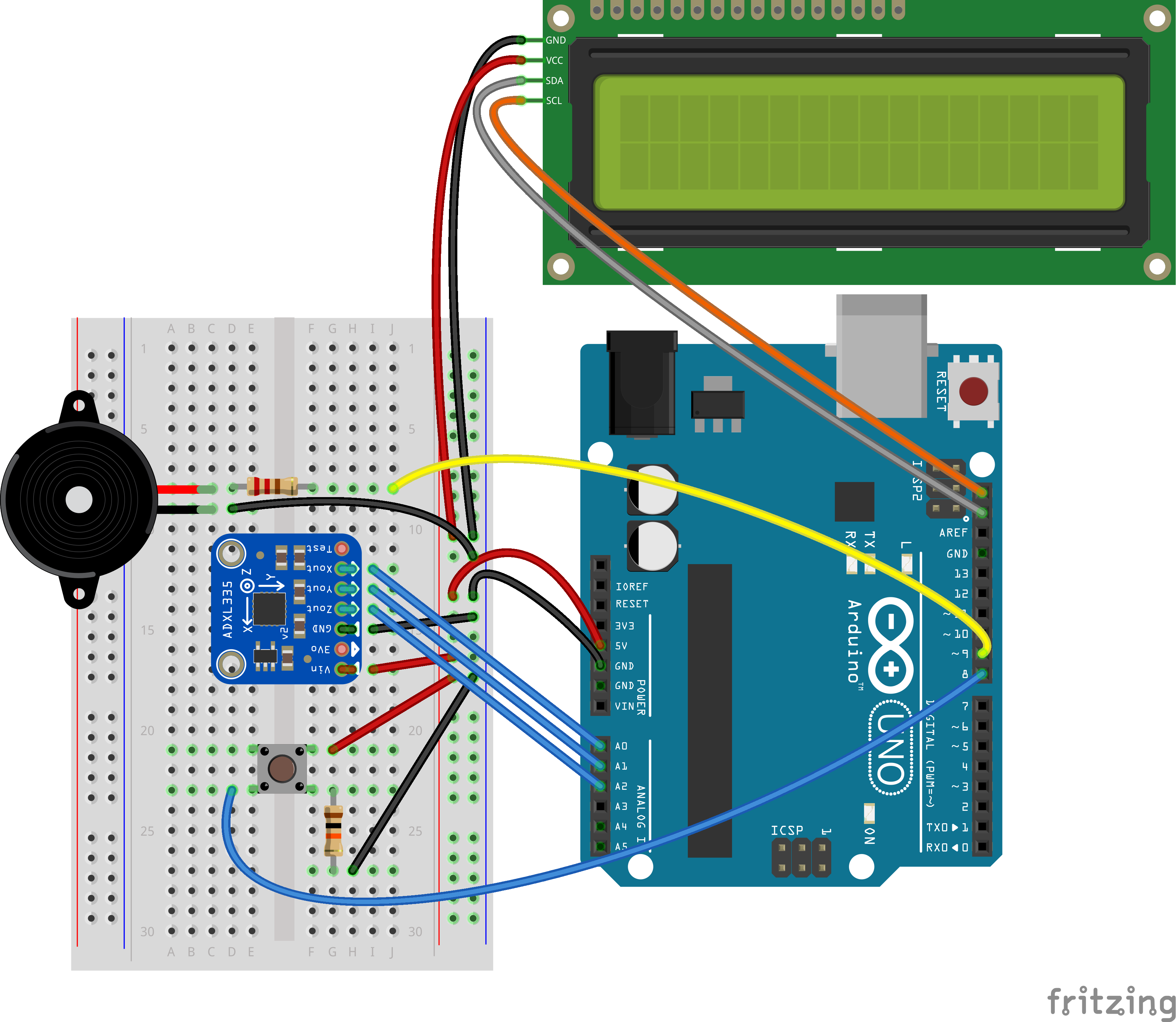
Circuit:
Circuit:
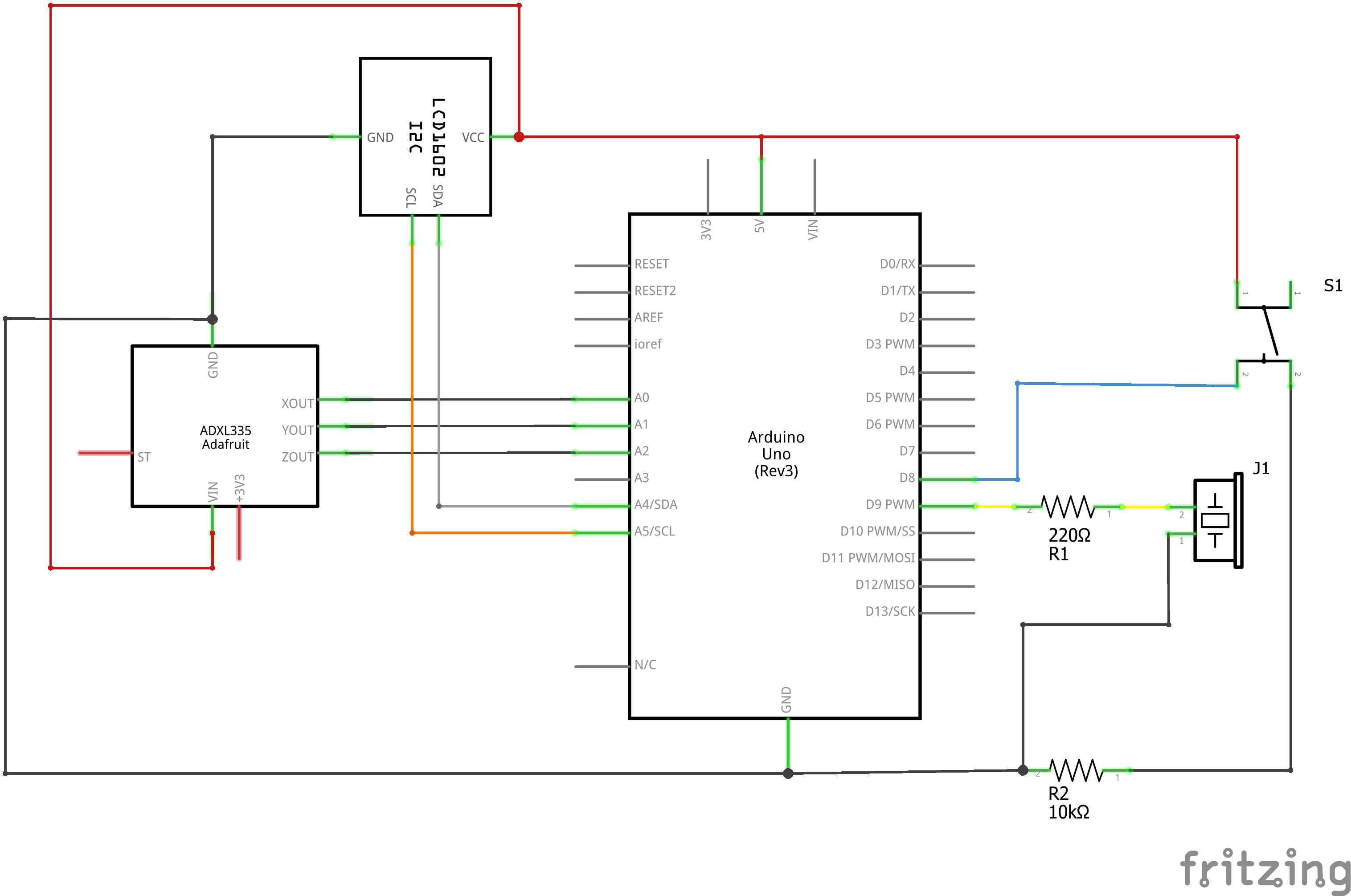
Schematic:
Schematic:
Comments
Only logged in users can leave comments