Arduino 'Can't Touch This' with D1 Mini ESP8266
Now it comes with Telegram app notification message!
Components and supplies
1
Jumper wires (generic)
1
Buzzer
1
Breadboard (generic)
1
Analog Accelerometer: ADXL335
1
Resistor 220 ohm
1
Resistor 330 ohm
1
Tactile Switch, Top Actuated
1
Wemos D1 Mini
1
Resistor 10k ohm
1
Arduino Nano R3
1
5 mm LED: Red
Project description
Code
Code:
arduino
To be uploaded to your Arduino Nano:
1/* Arduino 'Can't Touch This' Version 2
2   Components:
3                -  Arduino Nano
4                - D1 Mini (ESP8266) module
5                -  ADXL335
6                - Passive Buzzer
7                - Push button tactile  switch
8                - Red LED
9                - 220Ohm resistor
10                -  330Ohm resistor
11                - 10kOhm resistor
12                - Breadboard
13                - Some jumper wires
14
15   Libraries:
16                - https://arduino.esp8266.com/stable/package_esp8266com_index.json
17
18   Created on 23 August 2022 by c010blind3ngineer
19*/
20#define trigPin 6    //  this will be the pin that triggers the D1 Mini pin D1
21#define buzzerPin 9
22#define  LEDpin 8
23#define btnPin 7
24
25int X_axis = A0;
26int Y_axis = A1;
27int  Z_axis = A2;
28const int deg_acc = 3;
29boolean trigAlarm = false;
30int x, y,  z;
31int t = 0;
32
33int STILL[4];
34
35void setup() {
36  pinMode(buzzerPin,  OUTPUT);
37  pinMode(LEDpin, OUTPUT);
38  pinMode(btnPin, INPUT);
39  pinMode(trigPin,  OUTPUT);
40  Serial.begin(9600);
41  while (digitalRead(btnPin) != HIGH) {}
42}
43
44void  loop() {
45  if (digitalRead(btnPin) == HIGH) {
46    Serial.print("Calibrating");
47    delay(500);
48    int i = 0;    // reset 'i' counter
49    while (i < 3) {   // read XYZ readings 3 times, it also gives the User time to stabilise the device  properly
50      Serial.print(".");
51      STILL[0] = analogRead(X_axis);
52      STILL[1] = analogRead(Y_axis);
53      STILL[2] = analogRead(Z_axis);
54      delay(500);
55      i++;
56    }
57    digitalWrite(LEDpin, HIGH);
58    tone(buzzerPin, 2000);
59    delay(100);
60    digitalWrite(LEDpin, LOW);
61    noTone(buzzerPin);
62    delay(100);
63    digitalWrite(LEDpin, HIGH);
64    tone(buzzerPin, 2000);
65    delay(100);
66    digitalWrite(LEDpin, LOW);
67    noTone(buzzerPin);
68    trigAlarm = false;
69    t = 0;
70    digitalWrite(trigPin,  LOW);
71  }
72  // Read XYZ axis values
73  x = analogRead(X_axis);
74  y =  analogRead(Y_axis);
75  z = analogRead(Z_axis);
76
77  // Check to see if the  device is in the same position when the User set it initially
78  if ((x > (STILL[0]  - deg_acc)) && (x < (STILL[0] + deg_acc)) && (y > (STILL[1] - deg_acc)) && (y <  (STILL[1] + deg_acc)) && (z > (STILL[2] - deg_acc)) && (z < (STILL[2] + deg_acc))  ) {
79    // You can uncomment the lines below to see the XYZ values in the Serial  Monitor
80    //    Serial.print(x);
81    //    Serial.print("\	");
82    //    Serial.print(y);
83    //    Serial.print("\	");
84    //    Serial.print(z);
85    //    Serial.println();
86  }
87  else {
88    trigAlarm = true;
89    while(t  < 1){ // will only trigger pin 6 on the Arduino Nano once
90      digitalWrite(trigPin,  HIGH);  // trigger pin D1 on the D1 Mini (ESP8266) module
91      t = 1;
92    }
93  }
94  // Alarm goes off when someone moves the device out of position
95  if  (trigAlarm == true) {
96    digitalWrite(LEDpin, HIGH);
97    tone(buzzerPin,  2000);
98    delay(100);
99    digitalWrite(LEDpin, LOW);
100    noTone(buzzerPin);
101  }
102  delay(100);
103}
104
Code 2:
arduino
To be uploaded to your D1 Mini ESP8266
1/* Arduino 'Can't Touch This' Version 2
2   Components:
3                -  Arduino Nano
4                - D1 Mini (ESP8266) module
5                -  ADXL335
6                - Passive Buzzer
7                - Push button tactile  switch
8                - Red LED
9                - 220Ohm resistor
10                -  330Ohm resistor
11                - 10kOhm resistor
12                - Breadboard
13                - Some jumper wires
14
15   Libraries:
16                - https://arduino.esp8266.com/stable/package_esp8266com_index.json
17
18   Created on 23 August 2022 by c010blind3ngineer
19*/
20#include <ESP8266WiFi.h>
21#include  <WiFiClientSecure.h>
22#include <UniversalTelegramBot.h>
23#include <ArduinoJson.h>
24
25#define  btnPin D1
26
27// Wifi network station credentials
28#define WIFI_SSID "YOUR  WIFI NETWORK"
29#define WIFI_PASSWORD "YOUR WIFI PASSWORD"
30// Telegram BOT  Token (Get from Botfather)
31#define BOT_TOKEN "**********:***********************************"
32
33//  Use @myidbot (IDBot) to find out the chat ID of an individual or a group
34// Also  note that you need to click "start" on a bot before it can
35// message you
36#define  CHAT_ID "**********"
37
38X509List cert(TELEGRAM_CERTIFICATE_ROOT);
39WiFiClientSecure  secured_client;
40UniversalTelegramBot bot(BOT_TOKEN, secured_client);
41
42
43void  setup() {
44  pinMode(btnPin, INPUT);
45  pinMode(LED_BUILTIN, OUTPUT);
46  digitalWrite(LED_BUILTIN,  HIGH); // active LOW, means it will ON when it is LOW. We set it OFF (HIGH) it first.
47
48  // attempt to connect to Wifi network:
49  WiFi.begin(WIFI_SSID, WIFI_PASSWORD);
50  secured_client.setTrustAnchors(&cert); // Add root certificate for api.telegram.org
51  while (WiFi.status() != WL_CONNECTED)
52  {
53    digitalWrite(LED_BUILTIN,  LOW);
54    delay(500);
55    digitalWrite(LED_BUILTIN, HIGH);
56    delay(500);
57  }
58
59  digitalWrite(LED_BUILTIN, LOW);
60  delay(1000);
61  digitalWrite(LED_BUILTIN,  HIGH);
62  delay(500);
63  digitalWrite(LED_BUILTIN, LOW);
64  delay(1000);
65  digitalWrite(LED_BUILTIN, HIGH);
66
67  configTime(0, 0, "pool.ntp.org");  // get UTC time via NTP
68  time_t now = time(nullptr);
69  while (now < 24 *  3600)
70  {
71    delay(100);
72    now = time(nullptr);
73  }
74}
75
76void  loop() {
77  if (digitalRead(btnPin) == HIGH) {
78    bot.sendMessage(CHAT_ID,  "Movement detected!", "");
79  }
80}
81
Repository link:


Code:
arduino
To be uploaded to your Arduino Nano:
1/* Arduino 'Can't Touch This' Version 2
2   Components:
3                -   Arduino Nano
4                - D1 Mini (ESP8266) module
5                -   ADXL335
6                - Passive Buzzer
7                - Push button tactile   switch
8                - Red LED
9                - 220Ohm resistor
10                -   330Ohm resistor
11                - 10kOhm resistor
12                - Breadboard
13                 - Some jumper wires
14
15   Libraries:
16                - https://arduino.esp8266.com/stable/package_esp8266com_index.json
17
18    Created on 23 August 2022 by c010blind3ngineer
19*/
20#define trigPin 6    //   this will be the pin that triggers the D1 Mini pin D1
21#define buzzerPin 9
22#define   LEDpin 8
23#define btnPin 7
24
25int X_axis = A0;
26int Y_axis = A1;
27int   Z_axis = A2;
28const int deg_acc = 3;
29boolean trigAlarm = false;
30int x, y,   z;
31int t = 0;
32
33int STILL[4];
34
35void setup() {
36  pinMode(buzzerPin,   OUTPUT);
37  pinMode(LEDpin, OUTPUT);
38  pinMode(btnPin, INPUT);
39  pinMode(trigPin,   OUTPUT);
40  Serial.begin(9600);
41  while (digitalRead(btnPin) != HIGH) {}
42}
43
44void   loop() {
45  if (digitalRead(btnPin) == HIGH) {
46    Serial.print("Calibrating");
47     delay(500);
48    int i = 0;    // reset 'i' counter
49    while (i < 3) {    // read XYZ readings 3 times, it also gives the User time to stabilise the device   properly
50      Serial.print(".");
51      STILL[0] = analogRead(X_axis);
52       STILL[1] = analogRead(Y_axis);
53      STILL[2] = analogRead(Z_axis);
54       delay(500);
55      i++;
56    }
57    digitalWrite(LEDpin, HIGH);
58     tone(buzzerPin, 2000);
59    delay(100);
60    digitalWrite(LEDpin, LOW);
61     noTone(buzzerPin);
62    delay(100);
63    digitalWrite(LEDpin, HIGH);
64     tone(buzzerPin, 2000);
65    delay(100);
66    digitalWrite(LEDpin, LOW);
67     noTone(buzzerPin);
68    trigAlarm = false;
69    t = 0;
70    digitalWrite(trigPin,   LOW);
71  }
72  // Read XYZ axis values
73  x = analogRead(X_axis);
74  y =   analogRead(Y_axis);
75  z = analogRead(Z_axis);
76
77  // Check to see if the   device is in the same position when the User set it initially
78  if ((x > (STILL[0]   - deg_acc)) && (x < (STILL[0] + deg_acc)) && (y > (STILL[1] - deg_acc)) && (y <   (STILL[1] + deg_acc)) && (z > (STILL[2] - deg_acc)) && (z < (STILL[2] + deg_acc))   ) {
79    // You can uncomment the lines below to see the XYZ values in the Serial   Monitor
80    //    Serial.print(x);
81    //    Serial.print("\	");
82    //     Serial.print(y);
83    //    Serial.print("\	");
84    //    Serial.print(z);
85     //    Serial.println();
86  }
87  else {
88    trigAlarm = true;
89    while(t   < 1){ // will only trigger pin 6 on the Arduino Nano once
90      digitalWrite(trigPin,   HIGH);  // trigger pin D1 on the D1 Mini (ESP8266) module
91      t = 1;
92    }
93   }
94  // Alarm goes off when someone moves the device out of position
95  if   (trigAlarm == true) {
96    digitalWrite(LEDpin, HIGH);
97    tone(buzzerPin,   2000);
98    delay(100);
99    digitalWrite(LEDpin, LOW);
100    noTone(buzzerPin);
101   }
102  delay(100);
103}
104
Code 2:
arduino
To be uploaded to your D1 Mini ESP8266
1/* Arduino 'Can't Touch This' Version 2
2   Components:
3                -   Arduino Nano
4                - D1 Mini (ESP8266) module
5                -   ADXL335
6                - Passive Buzzer
7                - Push button tactile   switch
8                - Red LED
9                - 220Ohm resistor
10                -   330Ohm resistor
11                - 10kOhm resistor
12                - Breadboard
13                 - Some jumper wires
14
15   Libraries:
16                - https://arduino.esp8266.com/stable/package_esp8266com_index.json
17
18    Created on 23 August 2022 by c010blind3ngineer
19*/
20#include <ESP8266WiFi.h>
21#include   <WiFiClientSecure.h>
22#include <UniversalTelegramBot.h>
23#include <ArduinoJson.h>
24
25#define   btnPin D1
26
27// Wifi network station credentials
28#define WIFI_SSID "YOUR   WIFI NETWORK"
29#define WIFI_PASSWORD "YOUR WIFI PASSWORD"
30// Telegram BOT   Token (Get from Botfather)
31#define BOT_TOKEN "**********:***********************************"
32
33//   Use @myidbot (IDBot) to find out the chat ID of an individual or a group
34// Also   note that you need to click "start" on a bot before it can
35// message you
36#define   CHAT_ID "**********"
37
38X509List cert(TELEGRAM_CERTIFICATE_ROOT);
39WiFiClientSecure   secured_client;
40UniversalTelegramBot bot(BOT_TOKEN, secured_client);
41
42
43void   setup() {
44  pinMode(btnPin, INPUT);
45  pinMode(LED_BUILTIN, OUTPUT);
46  digitalWrite(LED_BUILTIN,   HIGH); // active LOW, means it will ON when it is LOW. We set it OFF (HIGH) it first.
47
48   // attempt to connect to Wifi network:
49  WiFi.begin(WIFI_SSID, WIFI_PASSWORD);
50   secured_client.setTrustAnchors(&cert); // Add root certificate for api.telegram.org
51   while (WiFi.status() != WL_CONNECTED)
52  {
53    digitalWrite(LED_BUILTIN,   LOW);
54    delay(500);
55    digitalWrite(LED_BUILTIN, HIGH);
56    delay(500);
57   }
58
59  digitalWrite(LED_BUILTIN, LOW);
60  delay(1000);
61  digitalWrite(LED_BUILTIN,   HIGH);
62  delay(500);
63  digitalWrite(LED_BUILTIN, LOW);
64  delay(1000);
65   digitalWrite(LED_BUILTIN, HIGH);
66
67  configTime(0, 0, "pool.ntp.org");   // get UTC time via NTP
68  time_t now = time(nullptr);
69  while (now < 24 *   3600)
70  {
71    delay(100);
72    now = time(nullptr);
73  }
74}
75
76void   loop() {
77  if (digitalRead(btnPin) == HIGH) {
78    bot.sendMessage(CHAT_ID,   "Movement detected!", "");
79  }
80}
81
Repository link:
Downloadable files
Schematic:
Schematic:

Schematic:
Schematic:
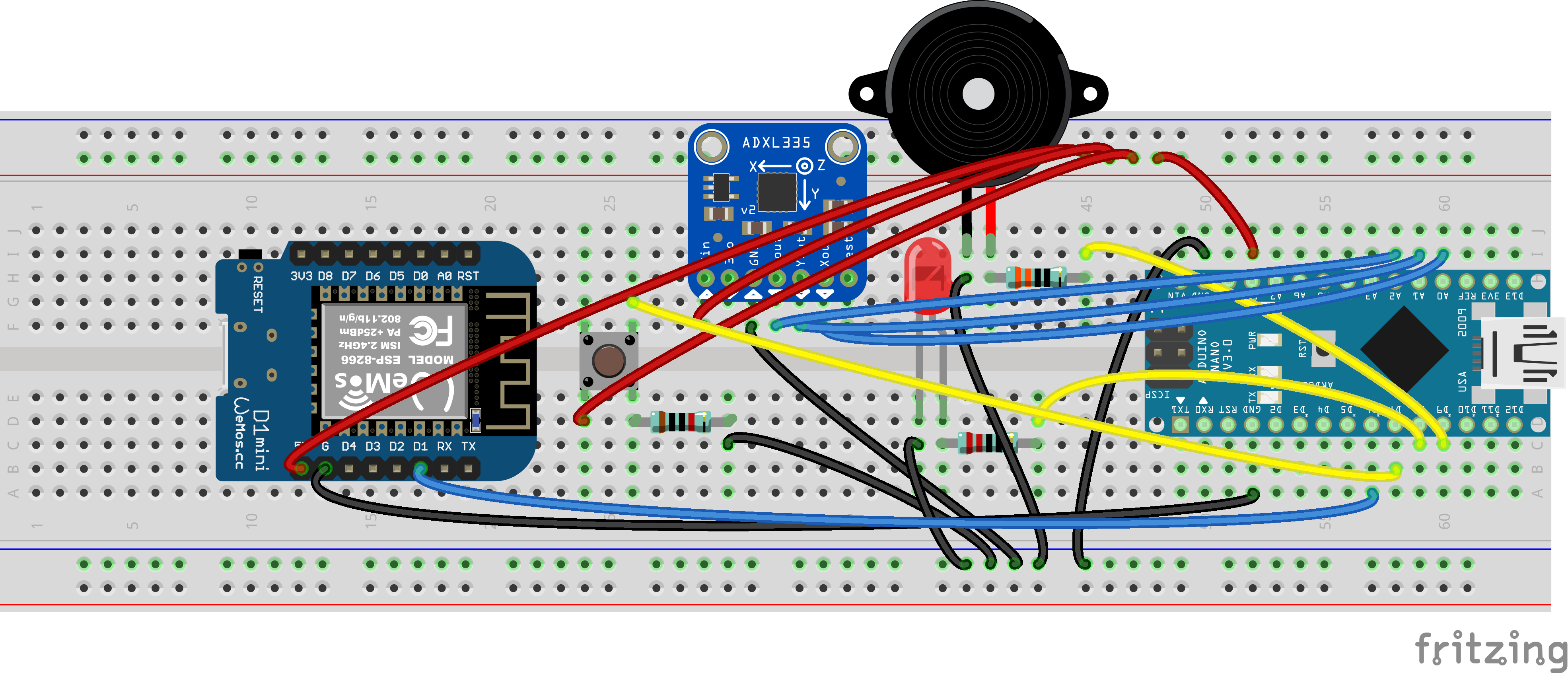
Circuit:
Circuit:
Comments
Only logged in users can leave comments