ESP32-CAM with PIR motion sensor PLUS Telegram?
Receive motion detected images to your Telegram app!
Devices & Components
1
Arduino Uno Rev3
1
Breadboard (generic)
1
Jumper wires (generic)
1
Resistor 220 ohm
1
ESP32 Camera Module Development Board
1
HC-SR501 PIR sensor
1
5 mm LED: Green
Software & Tools

Arduino IDE
Project description
Code
Code:
arduino
1/* ESP32-CAM PIR motion sensor to Telegram alert
2
3   Using the below   mentioned project as the base template,
4   I wanted to create a network camera   that is capable of
5   capturing movement and be able to access it easily
6    through an app. The idea was to use it to notify me if
7   the delivery person   is at my door (as sometimes there's no one at home).
8
9   Luckily I stumbled   upon Rui Santos's amazing website,
10   and it did make it easier for me since   he has already done
11   such a project.
12
13   You can follow his step   by step tutorial on how to
14   install the intended libraries to run this project   too!
15
16   Components:
17                - Arduino Uno
18                -   ESP32-CAM
19                - HC-SR501 PIR sensor
20                - Green LED
21                - 220Ohm resistor
22                - Helping-Hands tool with   alligator clips
23                - Breadboard
24                - Some jumper   wires
25
26///////////////////////////////////////////////////////////////////////////////////////////////////
27   Rui Santos
28  Complete project details at https://RandomNerdTutorials.com/telegram-esp32-cam-photo-arduino/
29
30   Permission is hereby granted, free of charge, to any person obtaining a copy
31   of this software and associated documentation files.
32
33  The above copyright   notice and this permission notice shall be included in all
34  copies or substantial   portions of the Software.
35*/
36
37#include <Arduino.h>
38#include <WiFi.h>
39#include   <WiFiClientSecure.h>
40#include "soc/soc.h"
41#include "soc/rtc_cntl_reg.h"
42#include   "esp_camera.h"
43#include <UniversalTelegramBot.h>
44#include <ArduinoJson.h>
45
46const   char* ssid = "ENTER YOUR WIFI NETWORK";
47const char* password = "*************";
48
49//   Initialize Telegram BOT
50String BOTtoken = "**********:***********************************";   // your Bot Token (Get from Botfather)
51
52// Use @myidbot to find out the   chat ID of an individual or a group
53// Also note that you need to click "start"   on a bot before it can
54// message you
55String CHAT_ID = "**********";
56
57bool   sendPhoto = false;
58
59WiFiClientSecure clientTCP;
60UniversalTelegramBot bot(BOTtoken,   clientTCP);
61
62#define FLASH_LED_PIN 4
63bool flashState = LOW;
64
65//Checks   for new messages every 1 second.
66int botRequestDelay = 1000;
67unsigned long   lastTimeBotRan;
68
69const int PIRsensor = 13;
70const int led = 12;
71int PIRstate   = LOW; // we start, assuming no motion detected
72int val = 0;
73
74// the time   we give the sensor to calibrate (approx. 10-60 secs according to datatsheet)
75const   int calibrationTime = 30; // 30 secs
76
77//CAMERA_MODEL_AI_THINKER
78#define   PWDN_GPIO_NUM     32
79#define RESET_GPIO_NUM    -1
80#define XCLK_GPIO_NUM      0
81#define   SIOD_GPIO_NUM     26
82#define SIOC_GPIO_NUM     27
83
84#define Y9_GPIO_NUM        35
85#define Y8_GPIO_NUM       34
86#define Y7_GPIO_NUM       39
87#define   Y6_GPIO_NUM       36
88#define Y5_GPIO_NUM       21
89#define Y4_GPIO_NUM       19
90#define   Y3_GPIO_NUM       18
91#define Y2_GPIO_NUM        5
92#define VSYNC_GPIO_NUM    25
93#define   HREF_GPIO_NUM     23
94#define PCLK_GPIO_NUM     22
95
96
97void configInitCamera()   {
98  camera_config_t config;
99  config.ledc_channel = LEDC_CHANNEL_0;
100  config.ledc_timer   = LEDC_TIMER_0;
101  config.pin_d0 = Y2_GPIO_NUM;
102  config.pin_d1 = Y3_GPIO_NUM;
103   config.pin_d2 = Y4_GPIO_NUM;
104  config.pin_d3 = Y5_GPIO_NUM;
105  config.pin_d4   = Y6_GPIO_NUM;
106  config.pin_d5 = Y7_GPIO_NUM;
107  config.pin_d6 = Y8_GPIO_NUM;
108   config.pin_d7 = Y9_GPIO_NUM;
109  config.pin_xclk = XCLK_GPIO_NUM;
110  config.pin_pclk   = PCLK_GPIO_NUM;
111  config.pin_vsync = VSYNC_GPIO_NUM;
112  config.pin_href =   HREF_GPIO_NUM;
113  config.pin_sscb_sda = SIOD_GPIO_NUM;
114  config.pin_sscb_scl   = SIOC_GPIO_NUM;
115  config.pin_pwdn = PWDN_GPIO_NUM;
116  config.pin_reset = RESET_GPIO_NUM;
117   config.xclk_freq_hz = 20000000;
118  config.pixel_format = PIXFORMAT_JPEG;
119
120   //init with high specs to pre-allocate larger buffers
121  if (psramFound()) {
122     config.frame_size = FRAMESIZE_UXGA;
123    config.jpeg_quality = 10;  //0-63   lower number means higher quality
124    config.fb_count = 2;
125  } else {
126     config.frame_size = FRAMESIZE_SVGA;
127    config.jpeg_quality = 12;  //0-63   lower number means higher quality
128    config.fb_count = 1;
129  }
130
131  //   camera init
132  esp_err_t err = esp_camera_init(&config);
133  if (err != ESP_OK)   {
134    Serial.printf("Camera init failed with error 0x%x", err);
135    delay(1000);
136     ESP.restart();
137  }
138
139  // Drop down frame size for higher initial frame   rate
140  sensor_t * s = esp_camera_sensor_get();
141  s->set_framesize(s, FRAMESIZE_CIF);   // UXGA|SXGA|XGA|SVGA|VGA|CIF|QVGA|HQVGA|QQVGA
142}
143
144void handleNewMessages(int   numNewMessages) {
145  Serial.print("Handle New Messages: ");
146  Serial.println(numNewMessages);
147
148   for (int i = 0; i < numNewMessages; i++) {
149    String chat_id = String(bot.messages[i].chat_id);
150     if (chat_id != CHAT_ID) {
151      bot.sendMessage(chat_id, "Unauthorized user",   "");
152      continue;
153    }
154
155    // Print the received message
156     String text = bot.messages[i].text;
157    Serial.println(text);
158
159    String   from_name = bot.messages[i].from_name;
160    if (text == "/start") {
161      String   welcome = "Welcome , " + from_name + "\
162";
163      welcome += "Use the following   commands to interact with the ESP32-CAM \
164";
165      welcome += "/photo : takes   a new photo\
166";
167      welcome += "/flash : toggles flash LED \
168";
169      bot.sendMessage(CHAT_ID,   welcome, "");
170    }
171    if (text == "/flash") {
172      flashState =   !flashState;
173      digitalWrite(FLASH_LED_PIN, flashState);
174      Serial.println("Change   flash LED state");
175    }
176    if (text == "/photo") {
177      sendPhoto   = true;
178      Serial.println("New photo request");
179    }
180  }
181}
182
183String   sendPhotoTelegram() {
184  const char* myDomain = "api.telegram.org";
185  String   getAll = "";
186  String getBody = "";
187
188  camera_fb_t * fb = NULL;
189   fb = esp_camera_fb_get();
190  if (!fb) {
191    Serial.println("Camera capture   failed");
192    delay(1000);
193    ESP.restart();
194    return "Camera capture   failed";
195  }
196
197  Serial.println("Connect to " + String(myDomain));
198
199
200   if (clientTCP.connect(myDomain, 443)) {
201    Serial.println("Connection successful");
202
203     String head = "--c010blind3ngineer\
\
204Content-Disposition: form-data; name=\\"chat_id\\";   \
\
205\
\
206" + CHAT_ID + "\
\
207--c010blind3ngineer\
\
208Content-Disposition:   form-data; name=\\"photo\\"; filename=\\"esp32-cam.jpg\\"\
\
209Content-Type:   image/jpeg\
\
210\
\
211";
212    String tail = "\
\
213--c010blind3ngineer--\
\
214";
215
216     uint16_t imageLen = fb->len;
217    uint16_t extraLen = head.length() + tail.length();
218     uint16_t totalLen = imageLen + extraLen;
219
220    clientTCP.println("POST   /bot" + BOTtoken + "/sendPhoto HTTP/1.1");
221    clientTCP.println("Host: "   + String(myDomain));
222    clientTCP.println("Content-Length: " + String(totalLen));
223     clientTCP.println("Content-Type: multipart/form-data; boundary=c010blind3ngineer");
224     clientTCP.println();
225    clientTCP.print(head);
226
227    uint8_t *fbBuf   = fb->buf;
228    size_t fbLen = fb->len;
229    for (size_t n = 0; n < fbLen; n   = n + 1024) {
230      if (n + 1024 < fbLen) {
231        clientTCP.write(fbBuf,   1024);
232        fbBuf += 1024;
233      }
234      else if (fbLen % 1024 > 0)   {
235        size_t remainder = fbLen % 1024;
236        clientTCP.write(fbBuf,   remainder);
237      }
238    }
239
240    clientTCP.print(tail);
241
242    esp_camera_fb_return(fb);
243
244     int waitTime = 10000;   // timeout 10 seconds
245    long startTimer = millis();
246     boolean state = false;
247
248    while ((startTimer + waitTime) > millis())   {
249      Serial.print(".");
250      delay(100);
251      while (clientTCP.available())   {
252        char c = clientTCP.read();
253        if (state == true) getBody +=   String(c);
254        if (c == '\
255') {
256          if (getAll.length() == 0) state   = true;
257          getAll = "";
258        }
259        else if (c != '\
')
260           getAll += String(c);
261        startTimer = millis();
262      }
263       if (getBody.length() > 0) break;
264    }
265    clientTCP.stop();
266    Serial.println(getBody);
267   }
268  else {
269    getBody = "Connected to api.telegram.org failed.";
270     Serial.println("Connected to api.telegram.org failed.");
271  }
272  return   getBody;
273}
274
275void setup() {
276  WRITE_PERI_REG(RTC_CNTL_BROWN_OUT_REG,   0);
277  // Init Serial Monitor
278  Serial.begin(115200);
279
280  // Set LED Flash   as output
281  pinMode(FLASH_LED_PIN, OUTPUT);
282  digitalWrite(FLASH_LED_PIN,   flashState);
283
284  // Set PIR sensor as input and LED as output
285  pinMode(PIRsensor,   INPUT);
286  pinMode(led, OUTPUT);
287
288  // Give some time for the PIR sensor   to warm up
289  Serial.println("Waiting for the sensor to warm up on first boot");
290   delay(calibrationTime * 1000); // Time converted back to miliseconds
291
292  //   Blink LED 3 times to indicate PIR sensor warmed up
293  digitalWrite(led, HIGH);
294   delay(500);
295  digitalWrite(led, LOW);
296  delay(500);
297  digitalWrite(led,   HIGH);
298  delay(500);
299  digitalWrite(led, LOW);
300  delay(500);
301  digitalWrite(led,   HIGH);
302  delay(500);
303  digitalWrite(led, LOW);
304  Serial.println("PIR sensor   is ACTIVE");
305
306  // Config and init the camera
307  configInitCamera();
308
309   // Connect to Wi-Fi
310  WiFi.mode(WIFI_STA);
311  Serial.println();
312  Serial.print("Connecting   to ");
313  Serial.println(ssid);
314  WiFi.begin(ssid, password);
315  clientTCP.setCACert(TELEGRAM_CERTIFICATE_ROOT);   // Add root certificate for api.telegram.org
316  while (WiFi.status() != WL_CONNECTED)   {
317    Serial.print(".");
318    delay(500);
319  }
320  Serial.println();
321   Serial.print("ESP32-CAM IP Address: ");
322  Serial.println(WiFi.localIP());
323}
324
325void   loop() {
326  val = digitalRead(PIRsensor);
327
328  if (val == HIGH) {
329    digitalWrite(led,   HIGH);
330    if (PIRstate == LOW) {
331      // we have just turned on because   movement is detected
332      Serial.println("Motion detected!");
333      delay(500);
334       Serial.println("Sending photo to Telegram");
335      sendPhotoTelegram();
336       PIRstate = HIGH;
337    }
338  }
339  else if (sendPhoto) {
340    Serial.println("Preparing   photo");
341    digitalWrite(FLASH_LED_PIN, HIGH);
342    Serial.println("Flash   state set to HIGH");
343    delay(500);
344    sendPhotoTelegram();
345    sendPhoto   = false;
346    digitalWrite(FLASH_LED_PIN, LOW);
347    Serial.println("Flash   state set to LOW");
348  }
349  else if (millis() > lastTimeBotRan + botRequestDelay)   {
350    int numNewMessages = bot.getUpdates(bot.last_message_received + 1);
351     while (numNewMessages) {
352      Serial.println("got response");
353      handleNewMessages(numNewMessages);
354       numNewMessages = bot.getUpdates(bot.last_message_received + 1);
355    }
356     lastTimeBotRan = millis();
357  }
358  else {
359    digitalWrite(led, LOW);
360     if (PIRstate == HIGH) {
361      Serial.println("Motion ended!");
362      PIRstate   = LOW;
363    }
364  }
365}
366
Repository link:


Code:
arduino
1/* ESP32-CAM PIR motion sensor to Telegram alert
2
3   Using the below  mentioned project as the base template,
4   I wanted to create a network camera  that is capable of
5   capturing movement and be able to access it easily
6   through an app. The idea was to use it to notify me if
7   the delivery person  is at my door (as sometimes there's no one at home).
8
9   Luckily I stumbled  upon Rui Santos's amazing website,
10   and it did make it easier for me since  he has already done
11   such a project.
12
13   You can follow his step  by step tutorial on how to
14   install the intended libraries to run this project  too!
15
16   Components:
17                - Arduino Uno
18                -  ESP32-CAM
19                - HC-SR501 PIR sensor
20                - Green LED
21                - 220Ohm resistor
22                - Helping-Hands tool with  alligator clips
23                - Breadboard
24                - Some jumper  wires
25
26///////////////////////////////////////////////////////////////////////////////////////////////////
27  Rui Santos
28  Complete project details at https://RandomNerdTutorials.com/telegram-esp32-cam-photo-arduino/
29
30  Permission is hereby granted, free of charge, to any person obtaining a copy
31  of this software and associated documentation files.
32
33  The above copyright  notice and this permission notice shall be included in all
34  copies or substantial  portions of the Software.
35*/
36
37#include <Arduino.h>
38#include <WiFi.h>
39#include  <WiFiClientSecure.h>
40#include "soc/soc.h"
41#include "soc/rtc_cntl_reg.h"
42#include  "esp_camera.h"
43#include <UniversalTelegramBot.h>
44#include <ArduinoJson.h>
45
46const  char* ssid = "ENTER YOUR WIFI NETWORK";
47const char* password = "*************";
48
49//  Initialize Telegram BOT
50String BOTtoken = "**********:***********************************";  // your Bot Token (Get from Botfather)
51
52// Use @myidbot to find out the  chat ID of an individual or a group
53// Also note that you need to click "start"  on a bot before it can
54// message you
55String CHAT_ID = "**********";
56
57bool  sendPhoto = false;
58
59WiFiClientSecure clientTCP;
60UniversalTelegramBot bot(BOTtoken,  clientTCP);
61
62#define FLASH_LED_PIN 4
63bool flashState = LOW;
64
65//Checks  for new messages every 1 second.
66int botRequestDelay = 1000;
67unsigned long  lastTimeBotRan;
68
69const int PIRsensor = 13;
70const int led = 12;
71int PIRstate  = LOW; // we start, assuming no motion detected
72int val = 0;
73
74// the time  we give the sensor to calibrate (approx. 10-60 secs according to datatsheet)
75const  int calibrationTime = 30; // 30 secs
76
77//CAMERA_MODEL_AI_THINKER
78#define  PWDN_GPIO_NUM     32
79#define RESET_GPIO_NUM    -1
80#define XCLK_GPIO_NUM      0
81#define  SIOD_GPIO_NUM     26
82#define SIOC_GPIO_NUM     27
83
84#define Y9_GPIO_NUM       35
85#define Y8_GPIO_NUM       34
86#define Y7_GPIO_NUM       39
87#define  Y6_GPIO_NUM       36
88#define Y5_GPIO_NUM       21
89#define Y4_GPIO_NUM       19
90#define  Y3_GPIO_NUM       18
91#define Y2_GPIO_NUM        5
92#define VSYNC_GPIO_NUM    25
93#define  HREF_GPIO_NUM     23
94#define PCLK_GPIO_NUM     22
95
96
97void configInitCamera()  {
98  camera_config_t config;
99  config.ledc_channel = LEDC_CHANNEL_0;
100  config.ledc_timer  = LEDC_TIMER_0;
101  config.pin_d0 = Y2_GPIO_NUM;
102  config.pin_d1 = Y3_GPIO_NUM;
103  config.pin_d2 = Y4_GPIO_NUM;
104  config.pin_d3 = Y5_GPIO_NUM;
105  config.pin_d4  = Y6_GPIO_NUM;
106  config.pin_d5 = Y7_GPIO_NUM;
107  config.pin_d6 = Y8_GPIO_NUM;
108  config.pin_d7 = Y9_GPIO_NUM;
109  config.pin_xclk = XCLK_GPIO_NUM;
110  config.pin_pclk  = PCLK_GPIO_NUM;
111  config.pin_vsync = VSYNC_GPIO_NUM;
112  config.pin_href =  HREF_GPIO_NUM;
113  config.pin_sscb_sda = SIOD_GPIO_NUM;
114  config.pin_sscb_scl  = SIOC_GPIO_NUM;
115  config.pin_pwdn = PWDN_GPIO_NUM;
116  config.pin_reset = RESET_GPIO_NUM;
117  config.xclk_freq_hz = 20000000;
118  config.pixel_format = PIXFORMAT_JPEG;
119
120  //init with high specs to pre-allocate larger buffers
121  if (psramFound()) {
122    config.frame_size = FRAMESIZE_UXGA;
123    config.jpeg_quality = 10;  //0-63  lower number means higher quality
124    config.fb_count = 2;
125  } else {
126    config.frame_size = FRAMESIZE_SVGA;
127    config.jpeg_quality = 12;  //0-63  lower number means higher quality
128    config.fb_count = 1;
129  }
130
131  //  camera init
132  esp_err_t err = esp_camera_init(&config);
133  if (err != ESP_OK)  {
134    Serial.printf("Camera init failed with error 0x%x", err);
135    delay(1000);
136    ESP.restart();
137  }
138
139  // Drop down frame size for higher initial frame  rate
140  sensor_t * s = esp_camera_sensor_get();
141  s->set_framesize(s, FRAMESIZE_CIF);  // UXGA|SXGA|XGA|SVGA|VGA|CIF|QVGA|HQVGA|QQVGA
142}
143
144void handleNewMessages(int  numNewMessages) {
145  Serial.print("Handle New Messages: ");
146  Serial.println(numNewMessages);
147
148  for (int i = 0; i < numNewMessages; i++) {
149    String chat_id = String(bot.messages[i].chat_id);
150    if (chat_id != CHAT_ID) {
151      bot.sendMessage(chat_id, "Unauthorized user",  "");
152      continue;
153    }
154
155    // Print the received message
156    String text = bot.messages[i].text;
157    Serial.println(text);
158
159    String  from_name = bot.messages[i].from_name;
160    if (text == "/start") {
161      String  welcome = "Welcome , " + from_name + "\
162";
163      welcome += "Use the following  commands to interact with the ESP32-CAM \
164";
165      welcome += "/photo : takes  a new photo\
166";
167      welcome += "/flash : toggles flash LED \
168";
169      bot.sendMessage(CHAT_ID,  welcome, "");
170    }
171    if (text == "/flash") {
172      flashState =  !flashState;
173      digitalWrite(FLASH_LED_PIN, flashState);
174      Serial.println("Change  flash LED state");
175    }
176    if (text == "/photo") {
177      sendPhoto  = true;
178      Serial.println("New photo request");
179    }
180  }
181}
182
183String  sendPhotoTelegram() {
184  const char* myDomain = "api.telegram.org";
185  String  getAll = "";
186  String getBody = "";
187
188  camera_fb_t * fb = NULL;
189  fb = esp_camera_fb_get();
190  if (!fb) {
191    Serial.println("Camera capture  failed");
192    delay(1000);
193    ESP.restart();
194    return "Camera capture  failed";
195  }
196
197  Serial.println("Connect to " + String(myDomain));
198
199
200  if (clientTCP.connect(myDomain, 443)) {
201    Serial.println("Connection successful");
202
203    String head = "--c010blind3ngineer\
\
204Content-Disposition: form-data; name=\\"chat_id\\";  \
\
205\
\
206" + CHAT_ID + "\
\
207--c010blind3ngineer\
\
208Content-Disposition:  form-data; name=\\"photo\\"; filename=\\"esp32-cam.jpg\\"\
\
209Content-Type:  image/jpeg\
\
210\
\
211";
212    String tail = "\
\
213--c010blind3ngineer--\
\
214";
215
216    uint16_t imageLen = fb->len;
217    uint16_t extraLen = head.length() + tail.length();
218    uint16_t totalLen = imageLen + extraLen;
219
220    clientTCP.println("POST  /bot" + BOTtoken + "/sendPhoto HTTP/1.1");
221    clientTCP.println("Host: "  + String(myDomain));
222    clientTCP.println("Content-Length: " + String(totalLen));
223    clientTCP.println("Content-Type: multipart/form-data; boundary=c010blind3ngineer");
224    clientTCP.println();
225    clientTCP.print(head);
226
227    uint8_t *fbBuf  = fb->buf;
228    size_t fbLen = fb->len;
229    for (size_t n = 0; n < fbLen; n  = n + 1024) {
230      if (n + 1024 < fbLen) {
231        clientTCP.write(fbBuf,  1024);
232        fbBuf += 1024;
233      }
234      else if (fbLen % 1024 > 0)  {
235        size_t remainder = fbLen % 1024;
236        clientTCP.write(fbBuf,  remainder);
237      }
238    }
239
240    clientTCP.print(tail);
241
242    esp_camera_fb_return(fb);
243
244    int waitTime = 10000;   // timeout 10 seconds
245    long startTimer = millis();
246    boolean state = false;
247
248    while ((startTimer + waitTime) > millis())  {
249      Serial.print(".");
250      delay(100);
251      while (clientTCP.available())  {
252        char c = clientTCP.read();
253        if (state == true) getBody +=  String(c);
254        if (c == '\n') {
255          if (getAll.length() == 0) state  = true;
256          getAll = "";
257        }
258        else if (c != '\r')
259          getAll += String(c);
260        startTimer = millis();
261      }
262      if (getBody.length() > 0) break;
263    }
264    clientTCP.stop();
265    Serial.println(getBody);
266  }
267  else {
268    getBody = "Connected to api.telegram.org failed.";
269    Serial.println("Connected to api.telegram.org failed.");
270  }
271  return  getBody;
272}
273
274void setup() {
275  WRITE_PERI_REG(RTC_CNTL_BROWN_OUT_REG,  0);
276  // Init Serial Monitor
277  Serial.begin(115200);
278
279  // Set LED Flash  as output
280  pinMode(FLASH_LED_PIN, OUTPUT);
281  digitalWrite(FLASH_LED_PIN,  flashState);
282
283  // Set PIR sensor as input and LED as output
284  pinMode(PIRsensor,  INPUT);
285  pinMode(led, OUTPUT);
286
287  // Give some time for the PIR sensor  to warm up
288  Serial.println("Waiting for the sensor to warm up on first boot");
289  delay(calibrationTime * 1000); // Time converted back to miliseconds
290
291  //  Blink LED 3 times to indicate PIR sensor warmed up
292  digitalWrite(led, HIGH);
293  delay(500);
294  digitalWrite(led, LOW);
295  delay(500);
296  digitalWrite(led,  HIGH);
297  delay(500);
298  digitalWrite(led, LOW);
299  delay(500);
300  digitalWrite(led,  HIGH);
301  delay(500);
302  digitalWrite(led, LOW);
303  Serial.println("PIR sensor  is ACTIVE");
304
305  // Config and init the camera
306  configInitCamera();
307
308  // Connect to Wi-Fi
309  WiFi.mode(WIFI_STA);
310  Serial.println();
311  Serial.print("Connecting  to ");
312  Serial.println(ssid);
313  WiFi.begin(ssid, password);
314  clientTCP.setCACert(TELEGRAM_CERTIFICATE_ROOT);  // Add root certificate for api.telegram.org
315  while (WiFi.status() != WL_CONNECTED)  {
316    Serial.print(".");
317    delay(500);
318  }
319  Serial.println();
320  Serial.print("ESP32-CAM IP Address: ");
321  Serial.println(WiFi.localIP());
322}
323
324void  loop() {
325  val = digitalRead(PIRsensor);
326
327  if (val == HIGH) {
328    digitalWrite(led,  HIGH);
329    if (PIRstate == LOW) {
330      // we have just turned on because  movement is detected
331      Serial.println("Motion detected!");
332      delay(500);
333      Serial.println("Sending photo to Telegram");
334      sendPhotoTelegram();
335      PIRstate = HIGH;
336    }
337  }
338  else if (sendPhoto) {
339    Serial.println("Preparing  photo");
340    digitalWrite(FLASH_LED_PIN, HIGH);
341    Serial.println("Flash  state set to HIGH");
342    delay(500);
343    sendPhotoTelegram();
344    sendPhoto  = false;
345    digitalWrite(FLASH_LED_PIN, LOW);
346    Serial.println("Flash  state set to LOW");
347  }
348  else if (millis() > lastTimeBotRan + botRequestDelay)  {
349    int numNewMessages = bot.getUpdates(bot.last_message_received + 1);
350    while (numNewMessages) {
351      Serial.println("got response");
352      handleNewMessages(numNewMessages);
353      numNewMessages = bot.getUpdates(bot.last_message_received + 1);
354    }
355    lastTimeBotRan = millis();
356  }
357  else {
358    digitalWrite(led, LOW);
359    if (PIRstate == HIGH) {
360      Serial.println("Motion ended!");
361      PIRstate  = LOW;
362    }
363  }
364}
365
Repository link:
Downloadable files
Schematic:
Schematic:
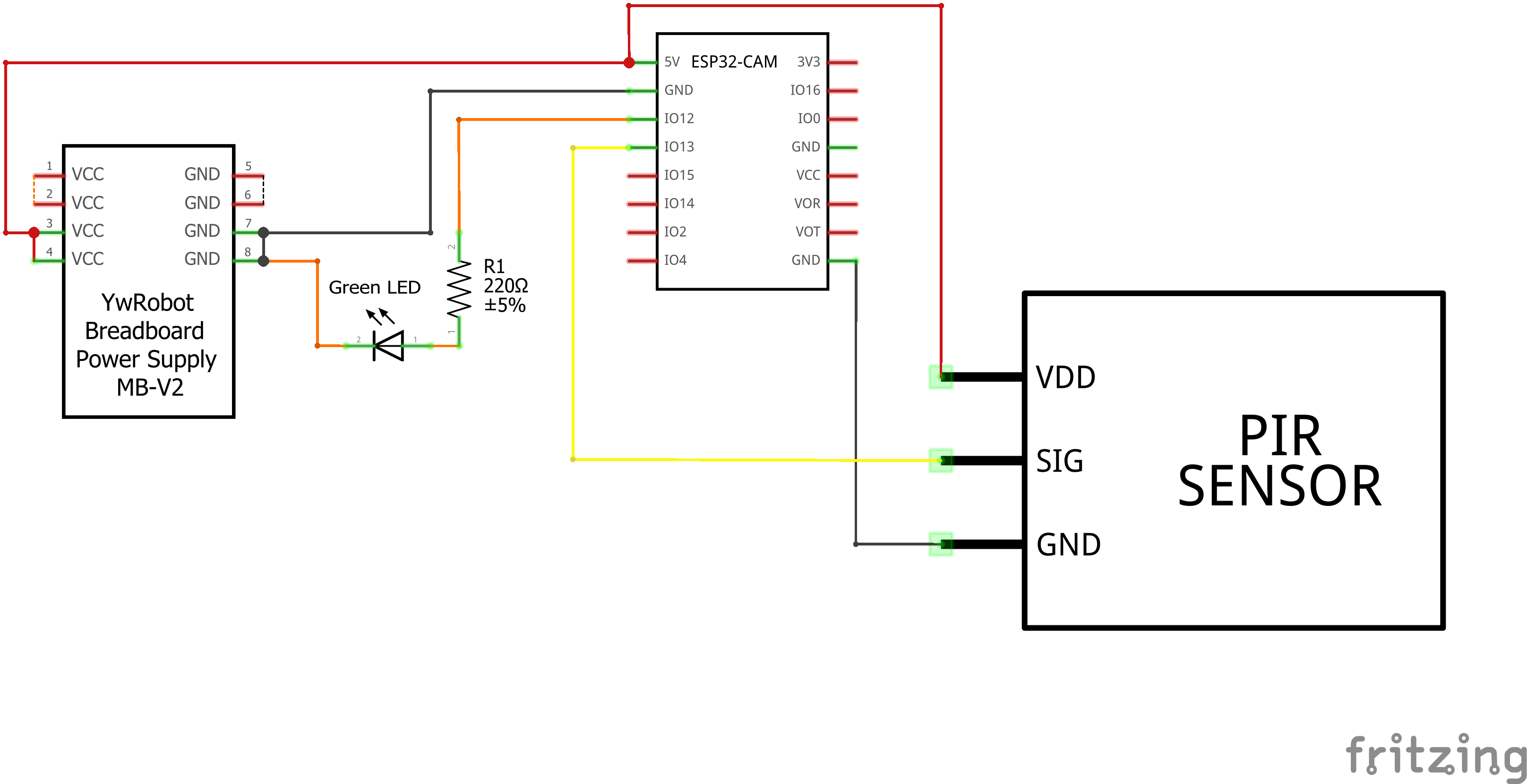
Schematic:
Schematic:
Circuit:
Circuit:

Comments
Only logged in users can leave comments