Devices & Components
Arduino Nano 33 IoT
LED (generic)
Solderless Breadboard Half Size
9V Battery Clip
Resistor 1k ohm
DC Motor, Miniature
9V battery (generic)
Dual H-Bridge motor drivers L293D
Jumper wires (generic)
Software & Tools
Arduino Web Editor
Arduino IoT Cloud
Project description
Code
Code
arduino
This is the Code that needs to be uploaded to the Nano 33 IoT for the train to function. You can modify it if you want to add anything extra, but you will need to change the controlled things inside the Arduino IoT Cloud
1/* 2 Controlled Variables through Arduino IoT Cloud 3 4 bool speedReset; 5 bool direction; 6 int speed; 7 int speedControl; 8 CloudDimmedLight led; 9*/ 10 11#include "thingProperties.h" 12 13//Set LED Channels and variables for control 14int ledC1 = 2; 15int ledC2 = 3; 16int ledC3 = 4; 17int ledC4 = 5; 18int DUTY = 0; 19bool ledSwitch = true; 20 21//Set Speed Control Pins 22int SC_A = 12; 23int SC_B = 8; 24 25//Set Motor Pins 26int MF_A = 10; 27int MB_A = 11; 28 29int MF_B = 6; 30int MB_B = 7; 31 32//Set values for speed control 33int MDUTY = -255; 34int MDUTY_N = 0; 35int Motor_Speed; 36 37void setup() { 38 // Initialize serial monitor: 39 Serial.begin(9600); 40 Serial.println("Serial Monitor Initialized"); 41 42 pinMode(ledC1, OUTPUT); 43 pinMode(ledC2, OUTPUT); 44 pinMode(ledC3, OUTPUT); 45 pinMode(ledC4, OUTPUT); 46 47 pinMode(SC_A, OUTPUT); 48 pinMode(SC_B, OUTPUT); 49 pinMode(MF_A, OUTPUT); 50 pinMode(MF_B, OUTPUT); 51 pinMode(MB_A, OUTPUT); 52 pinMode(MB_B, OUTPUT); 53 54 // Defined in thingProperties.h 55 initProperties(); 56 57 // Connect to Arduino IoT Cloud 58 ArduinoCloud.begin(ArduinoIoTPreferredConnection); 59 60 if(!ArduinoCloud.begin(ArduinoIoTPreferredConnection)) 61 { 62 Serial.println("Failed to Connect to wifi or UBLOX not initialized"); 63 } 64 65 /* 66 The following function allows you to obtain more information 67 related to the state of network and IoT Cloud connection and errors 68 the ledDUTYer number the more granular information you’ll get. 69 The default is 0 (only errors). 70 Maximum is 4 71 */ 72 setDebugMessageLevel(2); 73 ArduinoCloud.printDebugInfo(); 74} 75 76void loop() 77{ 78 ArduinoCloud.update(); 79} 80 81 82 83void onSpeedControlChange() 84{ 85 Motor_Speed = speedControl; 86 MDUTY = Motor_Speed; 87 88 if(MDUTY > 0) 89 { 90 speed = MDUTY; 91 direction = true; 92 93 //Set the speed of the motors 94 analogWrite(SC_A, MDUTY); 95 analogWrite(SC_B, MDUTY); 96 97 //Power Motors to turn forward 98 digitalWrite(MF_A, HIGH); 99 digitalWrite(MF_B, HIGH); 100 101 digitalWrite(MB_A, LOW); 102 digitalWrite(MB_B, LOW); 103 } 104 105 if(MDUTY < 0) 106 { 107 //Set MDUTY_N as the absolute value of MDUTY for speed 108 MDUTY_N = abs(MDUTY); 109 speed = MDUTY_N; 110 direction = false; 111 112 //Set the speed of the motors 113 analogWrite(SC_A, MDUTY_N); 114 analogWrite(SC_B, MDUTY_N); 115 116 //Power Motors to turn backward 117 digitalWrite(MF_A, LOW); 118 digitalWrite(MF_B, LOW); 119 120 digitalWrite(MB_A, HIGH); 121 digitalWrite(MB_B, HIGH); 122 } 123 124 if(MDUTY == 0) 125 { 126 speed = MDUTY; 127 //Set the speed of the motors to 0 128 analogWrite(SC_A, MDUTY); 129 analogWrite(SC_B, MDUTY); 130 131 //Turn off Motors 132 digitalWrite(MF_A, LOW); 133 digitalWrite(MF_B, LOW); 134 135 digitalWrite(MB_A, LOW); 136 digitalWrite(MB_B, LOW); 137 } 138} 139 140 141 142void onSpeedResetChange() 143{ 144 if(speedReset == true) 145 { 146 speedControl = 0; 147 speed = 0; 148 //Set the speed of the motors to 0 149 analogWrite(SC_A, MDUTY); 150 analogWrite(SC_B, MDUTY); 151 152 //Turn off Motors 153 digitalWrite(MF_A, LOW); 154 digitalWrite(MF_B, LOW); 155 156 digitalWrite(MB_A, LOW); 157 digitalWrite(MB_B, LOW); 158 } 159 160} 161 162 163void onLedChange() 164{ 165 if(led.getSwitch() == ledSwitch) 166 { 167 168 DUTY = led.getBrightness() * 2.5; 169 Serial.println(DUTY); 170 171 analogWrite(ledC1, DUTY); 172 analogWrite(ledC2, DUTY); 173 analogWrite(ledC3, DUTY); 174 analogWrite(ledC4, DUTY); 175 176 digitalWrite(ledC1, HIGH); 177 digitalWrite(ledC2, HIGH); 178 digitalWrite(ledC3, HIGH); 179 digitalWrite(ledC4, HIGH); 180 } 181 182 else 183 { 184 DUTY = 0; 185 analogWrite(ledC1, DUTY); 186 analogWrite(ledC2, DUTY); 187 analogWrite(ledC3, DUTY); 188 analogWrite(ledC4, DUTY); 189 190 digitalWrite(ledC1, LOW); 191 digitalWrite(ledC2, LOW); 192 digitalWrite(ledC3, LOW); 193 digitalWrite(ledC4, LOW); 194 } 195}
Downloadable files
Schematic
Circuit Diagram using Altium CircuitMaker (since I don't have fritzing)
Schematic
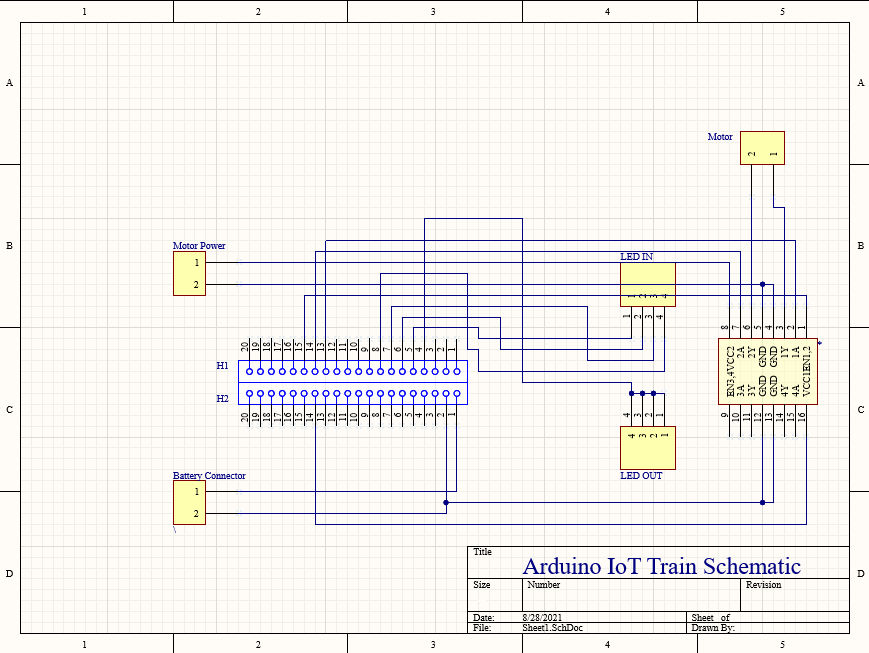
Schematic
Circuit Diagram using Altium CircuitMaker (since I don't have fritzing)
Schematic

Comments
Only logged in users can leave comments