Car Parking Simulator
A simulation of a real life car parking using Arduino, Ultrasonic sensors, LCD Display and RGB LEDs.
Devices & Components
1
16x2 LCD display with I²C interface
1
Arduino Uno Rev3
2
RGB Diffused Common Cathode
4
Resistor 221 ohm
1
Solderless Breadboard Full Size
1
USB-A to B Cable
4
Male/Female Jumper Wires
2
Ultrasonic Sensor - HC-SR04 (Generic)
20
Jumper wires (generic)
Software & Tools

Arduino IDE
Project description
Code
Code
c_cpp
Code of the project, made using Arduino IDE
1//Car parking simulator v2
2//Made by Bruno from Leds&mosfets
3//https://www.youtube.com/@ledMosfets
4
5//Include libraries
6#include <Ultrasonic.h>         //Library for the ultrasonic sensor
7#include <LiquidCrystal_I2C.h>  //Library for the display
8#include <Wire.h>
9
10//Create objects
11LiquidCrystal_I2C lcd(0x27, 16, 2);  //Creates an object lcd
12Ultrasonic ultrasonic1(11, 12);      //Creates an object  ultrasonic1
13Ultrasonic ultrasonic2(9, 10);       //Creates an object ultrasonic1
14
15//Variables for LEDS
16int ledOccupied1 = 4;  //LED to indicate if the spot is occupied
17int ledFree1 = 5;      //LED to indicate if the spot is free
18int ledOccupied2 = 6;  //LED to indicate  if the spot is occupied
19int ledFree2 = 7;      //LED to indicate if the spot is free
20
21//Variables for sensors
22int val1;  //val1 as a value variable for ultrasonic sensor
23int val2;  //val1 as a  value variable for ultrasonic sensor
24
25//Create custom chars
26byte SpaceA[] =  //Custom character to indicate  a free spot
27  {
28    0b11111,
29    0b10001,
30    0b10011,
31    0b10111,
32    0b11111,
33    0b10011,
34    0b10011,
35    0b10011
36  };
37byte SpaceB[] =  //Custom character  to indicate a free spot
38  {
39    0b11111,
40    0b10001,
41    0b11001,
42    0b11101,
43    0b11111,
44    0b11001,
45    0b11001,
46    0b11001
47  };
48byte SpaceC[] =  //Custom  character to indicate a free spot
49  {
50    0b10011,
51    0b10011,
52    0b10011,
53    0b10011,
54    0b10000,
55    0b10000,
56    0b10000,
57    0b11111
58  };
59byte SpaceD[] =  //Custom character to indicate a free spot
60  {
61    0b11001,
62    0b11001,
63    0b11001,
64    0b11001,
65    0b00001,
66    0b00001,
67    0b00001,
68    0b11111
69  };
70byte NoSpaceA[] =  //Custom character to indicate a occupied spot
71  {
72    0b11111,
73    0b10000,
74    0b10000,
75    0b11000,
76    0b11100,
77    0b11110,
78    0b10111,
79    0b10011
80  };
81byte NoSpaceB[] =  //Custom character to indicate a occupied spot
82  {
83    0b11111,
84    0b00001,
85    0b00001,
86    0b00011,
87    0b00111,
88    0b01111,
89    0b11101,
90    0b11001
91  };
92byte NoSpaceC[] = {  //Custom character to indicate  a occupied spot
93  0b10011,
94  0b10111,
95  0b11110,
96  0b11100,
97  0b11000,
98  0b10000,
99  0b10000,
100  0b11111
101};
102byte NoSpaceD[] = {  //Custom character  to indicate a occupied spot
103  0b11001,
104  0b11101,
105  0b01111,
106  0b00111,
107  0b00011,
108  0b00001,
109  0b00001,
110  0b11111
111};
112
113void setup() {
114  lcd.init();       //Starts the display
115  lcd.backlight();  //Turns on the display  backlight
116
117  //Create the custom characters
118  lcd.createChar(1, SpaceA);
119  lcd.createChar(2, SpaceB);
120  lcd.createChar(3, SpaceC);
121  lcd.createChar(4, SpaceD);
122  lcd.createChar(5, NoSpaceA);
123  lcd.createChar(6, NoSpaceB);
124  lcd.createChar(7, NoSpaceC);
125  lcd.createChar(8, NoSpaceD);
126
127  //Define all  LEDs as Output
128  pinMode(ledOccupied1, OUTPUT);
129  pinMode(ledFree1, OUTPUT);
130  pinMode(ledOccupied2, OUTPUT);
131  pinMode(ledFree2, OUTPUT);
132}
133
134void loop() {
135
136  //Value variables will store all informations from the sensors
137  val1 = ultrasonic1.read(CM);
138  val2 = ultrasonic2.read(CM);
139
140  //If  the first spot is occupied
141  if ((val1 < 12) && (val2 > 12)) {
142    digitalWrite(ledOccupied1, LOW);
143    digitalWrite(ledFree1, HIGH);
144    digitalWrite(ledOccupied2, HIGH);
145    digitalWrite(ledFree2, LOW);
146    lcd.clear();
147    lcd.write(5);
148    lcd.setCursor(1, 0);
149    lcd.write(6);
150    lcd.setCursor(0, 1);
151    lcd.write(7);
152    lcd.setCursor(1, 1);
153    lcd.write(8);
154    lcd.setCursor(7, 0);
155    lcd.write(1);
156    lcd.setCursor(8, 0);
157    lcd.write(2);
158    lcd.setCursor(7, 1);
159    lcd.write(3);
160    lcd.setCursor(8, 1);
161    lcd.write(4);
162    delay(100);
163  }
164
165  //If the second spot is  occupied
166  else if ((val1 > 12) && (val2 < 12)) {
167    digitalWrite(ledOccupied1, HIGH);
168    digitalWrite(ledFree1, LOW);
169    digitalWrite(ledOccupied2, LOW);
170    digitalWrite(ledFree2, HIGH);
171    lcd.clear();
172    lcd.write(1);
173    lcd.setCursor(1, 0);
174    lcd.write(2);
175    lcd.setCursor(0, 1);
176    lcd.write(3);
177    lcd.setCursor(1, 1);
178    lcd.write(4);
179    lcd.setCursor(7, 0);
180    lcd.write(5);
181    lcd.setCursor(8, 0);
182    lcd.write(6);
183    lcd.setCursor(7, 1);
184    lcd.write(7);
185    lcd.setCursor(8, 1);
186    lcd.write(8);
187    delay(100);
188  }
189
190  //If the first and second  spots are free
191  else if ((val1 > 12) && (val2 > 12)) {
192    digitalWrite(ledOccupied1, LOW);
193    digitalWrite(ledFree1, HIGH);
194    digitalWrite(ledOccupied2, LOW);
195    digitalWrite(ledFree2, HIGH);
196    lcd.clear();
197    lcd.write(1);
198    lcd.setCursor(1, 0);
199    lcd.write(2);
200    lcd.setCursor(0, 1);
201    lcd.write(3);
202    lcd.setCursor(1, 1);
203    lcd.write(4);
204    lcd.setCursor(7, 0);
205    lcd.write(1);
206    lcd.setCursor(8, 0);
207    lcd.write(2);
208    lcd.setCursor(7, 1);
209    lcd.write(3);
210    lcd.setCursor(8, 1);
211    lcd.write(4);
212    delay(100);
213  }
214
215  //If the first and second  spots are occupied
216  else if ((val1 < 12) && (val2 < 12)) {
217    digitalWrite(ledOccupied1, HIGH);
218    digitalWrite(ledFree1, LOW);
219    digitalWrite(ledOccupied2, HIGH);
220    digitalWrite(ledFree2, LOW);
221    lcd.clear();
222    lcd.write(5);
223    lcd.setCursor(1, 0);
224    lcd.write(6);
225    lcd.setCursor(0, 1);
226    lcd.write(7);
227    lcd.setCursor(1, 1);
228    lcd.write(8);
229    lcd.setCursor(7, 0);
230    lcd.write(5);
231    lcd.setCursor(8, 0);
232    lcd.write(6);
233    lcd.setCursor(7, 1);
234    lcd.write(7);
235    lcd.setCursor(8, 1);
236    lcd.write(8);
237    delay(100);
238  } else {
239    lcd.clear();
240    digitalWrite(ledOccupied1, LOW);
241    digitalWrite(ledFree1, LOW);
242    digitalWrite(ledOccupied2, LOW);
243    digitalWrite(ledFree2, LOW);
244  }
245}
Downloadable files
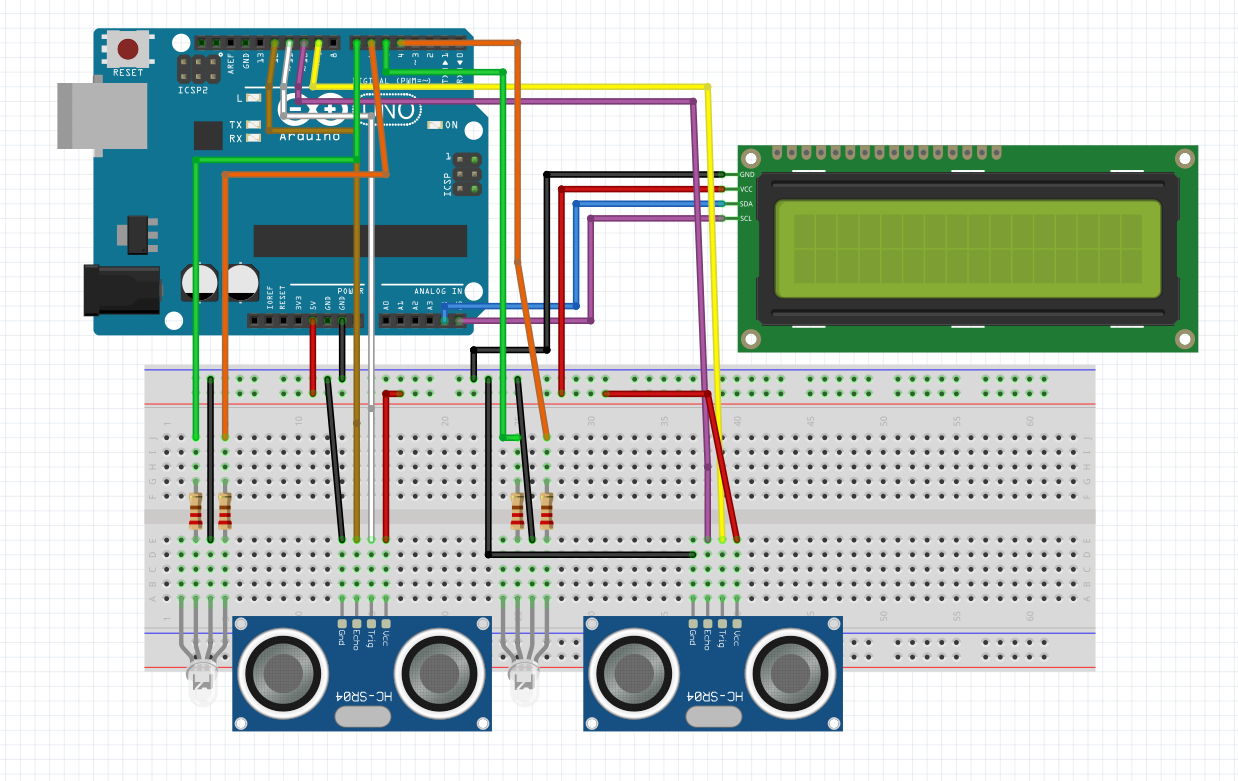
Schematics
Made in Fritzing
schematics.png
Comments
Only logged in users can leave comments