Devices & Components
1
Arduino Uno Rev3
2
Breadboard (generic)
26
LED (generic)
1
USB Cable, USB Type C Plug
Hardware & Tools
1
3D Printer (generic)
Project description
Code
The code
arduino
1const int buttonPinUp = 12;
2const int buttonPinLeft = 11;
3const   int buttonPinRight = 10;
4
5const int ledPinye1 = 5;
6const int ledPingre1   = 4;
7const int ledPinye2 = 3;
8const int ledPingre2 = 2;
9const int ledPinblue1   = 6;
10const int ledPinblue2 = 7;
11const int ledPinred1 = 8;
12const int ledPinred2   = 9;
13const int ledPinred3 = 13;
14
15int LastButtonUpState = HIGH;
16int LastButtonLeftState   = HIGH;
17int LastButtonRightState = HIGH;
18
19int LedState = 0;
20/* In the   beginning, we set the variable LedState to 0.
21Here's the programming logic of   this game:
22  if the button of the correct direction was clicked when LedState   is 0,
23    LedState became 1. With "if loop", we configurate the state of all   Leds:
24    which are on and which are off in condition that LedState is 1.
25   if the button of the correct direction was clicked when LedState is 1,
26    LedState   became 2. With "if loop", we configurate the state of all Leds:
27    which are   on and which are off in condition that LedState is 2.
28  if...
29  ...*/
30//LedState   can be imagined as a configuration.
31//All the "configurations" are setted up   below.
32//LedState = 0 -->configuation number 0: the first led on the way is lit
33//LedState   = 1 -->configuation number 1: the second led on the way is lit
34
35void setup(){
36   Serial.begin(9600);
37  pinMode(buttonPinUp,INPUT_PULLUP);  /*INPUT_PULLUP turns   on the internal
38  resistor which has the guarantied resistance between 20kΩ and   50kΩ.
39  For more information, consult Arduino official website's digital pins
40   section: https://docs.arduino.cc/learn/microcontrollers/digital-pins */
41  pinMode(buttonPinLeft,   INPUT_PULLUP);
42  pinMode(buttonPinRight, INPUT_PULLUP);
43
44  pinMode(ledPinye1,   OUTPUT);
45  pinMode(ledPinye2, OUTPUT);
46  pinMode(ledPingre1, OUTPUT);
47   pinMode(ledPingre2, OUTPUT);
48  pinMode(ledPinblue1, OUTPUT);
49  pinMode(ledPinblue2,   OUTPUT);
50  pinMode(ledPinred1, OUTPUT);
51  pinMode(ledPinred2, OUTPUT);
52   pinMode(ledPinred3, OUTPUT);
53
54  digitalWrite(ledPinye1, HIGH); /*When   arduino is powered,ledPinyel pin
55  is on to lighten the LED which shows the player's   initial position.*/
56  digitalWrite(ledPingre1, LOW);
57  digitalWrite(ledPinye2,   LOW);
58  digitalWrite(ledPingre2, LOW);
59  digitalWrite(ledPinblue1, LOW);
60   digitalWrite(ledPinblue2, LOW);
61  digitalWrite(ledPinred1, LOW);
62  digitalWrite(ledPinred2,   LOW);
63  digitalWrite(ledPinred3, LOW);
64}
65
66void loop(){
67 int buttonstate   = 0; /*create a new variable "buttonstate
68 and set its initial value to 0*/
69
70 buttonstate = digitalRead(buttonPinUp); /*get how many time the up-button
71                                           was clicked*/
72 if(buttonstate == LOW   &&
73    buttonstate != LastButtonUpState){  /*If the buttonstate is bigger than
74                                     the before(the up-button was clicked)*/
75     if(LedState == 7) /*If when the up-button i clicked, LedState is 7
76                      (we   are at step 7/the configuration 7)*/
77      LedState = 8;  /*LedState will be   8(the configuration of each LedState
78                      are below)*/
79    if(LedState   == 5)
80      LedState = 6;
81    else if(LedState == 3)
82      LedState = 4;
83     else if(LedState == 0)
84      LedState = 1;
85
86 }
87 LastButtonUpState   = buttonstate; /*updat the value of LastButtonUpState in
88 order to make them   egal to each other before the new click of button*/
89
90 buttonstate = digitalRead(buttonPinLeft);   /*get how many time the
91                                              left-button   was clicked*/
92 if(buttonstate == LOW &&
93    buttonstate != LastButtonLeftState){   /*If the buttonstate is bigger than
94                                    the before(the   left-button was clicked)*/
95     if(LedState == 4)
96      LedState = 5;
97      else if(LedState == 2)
98      LedState = 3;
99     else if(LedState == 1)
100       LedState = 2;
101 }
102 LastButtonLeftState = buttonstate;
103
104 buttonstate   = digitalRead(buttonPinRight);
105 if(buttonstate == LOW &&
106    buttonstate   != LastButtonRightState){
107       if(LedState == 6)
108        LedState = 7;
109   }
110 LastButtonRightState = buttonstate;
111
112 //print constantly the present   value of each variable on the serial monitor
113 Serial.print(LedState);
114   Serial.print(" ");
115 Serial.print(LastButtonUpState);
116 Serial.print(" ");
117   Serial.print(LastButtonLeftState);
118 Serial.print(" ");
119 Serial.println(LastButtonRightState);
120
121
122 //////////////////Here comes the "configurations" of when LedState =   0 to 8/
123 ///////////////////////////////////////////////////////////////////////////
124
125 if(LedState == 8){                      //configuation number 8
126   digitalWrite(ledPinye1,   LOW);
127   digitalWrite(ledPingre1, LOW);
128   digitalWrite(ledPinye2, LOW);
129    digitalWrite(ledPingre2, LOW);
130   digitalWrite(ledPinblue1, LOW);
131   digitalWrite(ledPinblue2,   LOW);
132   digitalWrite(ledPinred1, LOW);
133   digitalWrite(ledPinred2, LOW);
134    digitalWrite(ledPinred3, HIGH);
135 }
136
137 if(LedState == 7){                     //configuration   number 7
138   digitalWrite(ledPinye1, LOW);
139   digitalWrite(ledPingre1, LOW);
140    digitalWrite(ledPinye2, LOW);
141   digitalWrite(ledPingre2, LOW);
142   digitalWrite(ledPinblue1,   LOW);
143   digitalWrite(ledPinblue2, LOW);
144   digitalWrite(ledPinred1, LOW);
145    digitalWrite(ledPinred2, HIGH);
146   digitalWrite(ledPinred3, LOW);
147 }
148
149 if(LedState == 6){                     //configuration number 6
150   digitalWrite(ledPinye1,   LOW);
151   digitalWrite(ledPingre1, LOW);
152   digitalWrite(ledPinye2, LOW);
153    digitalWrite(ledPingre2, LOW);
154   digitalWrite(ledPinblue1, LOW);
155   digitalWrite(ledPinblue2,   LOW);
156   digitalWrite(ledPinred1, HIGH);
157   digitalWrite(ledPinred2, LOW);
158    digitalWrite(ledPinred3, LOW);
159 }
160
161 if(LedState == 5){                     //configuration   number 5
162   digitalWrite(ledPinye1, LOW);
163   digitalWrite(ledPingre1, LOW);
164    digitalWrite(ledPinye2, LOW);
165   digitalWrite(ledPingre2, LOW);
166   digitalWrite(ledPinblue1,   LOW);
167   digitalWrite(ledPinblue2, HIGH);
168   digitalWrite(ledPinred1, LOW);
169    digitalWrite(ledPinred2, LOW);
170   digitalWrite(ledPinred3, LOW);
171 }
172
173 if(LedState == 4){                     //configuration number 4
174   digitalWrite(ledPinye1,   LOW);
175   digitalWrite(ledPingre1, LOW);
176   digitalWrite(ledPinye2, LOW);
177    digitalWrite(ledPingre2, LOW);
178   digitalWrite(ledPinblue1, HIGH);
179   digitalWrite(ledPinblue2,   LOW);
180   digitalWrite(ledPinred1, LOW);
181   digitalWrite(ledPinred2, LOW);
182    digitalWrite(ledPinred3, LOW);
183 }
184
185 if(LedState == 3) {                     //configuration   number 3
186   digitalWrite(ledPinye1, LOW);
187   digitalWrite(ledPingre1, LOW);
188    digitalWrite(ledPinye2, LOW);
189   digitalWrite(ledPingre2, HIGH);
190   digitalWrite(ledPinblue1,   LOW);
191   digitalWrite(ledPinblue2, LOW);
192   digitalWrite(ledPinred1, LOW);
193    digitalWrite(ledPinred2, LOW);
194   digitalWrite(ledPinred3, LOW);
195 }
196
197 if(LedState == 2) {                     //configuration number 2
198   digitalWrite(ledPinye1,   LOW);
199   digitalWrite(ledPingre1, LOW);
200   digitalWrite(ledPinye2, HIGH);
201    digitalWrite(ledPingre2, LOW);
202   digitalWrite(ledPinblue1, LOW);
203   digitalWrite(ledPinblue2,   LOW);
204   digitalWrite(ledPinred1, LOW);
205   digitalWrite(ledPinred2, LOW);
206    digitalWrite(ledPinred3, LOW);
207 }
208
209 if(LedState == 1) {                     //configuration   number 1
210   digitalWrite(ledPinye1, LOW);
211   digitalWrite(ledPingre1, HIGH);
212    digitalWrite(ledPinye2, LOW);
213   digitalWrite(ledPingre2, LOW);
214   digitalWrite(ledPinblue1,   LOW);
215   digitalWrite(ledPinblue2, LOW);
216   digitalWrite(ledPinred1, LOW);
217    digitalWrite(ledPinred2, LOW);
218   digitalWrite(ledPinred3, LOW);
219 }
220
221 if(LedState == 0) {                     //the initial configuration
222    digitalWrite(ledPinye1, HIGH);
223   digitalWrite(ledPingre1, LOW);
224   digitalWrite(ledPinye2,   LOW);
225   digitalWrite(ledPingre2, LOW);
226   digitalWrite(ledPinblue1, LOW);
227    digitalWrite(ledPinblue2, LOW);
228   digitalWrite(ledPinred1, LOW);
229   digitalWrite(ledPinred2,   LOW);
230   digitalWrite(ledPinred3, LOW);
231 }
232
233}
234
235
236
The code
arduino
1const int buttonPinUp = 12;
2const int buttonPinLeft = 11;
3const  int buttonPinRight = 10;
4
5const int ledPinye1 = 5;
6const int ledPingre1  = 4;
7const int ledPinye2 = 3;
8const int ledPingre2 = 2;
9const int ledPinblue1  = 6;
10const int ledPinblue2 = 7;
11const int ledPinred1 = 8;
12const int ledPinred2  = 9;
13const int ledPinred3 = 13;
14
15int LastButtonUpState = HIGH;
16int LastButtonLeftState  = HIGH;
17int LastButtonRightState = HIGH;
18
19int LedState = 0;
20/* In the  beginning, we set the variable LedState to 0.
21Here's the programming logic of  this game:
22  if the button of the correct direction was clicked when LedState  is 0,
23    LedState became 1. With "if loop", we configurate the state of all  Leds:
24    which are on and which are off in condition that LedState is 1.
25  if the button of the correct direction was clicked when LedState is 1,
26    LedState  became 2. With "if loop", we configurate the state of all Leds:
27    which are  on and which are off in condition that LedState is 2.
28  if...
29  ...*/
30//LedState  can be imagined as a configuration.
31//All the "configurations" are setted up  below.
32//LedState = 0 -->configuation number 0: the first led on the way is lit
33//LedState  = 1 -->configuation number 1: the second led on the way is lit
34
35void setup(){
36  Serial.begin(9600);
37  pinMode(buttonPinUp,INPUT_PULLUP);  /*INPUT_PULLUP turns  on the internal
38  resistor which has the guarantied resistance between 20kΩ and  50kΩ.
39  For more information, consult Arduino official website's digital pins
40  section: https://docs.arduino.cc/learn/microcontrollers/digital-pins */
41  pinMode(buttonPinLeft,  INPUT_PULLUP);
42  pinMode(buttonPinRight, INPUT_PULLUP);
43
44  pinMode(ledPinye1,  OUTPUT);
45  pinMode(ledPinye2, OUTPUT);
46  pinMode(ledPingre1, OUTPUT);
47  pinMode(ledPingre2, OUTPUT);
48  pinMode(ledPinblue1, OUTPUT);
49  pinMode(ledPinblue2,  OUTPUT);
50  pinMode(ledPinred1, OUTPUT);
51  pinMode(ledPinred2, OUTPUT);
52  pinMode(ledPinred3, OUTPUT);
53
54  digitalWrite(ledPinye1, HIGH); /*When  arduino is powered,ledPinyel pin
55  is on to lighten the LED which shows the player's  initial position.*/
56  digitalWrite(ledPingre1, LOW);
57  digitalWrite(ledPinye2,  LOW);
58  digitalWrite(ledPingre2, LOW);
59  digitalWrite(ledPinblue1, LOW);
60  digitalWrite(ledPinblue2, LOW);
61  digitalWrite(ledPinred1, LOW);
62  digitalWrite(ledPinred2,  LOW);
63  digitalWrite(ledPinred3, LOW);
64}
65
66void loop(){
67 int buttonstate  = 0; /*create a new variable "buttonstate
68 and set its initial value to 0*/
69
70 buttonstate = digitalRead(buttonPinUp); /*get how many time the up-button
71                                          was clicked*/
72 if(buttonstate == LOW  &&
73    buttonstate != LastButtonUpState){  /*If the buttonstate is bigger than
74                                    the before(the up-button was clicked)*/
75    if(LedState == 7) /*If when the up-button i clicked, LedState is 7
76                      (we  are at step 7/the configuration 7)*/
77      LedState = 8;  /*LedState will be  8(the configuration of each LedState
78                      are below)*/
79    if(LedState  == 5)
80      LedState = 6;
81    else if(LedState == 3)
82      LedState = 4;
83    else if(LedState == 0)
84      LedState = 1;
85
86 }
87 LastButtonUpState  = buttonstate; /*updat the value of LastButtonUpState in
88 order to make them  egal to each other before the new click of button*/
89
90 buttonstate = digitalRead(buttonPinLeft);  /*get how many time the
91                                              left-button  was clicked*/
92 if(buttonstate == LOW &&
93    buttonstate != LastButtonLeftState){  /*If the buttonstate is bigger than
94                                    the before(the  left-button was clicked)*/
95     if(LedState == 4)
96      LedState = 5;
97     else if(LedState == 2)
98      LedState = 3;
99     else if(LedState == 1)
100      LedState = 2;
101 }
102 LastButtonLeftState = buttonstate;
103
104 buttonstate  = digitalRead(buttonPinRight);
105 if(buttonstate == LOW &&
106    buttonstate  != LastButtonRightState){
107       if(LedState == 6)
108        LedState = 7;
109  }
110 LastButtonRightState = buttonstate;
111
112 //print constantly the present  value of each variable on the serial monitor
113 Serial.print(LedState);
114  Serial.print(" ");
115 Serial.print(LastButtonUpState);
116 Serial.print(" ");
117  Serial.print(LastButtonLeftState);
118 Serial.print(" ");
119 Serial.println(LastButtonRightState);
120
121
122 //////////////////Here comes the "configurations" of when LedState =  0 to 8/
123 ///////////////////////////////////////////////////////////////////////////
124
125 if(LedState == 8){                      //configuation number 8
126   digitalWrite(ledPinye1,  LOW);
127   digitalWrite(ledPingre1, LOW);
128   digitalWrite(ledPinye2, LOW);
129   digitalWrite(ledPingre2, LOW);
130   digitalWrite(ledPinblue1, LOW);
131   digitalWrite(ledPinblue2,  LOW);
132   digitalWrite(ledPinred1, LOW);
133   digitalWrite(ledPinred2, LOW);
134   digitalWrite(ledPinred3, HIGH);
135 }
136
137 if(LedState == 7){                     //configuration  number 7
138   digitalWrite(ledPinye1, LOW);
139   digitalWrite(ledPingre1, LOW);
140   digitalWrite(ledPinye2, LOW);
141   digitalWrite(ledPingre2, LOW);
142   digitalWrite(ledPinblue1,  LOW);
143   digitalWrite(ledPinblue2, LOW);
144   digitalWrite(ledPinred1, LOW);
145   digitalWrite(ledPinred2, HIGH);
146   digitalWrite(ledPinred3, LOW);
147 }
148
149 if(LedState == 6){                     //configuration number 6
150   digitalWrite(ledPinye1,  LOW);
151   digitalWrite(ledPingre1, LOW);
152   digitalWrite(ledPinye2, LOW);
153   digitalWrite(ledPingre2, LOW);
154   digitalWrite(ledPinblue1, LOW);
155   digitalWrite(ledPinblue2,  LOW);
156   digitalWrite(ledPinred1, HIGH);
157   digitalWrite(ledPinred2, LOW);
158   digitalWrite(ledPinred3, LOW);
159 }
160
161 if(LedState == 5){                     //configuration  number 5
162   digitalWrite(ledPinye1, LOW);
163   digitalWrite(ledPingre1, LOW);
164   digitalWrite(ledPinye2, LOW);
165   digitalWrite(ledPingre2, LOW);
166   digitalWrite(ledPinblue1,  LOW);
167   digitalWrite(ledPinblue2, HIGH);
168   digitalWrite(ledPinred1, LOW);
169   digitalWrite(ledPinred2, LOW);
170   digitalWrite(ledPinred3, LOW);
171 }
172
173 if(LedState == 4){                     //configuration number 4
174   digitalWrite(ledPinye1,  LOW);
175   digitalWrite(ledPingre1, LOW);
176   digitalWrite(ledPinye2, LOW);
177   digitalWrite(ledPingre2, LOW);
178   digitalWrite(ledPinblue1, HIGH);
179   digitalWrite(ledPinblue2,  LOW);
180   digitalWrite(ledPinred1, LOW);
181   digitalWrite(ledPinred2, LOW);
182   digitalWrite(ledPinred3, LOW);
183 }
184
185 if(LedState == 3) {                     //configuration  number 3
186   digitalWrite(ledPinye1, LOW);
187   digitalWrite(ledPingre1, LOW);
188   digitalWrite(ledPinye2, LOW);
189   digitalWrite(ledPingre2, HIGH);
190   digitalWrite(ledPinblue1,  LOW);
191   digitalWrite(ledPinblue2, LOW);
192   digitalWrite(ledPinred1, LOW);
193   digitalWrite(ledPinred2, LOW);
194   digitalWrite(ledPinred3, LOW);
195 }
196
197 if(LedState == 2) {                     //configuration number 2
198   digitalWrite(ledPinye1,  LOW);
199   digitalWrite(ledPingre1, LOW);
200   digitalWrite(ledPinye2, HIGH);
201   digitalWrite(ledPingre2, LOW);
202   digitalWrite(ledPinblue1, LOW);
203   digitalWrite(ledPinblue2,  LOW);
204   digitalWrite(ledPinred1, LOW);
205   digitalWrite(ledPinred2, LOW);
206   digitalWrite(ledPinred3, LOW);
207 }
208
209 if(LedState == 1) {                     //configuration  number 1
210   digitalWrite(ledPinye1, LOW);
211   digitalWrite(ledPingre1, HIGH);
212   digitalWrite(ledPinye2, LOW);
213   digitalWrite(ledPingre2, LOW);
214   digitalWrite(ledPinblue1,  LOW);
215   digitalWrite(ledPinblue2, LOW);
216   digitalWrite(ledPinred1, LOW);
217   digitalWrite(ledPinred2, LOW);
218   digitalWrite(ledPinred3, LOW);
219 }
220
221 if(LedState == 0) {                     //the initial configuration
222   digitalWrite(ledPinye1, HIGH);
223   digitalWrite(ledPingre1, LOW);
224   digitalWrite(ledPinye2,  LOW);
225   digitalWrite(ledPingre2, LOW);
226   digitalWrite(ledPinblue1, LOW);
227   digitalWrite(ledPinblue2, LOW);
228   digitalWrite(ledPinred1, LOW);
229   digitalWrite(ledPinred2,  LOW);
230   digitalWrite(ledPinred3, LOW);
231 }
232
233}
234
235
236
Downloadable files
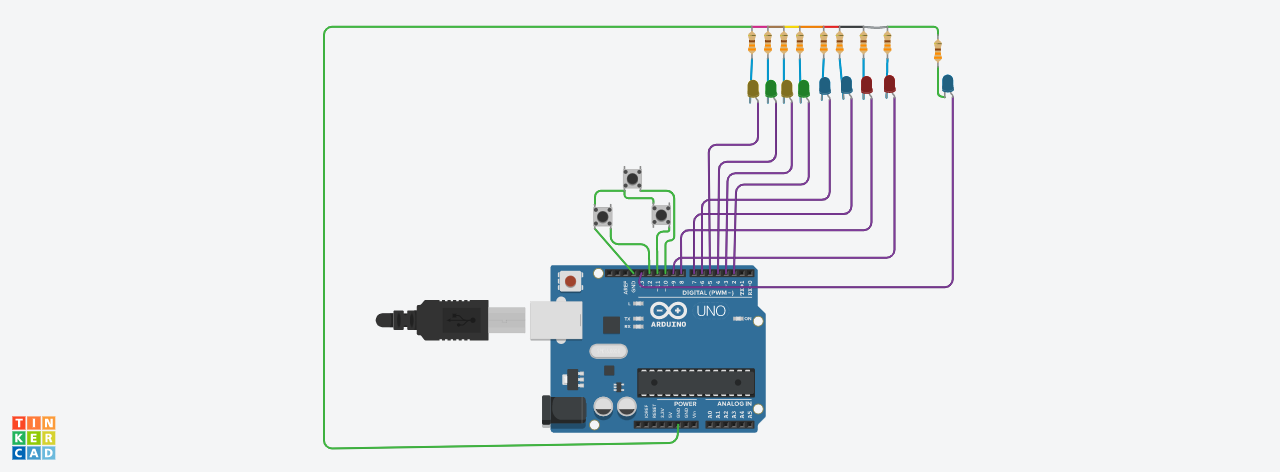
Circuit created in stimulator [Tinkercad]
Circuit created in stimulator [Tinkercad]
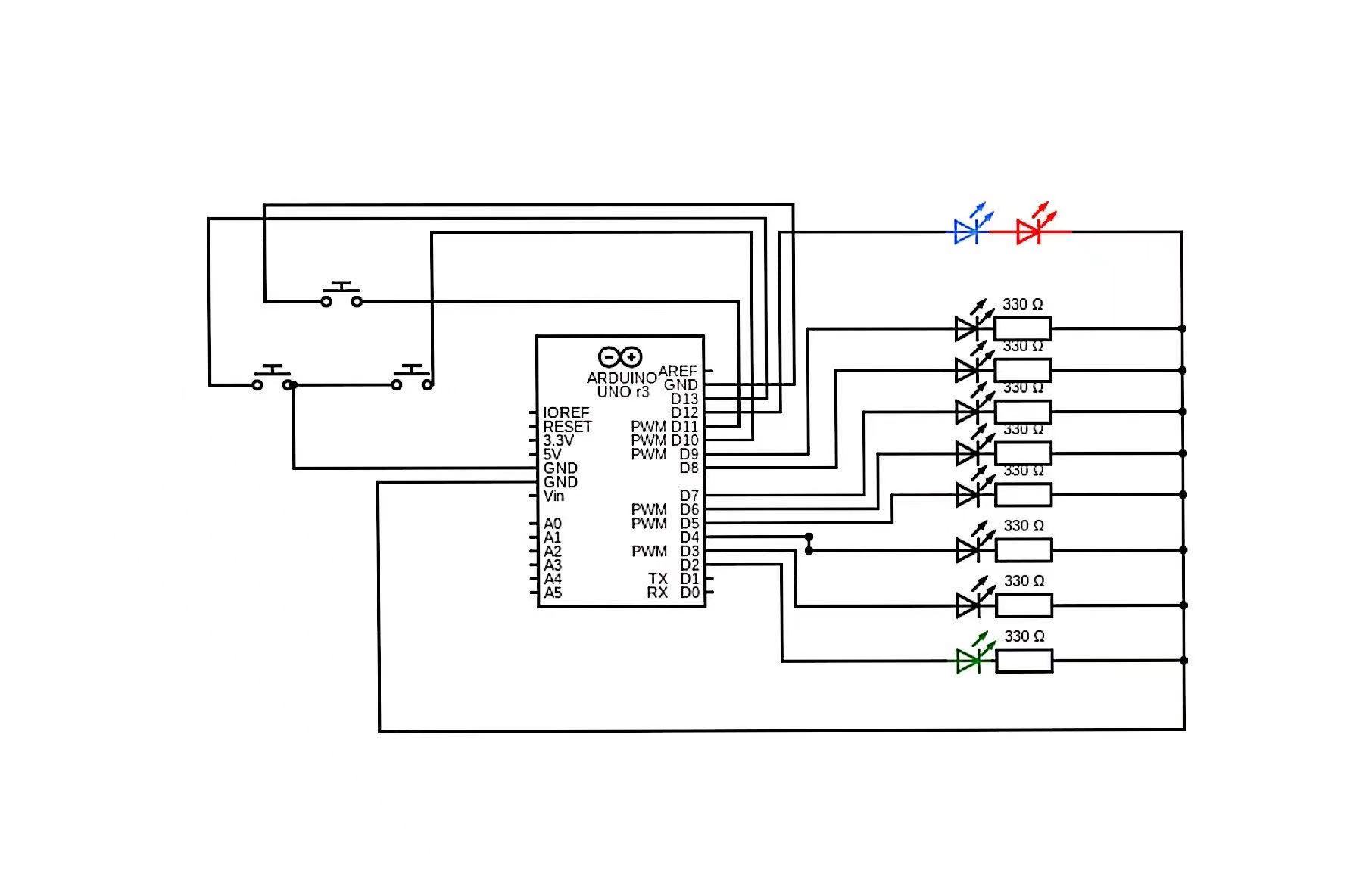
Circuit diagram
Circuit diagram
Circuit created in stimulator [Tinkercad]
Circuit created in stimulator [Tinkercad]
Comments
Only logged in users can leave comments