Devices & Components
1
Arduino Mega 2560 Rev3
1
Solderless Breadboard Full Size
1
LED(RGB)
5
LED (generic)
1
Jumper wires (generic)
6
Resistor 220 ohm
Software & Tools

Arduino IDE
Project description
Code
LED CODE
c_cpp
1void setup() {
2  // initialize digital pin 2,3,4,5,6,8,9,10 in output.
3
4  pinMode(2, OUTPUT);
5  pinMode(3, OUTPUT);
6  pinMode(4, OUTPUT);
7  pinMode(5, OUTPUT);
8  pinMode(6, OUTPUT);
9  pinMode(8, OUTPUT);
10  pinMode(9,  OUTPUT);
11  pinMode(10, OUTPUT);
12
13
14
15}
16// the loop function runs  over and over again forever
17void loop()
18{
19  delay(1000);
20  digitalWrite(2,  HIGH);   // turn the LED on (HIGH is the voltage level)
21  delay(50);
22  digitalWrite(2,  LOW);
23
24  digitalWrite(2, HIGH);   // turn the LED on (HIGH is the voltage  level)
25  delay(50);              // wait for a second
26  digitalWrite(2, LOW);    // turn the LED off by making the voltage LOW
27  delay(50);              //  wait for a second
28
29  digitalWrite(3, HIGH);   // turn the LED on (HIGH is  the voltage level)
30  delay(50);              // wait
31  digitalWrite(3, LOW);    // turn the LED off by making the voltage LOW
32  delay(50);  // wait
33
34  digitalWrite(4, HIGH);   // turn the LED on (HIGH is the voltage level)
35  delay(50);              // wait
36  digitalWrite(4, LOW);    // turn the LED off by making  the voltage LOW
37  delay(50);  // wait
38
39  digitalWrite(5, HIGH);   // turn  the LED on (HIGH is the voltage level)
40  delay(50);              // wait
41  digitalWrite(5, LOW);    // turn the LED off by making the voltage LOW
42  delay(50);  // wait
43
44   digitalWrite(6, HIGH);   // turn the LED on (HIGH is the voltage  level)
45  delay(50);                //wait
46  digitalWrite(6, LOW);    // turn  the LED off by making the voltage LOW
47  delay(100);  // wait
48
49//RGB LED
50  digitalWrite(8, HIGH);   // turn the LED on (HIGH is the voltage level)
51  delay(300);              // wait for a second
52  digitalWrite(8, LOW);    // turn the LED  off by making the voltage LOW
53  delay(300);  // wait
54
55  digitalWrite(9,  HIGH);   // turn the LED on (HIGH is the voltage level)
56  delay(300);              //  wait for a second
57  digitalWrite(9, LOW);    // turn the LED off by making the  voltage LOW
58  delay(300);  // wait
59
60  digitalWrite(10, HIGH);   // turn  the LED on (HIGH is the voltage level)
61  delay(300);              // wait for  a second
62  digitalWrite(10, LOW);    // turn the LED off by making the voltage  LOW
63  delay(300);  // wait
64
65}
LED CODE
c_cpp
1void setup() {
2  // initialize digital pin 2,3,4,5,6,8,9,10 in output.
3
4
5  pinMode(2, OUTPUT);
6  pinMode(3, OUTPUT);
7  pinMode(4, OUTPUT);
8
9  pinMode(5, OUTPUT);
10  pinMode(6, OUTPUT);
11  pinMode(8, OUTPUT);
12  pinMode(9,
13  OUTPUT);
14  pinMode(10, OUTPUT);
15
16
17
18}
19// the loop function runs
20  over and over again forever
21void loop()
22{
23  delay(1000);
24  digitalWrite(2,
25  HIGH);   // turn the LED on (HIGH is the voltage level)
26  delay(50);
27  digitalWrite(2,
28  LOW);
29
30  digitalWrite(2, HIGH);   // turn the LED on (HIGH is the voltage
31  level)
32  delay(50);              // wait for a second
33  digitalWrite(2, LOW);
34    // turn the LED off by making the voltage LOW
35  delay(50);              //
36  wait for a second
37
38  digitalWrite(3, HIGH);   // turn the LED on (HIGH is
39  the voltage level)
40  delay(50);              // wait
41  digitalWrite(3, LOW);
42    // turn the LED off by making the voltage LOW
43  delay(50);  // wait
44
45
46  digitalWrite(4, HIGH);   // turn the LED on (HIGH is the voltage level)
47  delay(50);
48              // wait
49  digitalWrite(4, LOW);    // turn the LED off by making
50  the voltage LOW
51  delay(50);  // wait
52
53  digitalWrite(5, HIGH);   // turn
54  the LED on (HIGH is the voltage level)
55  delay(50);              // wait
56
57  digitalWrite(5, LOW);    // turn the LED off by making the voltage LOW
58  delay(50);
59  // wait
60
61   digitalWrite(6, HIGH);   // turn the LED on (HIGH is the voltage
62  level)
63  delay(50);                //wait
64  digitalWrite(6, LOW);    // turn
65  the LED off by making the voltage LOW
66  delay(100);  // wait
67
68//RGB LED
69
70  digitalWrite(8, HIGH);   // turn the LED on (HIGH is the voltage level)
71  delay(300);
72              // wait for a second
73  digitalWrite(8, LOW);    // turn the LED
74  off by making the voltage LOW
75  delay(300);  // wait
76
77  digitalWrite(9,
78  HIGH);   // turn the LED on (HIGH is the voltage level)
79  delay(300);              //
80  wait for a second
81  digitalWrite(9, LOW);    // turn the LED off by making the
82  voltage LOW
83  delay(300);  // wait
84
85  digitalWrite(10, HIGH);   // turn
86  the LED on (HIGH is the voltage level)
87  delay(300);              // wait for
88  a second
89  digitalWrite(10, LOW);    // turn the LED off by making the voltage
90  LOW
91  delay(300);  // wait
92
93}
Downloadable files
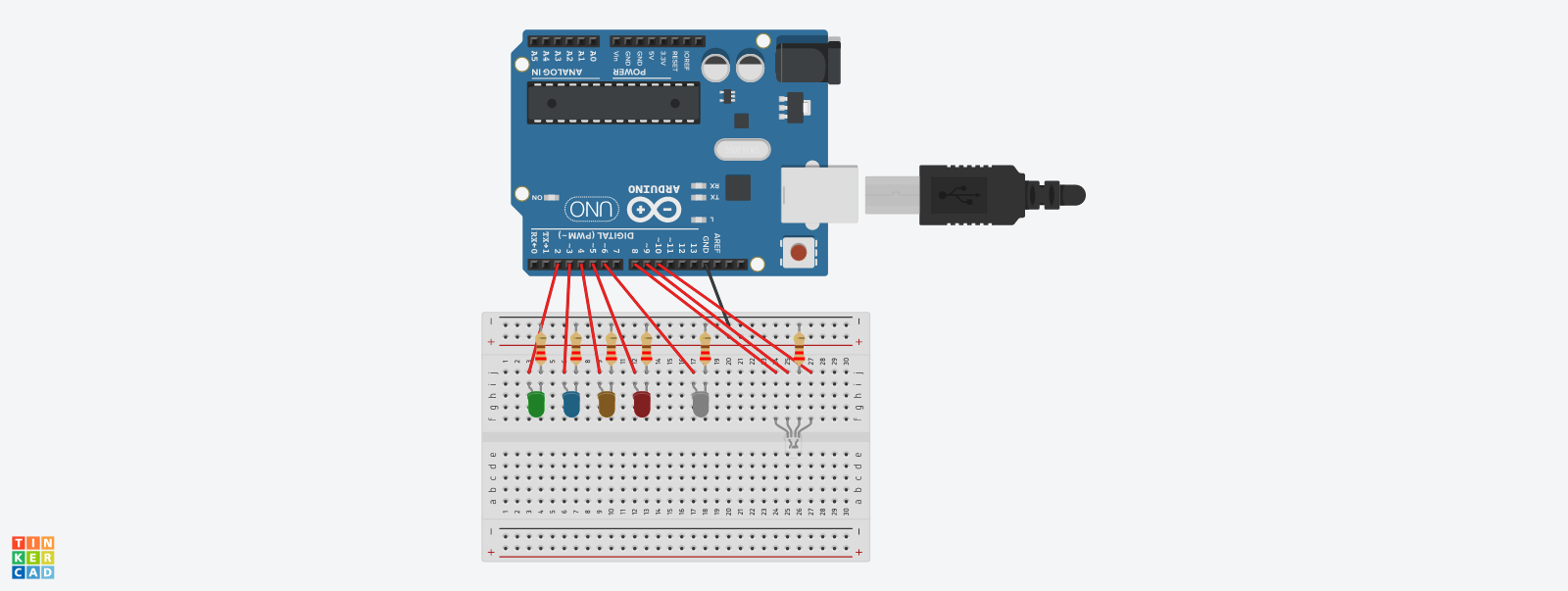
DIAGRAM
DIAGRAM
Comments
Only logged in users can leave comments