Devices & Components
Arduino Uno Rev3
DC motors with Wheels
L298N Motor Drive
HC-SR04 Ultrasonic Sensor
9V Battery Clip Connector
Universal Wheel
SG90 Micro Servo Motor
9V Batteries
Mini breadboard
9V Battery Clip to Arduino Connector
F to F Jumpers and M to M Jumpers
Project description
Code
NT1_ArduinoCode
arduino
1#include <Servo.h> //Include the servo motor library 2#include <NewPing.h> //This library needs to be downloaded and included so that we can use the HC-SR04 sensor 3//L298N (Motor driver)control pins 4const int LeftMotorFwd = 7; 5const int LeftMotorBwd = 6; 6const int RightMotorFwd = 4; 7const int RightMotorBwd = 5; 8//ultrasonic sensor pins 9#define trig_pin A1 //analog input 1 10#define echo_pin A2 //analog input 2 11#define maximum_distance 200 12boolean goesFwd = false; 13int distance = 100; 14NewPing sonar(trig_pin, echo_pin, maximum_distance); //sensor function 15Servo servo_motor; //our servo name 16void setup(){ 17 pinMode(RightMotorFwd, OUTPUT); 18 pinMode(LeftMotorFwd, OUTPUT); 19 pinMode(LeftMotorBwd, OUTPUT); 20 pinMode(RightMotorBwd, OUTPUT); 21 servo_motor.attach(10); //our servo pin 22 servo_motor.write(115); 23 delay(2000); 24 distance = readPing(); 25 delay(100); 26 distance = readPing(); 27 delay(100); 28 distance = readPing(); 29 delay(100); 30 distance = readPing(); 31 delay(100); 32} 33void loop(){ 34 int distanceRight = 0; 35 int distanceLeft = 0; 36 delay(50); 37 if (distance <= 20){ 38 moveStop(); 39 delay(300); 40 moveBackward(); 41 delay(400); 42 moveStop(); 43 delay(300); 44 distanceRight = lookRight(); 45 delay(300); 46 distanceLeft = lookLeft(); 47 delay(300); 48 if (distance >= distanceLeft){ 49 turnRight(); 50 moveStop(); 51 } 52 else{ 53 turnLeft(); 54 moveStop(); 55 } 56 } 57 else{ 58 moveForward(); 59 } 60 distance = readPing(); 61} 62int lookRight(){ 63 servo_motor.write(50); 64 delay(500); 65 int distance = readPing(); 66 delay(100); 67 servo_motor.write(115); 68 return distance; 69} 70int lookLeft(){ 71 servo_motor.write(170); 72 delay(500); 73 int distance = readPing(); 74 delay(100); 75 servo_motor.write(115); 76 return distance; 77 delay(100); 78} 79int readPing(){ 80 delay(70); 81 int cm = sonar.ping_cm(); 82 if (cm==0){ 83 cm=250; 84 } 85 return cm; 86} 87void moveStop(){ 88 digitalWrite(RightMotorFwd, LOW); 89 digitalWrite(LeftMotorFwd, LOW); 90 digitalWrite(RightMotorBwd, LOW); 91 digitalWrite(LeftMotorBwd, LOW); 92} 93void moveForward(){ 94 if(!goesForward){ 95 goesForward=true; 96 digitalWrite(LeftMotorFwd, HIGH); 97 digitalWrite(RightMotorFwd, HIGH); 98 digitalWrite(LeftMotorBwd, LOW); 99 digitalWrite(RightMotorBwd, LOW); 100 } 101} 102void moveBackward(){ 103 goesForward=false; 104 digitalWrite(LeftMotorBwd, HIGH); 105 digitalWrite(RightMotorBwd, HIGH); 106 digitalWrite(LeftMotorFwd, LOW); 107 digitalWrite(RightMotorFwd, LOW); 108} 109void turnRight(){ 110 digitalWrite(LeftMotorFwd, HIGH); 111 digitalWrite(RightMotorBwd, HIGH); 112 digitalWrite(LeftMotorBwd, LOW); 113 digitalWrite(RightMotorFwd, LOW); 114 delay(500); 115 digitalWrite(LeftMotorFwd, HIGH); 116 digitalWrite(RightMotorFwd, HIGH); 117 digitalWrite(LeftMotorBwd, LOW); 118 digitalWrite(RightMotorBwd, LOW); 119} 120void turnLeft(){ 121 digitalWrite(LeftMotorBwd, HIGH); 122 digitalWrite(RightMotorFwd, HIGH); 123 digitalWrite(LeftMotorFwd, LOW); 124 digitalWrite(RightMotorBwd, LOW); 125 delay(500); 126 digitalWrite(LeftMotorFwd, HIGH); 127 digitalWrite(RightMotorFwd, HIGH); 128 digitalWrite(LeftMotorBwd, LOW); 129 digitalWrite(RightMotorBwd, LOW); 130}
Downloadable files
NT1_BED_STL
NT1_BED_STL
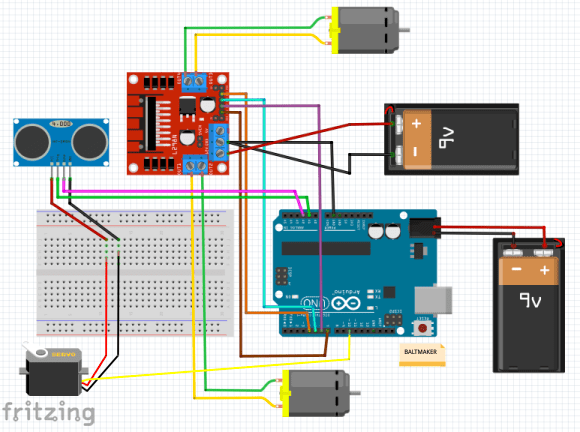
Fritzing Diagram
Fritzing Diagram
NT1_BED_STL
NT1_BED_STL
Fritzing Diagram
Fritzing Diagram

Comments
Only logged in users can leave comments