Devices & Components
Arduino Uno Rev3
16x2 LCD display with I²C interface
Solar Panel
5mm Green LED
Resistor 470 ohm
5mm Red LED
7 segment Display (common cathode )
Rainbow wires
Solar panel Charger Module
Switch DPDT
Rechargeable Battery AA
Hardware & Tools
Solder Soldering Wire
Soldering kit
Wire cutter
Digital Multimeter
Software & Tools
Arduino IDE
Project description
Code
Digital Decode Translation Kit
c
Digital Decoder
1//#include <LiquidCrystal_I2C.h> 2#include <LiquidCrystal_I2C_STEM.h> 3LiquidCrystal_I2C_STEM lcd(0x27, 16, 2); 4int D0 = 9; 5int D1 = 8; 6int D2 = 7; 7int D3 = 6; 8int D4 = 5; 9int D5 = 4; 10int D6 = 3; 11int D7 = 2; 12int invert(int lsb) 13{ 14 if(lsb==0) 15 { 16 return 1; 17 } 18 else 19 { 20 return 0; 21 } 22} 23 24void setup() { 25 26 // initialize serial communication at 9600 bits per second: 27 Serial.begin(9600); 28 // make the pushbutton's pin an input: 29 pinMode(D0, INPUT); 30 pinMode(D1, INPUT); 31 32 pinMode(D2, INPUT); 33 pinMode(D3, INPUT); 34 35 pinMode(D4, INPUT); 36 pinMode(D5, INPUT); 37 38 pinMode(D6, INPUT); 39 pinMode(D7, INPUT); 40 lcd.init(); // initialize the lcd 41 lcd.backlight(); // Set backlight on 42} 43 44// the loop routine runs over and over again forever: 45void loop() { 46 // read the input pin: 47 int lsb0 = invert(digitalRead(D0)); 48 int lsb1 = invert(digitalRead(D1)); 49 int lsb2 = invert(digitalRead(D2)); 50 int lsb3 = invert(digitalRead(D3)); 51 int lsb4 = invert(digitalRead(D4)); 52 int lsb5 = invert(digitalRead(D5)); 53 int lsb6 = invert(digitalRead(D6)); 54 int lsb7 = invert(digitalRead(D7)); 55 // print out the state of the button: 56 lcd.setCursor(0, 0); 57 lcd.print("Input Bits::"); 58 Serial.println(" "); 59 Serial.print(lsb0); 60 Serial.print(" "); 61 Serial.print(lsb1); 62 Serial.print(" "); 63 Serial.print(lsb2); 64 Serial.print(" "); 65 Serial.print(lsb3); 66 Serial.print(" "); 67 Serial.print(lsb4); 68 Serial.print(" "); 69 Serial.print(lsb5); 70 Serial.print(" "); 71 Serial.print(lsb6); 72 Serial.print(" "); 73 Serial.print(lsb7); 74 75 lcd.clear(); 76 lcd.setCursor(7,0); 77 lcd.print(lsb0); 78 lcd.setCursor(6,0); 79 lcd.print(lsb1); 80 lcd.setCursor(5,0); 81 lcd.print(lsb2); 82 lcd.setCursor(4,0); 83 lcd.print(lsb3); 84 lcd.setCursor(3,0); 85 lcd.print(lsb4); 86 lcd.setCursor(2,0); 87 lcd.print(lsb5); 88 lcd.setCursor(1,0); 89 lcd.print(lsb6); 90 lcd.setCursor(0,0); 91 lcd.print(lsb7); 92 int decimal=0; 93 //////////////////////////////////////////////////////////////////////////// 94 //////////////////////code for Binary to Decimal Conversion//////////////// 95 /////////////////////////////////////////////////////////////////////////// 96 if(lsb0==1) 97 { 98 decimal=decimal+1; 99 } 100 if(lsb1==1) 101 { 102 decimal=decimal+2; 103 } 104 if(lsb2==1) 105 { 106 decimal=decimal+4; 107 } 108 if(lsb3==1) 109 { 110 decimal=decimal+8; 111 } 112 if(lsb4==1) 113 { 114 decimal=decimal+16; 115 } 116if(lsb5==1) 117 { 118 decimal=decimal+32; 119 } 120if(lsb6==1) 121 { 122 decimal=decimal+64; 123 } 124 if(lsb7==1) 125 { 126 decimal=decimal+128; 127 } 128 lcd.setCursor(9,0); 129 lcd.print("D"); 130 lcd.print("="); 131 lcd.setCursor(11,0); 132 lcd.print(decimal); 133 134 char ascii; 135 //ascii=(char)decimal; 136 ascii=toascii(decimal); 137 lcd.setCursor(15,0); 138 lcd.write(decimal); 139 //lcd.print(ascii); 140 //lcd.print(toascii(decimal)); 141// lcd.print(ConvertToASCII(decimal)); 142 //////////////////////////////////////////////////////////////////////////// 143 //////////////////////code for Binary to octal Conversion//////////////// 144 /////////////////////////////////////////////////////////////////////////// 145 //digitalWrite(pushButton,LOW); 146 int octal=0; 147if(lsb0==1) 148 { 149 octal=octal+1; 150 } 151 if(lsb1==1) 152 { 153 octal=octal+2; 154 } 155 if(lsb2==1) 156 { 157 octal=octal+4; 158 } 159 lcd.setCursor(0,1); 160 lcd.print("Oct"); 161 lcd.setCursor(3,1); 162 lcd.print("="); 163 lcd.setCursor(6,1); 164 lcd.print(octal); 165 octal=0; 166 if(lsb3==1) 167 { 168 octal=octal+1; 169 } 170 if(lsb4==1) 171 { 172 octal=octal+2; 173 } 174 if(lsb5==1) 175 { 176 octal=octal+4; 177 } 178 lcd.setCursor(5,1); 179 lcd.print(octal); 180octal=0; 181 if(lsb6==1) 182 { 183 octal=octal+1; 184 } 185 if(lsb7==1) 186 { 187 octal=octal+2; 188 } 189 lcd.setCursor(4,1); 190 lcd.print(octal); 191 192 //////////////////////////////////////////////////////////////////////////// 193 //////////////////////code for Binary to Hexadecimal Conversion//////////////// 194 /////////////////////////////////////////////////////////////////////////// 195 //digitalWrite(pushButton,LOW); 196 int hexdecimal=0; 197if(lsb0==1) 198 { 199 hexdecimal=hexdecimal+1; 200 } 201 if(lsb1==1) 202 { 203 hexdecimal=hexdecimal+2; 204 } 205 if(lsb2==1) 206 { 207 hexdecimal=hexdecimal+4; 208 } 209 if(lsb3==1) 210 { 211 hexdecimal=hexdecimal+8; 212 } 213 214 lcd.setCursor(9,1); 215 lcd.print("Hex"); 216 lcd.setCursor(12,1); 217 lcd.print("="); 218 lcd.setCursor(14,1); 219 if(hexdecimal<10) 220 { 221 lcd.print(hexdecimal); 222 } 223 else 224 { 225 if(hexdecimal==10) 226 { 227 lcd.print("A"); 228 } 229 if(hexdecimal==11) 230 { 231 lcd.print("B"); 232 } 233if(hexdecimal==12) 234 { 235 lcd.print("C"); 236 } 237if(hexdecimal==13) 238 { 239 lcd.print("D"); 240 } 241if(hexdecimal==14) 242 { 243 lcd.print("E"); 244 } 245if(hexdecimal==15) 246 { 247 lcd.print("F"); 248 } 249 250 } 251 252 253 hexdecimal=0; 254 if(lsb4==1) 255 { 256 hexdecimal=hexdecimal+1; 257 } 258 if(lsb5==1) 259 { 260 hexdecimal=hexdecimal+2; 261 } 262 if(lsb6==1) 263 { 264 hexdecimal=hexdecimal+4; 265 } 266 if(lsb7==1) 267 { 268 hexdecimal=hexdecimal+8; 269 } 270 lcd.setCursor(13,1); 271 if(hexdecimal<10) 272 { 273 lcd.print(hexdecimal); 274 } 275 else 276 { 277 if(hexdecimal==10) 278 { 279 lcd.print("A"); 280 } 281 if(hexdecimal==11) 282 { 283 lcd.print("B"); 284 } 285if(hexdecimal==12) 286 { 287 lcd.print("C"); 288 } 289if(hexdecimal==13) 290 { 291 lcd.print("D"); 292 } 293if(hexdecimal==14) 294 { 295 lcd.print("E"); 296 } 297if(hexdecimal==15) 298 { 299 lcd.print("F"); 300 } 301 302 } 303 304 305 306 delay(1000); // delay in between reads for stability 307}
Downloadable files
Circuit Diagram of Digital Decoder Translation Kit
Circuit Diagram
Digital_Binary_Decoder.pdf
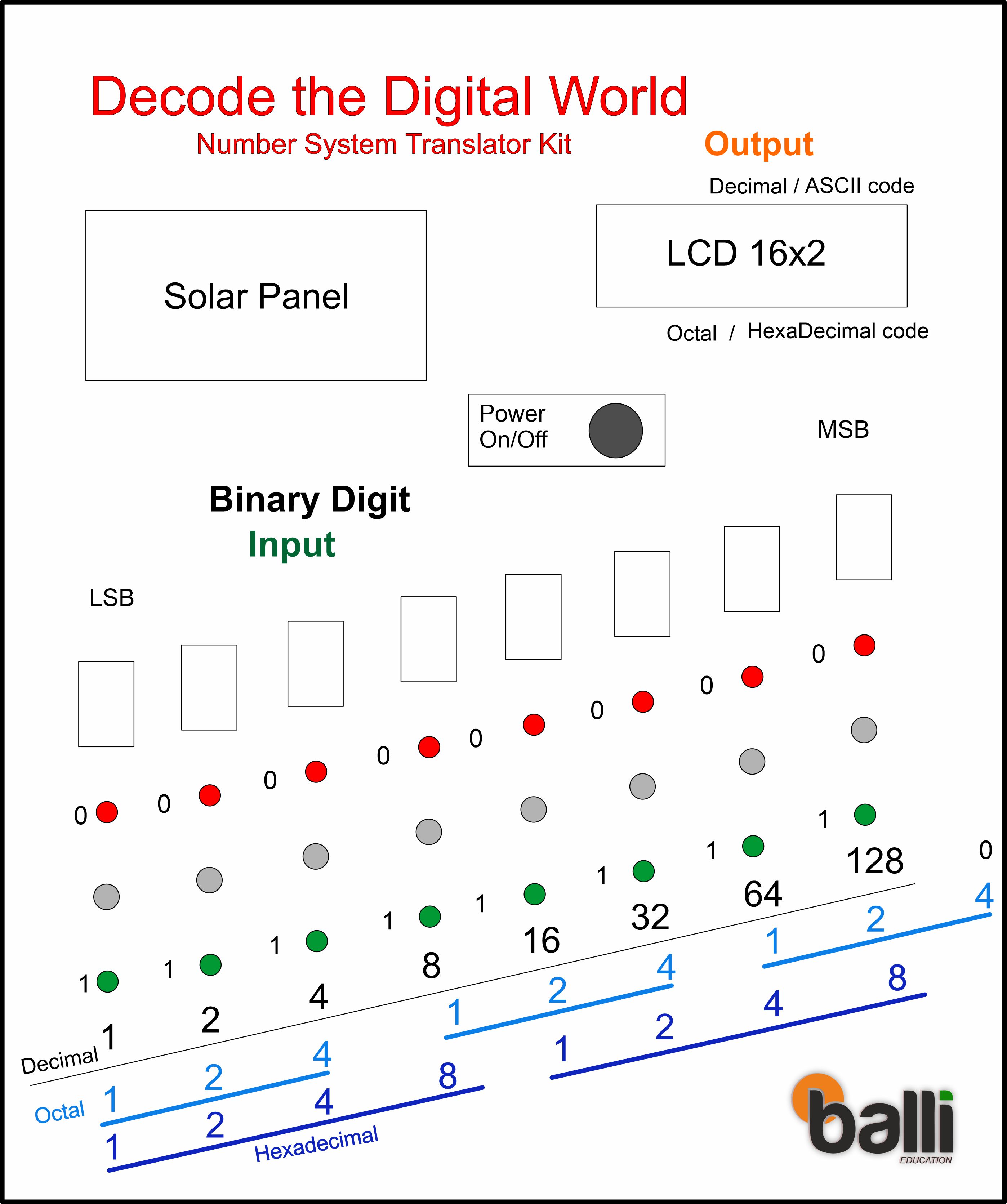
Front Page of Digital Decoder Trainer Board
Front Page of Digital Board
Final_DIY Trainter Kit Binary to Decimal converter.jpg
Comments
Only logged in users can leave comments