IoT Growbox Controler
Send the sensor values to the Arduino IoT cloud and conveniently control the irrigation remotely
Components and supplies
GROVE Oled Display 0,96 inch I2C
Unbuckled Grove Cable 1m/2m/50cm/20cm/10cm
5V Relay Module KY-019
Ultrasonic Sensor - HC-SR04 (Generic)
Isolation Spray

Arduino MKR WiFi 1010
Arduino MKR Connector Carrier
Jumper wires (generic)
Capacitive Soil Moisture Sensor V 1.2
DHT11 Temperature & Humidity Sensor (3 pins)
Tools and machines
Soldering iron (generic)
Mini Side Cutter, 120mm Length with 25mm Jaw Capacity
Apps and platforms
Arduino IoT Cloud
Project description
Code
GrowboxControler (Sketch)
arduino
With this code snippet the magic happens...
1#include "thingProperties.h"
2#include <EduIntro.h>
3#include <NewPing.h>
4#include   <Wire.h>
5#include <SeeedOLED.h>
6
7#define LEVELFULL 32
8#define LEVELEMPTY   32
9#define VOLUME 25
10
11#define trigPin  6
12#define echoPin  7
13#define   MAX_DISTANCE 100
14
15float duration;
16NewPing sonar(trigPin, echoPin, MAX_DISTANCE);
17
18int   moist1Pin = A1;
19int moist2Pin = A2;
20int moist3Pin = A3;
21int moist4Pin =   A4;
22
23int taster = 4;
24int tasterstatus = 0;
25
26float M1;
27float M2;
28float   M3;
29float M4;
30float HUM;
31float TMP;
32
33DHT11 dht11(D1);
34
35void   setup() {
36// Initialize serial and wait for port to open:
37Serial.begin(9600);
38//   This delay gives the chance to wait for a Serial Monitor without blocking if none   is found
39delay(1500);
40
41//Start I2C Communication for OLED Display
42Wire.begin();
43SeeedOled.init();   //initialze SEEED OLED display
44SeeedOled.clearDisplay(); //clear the screen and   set start position to top left corner
45SeeedOled.setNormalDisplay(); //Set display   to normal mode
46SeeedOled.setPageMode(); //Set addressing mode to Page Mode
47
48//Set   digital pin D2 as an output
49pinMode(2, OUTPUT);
50
51//Set digital pin D4   as an input
52pinMode(taster, INPUT);
53
54// Defined in thingProperties.h
55initProperties();
56
57// Connect to Arduino IoT Cloud
58ArduinoCloud.begin(ArduinoIoTPreferredConnection);
59//Get   Cloud Info/errors , 0 (only errors) up to 4
60setDebugMessageLevel(2);
61ArduinoCloud.printDebugInfo();
62
63//Wait   to get cloud connection
64while (ArduinoCloud.connected() != 1) {
65  ArduinoCloud.update();
66   delay(500);
67  }
68}
69
70void loop() {
71  //Update the Cloud
72  ArduinoCloud.update();
73
74
75  //read raw moisture1 value
76  float raw_moisture1 = analogRead(moist1Pin);
77
78
79  //map raw moisture1 to a scale of 0 - 100
80  moisture1 = map(raw_moisture1,   205, 471, 100, 0);
81
82
83   //read raw moisture2 value
84  float raw_moisture2   = analogRead(moist2Pin);
85
86
87  //map raw moisture2 to a scale of 0 - 100
88   moisture2 = map(raw_moisture2, 215, 480, 100, 0);
89
90
91  //read raw moisture3   value
92  float raw_moisture3 = analogRead(moist3Pin);
93
94
95  //map raw   moisture3 to a scale of 0 - 100
96  moisture3 = map(raw_moisture3, 220, 505, 100,   0);
97
98
99  //read raw moisture4 value
100  float raw_moisture4 = analogRead(moist4Pin);
101
102  //map raw moisture4 to a scale of 0 - 100
103  moisture4 = map(raw_moisture4,   200, 456, 100, 0);
104
105  //read temperature and humidity
106  dht11.update();
107   temperature = dht11.readCelsius();
108  humidity = dht11.readHumidity();
109
110   // Level monitoring with ultrasonic sensor
111  // Waiting time between pings   (about 20 pings/sec). not less than 29ms!
112  delay(50);
113  //Measurement with   averaging
114  int iterations = 5;
115  //duration = sonar.ping() without averaging
116   duration = sonar.ping_median(iterations);
117  //Distance in cm
118  int distance   = int((duration / 2) * 0.0343);
119  //Calculate level
120  int levelact = (LEVELEMPTY   - distance);
121  //Calculate level in Percent
122  levelpercent = (levelact * 100   / LEVELFULL);
123
124  //Button configuration to switch on the Oled display
125   tasterstatus = digitalRead(taster);
126
127  M1 = map(raw_moisture1, 205, 471,   100, 0);
128  M2 = map(raw_moisture2, 215, 480, 100, 0);
129  M3 = map(raw_moisture3,   220, 505, 100, 0);
130  M4 = map(raw_moisture4, 200, 456, 100, 0);
131  HUM = dht11.readHumidity();
132   TMP = dht11.readCelsius();
133
134  if (tasterstatus == HIGH)//Button is activated   - Oled outputs sensor values
135  {
136  SeeedOled.setTextXY(0,11); //Set the cursor   to Xth Page, Yth Column
137  SeeedOled.putString("Box1"); //Print the string
138   SeeedOled.setTextXY(1,0); //Set the cursor to Xth Page, Yth Column
139  SeeedOled.putString("TMP   "); //Print the string
140  SeeedOled.putFloat(TMP); //Print the value
141  SeeedOled.putString("   C"); //Print the string
142  SeeedOled.setTextXY(2,0); //Set the cursor to Xth   Page, Yth Column
143  SeeedOled.putString("RLH "); //Print the string
144  SeeedOled.putFloat(HUM);   //Print the value
145  SeeedOled.putString(" % "); //Print the string
146  SeeedOled.setTextXY(4,0);   //Set the cursor to Xth Page, Yth Column
147  SeeedOled.putString("M_1 "); //Print   the string
148  SeeedOled.putFloat(M1); //Print the value
149  SeeedOled.putString("   % "); //Print the string
150  SeeedOled.setTextXY(5,0); //Set the cursor to Xth   Page, Yth Column
151  SeeedOled.putString("M_2 "); //Print the string
152  SeeedOled.putFloat(M2);   //Print the value
153  SeeedOled.putString(" % "); //Print the string
154  SeeedOled.setTextXY(6,0);   //Set the cursor to Xth Page, Yth Column
155  SeeedOled.putString("M_3 "); //Print   the string
156  SeeedOled.putFloat(M3); //Print the value
157  SeeedOled.putString("   % "); //Print the string
158  SeeedOled.setTextXY(7,0); //Set the cursor to Xth   Page, Yth Column
159  SeeedOled.putString("M_4 "); //Print the string
160  SeeedOled.putFloat(M4);   //Print the value
161  SeeedOled.putString(" % "); //Print the string
162
163   delay(30000); //Oled stays activated for 30 seconds
164
165  SeeedOled.clearDisplay();   //Oled at rest
166
167  }
168  else
169  {
170  SeeedOled.clearDisplay();//Oled   at rest
171  }
172
173}
174/*
175  Since Pumpe is READ_WRITE variable, onPumpeChange()   is
176  executed every time a new value is received from IoT Cloud.
177*/
178void   onPumpeChange()  {
179  //Turn pump on or off
180  if(pumpe){
181    digitalWrite(2,   HIGH);
182  }
183  else{
184    digitalWrite(2, LOW);
185    }
186  }
187
GrowboxControler (Sketch)
arduino
With this code snippet the magic happens...
1#include "thingProperties.h"
2#include <EduIntro.h>
3#include <NewPing.h>
4#include  <Wire.h>
5#include <SeeedOLED.h>
6
7#define LEVELFULL 32
8#define LEVELEMPTY  32
9#define VOLUME 25
10
11#define trigPin  6
12#define echoPin  7
13#define  MAX_DISTANCE 100
14
15float duration;
16NewPing sonar(trigPin, echoPin, MAX_DISTANCE);
17
18int  moist1Pin = A1;
19int moist2Pin = A2;
20int moist3Pin = A3;
21int moist4Pin =  A4;
22
23int taster = 4;
24int tasterstatus = 0;
25
26float M1;
27float M2;
28float  M3;
29float M4;
30float HUM;
31float TMP;
32
33DHT11 dht11(D1);
34
35void  setup() {
36// Initialize serial and wait for port to open:
37Serial.begin(9600);
38//  This delay gives the chance to wait for a Serial Monitor without blocking if none  is found
39delay(1500);
40
41//Start I2C Communication for OLED Display
42Wire.begin();
43SeeedOled.init();  //initialze SEEED OLED display
44SeeedOled.clearDisplay(); //clear the screen and  set start position to top left corner
45SeeedOled.setNormalDisplay(); //Set display  to normal mode
46SeeedOled.setPageMode(); //Set addressing mode to Page Mode
47
48//Set  digital pin D2 as an output
49pinMode(2, OUTPUT);
50
51//Set digital pin D4  as an input
52pinMode(taster, INPUT);
53
54// Defined in thingProperties.h
55initProperties();
56
57// Connect to Arduino IoT Cloud
58ArduinoCloud.begin(ArduinoIoTPreferredConnection);
59//Get  Cloud Info/errors , 0 (only errors) up to 4
60setDebugMessageLevel(2);
61ArduinoCloud.printDebugInfo();
62
63//Wait  to get cloud connection
64while (ArduinoCloud.connected() != 1) {
65  ArduinoCloud.update();
66  delay(500);
67  }
68}
69
70void loop() {
71  //Update the Cloud
72  ArduinoCloud.update();
73
74
75  //read raw moisture1 value
76  float raw_moisture1 = analogRead(moist1Pin);
77
78
79  //map raw moisture1 to a scale of 0 - 100
80  moisture1 = map(raw_moisture1,  205, 471, 100, 0);
81
82
83   //read raw moisture2 value
84  float raw_moisture2  = analogRead(moist2Pin);
85
86
87  //map raw moisture2 to a scale of 0 - 100
88  moisture2 = map(raw_moisture2, 215, 480, 100, 0);
89
90
91  //read raw moisture3  value
92  float raw_moisture3 = analogRead(moist3Pin);
93
94
95  //map raw  moisture3 to a scale of 0 - 100
96  moisture3 = map(raw_moisture3, 220, 505, 100,  0);
97
98
99  //read raw moisture4 value
100  float raw_moisture4 = analogRead(moist4Pin);
101
102  //map raw moisture4 to a scale of 0 - 100
103  moisture4 = map(raw_moisture4,  200, 456, 100, 0);
104
105  //read temperature and humidity
106  dht11.update();
107  temperature = dht11.readCelsius();
108  humidity = dht11.readHumidity();
109
110  // Level monitoring with ultrasonic sensor
111  // Waiting time between pings  (about 20 pings/sec). not less than 29ms!
112  delay(50);
113  //Measurement with  averaging
114  int iterations = 5;
115  //duration = sonar.ping() without averaging
116  duration = sonar.ping_median(iterations);
117  //Distance in cm
118  int distance  = int((duration / 2) * 0.0343);
119  //Calculate level
120  int levelact = (LEVELEMPTY  - distance);
121  //Calculate level in Percent
122  levelpercent = (levelact * 100  / LEVELFULL);
123
124  //Button configuration to switch on the Oled display
125  tasterstatus = digitalRead(taster);
126
127  M1 = map(raw_moisture1, 205, 471,  100, 0);
128  M2 = map(raw_moisture2, 215, 480, 100, 0);
129  M3 = map(raw_moisture3,  220, 505, 100, 0);
130  M4 = map(raw_moisture4, 200, 456, 100, 0);
131  HUM = dht11.readHumidity();
132  TMP = dht11.readCelsius();
133
134  if (tasterstatus == HIGH)//Button is activated  - Oled outputs sensor values
135  {
136  SeeedOled.setTextXY(0,11); //Set the cursor  to Xth Page, Yth Column
137  SeeedOled.putString("Box1"); //Print the string
138  SeeedOled.setTextXY(1,0); //Set the cursor to Xth Page, Yth Column
139  SeeedOled.putString("TMP  "); //Print the string
140  SeeedOled.putFloat(TMP); //Print the value
141  SeeedOled.putString("  C"); //Print the string
142  SeeedOled.setTextXY(2,0); //Set the cursor to Xth  Page, Yth Column
143  SeeedOled.putString("RLH "); //Print the string
144  SeeedOled.putFloat(HUM);  //Print the value
145  SeeedOled.putString(" % "); //Print the string
146  SeeedOled.setTextXY(4,0);  //Set the cursor to Xth Page, Yth Column
147  SeeedOled.putString("M_1 "); //Print  the string
148  SeeedOled.putFloat(M1); //Print the value
149  SeeedOled.putString("  % "); //Print the string
150  SeeedOled.setTextXY(5,0); //Set the cursor to Xth  Page, Yth Column
151  SeeedOled.putString("M_2 "); //Print the string
152  SeeedOled.putFloat(M2);  //Print the value
153  SeeedOled.putString(" % "); //Print the string
154  SeeedOled.setTextXY(6,0);  //Set the cursor to Xth Page, Yth Column
155  SeeedOled.putString("M_3 "); //Print  the string
156  SeeedOled.putFloat(M3); //Print the value
157  SeeedOled.putString("  % "); //Print the string
158  SeeedOled.setTextXY(7,0); //Set the cursor to Xth  Page, Yth Column
159  SeeedOled.putString("M_4 "); //Print the string
160  SeeedOled.putFloat(M4);  //Print the value
161  SeeedOled.putString(" % "); //Print the string
162
163  delay(30000); //Oled stays activated for 30 seconds
164
165  SeeedOled.clearDisplay();  //Oled at rest
166
167  }
168  else
169  {
170  SeeedOled.clearDisplay();//Oled  at rest
171  }
172
173}
174/*
175  Since Pumpe is READ_WRITE variable, onPumpeChange()  is
176  executed every time a new value is received from IoT Cloud.
177*/
178void  onPumpeChange()  {
179  //Turn pump on or off
180  if(pumpe){
181    digitalWrite(2,  HIGH);
182  }
183  else{
184    digitalWrite(2, LOW);
185    }
186  }
187
Downloadable files
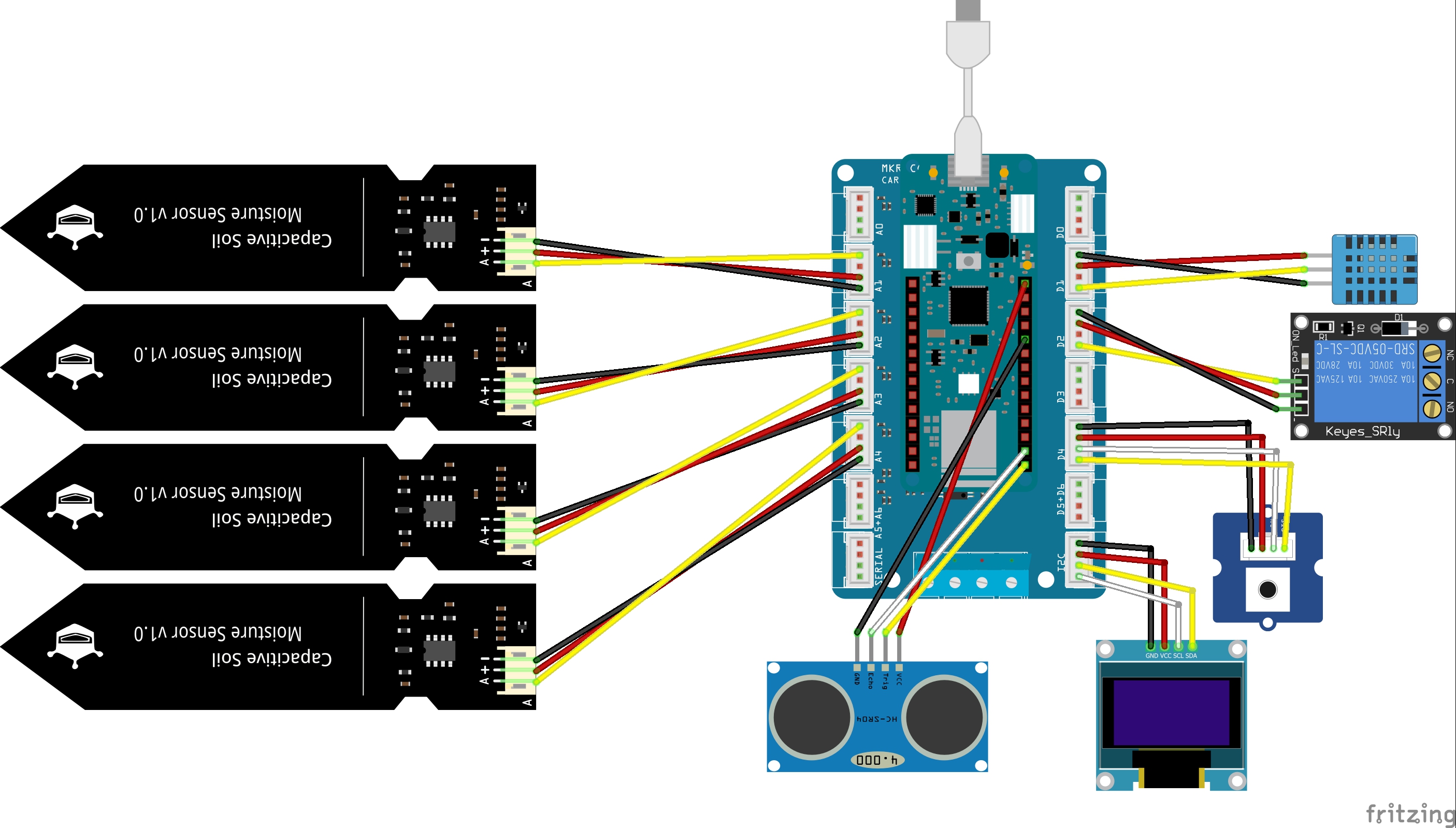
GrowboxControler (shematic)
Structure and connection of the components
GrowboxControler (shematic)
IoT Dashboard
Set up charts and displays in the cloud
IoT Dashboard
IoT Dashboard
Set up charts and displays in the cloud
IoT Dashboard
GrowboxControler (shematic)
Structure and connection of the components
GrowboxControler (shematic)
Variables
Define variables for the IoT dashboard
Variables
Comments
Only logged in users can leave comments